sketchucation logo sketchucation
    • Login
    Oops, your profile's looking a bit empty! To help us tailor your experience, please fill in key details like your SketchUp version, skill level, operating system, and more. Update and save your info on your profile page today!
    Mac User? | Join the Rayscaper Beta for Mac Learn More

    [Plugin] follow me rotate

    Scheduled Pinned Locked Moved Plugins
    211 Posts 79 Posters 280.0k Views 79 Watching
    Loading More Posts
    • Oldest to Newest
    • Newest to Oldest
    • Most Votes
    Reply
    • Reply as topic
    Log in to reply
    This topic has been deleted. Only users with topic management privileges can see it.
    • TIGT
      TIG Moderator
      last edited by

      I've not tested it in v2017 - but if it is "flaky" it will now be unfix-able because its code is encrypted !
      😞

      TIG

      1 Reply Last reply
      Reply Quote 0
      • chriC
        chri
        last edited by

        @tig said:

        I've not tested it in v2017 - but if it is "flaky" it will now be unfix-able because its code is encrypted !
        😞

        Hi TIG

        your are righ, i made a mistake during installation
        it works fine with 2015 2016 but not 2017 version.

        Thanks

        1 Reply Last reply
        Reply Quote 0
        • CoreMaster110C
          CoreMaster110
          last edited by

          Doesn't work with 2017 version. I removed the en version of the file.
          I made polyline and a face, selected both, clicked "Extensions/FollowAndRotate" but nothing happens, no dialog box.

          1 Reply Last reply
          Reply Quote 0
          • Dave RD
            Dave R
            last edited by

            @coremaster110 said:

            Doesn't work with 2017 version.

            Yes, if you read the posts above yours, this has already been reported. Unless the author fixes it, the extension won't work, It doesn't seem likely that the author will fix it so it's probably a good idea to find other ways to manage what you did with this one.

            Etaoin Shrdlu

            %

            (THERE'S NO PLACE LIKE)

            G28 X0.0 Y0.0 Z0.0

            M30

            %

            1 Reply Last reply
            Reply Quote 0
            • pilouP
              pilou
              last edited by

              ...or use an old version of Su! πŸ˜‰

              Frenchy Pilou
              Is beautiful that please without concept!
              My Little site :)

              1 Reply Last reply
              Reply Quote 0
              • T
                targetx
                last edited by

                Hi guys!
                Carefully had read everything, made every step as adviced. Installed, removed EN version. No errors, plugin appeared in the menu and everything seemed to be successful, but ... while clicking on the plugin there is NO input box ... Tried on SU 2016 ans 2013 - same result. Please help me to run the plugin πŸ˜„ Thanks!

                1 Reply Last reply
                Reply Quote 0
                • duanekempD
                  duanekemp
                  last edited by

                  @wikii said:

                  It is still in developing, here is the current version.
                  Get the latest version as an RBZ from the PluginStore:

                  wikii, This is such a cool, useful and needed plugin. Alternatives to get similar results are tedious, time consuming and not always effective. If possible, I'd like to encourage the continued development of this plugin for SU2017 and SU2018.... resurrect this puppy so it can be used without reverting to SU 2015/16.

                  I hope you release a new version since this does what needs to be done. And again, thank you for making this!!!

                  Duane Kemp

                  Kemp Productions
                  Puidoux, Switzerland
                  Gallery:
                  https://duanekemp.artstation.com/

                  1 Reply Last reply
                  Reply Quote 0
                  • A
                    Ahmed0007
                    last edited by

                    Thanks For Plugin
                    Please Update for 2017/18
                    Thanks

                    1 Reply Last reply
                    Reply Quote 0
                    • E
                      Einstein
                      last edited by

                      Houson, I have a problem 😞

                      I installed Follow and rotate, checked that all files have been pasted into Plugins folder. I clicked the extension record but the plugin window didn't show up 😞 Instead, Ruby throwed an error:

                      Error: #<TypeError: wrong argument type (expected Sketchup::Entity or Array of Sketchup::Entity)>
                      c:/users/dell/appdata/roaming/sketchup/sketchup 2017/sketchup/plugins/followandrotate_cn.rbs:42:in add' c:/users/dell/appdata/roaming/sketchup/sketchup 2017/sketchup/plugins/followandrotate_cn.rbs:42:in wikii_push_pull'
                      c:/users/dell/appdata/roaming/sketchup/sketchup 2017/sketchup/plugins/followandrotate_cn.rbs:109:in block in <main>' SketchUp:1:in call'

                      I preselected a face (with and then without its bounding edges, as TIG advised) and a welded path-curve but nothing happened. Adding quide point at the begining and ending of path did not help either. I read that many people had similar problem formerly but I didn't find solution in the thread.

                      I removed the .rbs file with _en suffix which prevented SU from splashing error on startup but still I cannot run the tool.

                      1 Reply Last reply
                      Reply Quote 0
                      • Dave RD
                        Dave R
                        last edited by

                        Einstein, see this. It doesn't work in SU2017 or SU2018 and the author would need to fix it because it is encrypted. So far the author hasn't shown any interest in fixing it, though.

                        Etaoin Shrdlu

                        %

                        (THERE'S NO PLACE LIKE)

                        G28 X0.0 Y0.0 Z0.0

                        M30

                        %

                        1 Reply Last reply
                        Reply Quote 0
                        • N
                          ninja29
                          last edited by

                          hi, how to i install this rbz file to sketcup 2017? thank you

                          1 Reply Last reply
                          Reply Quote 0
                          • Dave RD
                            Dave R
                            last edited by

                            @ninja29 said:

                            hi, how to i install this rbz file to sketcup 2017? thank you

                            If you've downloaded the RBZ file to your computer, use Install Extension which will be found in Window>Extension manager. There's not much point installing this one, however. If you read my post before yours and follow the link I provided, you'll see it doesn't work in SU2017.

                            Etaoin Shrdlu

                            %

                            (THERE'S NO PLACE LIKE)

                            G28 X0.0 Y0.0 Z0.0

                            M30

                            %

                            1 Reply Last reply
                            Reply Quote 0
                            • A
                              aleksandri
                              last edited by

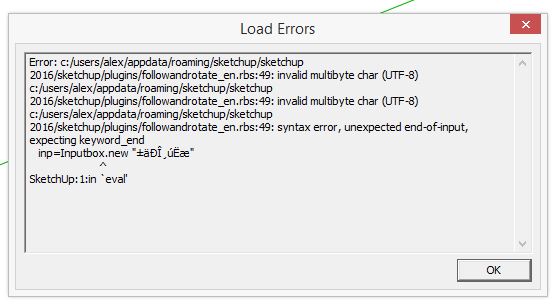
                              somethings's wrong.. I can't get it to work properly

                              Capture.JPG

                              1 Reply Last reply
                              Reply Quote 0
                              • TIGT
                                TIG Moderator
                                last edited by

                                Go back to posts over a year ago where it's explained how to remove the incorrect RB file so that it at least loads.
                                However, since it's already been reported as flaky in v2017, its encrypted files might not now be fixable...

                                TIG

                                1 Reply Last reply
                                Reply Quote 0
                                • H
                                  hikamalsingh
                                  last edited by

                                  Hi Wikii ... please help

                                  I am using sketup2018pro
                                  I have loaded the new file Far_v1.0
                                  I am selecting the follow curve and then the plane (without edges)
                                  and its giving me the following error

                                  Error: #<TypeError: wrong argument type (expected Sketchup::Entity or Array of Sketchup::Entity)>
                                  c:/users/kamal/appdata/roaming/sketchup/sketchup 2018/sketchup/plugins/followandrotate_cn.rbs:42:in add' c:/users/kamal/appdata/roaming/sketchup/sketchup 2018/sketchup/plugins/followandrotate_cn.rbs:42:in wikii_push_pull'
                                  c:/users/kamal/appdata/roaming/sketchup/sketchup 2018/sketchup/plugins/followandrotate_cn.rbs:109:in block in <main>' SketchUp:1:in call'

                                  thanks

                                  1 Reply Last reply
                                  Reply Quote 0
                                  • Dave RD
                                    Dave R
                                    last edited by

                                    @hikamalsingh said:

                                    Hi Wikii ... please help

                                    I am using sketup2018pro

                                    It's already been reported that this extension doesn't work in Su2017 or SU2018. See the previous posts in this thread regarding that. It appears that the author isn't going to update it for newer versions of SketchUp. At least they haven't yet.

                                    Etaoin Shrdlu

                                    %

                                    (THERE'S NO PLACE LIKE)

                                    G28 X0.0 Y0.0 Z0.0

                                    M30

                                    %

                                    1 Reply Last reply
                                    Reply Quote 0
                                    • TIGT
                                      TIG Moderator
                                      last edited by

                                      As Dave says the original author hasn't supported this tool for many years.
                                      It doesn't work in any of the newer SketchUp versions.
                                      Under the terms of its Β© notice it could be reworked and republished, but I looked at it last year and found that to make it compatible with newer SketchUp could involve so much work it might as well be rewritten from scratch !
                                      So search for an alternative tool...

                                      TIG

                                      1 Reply Last reply
                                      Reply Quote 0
                                      • M
                                        maxosmedia
                                        last edited by

                                        Is the plug-in module dead? Does not work on SU 2018-2019

                                        1 Reply Last reply
                                        Reply Quote 0
                                        • Dave RD
                                          Dave R
                                          last edited by

                                          @maxosmedia said:

                                          Is the plug-in module dead? Does not work on SU 2018-2019

                                          If you read the posts above yours, you'll see that it hasn't been updated in quite a long time. Evidently the author has elected not to support it anymore.

                                          Etaoin Shrdlu

                                          %

                                          (THERE'S NO PLACE LIKE)

                                          G28 X0.0 Y0.0 Z0.0

                                          M30

                                          %

                                          1 Reply Last reply
                                          Reply Quote 0
                                          • S
                                            Swick
                                            last edited by

                                            I get this error in the ruby console:

                                            Error: #<TypeError: wrong argument type (expected Sketchup::Entity or Array of Sketchup::Entity)>
                                            c:/users/kasutaja/appdata/roaming/sketchup/sketchup 2018/sketchup/plugins/followandrotate_cn.rbs:42:in add' c:/users/kasutaja/appdata/roaming/sketchup/sketchup 2018/sketchup/plugins/followandrotate_cn.rbs:42:in wikii_push_pull'
                                            c:/users/kasutaja/appdata/roaming/sketchup/sketchup 2018/sketchup/plugins/followandrotate_cn.rbs:109:in block in <main>' SketchUp:1:in call'

                                            1 Reply Last reply
                                            Reply Quote 0

                                            Hello! It looks like you're interested in this conversation, but you don't have an account yet.

                                            Getting fed up of having to scroll through the same posts each visit? When you register for an account, you'll always come back to exactly where you were before, and choose to be notified of new replies (either via email, or push notification). You'll also be able to save bookmarks and upvote posts to show your appreciation to other community members.

                                            With your input, this post could be even better πŸ’—

                                            Register Login
                                            • 1
                                            • 2
                                            • 7
                                            • 8
                                            • 9
                                            • 10
                                            • 11
                                            • 10 / 11
                                            • First post
                                              Last post
                                            Buy SketchPlus
                                            Buy SUbD
                                            Buy WrapR
                                            Buy eBook
                                            Buy Modelur
                                            Buy Vertex Tools
                                            Buy SketchCuisine
                                            Buy FormFonts

                                            Advertisement