sketchucation logo sketchucation
    • Login
    Oops, your profile's looking a bit empty! To help us tailor your experience, please fill in key details like your SketchUp version, skill level, operating system, and more. Update and save your info on your profile page today!
    Mac User? | Join the Rayscaper Beta for Mac Learn More

    [Plugin] Double line

    Scheduled Pinned Locked Moved Plugins
    91 Posts 38 Posters 70.7k Views 38 Watching
    Loading More Posts
    • Oldest to Newest
    • Newest to Oldest
    • Most Votes
    Reply
    • Reply as topic
    Log in to reply
    This topic has been deleted. Only users with topic management privileges can see it.
    • CadFatherC
      CadFather
      last edited by

      i second that

      1 Reply Last reply
      Reply Quote 0
      • Didier BurD
        Didier Bur
        last edited by

        Hi,
        Everybody will agree now, I hope. I finally got the double-click detection to work, so a double-clic will close a shape.
        Another small enhancement: when you draw only one segment on an existing face, it takes the face as the base geometric plane (to solve Fletch's issue).
        Download it at the top of topic.
        Regards,

        DB

        1 Reply Last reply
        Reply Quote 0
        • pilouP
          pilou
          last edited by

          Users presure πŸ˜„ πŸ‘

          Frenchy Pilou
          Is beautiful that please without concept!
          My Little site :)

          1 Reply Last reply
          Reply Quote 0
          • CadFatherC
            CadFather
            last edited by

            Thank you Master Didier!

            1 Reply Last reply
            Reply Quote 0
            • daikuD
              daiku
              last edited by

              Well, that last fix broke it for me. 😞 I like doing one wall at a time, and it now lays them down flat instead of upright. I'm adding walls to an existing framework, so there are planes adjacent to where I'm adding the wall. PS: if I could undo one wall at a time, that would be great - if I make a mistake and undo, I lose all the work I've done with the tool so far. Thanks, CB.

              Clark Bremer
              http://www.northernlightstimberframing.com

              1 Reply Last reply
              Reply Quote 0
              • Didier BurD
                Didier Bur
                last edited by

                Hi,

                @unknownuser said:

                if I could undo one wall at a time, that would be great

                Done. Download it again... πŸŽ‰

                DB

                1 Reply Last reply
                Reply Quote 0
                • EarthMoverE
                  EarthMover
                  last edited by

                  Didier,

                  Thanks for the plugin, it's great! Any plans to incorporate a double line function for an arc type tool as well?

                  3D Artist at Clearstory 3D Imaging
                  Guide Tool at Winning With Sketchup
                  Content Creator at Skapeup

                  1 Reply Last reply
                  Reply Quote 0
                  • Didier BurD
                    Didier Bur
                    last edited by

                    Why not...

                    DB

                    1 Reply Last reply
                    Reply Quote 0
                    • Mike LuceyM
                      Mike Lucey
                      last edited by

                      Thanks Didier πŸ‘

                      Support us so we can support you! Upgrade to Premium Membership!

                      1 Reply Last reply
                      Reply Quote 0
                      • R
                        rv1974
                        last edited by

                        Didier many thanks for your efforts!
                        Double click for close is neat idea though I couldn't manage to get good result- it's a bit messy.

                        1 Reply Last reply
                        Reply Quote 0
                        • pilouP
                          pilou
                          last edited by

                          it's a bit messy
                          ? Very clear! β˜€
                          A little trick if you find this difficult πŸ˜‰
                          Draw your lines without the plug, group it, then redraw with the plug over them! πŸ˜’
                          Erase the group

                          Frenchy Pilou
                          Is beautiful that please without concept!
                          My Little site :)

                          1 Reply Last reply
                          Reply Quote 0
                          • R
                            rv1974
                            last edited by

                            Now I understood: it closes wall in a newpoint not at the first one. I'm spoiled with CAD background )
                            @Pilou: With pre-drowed lines extrude lines.rb is better choise imho

                            1 Reply Last reply
                            Reply Quote 0
                            • pilouP
                              pilou
                              last edited by

                              @unknownuser said:

                              With pre-drowed lines extrude lines.rb is better choise imho

                              You have not the drawing of the dashed axis line πŸ˜‰
                              And you have a thickness with extrude simple lines ❓ And a wall ❓

                              @unknownuser said:

                              it closes wall in a new point not at the first one

                              Yes Didier is some original ! πŸ’š
                              It's some pertubating but after some try we are in the move! β˜€

                              Frenchy Pilou
                              Is beautiful that please without concept!
                              My Little site :)

                              1 Reply Last reply
                              Reply Quote 0
                              • R
                                rv1974
                                last edited by

                                @unknownuser said:

                                @unknownuser said:

                                With pre-drowed lines extrude lines.rb is better choise imho

                                You have not the drawing of the dashed axis line πŸ˜‰
                                And you have a thickness with extrude simple lines ❓ And a wall ❓

                                Pardon, I meant extrude along path .rb (of TIG i beleive).
                                I'm afraid the wink about dashed line I didn't understand. What do you mean?

                                1 Reply Last reply
                                Reply Quote 0
                                • pilouP
                                  pilou
                                  last edited by

                                  @unknownuser said:

                                  I'm afraid the wink about dashed line

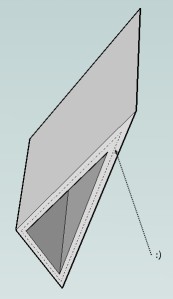
                                  Just this πŸ˜‰


                                  dashaxe.jpg

                                  Frenchy Pilou
                                  Is beautiful that please without concept!
                                  My Little site :)

                                  1 Reply Last reply
                                  Reply Quote 0
                                  • G
                                    gogo2suf
                                    last edited by

                                    Thank You vary much D. Bur ,
                                    Thank you!!!!!!!!!!!!
                                    GOGO

                                    1 Reply Last reply
                                    Reply Quote 0
                                    • A
                                      agrazdi
                                      last edited by

                                      Is it possible to add a png icon into the tool bars for the double line function ?

                                      Thanks

                                      agrazdi

                                      1 Reply Last reply
                                      Reply Quote 0
                                      • FletchF
                                        Fletch
                                        last edited by

                                        Didier! You are wonderful... but you already knew this. Thank you for sharing this wonderful update.

                                        Since you love bug-hunting... here's what I get now... it does draw the wall but in the opposite direction from expected... I drew vertically on the 'inside' of this wall... I think it's picking the 'positive' direction of the green axis... perhaps - just a guess.
                                        my axis lines show up now. πŸ˜„

                                        So, this guy goes to the doctor...
                                        man: "Doc, my arm hurts when I move it like this."
                                        doctor: "Well, don't move it like that."
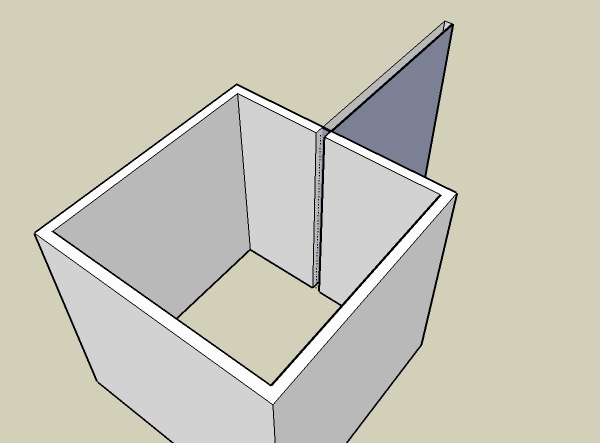

                                        doublelinebug2.jpg

                                        Fletch
                                        3D Modeling addict. Former owner/developer of Twilight Render. sleepinggiantvisual.com

                                        1 Reply Last reply
                                        Reply Quote 0
                                        • G
                                          gamore
                                          last edited by

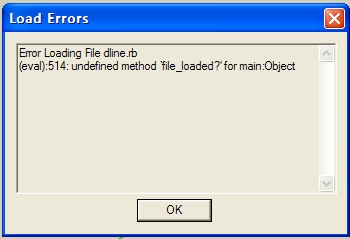
                                          some errors
                                          what should i do?
                                          18.JPG

                                          1 Reply Last reply
                                          Reply Quote 0
                                          • R
                                            RickW
                                            last edited by

                                            That's caused from "sketchup.rb" not being loaded. Didier should be able to fix that in no time.

                                            RickW
                                            www.smustard.com

                                            1 Reply Last reply
                                            Reply Quote 0

                                            Hello! It looks like you're interested in this conversation, but you don't have an account yet.

                                            Getting fed up of having to scroll through the same posts each visit? When you register for an account, you'll always come back to exactly where you were before, and choose to be notified of new replies (either via email, or push notification). You'll also be able to save bookmarks and upvote posts to show your appreciation to other community members.

                                            With your input, this post could be even better πŸ’—

                                            Register Login
                                            • 1
                                            • 2
                                            • 3
                                            • 4
                                            • 5
                                            • 4 / 5
                                            • First post
                                              Last post
                                            Buy SketchPlus
                                            Buy SUbD
                                            Buy WrapR
                                            Buy eBook
                                            Buy Modelur
                                            Buy Vertex Tools
                                            Buy SketchCuisine
                                            Buy FormFonts

                                            Advertisement