sketchucation logo sketchucation
    • Login
    Oops, your profile's looking a bit empty! To help us tailor your experience, please fill in key details like your SketchUp version, skill level, operating system, and more. Update and save your info on your profile page today!
    Mac User? | Join the Rayscaper Beta for Mac Learn More

    [Plugin] Double line

    Scheduled Pinned Locked Moved Plugins
    91 Posts 38 Posters 70.7k Views 38 Watching
    Loading More Posts
    • Oldest to Newest
    • Newest to Oldest
    • Most Votes
    Reply
    • Reply as topic
    Log in to reply
    This topic has been deleted. Only users with topic management privileges can see it.
    • arqpadaoA
      arqpadao
      last edited by

      Hi Didier
      thanks, this is great.

      fernando padรฃo
      arquiteto

      porto alegre - brasil

      http://arqpadao.blogspot.com

      1 Reply Last reply
      Reply Quote 0
      • free agentF
        free agent
        last edited by

        very handy, thanx!

        http://i167.photobucket.com/albums/u143/FreeAgent84/bug.gif

        1 Reply Last reply
        Reply Quote 0
        • Didier BurD
          Didier Bur
          last edited by

          Some enhancemments added today. See top of post.

          DB

          1 Reply Last reply
          Reply Quote 0
          • pilouP
            pilou
            last edited by

            @ Tig Same problem but ...
            Just enter any number then backspace for erase it then write c then Enter ๐Ÿ˜‰
            And you can keep your C shortcut ๐Ÿ˜„

            Frenchy Pilou
            Is beautiful that please without concept!
            My Little site :)

            1 Reply Last reply
            Reply Quote 0
            • honoluludesktopH
              honoluludesktop
              last edited by

              Are any other script.rb required to be installed in the plugin folder?

              1 Reply Last reply
              Reply Quote 0
              • M
                Matt666
                last edited by

                Hi Didier !!
                One question : Is it possible to add an "undo" key inside the command ?
                Thank you !

                Frenglish at its best !
                My scripts

                1 Reply Last reply
                Reply Quote 0
                • H
                  Hazza
                  last edited by

                  Do you know how easy this tool makes it to create pieces of wood for my models!!!! Hit D, enter 2 of the dimensions, click click, done.

                  That is awesome, thank you...

                  See all of my SketchUp models here.

                  1 Reply Last reply
                  Reply Quote 0
                  • Didier BurD
                    Didier Bur
                    last edited by

                    Hi,

                    @unknownuser said:

                    I can't get 'C' to work closing the loop - I have a short cur for circle that's 'c' so it dumps into that. Perhaps having something like shift+enter to close might do it ?

                    I noticed that also at the office on a standard install of SU, at home my PC doesn't have the "c" shortcut...
                    BTW, how to detect the Shift+enter keys pressed ?
                    I was thinking of a "x" shortcut instead but Shift+enter is more intuitive.

                    @honolulu: no, no additionnal files required. Maybe a glitch with the pushpull if you are on Mac ?
                    @Pilou: want always more, hey ? i'll try to do it...

                    DB

                    1 Reply Last reply
                    Reply Quote 0
                    • M
                      mike d
                      last edited by

                      thanks

                      The grass is always GREENER on the roof.

                      1 Reply Last reply
                      Reply Quote 0
                      • daikuD
                        daiku
                        last edited by

                        This is fantastic, Didier. I have one suggestion (for now ๐Ÿ˜„ ๐Ÿ˜ž Each time the user hits the enter key to draw the walls so far, commit the operation so the wall sections can be undone one at a time. Thanks again, this is really useful. CB.

                        Clark Bremer
                        http://www.northernlightstimberframing.com

                        1 Reply Last reply
                        Reply Quote 0
                        • pilouP
                          pilou
                          last edited by

                          @unknownuser said:

                          @Pilou: want always more, hey ?

                          With some arcs now? ๐Ÿ’š

                          Frenchy Pilou
                          Is beautiful that please without concept!
                          My Little site :)

                          1 Reply Last reply
                          Reply Quote 0
                          • Didier BurD
                            Didier Bur
                            last edited by

                            @unknownuser said:

                            With some arcs now?

                            No no no. Ask TIG! ๐Ÿคฃ
                            BTW, you can draw walls that include arcs with the "line2wall*.rb" scripts.

                            DB

                            1 Reply Last reply
                            Reply Quote 0
                            • TIGT
                              TIG Moderator
                              last edited by

                              Didier

                              Excellent idea - I was working on something similar, mine was called 'mline' - you beat me to it ! Well done.

                              I can't get 'C' to work closing the loop - I have a short cut for circle that's 'c' so it dumps into that. Perhaps having something like shift+enter to close might do it ?

                              .

                              TIG

                              1 Reply Last reply
                              Reply Quote 0
                              • TIGT
                                TIG Moderator
                                last edited by

                                @didier bur said:

                                Hi,

                                @unknownuser said:

                                I can't get 'C' to work closing the loop - I have a short cur for circle that's 'c' so it dumps into that. Perhaps having something like shift+enter to close might do it ?

                                I noticed that also at the office on a standard install of SU, at home my PC doesn't have the "c" shortcut...
                                BTW, how to detect the Shift+enter keys pressed ?
                                I was thinking of a "x" shortcut instead but Shift+enter is more intuitive.

                                @honolulu: no, no additionnal files required. Maybe a glitch with the pushpull if you are on Mac ?
                                @Pilou: want always more, hey ? i'll try to do it...

                                The code is basically "if key1== enter AND key2== shift then..." For example

                                def onKeyDown(key,repeat,flags,view)
                                ###...
                                  @key="shift" if key==CONSTRAIN_MODIFIER_KEY
                                ###...  
                                end#def
                                

                                TIG

                                1 Reply Last reply
                                Reply Quote 0
                                • Didier BurD
                                  Didier Bur
                                  last edited by

                                  Patch published today. Shortcut for "close" changed to "x" instead of "c".

                                  DB

                                  1 Reply Last reply
                                  Reply Quote 0
                                  • pilouP
                                    pilou
                                    last edited by

                                    Damned I have x for X-Ray ๐Ÿ’š
                                    So my previous trick will work fine again ๐Ÿ˜„

                                    @unknownuser said:

                                    Just write any number like 1
                                    then backspace for erase it
                                    then write x
                                    then Enter

                                    It's like Glen Gould but works ๐Ÿ’š

                                    Frenchy Pilou
                                    Is beautiful that please without concept!
                                    My Little site :)

                                    1 Reply Last reply
                                    Reply Quote 0
                                    • TIGT
                                      TIG Moderator
                                      last edited by

                                      @didier bur said:

                                      Patch published today. Shortcut for "close" changed to "x" instead of "c".

                                      Didier

                                      Using "X" is a good choice: x is usually reserved for copying - e.g. x3 to make copies within other commands and isn't a shortcut... If like Pilou you want to use 'X' as a shortcut for something like X-ray you need to remember to use 3x for copies rather than x3, as the latter will invoke X-ray rather than make copies ! Persoanlly I use Alt+X for X-ray mode...

                                      TIG

                                      1 Reply Last reply
                                      Reply Quote 0
                                      • pilouP
                                        pilou
                                        last edited by

                                        @unknownuser said:

                                        use 'X' as a shortcut for something like X-ray you need to remember to use 3x for copies rather than x3

                                        cool little trick ๐Ÿค“

                                        Frenchy Pilou
                                        Is beautiful that please without concept!
                                        My Little site :)

                                        1 Reply Last reply
                                        Reply Quote 0
                                        • FletchF
                                          Fletch
                                          last edited by

                                          Great work, Didier! Thanks so much for sharing!

                                          a couple little things:
                                          when I choose "show axis"... it does not show... whether or not I have it pop the wall up.

                                          After drawing a wall, I exit the tool, then I want to draw a double line vertically on a face, so I choose to use the tool again... set width to 12", no face, no close. I draw a vertical line from top edge to bottom edge of the wall face. I hit enter for it to draw the double line. I get this.
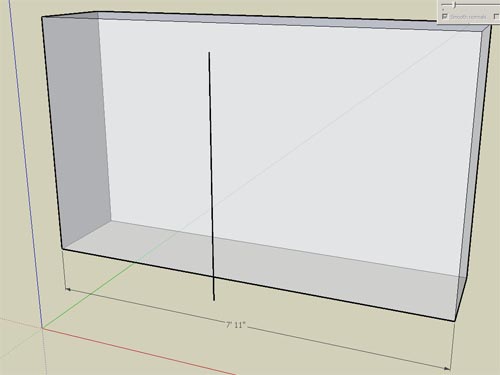

                                          doublelinebug.jpg

                                          Fletch
                                          3D Modeling addict. Former owner/developer of Twilight Render. sleepinggiantvisual.com

                                          1 Reply Last reply
                                          Reply Quote 0
                                          • B
                                            Ben Ritter
                                            last edited by

                                            Thank you very much Didier.

                                            1 Reply Last reply
                                            Reply Quote 0

                                            Hello! It looks like you're interested in this conversation, but you don't have an account yet.

                                            Getting fed up of having to scroll through the same posts each visit? When you register for an account, you'll always come back to exactly where you were before, and choose to be notified of new replies (either via email, or push notification). You'll also be able to save bookmarks and upvote posts to show your appreciation to other community members.

                                            With your input, this post could be even better ๐Ÿ’—

                                            Register Login
                                            • 1
                                            • 2
                                            • 3
                                            • 4
                                            • 5
                                            • 2 / 5
                                            • First post
                                              Last post
                                            Buy SketchPlus
                                            Buy SUbD
                                            Buy WrapR
                                            Buy eBook
                                            Buy Modelur
                                            Buy Vertex Tools
                                            Buy SketchCuisine
                                            Buy FormFonts

                                            Advertisement