What's your beginners tip?
-
Draw something that has an amorphic shape - sketch it out by hand, then create it with S/U. This may be more challenging than you think - pick something "easy" to begin with. Human body parts - head, hand, foot - are really very challenging to reproduce with accurate proportions and details.
Start with something simple and fun - it's a great way to learn more about S/U.
-
Use the forum like it's your best friend...ask for help when you are in trouble. No sense stumbling in the dark when someone is more than willing to shed some light on your problem.
Gboy -
As a month old sketchup user the things that have assisted me most recently, are the following:
-
When working on a model and making changes always save with the same name but add version 2 or 3 or 13... This way, if you make a mistake you can always go back to a previously saved version.
-
Locking groups assists in keeping ones sanity, it's only one extra click to do or undo, but can save one a lot of anguish.
-
Sometimes orbiting with the eraser or the move tool active, is akin to running around with a virtual pair of scissors.
I think the most important rule to remember is always... always.... group... It took me some time to get into the habit, but it makes all the difference. Also, always check components downloaded from 3DWH for extra layers and mistakes and purge them to the default layer, B4 introducing them into ones own model. Don't take it for granted that the model one has downloaded is safe to use... they sometimes simply aren't. Ever since I picked up this tip from Gaeius in this forum, life has been a lot more stress free.
-
-
@arklandesign said:
...Sometimes orbiting with the eraser or the move tool active, is akin to running around with a virtual pair of scissors...
Haha. How true. And how much I recognise my girlfriend (who is NOT using "virtual" weapons only)

-
• If you ever want to select an object enclosed in faces, instead of zooming into it, delete an enclosing face, select the object, then undo. The object will stay selected.
• If you ever wish you had a tool for doing something specific, such as push/pull on curved surfaces, making tapers, creating bezier curves, sculpting, flattening geometry, painting materials randomly on faces, rounding corners, or something else, you might find what you're looking for in the plugins forum.
• Look for free textures on the internet. The ones that come with sketchup aren't usually that good.
• Figure out the keyboard shortcuts for all the tools. If you don't know one, just guess. ( L = line, R = rectangle, C = circle, O = orbit, etc.)
-
Use Outliner to select groups and components.
If you have comprehensive naming convention for them, selecting deeply nested components within others is a piece of cake.
It will drastically reduce the need of zooming in + out and orbiting around the space because it will grant you access even to components outside of your screen... or no matter how small they appear on the screen.
So... Let's start grouping and naming them! -
Didn't see this mentioned in the thread, however, I may have missed it.
If you're working in tight and especially inside detailed areas, create a scene saving that perspective and position. If you get turned around and disoriented, you can quickly return to the view.
-
Hi all,
I keep watching this forum, but never did post much... but I've just posted a new article on my blog at http://www.ronenbekerman.com called 9 SketchUP Tips for better 3d modeling workflow that sums up my tips for a SketchUP beginner users or even more experienced ones.
Do check it out.
-
The axes tool is a nice one. you can line up your axes with the perhaps not sraight face that you are working on. I think its in the "Large tool set" Hope I help someone with this.

-
- do these tutorials http://sketchup.google.com/intl/en/gsu7/videos.html
2.get a 3 button mouse
3.ctrl Z will undo last action
4.stay away from the move tool (like an X with arrows on the endes)to start with. - print the keyboard short cuts and put them in a place you can see until you get used to them
6.get the book "Sketchup for dummies" big help. - learn about components Short cut is "G"
Happy sketchuping.
- do these tutorials http://sketchup.google.com/intl/en/gsu7/videos.html
-
I'm a complete begginner, so here is my tip.

Sooner or later you will be using some plugins or ruby scripts.
Try one at a time, know what it does, and if it works for you, save a copy in an ordered folder.
You can always re-install the main aplication, but find again a usefull plugin may take time. -
I too am still a beginner, but have come to understand that its not always necessary to look for a plugin to do what you want. Often there are ways to do things by SU commands that are not obvious to us beginners. "Move" not only moves, but copies, creates arrays, rotates, etc. So my tip is, at first as a beginner, try hard to find a way to do it without a plugin, because that forces you to understand the program better.
Also read this page everytime a tip is posted:-)
-
@honoluludesktop said:
its not always necessary to look for a plugin to do what you want. Often there are ways to do things by SU commands that are not obvious to us beginners. "Move" not only moves, but copies, creates arrays, rotates, etc. So my tip is, at first as a beginner, try hard to find a way to do it without a plugin, because that forces you to understand the program better.
And tho learn these tricks, look at Johnny Lemire's cool tutorials (many of them to be found in these pages, in .SKP format), even if you think you know how to do what the tut is about. They still make my jaw drop.
Anssi
-
Indeed. Jean (Johnny) performs these tuts in a way you will always understand why and how SU (or in fact, YOU) is/are doing things like they can be done in a certain way.
Native SU - native learners of it...
-
Well, here is my tip (hope someone hasn't said this yet, if so... its never enough to repeat)
Since Sketchup works with front and back faces (a plane has both) be sure that front faces are always facing you and the camera. Having a mixture of front/back faces makes applying materials harder in Sketchup and a lot of other problems when, later on, you will export sketchup scenes to be rendered in an external renderer software.
By default, back faces display in a blue/gray shade which sometimes is confusing with the front faces (which display white). So, I always work with red back-faces: the switch can be done in the styles/edit panel of Sketchup.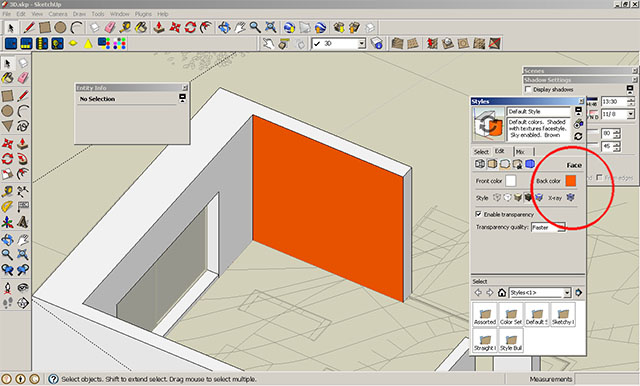
-
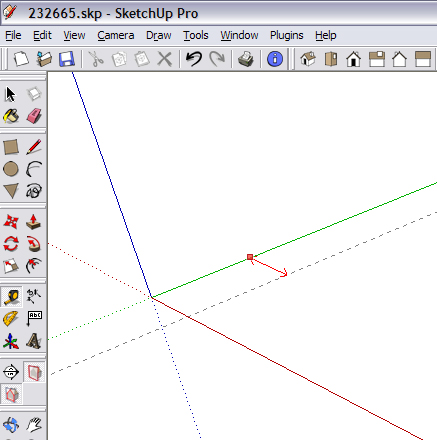
If this was mentioned before sorry. However, here is something I use all the time. Use the X, Y & Z axis to create construction lines with the Tape Measure tool . There is no need to have a face already drawn.
-
DON'T bring your old CAD preconceptions to SketchUp! Groups, components, guides, and accuracy are just fine, but FIRST, discover what's DIFFERENT about SU: the 'sticky' geometry! Get comfortable with 'Move' and 'toggle autofold'; these two tools are all you need to create amazing objects from elementary geometry. Forget everything you know about CAD and discover what is possible! Have fun!
-
First open beer, then open sketchup!
pmo
-
I have one,
If you are working in a big detailed model that is slow to open or change scenes. Set up a scene with only the basic geometry on so you can use it to move around. This is helpful when creating an animation.
-
Beginners of an appropriate age of course.










Advertisement