sketchucation logo sketchucation
    • 登入
    Oops, your profile's looking a bit empty! To help us tailor your experience, please fill in key details like your SketchUp version, skill level, operating system, and more. Update and save your info on your profile page today!
    🔌 Smart Spline | Fluid way to handle splines for furniture design and complex structures. Download

    [Plugin][$] Tools On Surface - v2.6a - 01 Apr 24


    已排程 已置頂 已鎖定 已移動 Plugins
    638 貼文 203 Posters 1.6m 瀏覽 202 Watching
    正在載入更多貼文
    • 從舊到新
    • 從新到舊
    • 最多點贊
    回覆
    • 在新貼文中回覆
    登入後回覆
    此主題已被刪除。只有擁有主題管理權限的使用者可以查看。
    • bagateloB 離線
      bagatelo
      最後由 編輯

      It would be interesting we could draw our own shapes and to save at an own library. Thanks for the great plugins. You are de best. (not the beast 😆 )

      While the cat's away, the mice will play

      1 條回覆 最後回覆 回覆 引用 0
      • kenK 離線
        ken
        最後由 編輯

        @unknownuser said:

        New version v1.6b, 8 May 10available.

        It allows to use the replication feature (by double-click) for shapes which are drawn perpendicular to edges.

        See small video in main post http://forums.sketchucation.com/viewtopic.php?f=323&t=11212#p76625

        Fredo

        Fredo

        I have loaded v1.6b. My make group or component in the contents or edit menu is grayed out. When I change the name of ZLoader__OnSurface.rb to ZLoader__OnSurface.ken, not allowing this plugin to load on start up, the contents and edit menu to make group or components is back.

        Nothing the in the ZLoader__OnSurface.rb indicates it has been upgrade to May 8.

        And I have update all the other files as required.

        Ken

        Fight like your the third monkey on Noah's Ark gangway.

        1 條回覆 最後回覆 回覆 引用 0
        • fredo6F 離線
          fredo6
          最後由 編輯

          @unknownuser said:

          Nothing the in the ZLoader__OnSurface.rb indicates it has been upgrade to May 8.

          And I have update all the other files as required.

          Ken

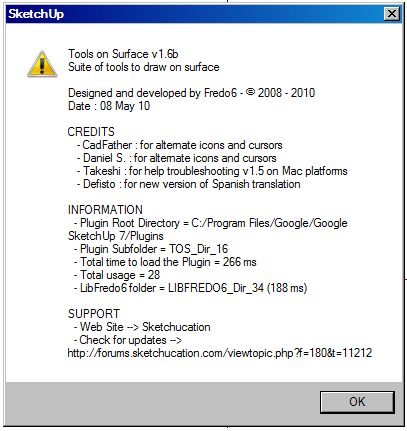
          Can you check the About menu of ToolsOnSurface. It should indicate the version and date.

          Fredo

          1 條回覆 最後回覆 回覆 引用 0
          • kenK 離線
            ken
            最後由 編輯

            @unknownuser said:

            @unknownuser said:

            Nothing the in the ZLoader__OnSurface.rb indicates it has been upgrade to May 8.

            And I have update all the other files as required.

            Ken

            Can you check the About menu of ToolsOnSurface. It should indicate the version and date.

            Fredo

            Here is the about menu for TOS

            Thanks for the quick response

            Ken

            TOS.PNG

            Fight like your the third monkey on Noah's Ark gangway.

            1 條回覆 最後回覆 回覆 引用 0
            • fredo6F 離線
              fredo6
              最後由 編輯

              Ken,

              On which type of selected geometry do you observe the menu grayout?

              If it is on San or on a single group or component, this may be a normal behavior in SU, which assumes you do not need to make a component or group from a single component or group.

              Fredo

              1 條回覆 最後回覆 回覆 引用 0
              • kenK 離線
                ken
                最後由 編輯

                @unknownuser said:

                Ken,

                On which type of selected geometry do you observe the menu grayout?

                If it is on San or on a single group or component, this may be a normal behavior in SU, which assumes you do not need to make a component or group from a single component or group.

                Fredo

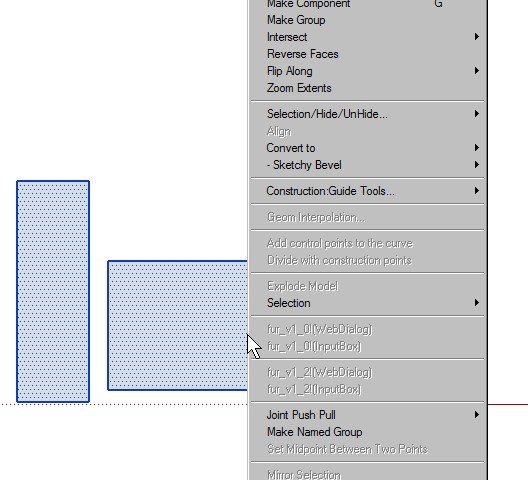
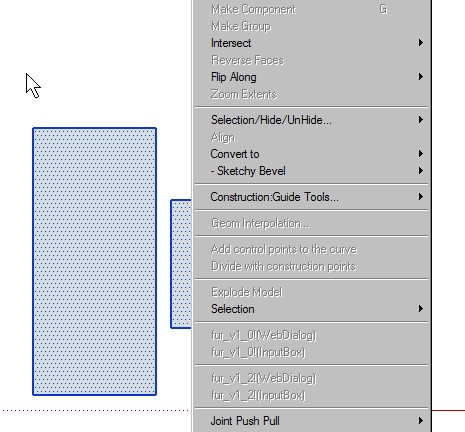
                I was using a simple rectangle. Selected face and lines, not able to make group or component. Tried again with two rectangles, selected all, not able to group or make component. With ZLoader__OnSurface.rb not loaded, able to group rectangle or rectangles.

                Note, the difference in the two screen shots, is ZLoader__OnSurface.rb being allowed to load or not allowed to load.

                Ken

                ZLoader__OnSurface loaded.jpg


                ZLoader__OnSurface not loaded.jpg

                Fight like your the third monkey on Noah's Ark gangway.

                1 條回覆 最後回覆 回覆 引用 0
                • thomthomT 離線
                  thomthom
                  最後由 編輯

                  Ken can you enter this into the console:
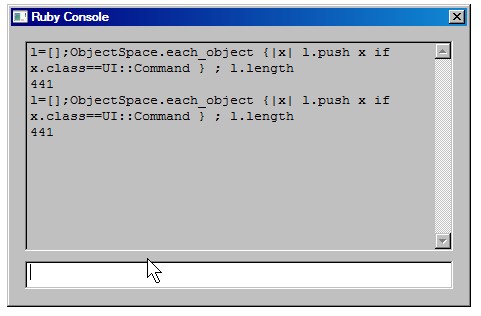
                  l=[];ObjectSpace.each_object {|x| l.push x if x.class==UI::Command } ; l.length

                  Try with it unloaded before right click
                  Try with it unloaded after right click
                  Loaded before right click
                  Loaded after right click

                  Thomas Thomassen — SketchUp Monkey & Coding addict
                  List of my plugins and link to the CookieWare fund

                  1 條回覆 最後回覆 回覆 引用 0
                  • kenK 離線
                    ken
                    最後由 編輯

                    Tom

                    Attached is the required screen shots.

                    Top is always before right click, bottom is after right click.

                    Thanks to Fredo and Tom for their help.

                    Ken


                    Not Loaded.jpg


                    Loaded.jpg

                    Fight like your the third monkey on Noah's Ark gangway.

                    1 條回覆 最後回覆 回覆 引用 0
                    • thomthomT 離線
                      thomthom
                      最後由 編輯

                      hm... this appear to be caused by something else then. As the number has not reached 1000.

                      Thomas Thomassen — SketchUp Monkey & Coding addict
                      List of my plugins and link to the CookieWare fund

                      1 條回覆 最後回覆 回覆 引用 0
                      • fredo6F 離線
                        fredo6
                        最後由 編輯

                        Ken,

                        This bug is very strange.

                        Would you mind to make the same test with another of my scripts (say FredoScale or Roundcorner). This will help me to determine whether this is specific to ToolsOnSurface or this comes from the shared library LibFredo6. I can't reproduce the bug myself.

                        Also, on the pictures you posted, I noticed that the cursor is a large white arrow. Are you popping up the context menu from with the SU Selection tool or from within another tool?

                        Thanks again

                        Fredo

                        1 條回覆 最後回覆 回覆 引用 0
                        • dermotcollD 離線
                          dermotcoll
                          最後由 編輯

                          Fredo / TIG

                          I was extracting to a different folder - just copied the files to the folder indicated by TIG and it works no problem. Thanks for a great plugin and super help for getting me going with it.

                          When you burn your arse - you gotta sit on the blisters!!

                          1 條回覆 最後回覆 回覆 引用 0
                          • fredo6F 離線
                            fredo6
                            最後由 編輯

                            @dermotcoll said:

                            Fredo / TIG

                            I was extracting to a different folder - just copied the files to the folder indicated by TIG and it works no problem. Thanks for a great plugin and super help for getting me going with it.

                            By the way, do you experience the same problems as Ken does (see his above message) about the menu gray out syndrom?

                            Fredo

                            1 條回覆 最後回覆 回覆 引用 0
                            • dermotcollD 離線
                              dermotcoll
                              最後由 編輯

                              Fredo

                              Not as yet but then again I am not as accomplished a modeller as these other guys and probably am not asking the plug in to do any thing too difficult. I use your Fredoscale plugin on a daily basis but rarely use the TOS one. I have tried to replicate the grey menu but have not been able to do so as yet. Sorry for the late reply.

                              When you burn your arse - you gotta sit on the blisters!!

                              1 條回覆 最後回覆 回覆 引用 0
                              • fredo6F 離線
                                fredo6
                                最後由 編輯

                                [Important Upgrade version 1.6c, 15 May 10]

                                I just realized that in v1.6b, I have introduced a ennoying bug in the inferencing of the tool LineOnSurface.

                                This is fixed in this new release 1.6c.

                                See main post for download: http://forums.sketchucation.com/viewtopic.php?p=76625#p76625

                                Fredo

                                1 條回覆 最後回覆 回覆 引用 0
                                • C 離線
                                  chouaibcl65
                                  最後由 編輯

                                  thank youuuuuu

                                  1 條回覆 最後回覆 回覆 引用 0
                                  • keea1111K 離線
                                    keea1111
                                    最後由 編輯

                                    HI,

                                    I am trying to get this to install on my new computer and it isn't coming up for me. I have dropped both rb file as well as the tools file into the plugins folder, open sketchup and am not finding it. Is there a companion plug in needed for this, or am I missing something else. thanks so much for the help..Keea

                                    KEEA

                                    1 條回覆 最後回覆 回覆 引用 0
                                    • massimoM 離線
                                      massimo Moderator
                                      最後由 編輯

                                      Hi Keea, have you installed LibFredo as well? Btw have you read the PDF quickcard (2. installation and configuration)?

                                      1 條回覆 最後回覆 回覆 引用 0
                                      • M 離線
                                        mavie
                                        最後由 編輯

                                        After reading his installation notes and carefully loading all the components for Fredo's great Tools on Surface plugin (about 4 times), I got my error messages down to just this one upon opening SketchUp after install:

                                        Error Loading File Zloader_OnSurface.rb unititialized constant Traductor:Plugin

                                        I reinstalled Zloader (the freshest version, I believe) and have the latest version of his plugin, but I would love to find out what I'm doing wrong. MacBookPro, Snow Leopard, and I cleaned out all the bits of Fredo's older versions, etc.

                                        Thanks in advance for any advice,

                                        Mave

                                        1 條回覆 最後回覆 回覆 引用 0
                                        • M 離線
                                          mavie
                                          最後由 編輯

                                          Okay, yes. Woke up fresh, tried another 2 installs and I'm good to go! Such a cool plugin. Merci bien Fredo!

                                          1 條回覆 最後回覆 回覆 引用 0
                                          • H 離線
                                            hgdn
                                            最後由 編輯

                                            Is anyone please pointing it out for me of what is not right as I have tried a lot of times to install but still not get it? I got files LIBFREDO6_Dir_34, FREDOSCALE_Dir_20, TOS_Dir_16 and 3 rb(s) LibFredo6.rb, ZLoader__FredoScale.rb, ZLoader__OnSurface.rb located in Program Files\Google\Google SketchUp 7-pro\Plugins.. . The Fredoscale is fine and working icons shown but Tools on Surface icon(s) is not and in Preferences I saw it there and I checked that box and restart computer but still not shown. Oh one more thing that I never had installed any of those files before (3 files) so is there any relation of old and new files installed that makes it does not work or any missing things I don't know??? please tell me as I am tired of trying so many times...Thanks!


                                            1 條回覆 最後回覆 回覆 引用 0
                                            • 1
                                            • 2
                                            • 5
                                            • 6
                                            • 7
                                            • 8
                                            • 9
                                            • 31
                                            • 32
                                            • 7 / 32
                                            • 第一個貼文
                                              最後的貼文
                                            Buy SketchPlus
                                            Buy SUbD
                                            Buy WrapR
                                            Buy eBook
                                            Buy Modelur
                                            Buy Vertex Tools
                                            Buy SketchCuisine
                                            Buy FormFonts

                                            Advertisement