sketchucation logo sketchucation
    • Login
    Oops, your profile's looking a bit empty! To help us tailor your experience, please fill in key details like your SketchUp version, skill level, operating system, and more. Update and save your info on your profile page today!
    ⚠️ Update | Sketchucation Tools 5.0.8 released with licensing improvements and bugfixes Download

    [Plugin][$] Tools On Surface - v2.6a - 01 Apr 24


    Scheduled Pinned Locked Moved Plugins
    638 Posts 203 Posters 1.8m Views 202 Watching
    Loading More Posts
    • Oldest to Newest
    • Newest to Oldest
    • Most Votes
    Reply
    • Reply as topic
    Log in to reply
    This topic has been deleted. Only users with topic management privileges can see it.
    • fredo6F
      fredo6
      last edited by

      @cadfather said:

      Hi Fredo, i don't think this same 16/24 system applies to bezier as well - had a look at the scripts but cannot locate/attempt how to make the switch automatic..any pointers would be great..

      No, Bezierspline is an old script now, but I plan to refresh it at some point in time.
      This being said, it would be relatively simple to make just the modification about icons. Let me think about it.

      1 Reply Last reply
      Reply Quote 0
      • CadFatherC
        CadFather
        last edited by

        ..it would be great to have _16, _24 naming convention like TOS - but all in your own time of course πŸ˜‰

        1 Reply Last reply
        Reply Quote 0
        • fredo6F
          fredo6
          last edited by

          CadFather,

          For easier access to your set of icons and cursors, I edited the first message of this thread and attached the archive file.
          http://www.sketchucation.com/forums/scf/viewtopic.php?f=180&t=11212&st=0&sk=t&sd=a#p76625

          Fred

          1 Reply Last reply
          Reply Quote 0
          • F
            FkY
            last edited by

            Hello all, it's my first message here...

            Thanks to Fredo6 for this awesome plugin, it's very useful.

            I've just seen a little bug in the arc display. When you move an arc created with this plugin, the center point (displayed by a cross) doesn't move.

            It would be nice to have the tangent constraint when you create an arc after an other or a line to have a continuity.

            FkY_

            PS : sorry for my "garbage english", I do my best but...

            1 Reply Last reply
            Reply Quote 0
            • fredo6F
              fredo6
              last edited by

              @fky said:

              I've just seen a little bug in the arc display. When you move an arc created with this plugin, the center point (displayed by a cross) doesn't move.

              Not really a bug actually. the script just create a construction point for the arc center for convenience (as it should maybe in native Sketchup!). But the construction point is not really part of the arc and does not keep any connection with it afterward.

              @fky said:

              It would be nice to have the tangent constraint when you create an arc after an other or a line to have a continuity.

              Yes, that would be nice. On a Surface, it is however a little bit tricky, though probably feasible.

              1 Reply Last reply
              Reply Quote 0
              • CadFatherC
                CadFather
                last edited by

                @unknownuser said:

                CadFather,

                For easier access to your set of icons and cursors, I edited the first message of this thread and attached the archive file.
                http://www.sketchucation.com/forums/scf/viewtopic.php?f=180&t=11212&st=0&sk=t&sd=a#p76625

                Fred

                oh..i'm honoured to have my name next to it! πŸ˜„

                1 Reply Last reply
                Reply Quote 0
                • Z
                  zhuangsuph
                  last edited by

                  Thank youThank youThank you

                  1 Reply Last reply
                  Reply Quote 0
                  • T
                    theolwakachangchang
                    last edited by

                    for some reason i cannot get the toolbar to show up???

                    i only get this:
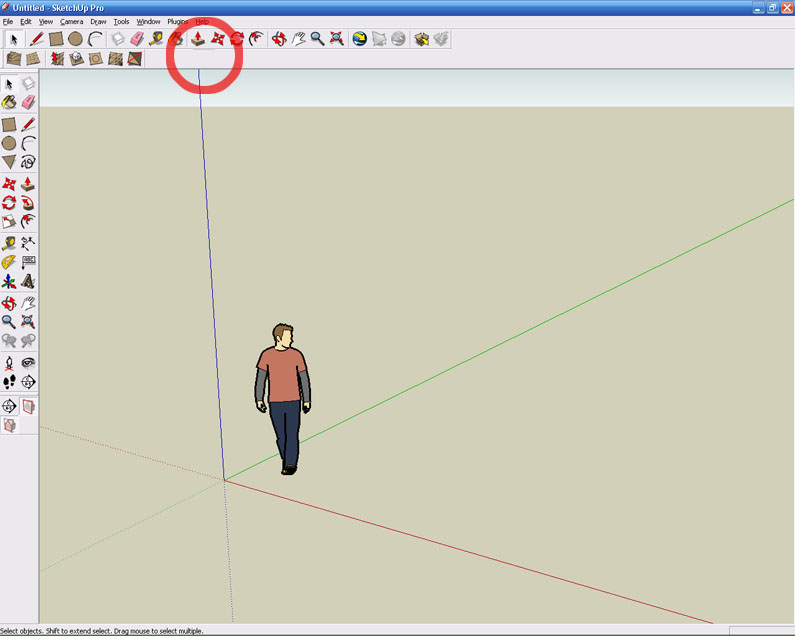

                    toolbarerror.jpg


                    toolbarerror2.jpg

                    1 Reply Last reply
                    Reply Quote 0
                    • CadFatherC
                      CadFather
                      last edited by

                      make sure you have al the files in 'plugins'

                      ZLoader__OnSurface.rb
                      and the folder TOS_Dir_13 which contains the scripts and the toolbar icons

                      1 Reply Last reply
                      Reply Quote 0
                      • FrederikF
                        Frederik
                        last edited by

                        Isn't this because the script needs to be activated from the Extensions..?? πŸ˜•

                        From the menu-bar click Window > Preferences, which will open the System Preferences window...
                        Select Extensions and make sure the Tools on Surface is ticked... πŸ˜‰

                        Now you shold be able to see the toolbar - that is if you've extracted the zip-file to the correct folder... πŸ˜‰

                        Cheers
                        Kim Frederik

                        1 Reply Last reply
                        Reply Quote 0
                        • CadFatherC
                          CadFather
                          last edited by

                          oh yes indeed that is the first thing πŸ˜›

                          1 Reply Last reply
                          Reply Quote 0
                          • T
                            theolwakachangchang
                            last edited by

                            I believe I have all the necessary files. I have the ZLoader__OnSurface.rb and then in the TOS_Dir_13 folder I have 73 *.png files, 9 *.rb files, 1 *.def file and 2 manuals.... I have activated the script from extensions. I get all the options from the Tools on Surface section in the Tools pulldown, its just a pain not having a toolbar

                            Pretty sure I have installed and followed all the instructions correctly?

                            1 Reply Last reply
                            Reply Quote 0
                            • fredo6F
                              fredo6
                              last edited by

                              By chance, can you check in the menu View>Toolbar if you have a toolbar named "Surface Operations" and if it is checked.

                              Fredo

                              1 Reply Last reply
                              Reply Quote 0
                              • T
                                theolwakachangchang
                                last edited by

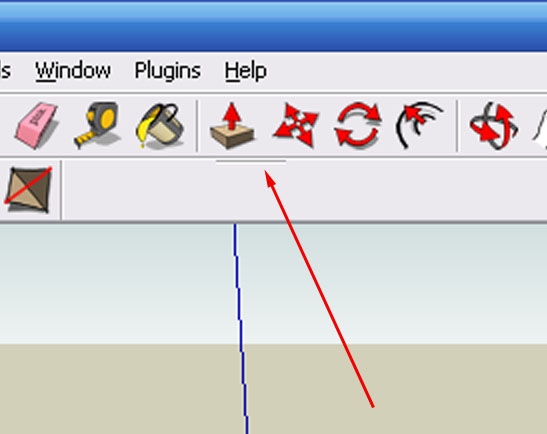
                                Yep, I have that checked.. that little 'dash thing' that shows up (as shown earlier in the image with the arrow) is what shows up when I have 'Surface Operations' checked

                                1 Reply Last reply
                                Reply Quote 0
                                • CadFatherC
                                  CadFather
                                  last edited by

                                  in these cases i move all the plugins to another folder and keep only the troubling one.

                                  give it a try if you still have a problem, redownload the plugin and re-try. if still no good you can try re-installing SU - wouldn't kow what else..

                                  1 Reply Last reply
                                  Reply Quote 0
                                  • T
                                    theolwakachangchang
                                    last edited by

                                    πŸ˜† πŸ˜†

                                    hmmmm turns out I found the problem... For some reason I had extracted the files into the tools directory instead of the plugins directory

                                    1 Reply Last reply
                                    Reply Quote 0
                                    • CadFatherC
                                      CadFather
                                      last edited by

                                      πŸ˜’ πŸ˜‰

                                      1 Reply Last reply
                                      Reply Quote 0
                                      • R
                                        renyiandhan
                                        last edited by

                                        Amazing!!! Thanks!!!

                                        1 Reply Last reply
                                        Reply Quote 0
                                        • A
                                          agrazdi
                                          last edited by

                                          Fredo

                                          Any news about the double line you mentioned for V1.4 ?

                                          Thanks
                                          agrazdi

                                          1 Reply Last reply
                                          Reply Quote 0
                                          • fredo6F
                                            fredo6
                                            last edited by

                                            This will come, but not before end of Sep (actually, it should do more than double, and on any contour). I did not spend a lot of time recently on Rubys, but should try to resume soon, with some work on Web dialogs as well.
                                            I also solved the question of generating faces when drawing lines on surfaces.

                                            Fredo

                                            1 Reply Last reply
                                            Reply Quote 0

                                            Hello! It looks like you're interested in this conversation, but you don't have an account yet.

                                            Getting fed up of having to scroll through the same posts each visit? When you register for an account, you'll always come back to exactly where you were before, and choose to be notified of new replies (either via email, or push notification). You'll also be able to save bookmarks and upvote posts to show your appreciation to other community members.

                                            With your input, this post could be even better πŸ’—

                                            Register Login
                                            • 1
                                            • 2
                                            • 6
                                            • 7
                                            • 8
                                            • 9
                                            • 10
                                            • 31
                                            • 32
                                            • 8 / 32
                                            • First post
                                              Last post
                                            Buy SketchPlus
                                            Buy SUbD
                                            Buy WrapR
                                            Buy eBook
                                            Buy Modelur
                                            Buy Vertex Tools
                                            Buy SketchCuisine
                                            Buy FormFonts

                                            Advertisement