sketchucation logo sketchucation
    • 登入
    Oops, your profile's looking a bit empty! To help us tailor your experience, please fill in key details like your SketchUp version, skill level, operating system, and more. Update and save your info on your profile page today!
    ⚠️ Important | Libfredo 15.6b introduces important bugfixes for Fredo's Extensions Update

    [Plugin] SceneExporter

    已排程 已置頂 已鎖定 已移動 Plugins
    56 貼文 16 Posters 31.9k 瀏覽 16 Watching
    正在載入更多貼文
    • 從舊到新
    • 從新到舊
    • 最多點贊
    回覆
    • 在新貼文中回覆
    登入後回覆
    此主題已被刪除。只有擁有主題管理權限的使用者可以查看。
    • M 離線
      Matt666
      最後由 編輯

      Hi Rick !

      @unknownuser said:

      Is the current view you show accessed directly from a scene tab, or was it manually set after clicking on a scene tab?

      Directly from a scene tab...

      @unknownuser said:

      I will investigate further

      Thank you !

      Frenglish at its best !
      My scripts

      1 條回覆 最後回覆 回覆 引用 0
      • R 離線
        RickW
        最後由 編輯

        Okay, I found and fixed the settings issue. Any word on using saved settings as default (I guess it makes sense).

        RickW
        [www.smustard.com](http://www.smustard.com)

        1 條回覆 最後回覆 回覆 引用 0
        • daikuD 離線
          daiku
          最後由 編輯

          Thanks Rick. That's exactly what happend. I expected that if I saved to the model, then it would automatically use those settings next time. So if you change the behavior, I guess you won't need the "restore from model" button at all. CB.

          Clark Bremer
          http://www.northernlightstimberframing.com

          1 條回覆 最後回覆 回覆 引用 0
          • R 離線
            RickW
            最後由 編輯

            It might still be useful - say you try some different settings, then decide you don't like them - just "Restore from Model" and you don't have to try to re-create them. 😄

            RickW
            [www.smustard.com](http://www.smustard.com)

            1 條回覆 最後回覆 回覆 引用 0
            • R 離線
              RickW
              最後由 編輯

              Looks like Matt's problem was caused by SketchUp reporting the screen size prior to the toolbars loading, skewing the settings and causing the clipping issue. I've fixed that to check the screen size prior to the first run and then every time the dialog is refreshed, so if you change your SU window size, refresh the dialog (start it again from the menu bar) and you'll have accurate screen size settings.

              I've also updated it to use the saved settings by default.

              RickW
              [www.smustard.com](http://www.smustard.com)

              1 條回覆 最後回覆 回覆 引用 0
              • H 離線
                haynesc
                最後由 編輯

                hi i bought the pro version but its not working for me ....

                all i get are the scene names as files in the folder but they have 0kb as file size and i get no image ...

                whats up !?

                1 條回覆 最後回覆 回覆 引用 0
                • jujuJ 離線
                  juju
                  最後由 編輯

                  It takes a little time (not much though), the plugin will tell you when it's done.

                  Save the Earth, it's the only planet with chocolate.

                  1 條回覆 最後回覆 回覆 引用 0
                  • H 離線
                    haynesc
                    最後由 編輯

                    i got the message saying "12 scenes have been exported" ... but when i looked at the files all i got back was files with 0 file size

                    1 條回覆 最後回覆 回覆 引用 0
                    • F 離線
                      Fletch
                      最後由 編輯

                      Sorry for my dumb question, it will be obvious I haven't tried the plug. yet.

                      I use the "Automated 2D Output" ruby to export to CAD.
                      The problem is that it doesn't read all the info about the scene when it exports... it just reads the camera. So if each scene I'm trying to export to CAD format has hidden geometry, hidden layers, and an active section cut (like one would do when exporting the four interior elevations for a room) it will only export the first of the cams correctly, and after that I get junk.

                      So... in short, can THIS "Scene Exporter" read/remember everything each scene has checked or unchecked and export that view accurately to 2D CAD format?

                      Fletch
                      Twilight Render Cross-platform Plugin for SketchUp on PC or Mac

                      1 條回覆 最後回覆 回覆 引用 0
                      • jujuJ 離線
                        juju
                        最後由 編輯

                        I think Rick will most definitely the most qualified to answer your questions. But as far as I understand the plugin works with the scenes you've set up and the way you've set them up. Basically it automates the export process so you don't have to manually export images generated from from scenes. You can tell it which scenes to export and which not to. Works like a charm, had mine running late last night...

                        Save the Earth, it's the only planet with chocolate.

                        1 條回覆 最後回覆 回覆 引用 0
                        • R 離線
                          RickW
                          最後由 編輯

                          haynesc: If you have shadows turned on, try exporting with prompts at each scene. That will give SU time to generate the shadows for the scenes - something it might not do adequately if you have a complex model.

                          fletch: This plugin uses the scene settings to export image files. Unfortunately, it doesn't do CAD export. I could mod Didier's script to handle scene settings, or perhaps he could be persuaded to mod it himself 😉 IIRC, it was written before we had a pages.active_page= method available, so we had to do some gymnastics to get things to happen correctly. Now, a quick mod would fix the issues you're having.

                          RickW
                          [www.smustard.com](http://www.smustard.com)

                          1 條回覆 最後回覆 回覆 引用 0
                          • C 離線
                            chango70
                            最後由 編輯

                            Just bought it. Used it in my office today. What a time saver! Thanks Rick!

                            1 條回覆 最後回覆 回覆 引用 0
                            • F 離線
                              Fletch
                              最後由 編輯

                              thanks for the reply - so what formats besides .jpg will it export?

                              Fletch
                              Twilight Render Cross-platform Plugin for SketchUp on PC or Mac

                              1 條回覆 最後回覆 回覆 引用 0
                              • R 離線
                                RickW
                                最後由 編輯

                                Fletch: from the plugin's page:
                                @unknownuser said:

                                The default format is .jpg, but .bmp, .png, and .tif formats are also available.

                                Those are the available types in SU ruby. I'm looking into how to tie into the 3d exporters.

                                chango70: thanks, and glad it helped! 😄

                                RickW
                                [www.smustard.com](http://www.smustard.com)

                                1 條回覆 最後回覆 回覆 引用 0
                                • F 離線
                                  Fletch
                                  最後由 編輯

                                  bought 'pro' version today... just used it.

                                  wish it has one tiny thing... a way to specify the output folder. Didier's 2d output ruby has this... so I'm sure you can figure out a way. 😉

                                  like it for what it does! no complaints so far. haven't tested it on anything 'heavy duty' yet.

                                  thanks for your work on it. it's something SU has needed for a very long time.... should have been built-in functionality long ago...

                                  Fletch
                                  Twilight Render Cross-platform Plugin for SketchUp on PC or Mac

                                  1 條回覆 最後回覆 回覆 引用 0
                                  • R 離線
                                    RickW
                                    最後由 編輯

                                    Since you asked nicely, I'll get one put in. Will post when it's ready.

                                    RickW
                                    [www.smustard.com](http://www.smustard.com)

                                    1 條回覆 最後回覆 回覆 引用 0
                                    • F 離線
                                      Fletch
                                      最後由 編輯

                                      Thanks Rick!
                                      since you're there - One more thing!
                                      If you have a lot of scenes... you can't access the buttons! 😞

                                      hmmm... maybe not a major prob. I closed and re-opened the dialog, now I get the scroll bar on the right to access the buttons.... but I still would prefer multiple columns to see as many as possible in one screen without scrolling - wouldn't you?
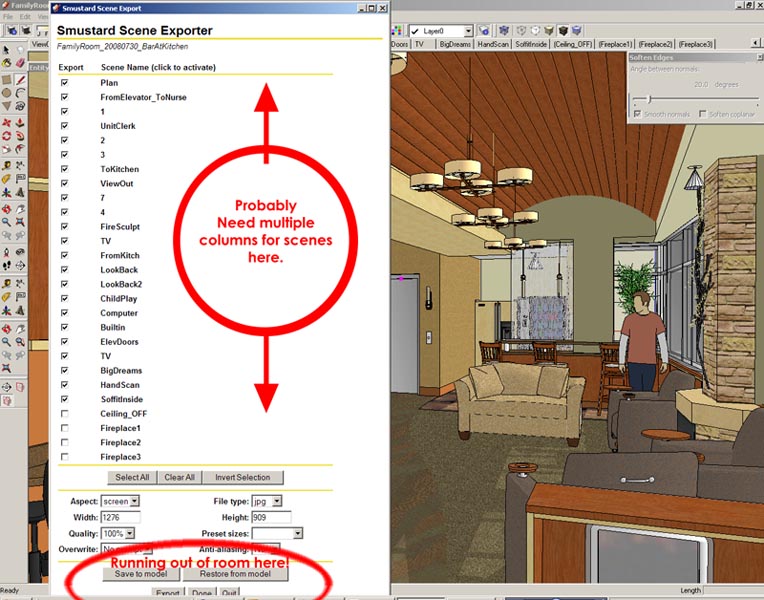

                                      scenedialogprob.jpg

                                      Fletch
                                      Twilight Render Cross-platform Plugin for SketchUp on PC or Mac

                                      1 條回覆 最後回覆 回覆 引用 0
                                      • R 離線
                                        RickW
                                        最後由 編輯

                                        The inactive scrollbars on the intial launch of the webDialog is a known SU bug. You can also right-click and select "refresh" to get the scrollbar to activate. I suppose I could shrink the text and/or make the rows shorter...

                                        RickW
                                        [www.smustard.com](http://www.smustard.com)

                                        1 條回覆 最後回覆 回覆 引用 0
                                        • F 離線
                                          Fletch
                                          最後由 編輯

                                          multiple columns of scene names is not possible? you have multiple columns of buttons...

                                          Fletch
                                          Twilight Render Cross-platform Plugin for SketchUp on PC or Mac

                                          1 條回覆 最後回覆 回覆 引用 0
                                          • W 離線
                                            wrecknball
                                            最後由 編輯

                                            Looks like an awesome time saver.

                                            Any chance this will work on my mac?

                                            1 條回覆 最後回覆 回覆 引用 0
                                            • 1
                                            • 2
                                            • 3
                                            • 2 / 3
                                            • 第一個貼文
                                              最後的貼文
                                            Buy SketchPlus
                                            Buy SUbD
                                            Buy WrapR
                                            Buy eBook
                                            Buy Modelur
                                            Buy Vertex Tools
                                            Buy SketchCuisine
                                            Buy FormFonts

                                            Advertisement
