sketchucation logo sketchucation
    • 登入
    Oops, your profile's looking a bit empty! To help us tailor your experience, please fill in key details like your SketchUp version, skill level, operating system, and more. Update and save your info on your profile page today!
    ⚠️ Important | Libfredo 15.6b introduces important bugfixes for Fredo's Extensions Update

    [Plugin] SceneExporter

    已排程 已置頂 已鎖定 已移動 Plugins
    56 貼文 16 Posters 31.9k 瀏覽 16 Watching
    正在載入更多貼文
    • 從舊到新
    • 從新到舊
    • 最多點贊
    回覆
    • 在新貼文中回覆
    登入後回覆
    此主題已被刪除。只有擁有主題管理權限的使用者可以查看。
    • R 離線
      RickW
      最後由 編輯

      SceneExporter(free) will export the scenes in your model to a jpeg image, using the drawing window resolution as the image size. Scenes not part of the slideshow will not be exported, allowing the user to control which scenes are exported to image files.

      A "Pro" version is nearing completion that adds a webDialog to allow users to preselect scenes to export, along with specifying the image size and file type. Clicking on the scene name in the list will display the scene in the SketchUp drawing window so you can preview the image before (de)selecting it. There are several preset image sizes and optional aspect ratio locking for custom sizing. The dialog auto-updates as you add/remove/rename scenes, and remembers the last used settings.
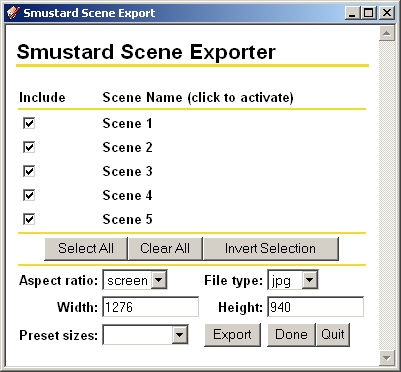
      screenshot from SceneExporterPro

      RickW
      [www.smustard.com](http://www.smustard.com)

      1 條回覆 最後回覆 回覆 引用 0
      • PixeroP 離線
        Pixero
        最後由 編輯

        Just a couple of questions.
        Will there be a setting for jpg quality? What is it now, best or middle quality?
        Is this as "memory hungry" as SketchUps export 2D-image is for large images? (4000px < )

        1 條回覆 最後回覆 回覆 引用 0
        • R 離線
          remus
          最後由 編輯

          Cheers rick, a very handy script indeed.

          http://remusrendering.wordpress.com/

          1 條回覆 最後回覆 回覆 引用 0
          • jujuJ 離線
            juju
            最後由 編輯

            Dude, your milkshake brings all the boys to the yard...

            I was all over it yesterday when I saw the update in the RSS feed!

            Save the Earth, it's the only planet with chocolate.

            1 條回覆 最後回覆 回覆 引用 0
            • R 離線
              RickW
              最後由 編輯

              For the free version, it is coded to use anti-alising and the default compression quality setting, whatever that is.

              For the Pro version, I've gotten some good testing feedback, and have added options for antialiasing, compression quality, file overwrite notification, and saving the settings into the model & retrieving saved settings. If all goes well, it will be released early next week.
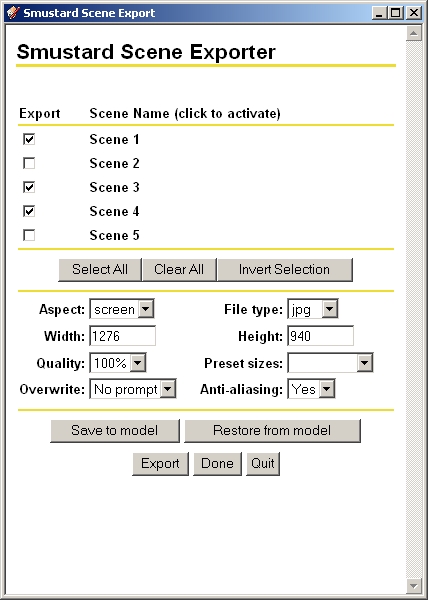
              revised webDialog for SceneExporterPro

              RickW
              [www.smustard.com](http://www.smustard.com)

              1 條回覆 最後回覆 回覆 引用 0
              • F 離線
                Fletch
                最後由 編輯

                this is looking promising, Rick!
                Is there a way you could develop a "Scene Organizer" so I can drag-n-drop these 6 scenes before in front of 45 others or quickly add/delete some properties of many scenes at once. ctrl-selecting multiple scenes and quickly grouping them, etc.?!

                Fletch
                Twilight Render Cross-platform Plugin for SketchUp on PC or Mac

                1 條回覆 最後回覆 回覆 引用 0
                • R 離線
                  RickW
                  最後由 編輯

                  I started one, and even thought about combining the two - may do that in the (hopefully near) future.

                  By way of update, all that's left is to save/retrieve settings in the model.

                  RickW
                  [www.smustard.com](http://www.smustard.com)

                  1 條回覆 最後回覆 回覆 引用 0
                  • R 離線
                    RickW
                    最後由 編輯

                    Save/retrieve settings in model is done! A little more testing, and we'll be good to go...

                    RickW
                    [www.smustard.com](http://www.smustard.com)

                    1 條回覆 最後回覆 回覆 引用 0
                    • F 離線
                      Fletch
                      最後由 編輯

                      301 Moved Permanently

                      favicon

                      (www.sketchucation.com)

                      Fletch
                      Twilight Render Cross-platform Plugin for SketchUp on PC or Mac

                      1 條回覆 最後回覆 回覆 引用 0
                      • daikuD 離線
                        daiku
                        最後由 編輯

                        Great Plugin, Rick. Thanks for the freebie! I did find a bug, though. I used some screen text to put a title block in the upper left corner of the screen, but it ends up in the wrong place (often the center of the screen, but not always) in the resulting jpegs. It works fine if I export "by hand" using the menus. Let me know if you want to see either the skippy or the jpgs. CB.

                        Clark Bremer
                        http://www.northernlightstimberframing.com

                        1 條回覆 最後回覆 回覆 引用 0
                        • R 離線
                          RickW
                          最後由 編輯

                          Yeah, I heard about that one. It's an internal SU bug that is overcome by prompting at each scene (!). I'll add an option for prompting and re-upload the freebie. Prompting is already built into the Pro version.

                          EDIT: Uploaded a revised free version that asks if you want a prompt at each scene. This solves the screen text bug.

                          RickW
                          [www.smustard.com](http://www.smustard.com)

                          1 條回覆 最後回覆 回覆 引用 0
                          • R 離線
                            RickW
                            最後由 編輯

                            SceneExporterPro is now available.

                            RickW
                            [www.smustard.com](http://www.smustard.com)

                            1 條回覆 最後回覆 回覆 引用 0
                            • jujuJ 離線
                              juju
                              最後由 編輯

                              And you have a purchase! Thanks for making life easier.

                              Save the Earth, it's the only planet with chocolate.

                              1 條回覆 最後回覆 回覆 引用 0
                              • jujuJ 離線
                                juju
                                最後由 編輯

                                @rickw said:

                                SceneExporterPro is now available.

                                Why do I get this message?

                                @unknownuser said:

                                Error Loading File sceneExporterPro.rb
                                No such file to load -- smustard-app-observer.rb

                                Save the Earth, it's the only planet with chocolate.

                                1 條回覆 最後回覆 回覆 引用 0
                                • N 離線
                                  N Lindenthal
                                  最後由 編輯

                                  Is ruby mighty to ask SU, which preferences are collected in scenes?

                                  This would be an other way to export scenes.

                                  I ask this to turn it opposite. I would like to tell SU by ruby script, how to show, what a scene could show.

                                  1 條回覆 最後回覆 回覆 引用 0
                                  • R 離線
                                    RickW
                                    最後由 編輯

                                    Juju,

                                    Sorry about that. I have repackaged the plugin with the missing file included, so you should be good to go.

                                    Thanks...

                                    RickW
                                    [www.smustard.com](http://www.smustard.com)

                                    1 條回覆 最後回覆 回覆 引用 0
                                    • jujuJ 離線
                                      juju
                                      最後由 編輯

                                      Thanks for the prompt support. Good to go after re-downloading and re-installing the script.

                                      Save the Earth, it's the only planet with chocolate.

                                      1 條回覆 最後回覆 回覆 引用 0
                                      • M 離線
                                        Matt666
                                        最後由 編輯

                                        Hi Rick !
                                        Thank you for this incredible script !

                                        Just a problem... 😄 Exporting image hasn't same witdh that the screen image !
                                        The screen : You can see all the drawing. It's a bar 😉

                                        http://images4.hiboox.com/images/3008/a66378da21932cd15010826d732e8e30.jpg

                                        The parameters (perhaps i have a problem with them!)

                                        http://images4.hiboox.com/images/3008/30237b0b97fe95375bdf58b639f0b5b6.jpg

                                        The image :

                                        http://images4.hiboox.com/images/3008/2c5ce0067dd3bc663c013adcdd5602af.jpg

                                        You will see that exported image is croped...
                                        I have a 16:10 screen.

                                        Have you seen that before ? Can you do smt please ? Or I'm condamned to zoom out all scenes before exporting ?

                                        However that's a very good script!
                                        Thank you !! 😍

                                        Frenglish at its best !
                                        My scripts

                                        1 條回覆 最後回覆 回覆 引用 0
                                        • daikuD 離線
                                          daiku
                                          最後由 編輯

                                          Hi Rick. Thanks for the tweak to the free version, but I went ahead and spent the $10 for the pro version. But I'm running into an issue where it resets the image quality back to 100% after every export, even if I "save to model". Also, none of the settings seem to get saved to the model. I reduced the image size to 1024. Then I saved to model. Then close and re-open the model, and the settings revert back to default. I'm running 64-bit vista.

                                          Clark Bremer
                                          http://www.northernlightstimberframing.com

                                          1 條回覆 最後回覆 回覆 引用 0
                                          • R 離線
                                            RickW
                                            最後由 編輯

                                            Matt: I have not seen that issue. I will investigate further. Is the current view you show accessed directly from a scene tab, or was it manually set after clicking on a scene tab?

                                            Clark: settings saved to the model need to be activated - did you use the "Restore from model" button to do this? I went back and forth on whether saved settings should be used automatically, and decided not. If there's a consensus, I'll change it. I'll look into the image quality setting issue. I suspect a javascript-ruby translation problem.


                                            RickW
                                            [www.smustard.com](http://www.smustard.com)

                                            1 條回覆 最後回覆 回覆 引用 0
                                            • 1
                                            • 2
                                            • 3
                                            • 1 / 3
                                            • 第一個貼文
                                              最後的貼文
                                            Buy SketchPlus
                                            Buy SUbD
                                            Buy WrapR
                                            Buy eBook
                                            Buy Modelur
                                            Buy Vertex Tools
                                            Buy SketchCuisine
                                            Buy FormFonts

                                            Advertisement
