sketchucation logo sketchucation
    • Login
    Oops, your profile's looking a bit empty! To help us tailor your experience, please fill in key details like your SketchUp version, skill level, operating system, and more. Update and save your info on your profile page today!
    ⚠️ Update | Sketchucation Tools 5.0.8 released with licensing improvements and bugfixes Download

    [TUTORIAL]: texturing organic form (subsmooth)

    Scheduled Pinned Locked Moved SketchUp Tutorials
    sketchup
    36 Posts 17 Posters 21.6k Views 17 Watching
    Loading More Posts
    • Oldest to Newest
    • Newest to Oldest
    • Most Votes
    Reply
    • Reply as topic
    Log in to reply
    This topic has been deleted. Only users with topic management privileges can see it.
    • D
      Daniel Bouchard
      last edited by

      Thanks for this tutorial Kwistenbiebel.

      Very useful for me.

      Daniel

      1 Reply Last reply
      Reply Quote 0
      • K
        kwistenbiebel
        last edited by

        @frederik said:

        I assume that Kwistenbiebel have used Displacement mapping...

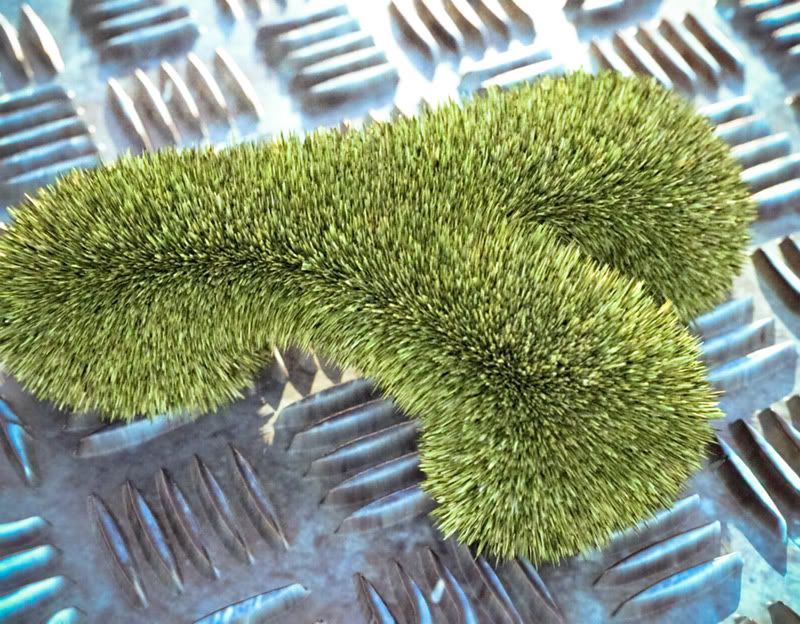
        Indeed, I used displacement maps on the object.
        It works just like adding a bump map ( a Black@White image defining depth).
        The only difference is that displacement will actually deform the geometry by subdividing it to show depth, while a bump map is only mimicing it.
        Curently displacement is supported by Vray, Fry, Maxwell and Indigo.
        For architectural scenes, bump maps most of the times are sufficient, as displacement tends to increase render time considerably. But the results can be convincing.

        This is an example of displacement on that same form using (SK)indigo:
        http://i140.photobucket.com/albums/r3/kwistenbiebel1/displ-2a.jpg

        http://i140.photobucket.com/albums/r3/kwistenbiebel1/displ1c.jpg

        1 Reply Last reply
        Reply Quote 0
        • pilouP
          pilou
          last edited by

          Macro photography 😉

          Frenchy Pilou
          Is beautiful that please without concept!
          My Little site :)

          1 Reply Last reply
          Reply Quote 0
          • david_hD
            david_h
            last edited by

            Biebel . . .you just amaze me. . .. 👍

            Look what I did in school today Mommy!!!20080709110002_22h11m26s.jpg

            If I make it look easy...It is probably easy

            1 Reply Last reply
            Reply Quote 0
            • C
              Click Draw
              last edited by

              I love this forum. I've learned so much more since I joined. Thx to everyone! Great tutorial. I got the material distributing evenly, I just have to learn to texture properly....
              Jeff

              Have I mentioned how much of a laugh I get out of some of the Signatures on here!

              1 Reply Last reply
              Reply Quote 0
              • pbacotP
                pbacot
                last edited by

                This is amazing. I never saw displacement like this before. Not that I have experience rendering. But I can use the texturing technique right away. Thanks for posting so people like me can get "edicated"! B

                MacOSX MojaveSketchUp Pro v19 Twilight v2 Thea v3 PowerCADD

                1 Reply Last reply
                Reply Quote 0
                • C
                  Click Draw
                  last edited by

                  Hi Kwistenbiebel,
                  Any chance of you doing a Tut on the technique of bump mapping or the way you put or change the actual surface texture? Or, is this something done in another program? I got the understanding of evenly patterning a material but you have pics showing that the surface is not smooth. Thanks in advance....
                  Jeff

                  Have I mentioned how much of a laugh I get out of some of the Signatures on here!

                  1 Reply Last reply
                  Reply Quote 0
                  • GaieusG
                    Gaieus
                    last edited by

                    Hi Jeff,

                    SU doesn't support either bupmapping or displacement. That part was done in a 3rd party renderer.

                    Gai...

                    1 Reply Last reply
                    Reply Quote 0
                    • C
                      Click Draw
                      last edited by

                      Thanks Gaieus,

                      Appreciate that. So that would be one like Podium or Vray?

                      Jeff

                      Have I mentioned how much of a laugh I get out of some of the Signatures on here!

                      1 Reply Last reply
                      Reply Quote 0
                      • GaieusG
                        Gaieus
                        last edited by

                        Yes exactly. Even some of those do not do displacement (like Kerkythea at the moment)

                        Gai...

                        1 Reply Last reply
                        Reply Quote 0
                        • C
                          Click Draw
                          last edited by

                          What is your preferrance for a rendering program. I'd like to get as much feedback and opinions as possible before I layout the money.
                          Jeff

                          Have I mentioned how much of a laugh I get out of some of the Signatures on here!

                          1 Reply Last reply
                          Reply Quote 0
                          • GaieusG
                            Gaieus
                            last edited by

                            I don't really render too much (no time to learn it well).I used Podium and Kerkythea (a bit more this latter one). It is free and Podium also has a free version with images limited to 500x500 pixels.

                            Indigo is also free.

                            Gai...

                            1 Reply Last reply
                            Reply Quote 0
                            • C
                              Click Draw
                              last edited by

                              Good stuff! Thanks
                              Jeff

                              Have I mentioned how much of a laugh I get out of some of the Signatures on here!

                              1 Reply Last reply
                              Reply Quote 0
                              • W
                                wheay
                                last edited by

                                wow! i want to learn this. since im using vray and loving its rendering capability. i want to learn the grass thing, it really amazed me. hope more tutorials on this.

                                "i try to learn everyday"
                                http://designerslandmark.blogspot.com/

                                1 Reply Last reply
                                Reply Quote 0
                                • C
                                  Click Draw
                                  last edited by

                                  Hey wheay,

                                  Do you know of a better tutorial than the one on the Vray site? I'd like to learn what the settings are for and so on. Thanks...

                                  Jeff

                                  Have I mentioned how much of a laugh I get out of some of the Signatures on here!

                                  1 Reply Last reply
                                  Reply Quote 0
                                  • K
                                    krowka_smieszka
                                    last edited by

                                    kwistenbiebel how did u make this organic shape? I know that may be silly question but I am still learning how to use sketchup...

                                    1 Reply Last reply
                                    Reply Quote 0
                                    • soloS
                                      solo
                                      last edited by

                                      Krowka, hope this helps, it's a very crude and fast example, Biebel's shape is cleaner.

                                      [flash=600,400:3gn1ftdy]http://vimeo.com/moogaloop.swf?clip_id=2335698&server=vimeo.com&show_title=1&show_byline=1&show_portrait=0&color=00ADEF&fullscreen=1[/flash:3gn1ftdy]

                                      Displaced with ecosystem in Vue:


                                      http://img81.imageshack.us/img81/938/biebelshapefu4.jpg

                                      http://www.solos-art.com

                                      If you see a toilet in your dreams do not use it.

                                      1 Reply Last reply
                                      Reply Quote 0
                                      • C
                                        Click Draw
                                        last edited by

                                        Very cool Solo....how about doing a tut to show how to displace with Vray? Don't make me bag....cause I will! 😄

                                        Have I mentioned how much of a laugh I get out of some of the Signatures on here!

                                        1 Reply Last reply
                                        Reply Quote 0
                                        • soloS
                                          solo
                                          last edited by

                                          Jeff, I would like to help with V-ray but my trial has ended and I had a choice between v-ray and Vue and I'm sure you know who won. I am sure once Kwistenbiebel gets settled into Oz he will get one going, after all this is his turf. 😉

                                          http://www.solos-art.com

                                          If you see a toilet in your dreams do not use it.

                                          1 Reply Last reply
                                          Reply Quote 0
                                          • C
                                            Click Draw
                                            last edited by

                                            No worries....I'm sure he'll show us mower 🤣

                                            Have I mentioned how much of a laugh I get out of some of the Signatures on here!

                                            1 Reply Last reply
                                            Reply Quote 0

                                            Hello! It looks like you're interested in this conversation, but you don't have an account yet.

                                            Getting fed up of having to scroll through the same posts each visit? When you register for an account, you'll always come back to exactly where you were before, and choose to be notified of new replies (either via email, or push notification). You'll also be able to save bookmarks and upvote posts to show your appreciation to other community members.

                                            With your input, this post could be even better 💗

                                            Register Login
                                            • 1
                                            • 2
                                            • 2 / 2
                                            • First post
                                              Last post
                                            Buy SketchPlus
                                            Buy SUbD
                                            Buy WrapR
                                            Buy eBook
                                            Buy Modelur
                                            Buy Vertex Tools
                                            Buy SketchCuisine
                                            Buy FormFonts

                                            Advertisement