sketchucation logo sketchucation
    • 登入
    Oops, your profile's looking a bit empty! To help us tailor your experience, please fill in key details like your SketchUp version, skill level, operating system, and more. Update and save your info on your profile page today!
    ⚠️ Important | Libfredo 15.6b introduces important bugfixes for Fredo's Extensions Update

    [Plugin] UVTools v0.1

    已排程 已置頂 已鎖定 已移動 Plugins
    180 貼文 71 Posters 128.4k 瀏覽 71 Watching
    正在載入更多貼文
    • 從舊到新
    • 從新到舊
    • 最多點贊
    回覆
    • 在新貼文中回覆
    登入後回覆
    此主題已被刪除。只有擁有主題管理權限的使用者可以查看。
    • F 離線
      fakircho
      最後由 編輯

      Yes you are quite correct. Once the texture is applied correctly ,you can scale the object back down 😄

      1 條回覆 最後回覆 回覆 引用 0
      • B 離線
        bbwolf
        最後由 編輯

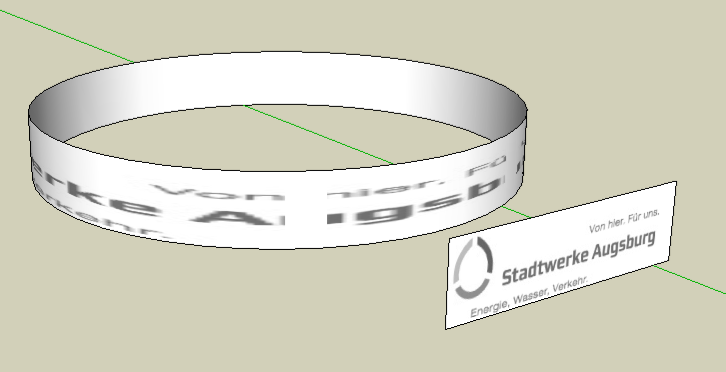
        Okay I know you´re all big shots and do renderings at an amazing rate but I still can´t get desired results in SU. UVTools is in the Plug in Folder (OSX 10.4.9 btw) and I tried to project a text. See attached pics.

        Question, is text just not for UVTools or do I make a mistake (or more) somewhere in process?

        Any help would be appreciated, thanks

        Wolf
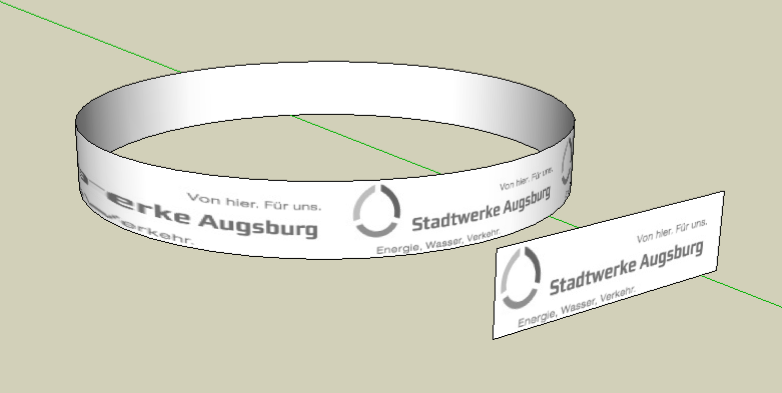

        Bild 2.png


        Bild 3.png

        1 條回覆 最後回覆 回覆 引用 0
        • GaieusG 離線
          Gaieus
          最後由 編輯

          Do you want the text to be repeated or only appear at the same size and only once?

          Gai...

          1 條回覆 最後回覆 回覆 引用 0
          • majidM 離線
            majid
            最後由 編輯

            Thanx dear WHATT .i did a try over this usefull script ( after a long while ) , and rendered it using KT, here is the result:
            http://www.sketchucation.com/forums/scf/viewtopic.php?f=81&t=14993
            hope u joy

            My inspiring A, B, Sketches book: https://sketchucation.com/shop/books/intermediate/2612-alphabet-inspired-sketches--inspiring-drills-for-architects--3d-artists-and-designers-

            1 條回覆 最後回覆 回覆 引用 0
            • C 離線
              crc
              最後由 編輯

              Just found this, really great!

              Thanks!

              http://www.motoclip.net

              1 條回覆 最後回覆 回覆 引用 0
              • C 離線
                chango70
                最後由 編輯

                Is UVTools still on v0.1? Does it work in SU7?

                1 條回覆 最後回覆 回覆 引用 0
                • W 離線
                  Whaat
                  最後由 編輯

                  should work fine on SU7

                  SketchUp Plugins for Professionals

                  1 條回覆 最後回覆 回覆 引用 0
                  • X 離線
                    xrok1
                    最後由 編輯

                    if you could look at this file, if you have time not too important. if you dB click inside one of the body parts (select all) then apply a spherical map to it, it crashes every time?
                    tank.skp

                    “There are three classes of people: those who see. Those who see when they are shown. Those who do not see.”

                    http://www.Twilightrender.com try it!

                    1 條回覆 最後回覆 回覆 引用 0
                    • C 離線
                      Carwash
                      最後由 編輯

                      Hiya

                      Sketchup newb here, but I really need to do some UV mapping for a game. I need to stetch and position a texture on a flat surface but the defult tools in SU don't seem to change the position of the texture in the game once the model is exported. Are there any tools to do UV mapping on flat surfaces? Or am I totally barking up the wrong tree here...

                      1 條回覆 最後回覆 回覆 引用 0
                      • Chris FullmerC 離線
                        Chris Fullmer
                        最後由 編輯

                        Have you tried the built in material positioning system? You should be able to right click on a single face and choose "Texture>Position". Then there are some little positioning tools that show up on the face. Check out the help docs for more info on how to use them. But essentially they help rotate, skew, scale , and place the material. Try that see if it helps keep the material placed correctly in the game,

                        Chris

                        Lately you've been tan, suspicious for the winter.
                        All my Plugins I've written

                        1 條回覆 最後回覆 回覆 引用 0
                        • RichardR 離線
                          Richard
                          最後由 編輯

                          Hey has anyone managed to map a sphere the same on both the normal and reverse sides? Would love one mapped with a 2:1 image if they have mastered this!

                          Trying to create a sphere mapped with a PNG grid, so that I can develop a component that can be used as a tool for getting the correct coordinates for offset values when positioning HDRI maps in renderers! See the attached poor example.

                          The idea is that an Grid with numerical values (PNG image) can be placed over a HDRI in PS and the yellow dot placed over the main light source as a reference, the HDRI image hidden and the file exported and reloaded into the sphere mapping.

                          The Globe can then be rotated where you want your light source to be and the values read where they correspond to the red indicator and these values then used as offsets in the rendering app to correctly locate the HDRI illumination channel.

                          http://img403.imageshack.us/img403/889/18080998.jpg

                          [BUILTBRAND.COM.AU](http://builtbrand.com.au/)

                          1 條回覆 最後回覆 回覆 引用 0
                          • thomthomT 離線
                            thomthom
                            最後由 編輯

                            That's very interesting on what you're doing Richard. Would you mind making a post when you've perfected this?

                            For transfering UV mapped textured from front to back and the other way around you can use this plugin: http://www.sketchucation.com/forums/scf/viewtopic.php?f=180&t=14684

                            But I'm not sure if that's what you're asking for? I see that the top of your sphere's texture is distorted while the bottom isn't. Was this what you where referring to?

                            Thomas Thomassen — SketchUp Monkey & Coding addict
                            List of my plugins and link to the CookieWare fund

                            1 條回覆 最後回覆 回覆 引用 0
                            • RichardR 離線
                              Richard
                              最後由 編輯

                              @thomthom said:

                              That's very interesting on what you're doing Richard. Would you mind making a post when you've perfected this?

                              For transfering UV mapped textured from front to back and the other way around you can use this plugin: http://www.sketchucation.com/forums/scf/viewtopic.php?f=180&t=14684

                              But I'm not sure if that's what you're asking for? I see that the top of your sphere's texture is distorted while the bottom isn't. Was this what you where referring to?

                              Mate I'm just not sure that would work with Whaat's spherical mapping?

                              I certainly shall keep posted! I worked out a simple way to get the HDRI sun in exactly the same direction as the SU sun so that the SU sun can be used as a guide for shadow cast from the final HDRI!

                              UPDATE

                              http://img16.imageshack.us/img16/4933/globet.jpg

                              [BUILTBRAND.COM.AU](http://builtbrand.com.au/)

                              1 條回覆 最後回覆 回覆 引用 0
                              • thomthomT 離線
                                thomthom
                                最後由 編輯

                                I shouldn't matter how you map the faces. The UV Mirror plugin should be able to transfer them anyway.

                                This gizmo of your is looking good. I'm very interested in this. And I'm sure there's a large bunch over at ASGVis's forum that'd be happy to see this.

                                Thomas Thomassen — SketchUp Monkey & Coding addict
                                List of my plugins and link to the CookieWare fund

                                1 條回覆 最後回覆 回覆 引用 0
                                • RichardR 離線
                                  Richard
                                  最後由 編輯

                                  [quote="thomthom"]I shouldn't matter how you map the faces. The UV Mirror plugin should be able to transfer them anyway.[quote]

                                  And perfectly it did mate, thanks a bundle! Great job!

                                  [BUILTBRAND.COM.AU](http://builtbrand.com.au/)

                                  1 條回覆 最後回覆 回覆 引用 0
                                  • M 離線
                                    milena
                                    最後由 編輯

                                    @whaat said:

                                    @unknownuser said:

                                    Tip: trying this plugin on an untextured object causes the fastest splat you've ever seen. Zappp - and SU's gone. 💚

                                    Thanks for the comment. This is an easy fix.

                                    Splat and splat, I tried with the scale, with untextured and textured object, but splat is much faster. I tried on the different coputer.. I can use UVtools only once after first "installation", first object is perfect and than splat, splat. Can someone help me, please? My objects are not so complicate, revolve surfaces (like vase).

                                    1 條回覆 最後回覆 回覆 引用 0
                                    • W 離線
                                      Whaat
                                      最後由 編輯

                                      @milena said:

                                      @whaat said:

                                      @unknownuser said:

                                      Tip: trying this plugin on an untextured object causes the fastest splat you've ever seen. Zappp - and SU's gone. 💚

                                      Thanks for the comment. This is an easy fix.

                                      Splat and splat, I tried with the scale, with untextured and textured object, but splat is much faster. I tried on the different coputer.. I can use UVtools only once after first "installation", first object is perfect and than splat, splat. Can someone help me, please? My objects are not so complicate, revolve surfaces (like vase).

                                      Please upload the SKP file so I can take a look. Thanks.

                                      SketchUp Plugins for Professionals

                                      1 條回覆 最後回覆 回覆 引用 0
                                      • M 離線
                                        milena
                                        最後由 編輯

                                        Splat and splat, I tried with the scale, with untextured and textured object, but splat is much faster. I tried on the different coputer.. I can use UVtools only once after first "installation", first object is perfect and than splat, splat. Can someone help me, please? My objects are not so complicate, revolve surfaces (like vase).[/quote]
                                        Please upload the SKP file so I can take a look. Thanks.[/quote]
                                        [quote:1nk2klmi]Thanks a lot and here is my file[/quote:1nk2klmi]


                                        uv_help.skp

                                        1 條回覆 最後回覆 回覆 引用 0
                                        • W 離線
                                          Whaat
                                          最後由 編輯

                                          milena,

                                          As I expected, you are trying to map the back faces while the front faces have no material applied to them. You need to apply the material to the front side of the faces. First, reverse the faces of your vase and then paint the material on them. Then, use UVTools.

                                          SketchUp Plugins for Professionals

                                          1 條回覆 最後回覆 回覆 引用 0
                                          • M 離線
                                            milena
                                            最後由 編輯

                                            Thanks a lot for tip!!!
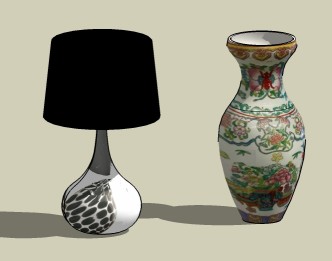
                                            Is it possible with your tool to get this results?.I find on-line this vase and I am trying to apply on my models but I am not sure I am doing right. Can you see this file, please?


                                            VASE_UV.skp


                                            vase_UV.jpg

                                            1 條回覆 最後回覆 回覆 引用 0
                                            • 1
                                            • 2
                                            • 3
                                            • 4
                                            • 5
                                            • 6
                                            • 7
                                            • 8
                                            • 9
                                            • 5 / 9
                                            • 第一個貼文
                                              最後的貼文
                                            Buy SketchPlus
                                            Buy SUbD
                                            Buy WrapR
                                            Buy eBook
                                            Buy Modelur
                                            Buy Vertex Tools
                                            Buy SketchCuisine
                                            Buy FormFonts

                                            Advertisement