sketchucation logo sketchucation
    • Login
    Oops, your profile's looking a bit empty! To help us tailor your experience, please fill in key details like your SketchUp version, skill level, operating system, and more. Update and save your info on your profile page today!
    Mac User? | Join the Rayscaper Beta for Mac Learn More

    [Plugin] SketchyBevel 0.1(Updated May 11)

    Scheduled Pinned Locked Moved Plugins
    143 Posts 85 Posters 150.1k Views 85 Watching
    Loading More Posts
    • Oldest to Newest
    • Newest to Oldest
    • Most Votes
    Reply
    • Reply as topic
    Log in to reply
    This topic has been deleted. Only users with topic management privileges can see it.
    • C
      CPhillips
      last edited by

      Its a known bug. I haven't figured out how to detect those faces yet. You can fix it by erasing the face and redrawing it using a clockwise line.

      1 Reply Last reply
      Reply Quote 0
      • W
        Whaat
        last edited by

        @cphillips said:

        Its a known bug. I haven't figured out how to detect those faces yet. You can fix it by erasing the face and redrawing it using a clockwise line.

        As I was playing around with my own beveling script, I found this method to be useful:

        edge.reversed_in?(face) 
        

        The EdgeUse class also has some useful methods that may help fix this bug.

        Great script, BTW

        SketchUp Plugins for Professionals

        1 Reply Last reply
        Reply Quote 0
        • C
          CPhillips
          last edited by

          I'll try that. Thanks Whaat!

          BTW. I understand you lost your bevel script in a HD crash. SketchyBevel was almost doomed as well. My Ruby editor crashed (the only time in years of use) taking the only version of the almost finished plugin with it. Nothing was left. I was despondent. But I manage to pull a half digested version of the Ruby code out of a Sketchup core dump. Whew! I would have never had the strength to redo the code without that.

          1 Reply Last reply
          Reply Quote 0
          • Y
            Yup_done
            last edited by

            @cphillips said:

            I'll try that. Thanks Whaat!

            DELETED FOR BREVITY

            But I manage to pull a half digested version of the Ruby code out of a Sketchup core dump. Whew! I would have never had the strength to redo the code without that.

            We're all in your debt for that heroic effort.
            Has NBC heard of you yet? Maybe a spinoff of
            heroes...

            Heroes... The CAD team?
            Saving the world, one bezel at a time!? 🀣

            Your efforts are appreciated by all who don't dare put words to paper...
            errr.. make that:

            font to blog 😲

            1 Reply Last reply
            Reply Quote 0
            • T
              twharvey
              last edited by

              Super useful!!

              Thanks a million.
              Tom

              Tom

              1 Reply Last reply
              Reply Quote 0
              • R
                rufy
                last edited by

                😍 Greaat !!!!

                1 Reply Last reply
                Reply Quote 0
                • T
                  topmanblue
                  last edited by

                  β˜€ β˜€ β˜€ very very nice !!!!

                  1 Reply Last reply
                  Reply Quote 0
                  • FletchF
                    Fletch
                    last edited by

                    realized I neglected to give you my thanks for this great plugin - it was something I had requested many times over the years.
                    a great big 😍 for you, Chris!

                    Fletch
                    3D Modeling addict. Former owner/developer of Twilight Render. sleepinggiantvisual.com

                    1 Reply Last reply
                    Reply Quote 0
                    • J
                      Jim
                      last edited by

                      I can't get this simple box to bevel, but I also can't find anything wrong with the geometry. Can someone look at it and tell me if there's a problem? Thanks.


                      box.skp

                      Hi

                      1 Reply Last reply
                      Reply Quote 0
                      • R
                        remus
                        last edited by

                        Worked fine for me, did you select the entire box->right click->bevel?

                        http://remusrendering.wordpress.com/

                        1 Reply Last reply
                        Reply Quote 0
                        • david_hD
                          david_h
                          last edited by

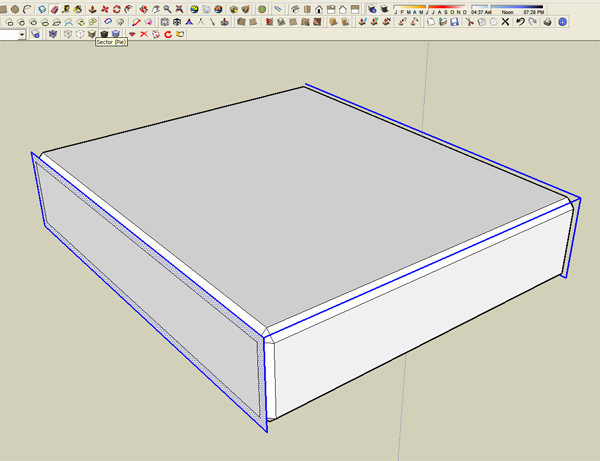
                          Worked for me too. . it's a great tool, but there is one issue I don't understand about it. How come it leaves some Geometry "Residue" (i.e. tell-tale faces and lines) after running the sweep? Doesn't do it everytime, but it did in this model (jim's) even after playing with the different values and "True/False" options.

                          see attachedscreenshot.jpg

                          If I make it look easy...It is probably easy

                          1 Reply Last reply
                          Reply Quote 0
                          • R
                            remus
                            last edited by

                            I think the ruby works by offsetting all the faces of the mesh then joining them up to create the bevel, id guess the residue is from when the ruby doesnt delete all the faces it should, for whatever reason.

                            http://remusrendering.wordpress.com/

                            1 Reply Last reply
                            Reply Quote 0
                            • david_hD
                              david_h
                              last edited by

                              Offset thing. . .good tip. . .I just like using the word Residue. πŸ’š

                              If I make it look easy...It is probably easy

                              1 Reply Last reply
                              Reply Quote 0
                              • J
                                Jim
                                last edited by

                                @unknownuser said:

                                Worked for me too. . it's a great tool, but there is one issue I don't understand about it. How come it leaves some Geometry "Residue" (i.e. tell-tale faces and lines) after running the sweep? Doesn't do it everytime, but it did in this model (jim's) even after playing with the different values and "True/False" options.

                                see attached[attachment=0:2l2qcph5]<!-- ia0 -->screenshot.jpg<!-- ia0 -->[/attachment:2l2qcph5]

                                I think I've found a solution. I'll forward it to Chris to see what he thinks.

                                Hi

                                1 Reply Last reply
                                Reply Quote 0
                                • C
                                  CPhillips
                                  last edited by

                                  @unknownuser said:

                                  Worked for me too. . it's a great tool, but there is one issue I don't understand about it. How come it leaves some Geometry "Residue" (i.e. tell-tale faces and lines) after running the sweep? Doesn't do it everytime, but it did in this model (jim's) even after playing with the different values and "True/False" options.

                                  see attached[attachment=0:1xmyg9fv]<!-- ia0 -->screenshot.jpg<!-- ia0 -->[/attachment:1xmyg9fv]

                                  In this case it looks like the front face of the box was reversed. This is a known bug. You can fix it by erasing and redrawing the face using a clockwise line. Lame I know. Whaat suggested a fix a few posts ago but I haven't tried it yet.

                                  Residue can also be caused by a face shrinking so much that it becomes reversed. That is a lot harder to fix.

                                  Chris

                                  1 Reply Last reply
                                  Reply Quote 0
                                  • S
                                    shuyan
                                    last edited by

                                    1 Reply Last reply
                                    Reply Quote 0
                                    • G
                                      gaucho
                                      last edited by

                                      thanks mate!

                                      "eat well, stay fit, die anyway..."

                                      1 Reply Last reply
                                      Reply Quote 0
                                      • S
                                        sketchyup
                                        last edited by

                                        This plugin should help with a model I'm currently working on. Thanks πŸ˜„

                                        1 Reply Last reply
                                        Reply Quote 0
                                        • D
                                          daphne0804
                                          last edited by

                                          Thanks!This is VERY useful πŸ˜„

                                          1 Reply Last reply
                                          Reply Quote 0
                                          • free agentF
                                            free agent
                                            last edited by

                                            Cphillips: as amazing useful as this script is (carzy that sketchup doesnt have this built in) did you manage to work on it a bit? it puts a masave hault on production to have to delete faces and close them (sometimes that doesnt work and and i have to keep deleting face faces and closing to figure out which is the problem face)


                                            http://i167.photobucket.com/albums/u143/FreeAgent84/bug.gif

                                            1 Reply Last reply
                                            Reply Quote 0

                                            Hello! It looks like you're interested in this conversation, but you don't have an account yet.

                                            Getting fed up of having to scroll through the same posts each visit? When you register for an account, you'll always come back to exactly where you were before, and choose to be notified of new replies (either via email, or push notification). You'll also be able to save bookmarks and upvote posts to show your appreciation to other community members.

                                            With your input, this post could be even better πŸ’—

                                            Register Login
                                            • 1
                                            • 2
                                            • 3
                                            • 4
                                            • 5
                                            • 6
                                            • 7
                                            • 8
                                            • 4 / 8
                                            • First post
                                              Last post
                                            Buy SketchPlus
                                            Buy SUbD
                                            Buy WrapR
                                            Buy eBook
                                            Buy Modelur
                                            Buy Vertex Tools
                                            Buy SketchCuisine
                                            Buy FormFonts

                                            Advertisement