sketchucation logo sketchucation
    • 登入
    Oops, your profile's looking a bit empty! To help us tailor your experience, please fill in key details like your SketchUp version, skill level, operating system, and more. Update and save your info on your profile page today!
    🔌 Smart Spline | Fluid way to handle splines for furniture design and complex structures. Download

    Question ...

    已排程 已置頂 已鎖定 已移動 Developers' Forum
    36 貼文 17 Posters 5.2k 瀏覽 17 Watching
    正在載入更多貼文
    • 從舊到新
    • 從新到舊
    • 最多點贊
    回覆
    • 在新貼文中回覆
    登入後回覆
    此主題已被刪除。只有擁有主題管理權限的使用者可以查看。
    • StinkieS 離線
      Stinkie
      最後由 編輯

      Hmm. We'll see how useful it is in that regard.

      1 條回覆 最後回覆 回覆 引用 0
      • R 離線
        remus
        最後由 編輯

        Itd still be nice to have a proper beveling script though, where you could just select a face/edge, set the radius and press go.

        http://remusrendering.wordpress.com/

        1 條回覆 最後回覆 回覆 引用 0
        • F 離線
          Fletch
          最後由 編輯

          Gjenio,
          that thread DOES mention he's thinking about a bevel option... hopefully it will be integrated... I really want a bevel tool as well... and I think it's critically connected to the functions of the SubDiv/Smooth tool he's developing.

          my vote here for a bevel command! I've been looking for it for months!

          Fletch
          Twilight Render Cross-platform Plugin for SketchUp on PC or Mac

          1 條回覆 最後回覆 回覆 引用 0
          • W 離線
            Whaat
            最後由 編輯

            I had started work on a bevelling script. It was not nearly finished when my hard drive crashed and all was lost. It shouldn't be too hard to redo the work but I'm not committing to any new projects right now. My wife will kill me if I start another Ruby project before getting some work done in our basement. 👊

            FYI, bevelling an edge is a very different operation than what my other script does and needs to be handelled in a completely different way. So, it didn't make sense to incorporate a bevel feature in my latest script.

            I really wonder if this feature will be in SU7... another reason that I may never finish that script.

            Cheers

            SketchUp Plugins for Professionals

            1 條回覆 最後回覆 回覆 引用 0
            • R 離線
              remus
              最後由 編輯

              good point about bringing SU to a halt, maybe if there was some way to turn the bevel on and off, kind of like layers but with bevels.

              http://remusrendering.wordpress.com/

              1 條回覆 最後回覆 回覆 引用 0
              • C 離線
                CPhillips
                最後由 編輯

                Doesn't sound too hard. What do you see as the minimum feature set?

                1 條回覆 最後回覆 回覆 引用 0
                • RayOchoaR 離線
                  RayOchoa
                  最後由 編輯

                  Im sorry if i ask an ovious question but what does it mean to bevel?

                  CaR DeSiGnS bY mE
                  http://ray-ochoa.com

                  1 條回覆 最後回覆 回覆 引用 0
                  • R 離線
                    remus
                    最後由 編輯

                    http://farm4.static.flickr.com/3035/2438018922_8f65b18496.jpg

                    If you cant read the writing, the one of the left is bevelled.

                    http://remusrendering.wordpress.com/

                    1 條回覆 最後回覆 回覆 引用 0
                    • D 離線
                      Daniel S
                      最後由 編輯

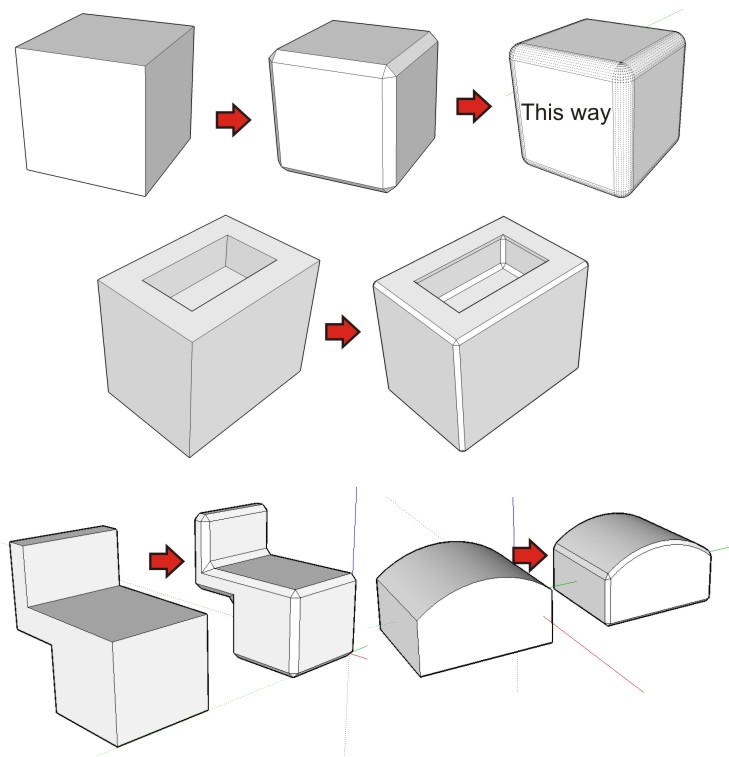
                      Here I put examples of what I think a script for bevel edges must do.

                      Like i cannot make it with SketchUp, the examples I make looks like a chamfer tool. In the first example i put a normal cube, a chamfered cube and the bevel tool. The other examples are the normal shapes and the chamfered result. I cannot make the bevel in sketchup for the examples but will be the same rounded (like the cube that says ´This way´).

                      Daniel S

                      bevel round edges.jpg

                      1 條回覆 最後回覆 回覆 引用 0
                      • Dave RD 離線
                        Dave R
                        最後由 編輯

                        I agree, Chris. I'm kind of glad I don't know enough about Rubies to write one.😉

                        While I never build furniture with sharp edges, I rarely bother with beveling or radiusing edges in my SketchUp drawings of that furniture. Those details may add some realism but aren't usually worth the time they take to create. If the bevel is a large part of the design as in Gary Rogowski's table (the one in my video clip), I would certainly add it. In that case it wasn't a complicated thing to do with Offset and Autofold. For small radiused edges, if I need to show them, I prefer to insinuate them with Offset, Soften and Hide. The appearance is believable without the large increase in entities. For my use, automating that would work as well as a beveling plugin most of the time.

                        Etaoin Shrdlu

                        %

                        (THERE'S NO PLACE LIKE)

                        G28 X0.0 Y0.0 Z0.0

                        M30

                        %

                        1 條回覆 最後回覆 回覆 引用 0
                        • Dave RD 離線
                          Dave R
                          最後由 編輯

                          @daniel s said:

                          Here I put examples of what I think a script for bevel edges must do.

                          Like i cannot make it with SketchUp, the examples I make looks like a chamfer tool. In the first example i put a normal cube, a chamfered cube and the bevel tool. The other examples are the normal shapes and the chamfered result. I cannot make the bevel in sketchup for the examples but will be the same rounded (like the cube that says ´This way´).

                          Daniel S

                          Daniel, if I was a machinist and you handed me those parts and said you wanted a bevel on the edge, I would put a chamfer on them as you have drawn. You would have to tell me you want a radius on the edge to get what you show in the cube labelled "this way".

                          So perhaps a plugin that does both is what folks want or need?

                          The following comes from the Wikipedia

                          http://en.wikipedia.org/wiki/Bevel
                          A beveled edge refers to an edge of a structure that is not perpendicular (but instead often at 45 degrees) to the faces of the piece. The words bevel and chamfer overlap in usage; in general usage they are often interchanged, while in technical usage they may sometimes be differentiated as shown in the image at right.

                          http://upload.wikimedia.org/wikipedia/commons/f/f1/Bevel_and_chamfer.JPG

                          Bevel top, Chamfer bottom

                          Etaoin Shrdlu

                          %

                          (THERE'S NO PLACE LIKE)

                          G28 X0.0 Y0.0 Z0.0

                          M30

                          %

                          1 條回覆 最後回覆 回覆 引用 0
                          • Dave RD 離線
                            Dave R
                            最後由 編輯

                            @rayochoa said:

                            Im sorry if i ask an ovious question but what does it mean to bevel?

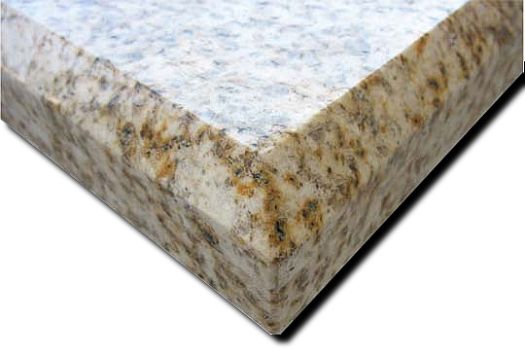
                            A bevel would be similar to a chamfer This countertop has a bevel or a chamfer on the edge.
                            http://www.graniterocktops.com/images/edges/edge_large_bevel.jpg

                            While we're at it, a fillet is a concave curve between two surfaces at angles to each other. This bicycle frame has fillets between the tubes.

                            http://www.kirkframeworks.com/raw fillet seatcluster 400.jpg

                            Remus, in your drawing, the one on the right has a radiused corner, not a beveled corner. the one on the left appears to have a simple square corner.

                            Etaoin Shrdlu

                            %

                            (THERE'S NO PLACE LIKE)

                            G28 X0.0 Y0.0 Z0.0

                            M30

                            %

                            1 條回覆 最後回覆 回覆 引用 0
                            • D 離線
                              Daniel S
                              最後由 編輯

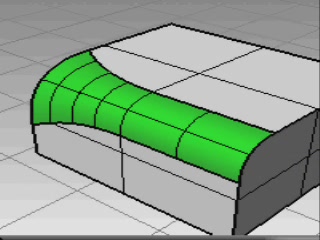
                              Here are two video examples in the zip attached.
                              One for chamfer, other for bevel. Of course that bevel need to put a radius...

                              Daniel S
                              In the video you will see a variable radius...

                              bevel1.JPG


                              Chamfer-bevel video.zip

                              1 條回覆 最後回覆 回覆 引用 0
                              • StinkieS 離線
                                Stinkie
                                最後由 編輯

                                @whaat said:

                                I had started work on a bevelling script. It was not nearly finished when my hard drive crashed and all was lost. It shouldn't be too hard to redo the work but I'm not committing to any new projects right now. My wife will kill me if I start another Ruby project before getting some work done in our basement. 👊

                                Too bad! Of course, I understand. 😄

                                Any other takers? Remember: you'll be considered a hero! 💚

                                1 條回覆 最後回覆 回覆 引用 0
                                • C 離線
                                  CPhillips
                                  最後由 編輯

                                  Maybe something like this?

                                  http://sketchyphysics2.googlecode.com/files/Bevel.gif

                                  1 條回覆 最後回覆 回覆 引用 0
                                  • R 離線
                                    remus
                                    最後由 編輯

                                    Looks very nice, one question though, does it do arcs?

                                    (and can i have a copy? pretty please 😆 )

                                    http://remusrendering.wordpress.com/

                                    1 條回覆 最後回覆 回覆 引用 0
                                    • Jean-FrancoJ 離線
                                      Jean-Franco
                                      最後由 編輯

                                      Hi, that would be a fantastic tool for me !

                                      Jean-Franco

                                      1 條回覆 最後回覆 回覆 引用 0
                                      • D 離線
                                        Daniel S
                                        最後由 編輯

                                        It´s AMAZING Chris!!! 😍 😍 😍

                                        I don´t know how you make it. I was doing this kind of bevel with offset all faces, delete the original geometry and triangulate the vertices. but for making it takes a lot of time.. and have to use a lot of plugins.

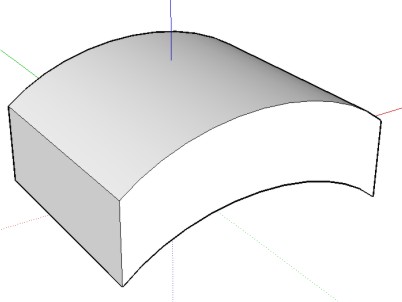
                                        It works for curved faces?

                                        Daniel S

                                        curved faces

                                        1 條回覆 最後回覆 回覆 引用 0
                                        • R 離線
                                          remus
                                          最後由 編輯

                                          Just a little alternative thing:

                                          http://farm3.static.flickr.com/2134/2446420344_e19c2d11a6.jpg

                                          Its not really bevelling, more of a fillet, but not a bad result 😉

                                          how to:

                                          1. buy subd and smooth

                                          2)select the shape to fillet

                                          3)subdivide a couple of times

                                          4)subdivide and smooth

                                          http://remusrendering.wordpress.com/

                                          1 條回覆 最後回覆 回覆 引用 0
                                          • C 離線
                                            CPhillips
                                            最後由 編輯

                                            Looks like it works with curves and arcs.
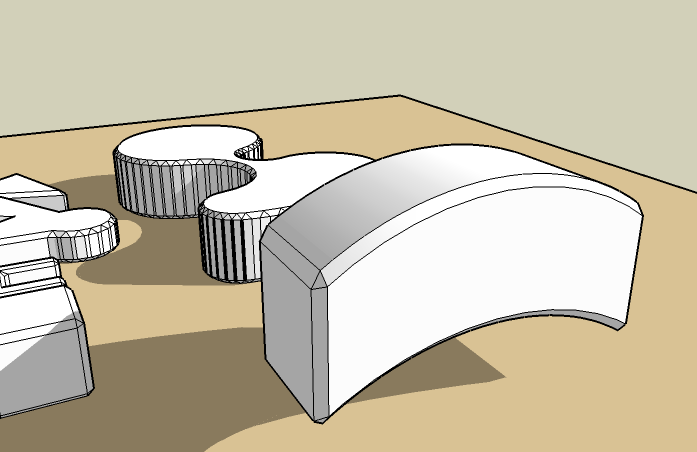
                                            BevelCurve.png

                                            1 條回覆 最後回覆 回覆 引用 0
                                            • 1
                                            • 2
                                            • 2 / 2
                                            • 第一個貼文
                                              最後的貼文
                                            Buy SketchPlus
                                            Buy SUbD
                                            Buy WrapR
                                            Buy eBook
                                            Buy Modelur
                                            Buy Vertex Tools
                                            Buy SketchCuisine
                                            Buy FormFonts

                                            Advertisement