sketchucation logo sketchucation
    • 登入
    Oops, your profile's looking a bit empty! To help us tailor your experience, please fill in key details like your SketchUp version, skill level, operating system, and more. Update and save your info on your profile page today!
    🔌 Smart Spline | Fluid way to handle splines for furniture design and complex structures. Download

    Curved_slanted_wall

    已排程 已置頂 已鎖定 已移動 SketchUp Discussions
    sketchup
    30 貼文 11 Posters 4.4k 瀏覽 11 Watching
    正在載入更多貼文
    • 從舊到新
    • 從新到舊
    • 最多點贊
    回覆
    • 在新貼文中回覆
    登入後回覆
    此主題已被刪除。只有擁有主題管理權限的使用者可以查看。
    • L 離線
      lapx
      最後由 編輯

      What's the best approach for doing a curved tilted wall of giving thickness?
      See file attached. Is there a good ruby script for this?
      I'm tryin to get the wall to slant to the outside at a given angle.


      curve_tiltwall.skp

      1 條回覆 最後回覆 回覆 引用 0
      • GaieusG 離線
        Gaieus
        最後由 編輯

        Hi Lapx,

        Something like this?

        curve_tiltwall.skp

        1. I copy moved it up
        2. then used skin.rb to create a face
        3. then used Joint PushPull to give thickness
        4. needed some intersection and cleanup at the origin (even now it's not perfect there)
        5. finally selected the outer edge and moved it down a bit.

        Gai...

        1 條回覆 最後回覆 回覆 引用 0
        • F 離線
          fbartels
          最後由 編輯

          Greyhead,

          Beautifully done model. I love these elegantly simple yet subtle SU solutions.

          Fred

          1 條回覆 最後回覆 回覆 引用 0
          • L 離線
            lapx
            最後由 編輯

            Geyhead,

            That's It! Thanks Greyhead. 😄

            1 條回覆 最後回覆 回覆 引用 0
            • GaieusG 離線
              Gaieus
              最後由 編輯

              Lapx,

              Please, see my post above and the attached skippy.
              😉

              Gai...

              1 條回覆 最後回覆 回覆 引用 0
              • G 離線
                GreyHead
                最後由 編輯

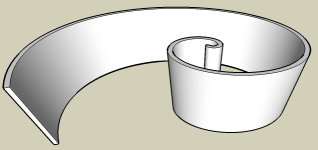
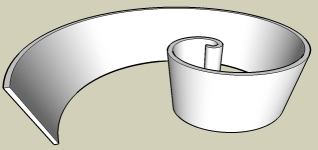
                Is this more what you had in mind with the wall sloping?

                For this style:

                • Create a upright rectangle the height and width of the wall;
                • Place it at the center of the spiral (at the origin along the green axis);
                • Use the follow-me tool to copy it along the curve;
                • Select the top surface only and rotate copy through 180 (this is to provide a fixed center for the next step)
                • Select the top surface of the wall and the copy and scale about the center to get the outer end of the wall to match the slope you want.
                • Clean up and smooth lines.

                Bob


                curve_tiltwall.png


                Added jpg version as png is showing as 'extension deactivated'

                1 條回覆 最後回覆 回覆 引用 0
                • L 離線
                  lapx
                  最後由 編輯

                  Thanks Gaieus,

                  I don't see that your wall tilts outward. I'm also trying to get it to slope in the z direction as well.

                  1 條回覆 最後回覆 回覆 引用 0
                  • L 離線
                    lapx
                    最後由 編輯

                    My next challenge is to slope the top of the wall. That is the highest part would be at the smaller radius point and the low part would be at the end of the largest radius.
                    At first glance I thought I could easily draw a rect and slope the top and intersect this form with spiral wall but ofcurse this will not give the desired result. Any ideas?

                    edit: Maybe I need to do the top wall slope part before the scaling.
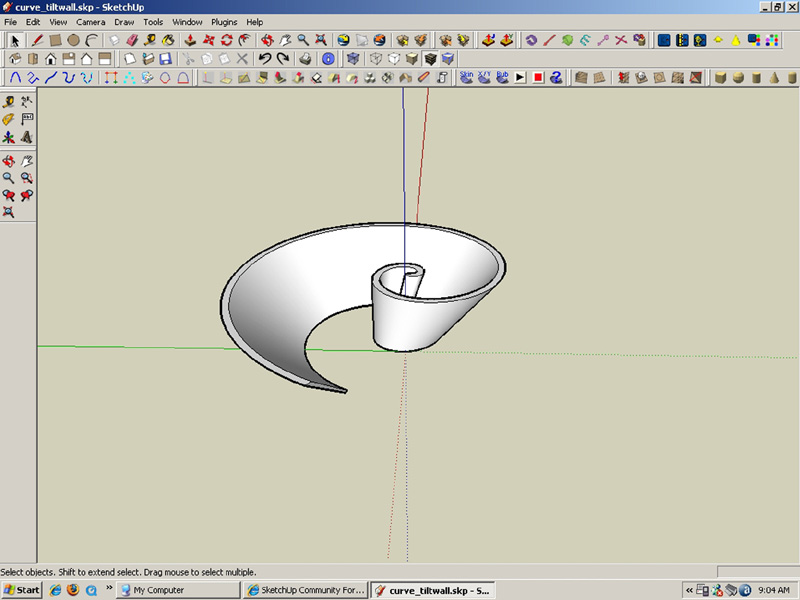

                    slant_wall.jpg


                    curve_tiltwall.jpg

                    1 條回覆 最後回覆 回覆 引用 0
                    • GaieusG 離線
                      Gaieus
                      最後由 編輯

                      Ah, sorry. Yes obvuiously it was a misunderstanding - the top of it is slanting - not the whole wall is tilting (damn - my bad English...) 😳

                      Gai...

                      1 條回覆 最後回覆 回覆 引用 0
                      • L 離線
                        lapx
                        最後由 編輯

                        That's quite alright Gaeius. We at east know how to do this when it comes up.
                        That's the great thing about this community is that in looking for solutions to one problem may solve another for someone else, so all is not lost.

                        Have a wonderful weekend!

                        1 條回覆 最後回覆 回覆 引用 0
                        • Wo3DanW 離線
                          Wo3Dan
                          最後由 編輯

                          @lapx said:

                          My next challenge is to slope the top of the wall. That is the highest part would be at the smaller radius point and the low part would be at the end of the largest radius.
                          At first glance I thought I could easily draw a rect and slope the top and intersect this form with spiral wall but ofcurse this will not give the desired result. Any ideas?

                          edit: Maybe I need to do the top wall slope part before the scaling.
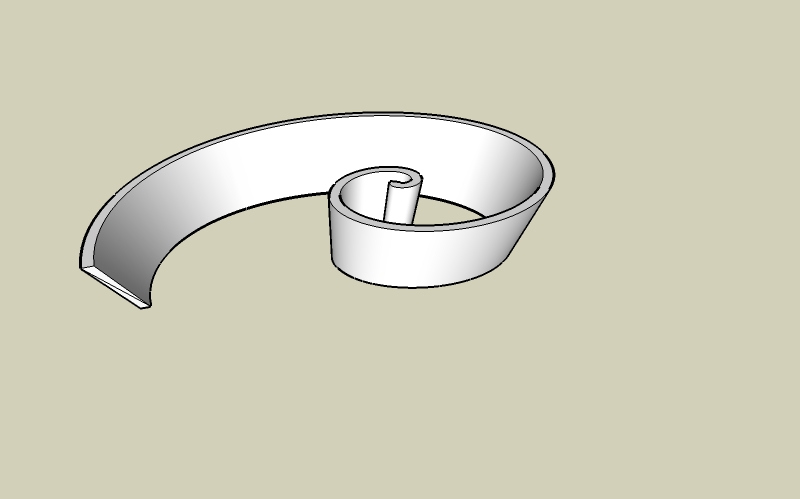
                          lapx,

                          Here is my attempt in the attached skp.
                          (partly Bob's solution integrated)


                          CurvedTiltedWall.skp

                          1 條回覆 最後回覆 回覆 引用 0
                          • G 離線
                            GreyHead
                            最後由 編輯

                            That's neat - I didn't think of smooving to lift the spiral.

                            Bob

                            1 條回覆 最後回覆 回覆 引用 0
                            • G 離線
                              gorygreg
                              最後由 編輯

                              @wo3dan said:

                              @lapx said:

                              My next challenge is to slope the top of the wall. That is the highest part would be at the smaller radius point and the low part would be at the end of the largest radius.
                              At first glance I thought I could easily draw a rect and slope the top and intersect this form with spiral wall but ofcurse this will not give the desired result. Any ideas?

                              edit: Maybe I need to do the top wall slope part before the scaling.

                              lapx,

                              Here is my attempt in the attached skp.
                              (partly Bob's solution integrated)

                              As a newbie, I almost get this!
                              I do remeber another tutorial by someone on the forum, who demonstrated the Scene 3 technique. The one that copies and flips 180 degrees to have a center point. Can you elaborate again one why this is done? Then I will fully get it!
                              Great job!

                              1 條回覆 最後回覆 回覆 引用 0
                              • L 離線
                                lapx
                                最後由 編輯

                                Wo3Dan great job. One tip though, would it not be easier to use the contour from scratch in lieu of hand stitching? Just have to erase to to clean up excess.

                                1 條回覆 最後回覆 回覆 引用 0
                                • Wo3DanW 離線
                                  Wo3Dan
                                  最後由 編輯

                                  gorygreg,

                                  My attempt to try to explain is in the attached skp.

                                  @lapx said:

                                  Wo3Dan great job. One tip though, would it not be easier to use the contour from scratch in lieu of hand stitching? Just have to erase to to clean up excess.

                                  Lapx,

                                  Leaving the top face in the curved boundary when using the Smoove tool will often result in an irragular pattern of triangles. I find it hard to correct all these lines. Better to do hand stitching, letting you make small adjustments to make cross sections horizontal at the top (if necessary).

                                  I don't know how you are going to apply the "contour from scratch" tool here.
                                  Maybe I can learn something. In my opinion SU will make a mess of all the extra lines (edges) within the curves. So what did you mean?

                                  Wo3Dan


                                  Scaling symetrical object.skp

                                  1 條回覆 最後回覆 回覆 引用 0
                                  • G 離線
                                    GreyHead
                                    最後由 編輯

                                    @unknownuser said:

                                    I do remember another tutorial by someone on the forum, who demonstrated the Scene 3 technique. The one that copies and flips 180 degrees to have a center point. Can you elaborate again one why this is done? Then I will fully get it!
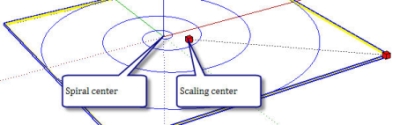
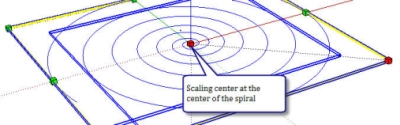
                                    This is done here because we want to keep the inner end of the wall vertical. The scale tool will leave the 'center' of the shape unchanged. But the center of a spiral is not at the inner end (see spiral_1). Copy-rotating the spiral gives a new shape where the scaling center is at the center of rotation and when you scale this shape the center of the spiral remains unchanged.

                                    Bob

                                    spiral_1.jpg

                                    spiral_2.jpg

                                    1 條回覆 最後回覆 回覆 引用 0
                                    • D 離線
                                      dtrarch
                                      最後由 編輯

                                      lapX

                                      Just back from ski trip so a little late to all this but if the attached is what you wanted just let me know.

                                      dtr


                                      Curved tilt wall+thickness.skp

                                      1 條回覆 最後回覆 回覆 引用 0
                                      • L 離線
                                        lapx
                                        最後由 編輯

                                        @Wo3Dan,

                                        Great explaination on that scaling issue. I figued this was the case your explaination reaffirmed. Thanks!
                                        On the "contour from scratch" I just selected the top edge of the wall and used SU's contour from scratch. From first glance it seamed to work fine with a little clean up.
                                        I will look at it again.

                                        @dtracrh,
                                        My walls would be titlted out ward as it follows the path. However, I would be interested in
                                        what method you chose to arrive at your conclusion.

                                        1 條回覆 最後回覆 回覆 引用 0
                                        • Wo3DanW 離線
                                          Wo3Dan
                                          最後由 編輯

                                          @lapx said:

                                          @Wo3Dan,.......
                                          On the "contour from scratch" I just selected the top edge of the wall and used SU's contour from scratch. From first glance it seamed to work fine with a little clean up.
                                          I will look at it again.
                                          ......

                                          lapx,

                                          Now I see what you mean, not "contour from scratch" (and not "from scratch" either) but "From Contours".
                                          And you are quite right, that works perfect when no height corrections are needed.
                                          When you have both the inner and the outer curves selected (spirals in scene 4, without their connecting edges at beginning and end) and apply "From Contours" you get a very good result that only needs some cleaning up.
                                          I guess I was to much focused on "what if height corrections are needed for horizontal cross sections at the top of the wall". Even though the curves are slanted it's best to apply "From Contours".
                                          (Leaving the face in scene 3 > 4 will give bad results when applying the "Smoove" tool)
                                          Well, as I said: "maybe I can learn something".
                                          Thanks for the suggestion.

                                          Wo3Dan

                                          1 條回覆 最後回覆 回覆 引用 0
                                          • L 離線
                                            lapx
                                            最後由 編輯

                                            Thanks for clearing that up for me 😳

                                            1 條回覆 最後回覆 回覆 引用 0
                                            • 1
                                            • 2
                                            • 1 / 2
                                            • 第一個貼文
                                              最後的貼文
                                            Buy SketchPlus
                                            Buy SUbD
                                            Buy WrapR
                                            Buy eBook
                                            Buy Modelur
                                            Buy Vertex Tools
                                            Buy SketchCuisine
                                            Buy FormFonts

                                            Advertisement