sketchucation logo sketchucation
    • Login
    Oops, your profile's looking a bit empty! To help us tailor your experience, please fill in key details like your SketchUp version, skill level, operating system, and more. Update and save your info on your profile page today!
    Mac User? | Join the Rayscaper Beta for Mac Learn More

    Rayscaper New Releases

    Scheduled Pinned Locked Moved Extensions & Applications Discussions
    rayscaperrender
    565 Posts 13 Posters 257.2k Views 14 Watching
    Loading More Posts
    • Oldest to Newest
    • Newest to Oldest
    • Most Votes
    Reply
    • Reply as topic
    Log in to reply
    This topic has been deleted. Only users with topic management privileges can see it.
    • KrassK
      Krass
      last edited by

      Thomas,
      In the latest version, I am unable to create any light points.

      SketchUp_Vi5ZpQRhXV.mp4

      Krass

      pixelcruncherP 1 Reply Last reply
      Reply Quote 0
      • pixelcruncherP
        pixelcruncher Extension Creator @Krass
        last edited by

        @Krass Yikes, I'm having a look. Will likely update with a new hotfix release.

        thanks for reporting!

        Cheers,
        Thomas

        I'm the developer of Rayscaper: https://rayscaper.com/ - Fast and easy rendering for SketchUp.

        1 Reply Last reply
        Reply Quote 0
        • pixelcruncherP
          pixelcruncher Extension Creator
          last edited by

          Hey, Rayscaper users!

          Rayscaper 0.9.104 Beta is available. This is a hotfix for 0.9.103.

          Heads-up: I couldn't upload 0.9.104 to the SketchUcation store yet, so the store still has 0.9.102. Please download it directly: Rayscaper_Win_0.9.104_Beta.rbz.

          If you use SketchUp 2024 with 0.9.103, please upgrade.

          What Changed?

          • Fix placing lights in SketchUp 2024: in 0.9.103, the light tools couldn't add a light to a model that had no Rayscaper lights yet.

          Thanks to @krass for reporting it!

          Full release notes: rayscaper.com/manual/release-notes

          Help Me Build the Community πŸ‘

          If you like Rayscaper, please share your renders (final or work-in-progress, it doesn't matter)! This is motivating and helps me showcase its capabilities to new users.

          Follow me on X.

          Happy Rendering!
          Thomas

          I'm the developer of Rayscaper: https://rayscaper.com/ - Fast and easy rendering for SketchUp.

          1 Reply Last reply
          Reply Quote 0
          • Mike AmosM
            Mike Amos
            last edited by

            Just a quick question, I am hoping that mirrors make a comeback, they seem to be missing lately.

            Absentia mortis praesentiam vitae probat, vita autem est argumentum constantiae.

            pixelcruncherP 1 Reply Last reply
            Reply Quote 0
            • pixelcruncherP
              pixelcruncher Extension Creator @Mike Amos
              last edited by

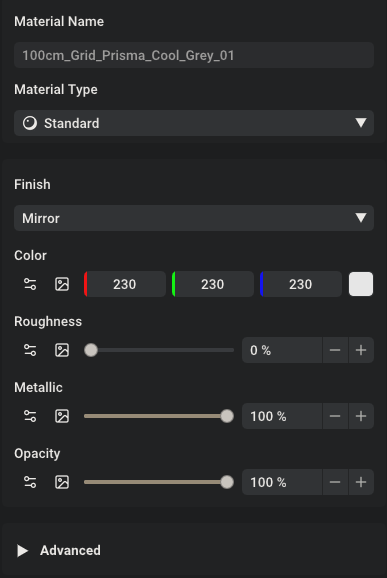
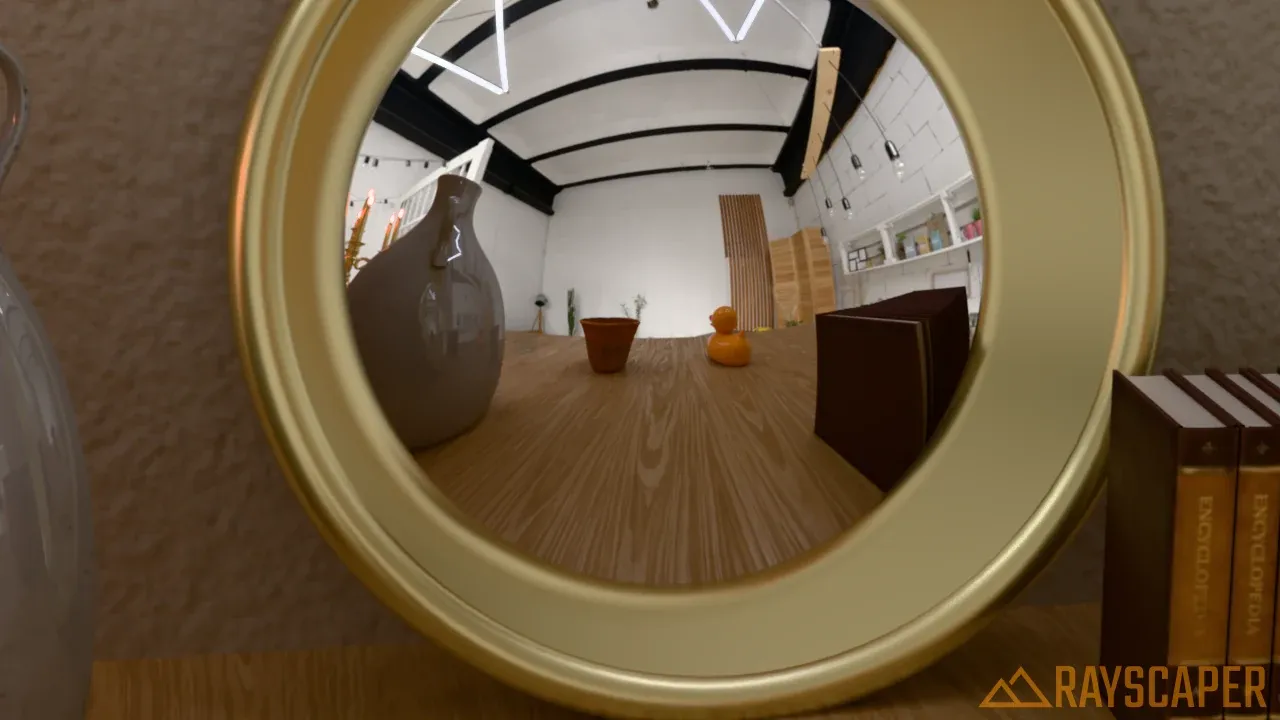
              @Mike-Amos Mirrors are still there, they just moved! Since 0.9.99 the Mirror is a Finish of the Standard material instead of a material type of its own: select the material, keep Material Type on Standard and pick Mirror under Finish. That gives a perfect reflection, tinted by the material's color.
              mirror_finish.png

              Older Mirror materials open as Standard materials with that finish, so they keep their look. There's also a ready-made Mirror and Bronze mirror in the Rayscaper material library in the Asset Manager.
              mirror_finish_render.webp

              More in the docs: rayscaper.com/manual/material-types

              Cheers,
              Thomas

              I'm the developer of Rayscaper: https://rayscaper.com/ - Fast and easy rendering for SketchUp.

              1 Reply Last reply
              Reply Quote 0

              Hello! It looks like you're interested in this conversation, but you don't have an account yet.

              Getting fed up of having to scroll through the same posts each visit? When you register for an account, you'll always come back to exactly where you were before, and choose to be notified of new replies (either via email, or push notification). You'll also be able to save bookmarks and upvote posts to show your appreciation to other community members.

              With your input, this post could be even better πŸ’—

              Register Login
              • 1
              • 2
              • 25
              • 26
              • 27
              • 28
              • 29
              • 29 / 29
              • First post
                Last post
              Buy SketchPlus
              Buy SUbD
              Buy WrapR
              Buy eBook
              Buy Modelur
              Buy Vertex Tools
              Buy SketchCuisine
              Buy FormFonts

              Advertisement

