sketchucation logo sketchucation
    • Login
    Oops, your profile's looking a bit empty! To help us tailor your experience, please fill in key details like your SketchUp version, skill level, operating system, and more. Update and save your info on your profile page today!
    ⚠️ Update | Sketchucation Tools 5.0.8 released with licensing improvements and bugfixes Download

    Modlumi - Easy 3D modelling


    Scheduled Pinned Locked Moved Corner Bar
    140 Posts 7 Posters 4.2k Views 6 Watching
    Loading More Posts
    • Oldest to Newest
    • Newest to Oldest
    • Most Votes
    Reply
    • Reply as topic
    Log in to reply
    This topic has been deleted. Only users with topic management privileges can see it.
    • KrassK
      Krass
      last edited by Krass

      hello
      bravo !
      iMporting soften edges skp model is ok, but no soften edges for geometry made in the software?
      It's great to already ahave de desktop version. But when importing the same model in the web version and desktop version, desktop version displays strange edges artefacts that are not visible. especially when navigating the model

      modlumi_53pJANOnUv.mp4

      chrome_cGmxSsPcAk.mp4

      Krass

      1 Reply Last reply
      Reply Quote 0
      • pixelcruncherP
        pixelcruncher Extension Creator
        last edited by

        @krass you are fast man, you already found the download 🙂 - Will announce it shortly.

        Will have a look at these bugs. Softening edges is not done yet; will do that soon. Thanks for the bugs; I will make things a bit better again.

        Cheers,
        Thomas

        I'm the developer of Rayscaper: https://rayscaper.com/ - Fast and easy rendering for SketchUp.

        1 Reply Last reply
        Reply Quote 0
        • pilouP
          pilou
          last edited by

          How big is or will the Desktop version ? (i have no very big place free on my old Latop ! 😉

          Request : does it possible to hide:Show the axes in the screen ? I know this function is existing when you save image! But..

          Does it possible to have also the JPG format inside the Save to Image ?

          Frenchy Pilou
          Is beautiful that please without concept!
          My Little site :)

          1 Reply Last reply
          Reply Quote 0
          • pilouP
            pilou
            last edited by pilou

            can we load .rbz in the Desktop version ?
            Can we yet scripting in the desktop version ?

            Frenchy Pilou
            Is beautiful that please without concept!
            My Little site :)

            1 Reply Last reply
            Reply Quote 0
            • pixelcruncherP
              pixelcruncher Extension Creator
              last edited by

              Modlumi for Windows is out 🎉

              Hi all,

              The desktop version of Modlumi is now available for Windows. You can get it from the big button on modlumi.com, or directly here: modlumi.com/download/latest/windows. It's free.

              What the desktop app adds over the browser preview

              • Save models straight to disk (the browser only downloads a .modl file, and you lose your session when you reload)
              • File → Save to Image…
              • Plugins and scripting, with a script console and an editor
              • Touch controls

              Plugins

              The desktop app comes with ten built-in plugins: Shapes, Clean Up, Solid Inspector, True Bend, Modify Solids, Select Similar, Levels, Face Area, and OBJ and STL export. You can turn each one on or off in Extensions → Manage Extensions. To write your own, use JavaScript or TypeScript. The plugin guide explains how, and the source of the built-in plugins is there to learn from.

              @pilou, to answer your questions: the installer is about 5 MB. SketchUp .rbz extensions won't run because Modlumi plugins are written in JS/TS rather than Ruby.

              Not on Windows? The browser preview at modlumi.com still has the same modeling tools. There's no Linux download yet, and macOS will come later.

              If you find bugs, please use Help → Report a Bug or Send Feedback… and attach modlumi.log, or post them here as usual. @Krass, I'm looking at the edge artifacts you saw on desktop.

              Cheers,
              Thomas

              I'm the developer of Rayscaper: https://rayscaper.com/ - Fast and easy rendering for SketchUp.

              1 Reply Last reply
              Reply Quote 0
              • pixelcruncherP
                pixelcruncher Extension Creator
                last edited by

                I also put the plugin examples on github: https://github.com/thomasloockx/modlumi-plugins

                I'm the developer of Rayscaper: https://rayscaper.com/ - Fast and easy rendering for SketchUp.

                1 Reply Last reply
                Reply Quote 0
                • pilouP
                  pilou
                  last edited by

                  Many thanks for the infos ! 🙂

                  Frenchy Pilou
                  Is beautiful that please without concept!
                  My Little site :)

                  1 Reply Last reply
                  Reply Quote 0
                  • pilouP
                    pilou
                    last edited by pilou

                    You said 5 Megas for the Installer yes but the complete program installed is how Big ( 500 Meg ...? )

                    Frenchy Pilou
                    Is beautiful that please without concept!
                    My Little site :)

                    pixelcruncherP 1 Reply Last reply
                    Reply Quote 0
                    • pilouP
                      pilou
                      last edited by pilou

                      Request
                      In the Move, Rotate, Size + CTRL + * / % ...+ a "randomize" for give some fun variations in the result?

                      Not yet on the volume itself... but... 🙂

                      Frenchy Pilou
                      Is beautiful that please without concept!
                      My Little site :)

                      1 Reply Last reply
                      Reply Quote 0
                      • pixelcruncherP
                        pixelcruncher Extension Creator @pilou
                        last edited by

                        @pilou still about 5 meg, it’s a small program. It doesn’t download a ton of stuff from the web.

                        I'm the developer of Rayscaper: https://rayscaper.com/ - Fast and easy rendering for SketchUp.

                        1 Reply Last reply
                        Reply Quote 0
                        • pixelcruncherP
                          pixelcruncher Extension Creator
                          last edited by

                          Well it doesn’t download anything for the installation. Its just one exe.

                          I'm the developer of Rayscaper: https://rayscaper.com/ - Fast and easy rendering for SketchUp.

                          1 Reply Last reply
                          Reply Quote 0
                          • ntxdaveN
                            ntxdave
                            last edited by ntxdave

                            Another of my silly questions: How do you draw/show/hide guides?

                            Still another one: I want to draw a rectangle with each of the 4 corners rounded (same size). What is the best way to do that. In SketchUp, when you do that, you can double click in each of the other corners and it will repeat the first corner.

                            Press F1...thank me later

                            1 Reply Last reply
                            Reply Quote 0
                            • pixelcruncherP
                              pixelcruncher Extension Creator
                              last edited by

                              Modlumi 0.13 is out: fixes for your latest reports

                              Modlumi 0.13 is live at https://modlumi.com/app. Thanks @pilou for the reports and the files, they made these easy to track down.

                              Combine Solids through curves

                              Union, Subtract, Intersect, Trim, Split and Outer Shell now work when the cut goes through an arc or a curve, like the two half-round volumes in your 2volumes file. Before, they all failed with "the result would not be a closed solid".
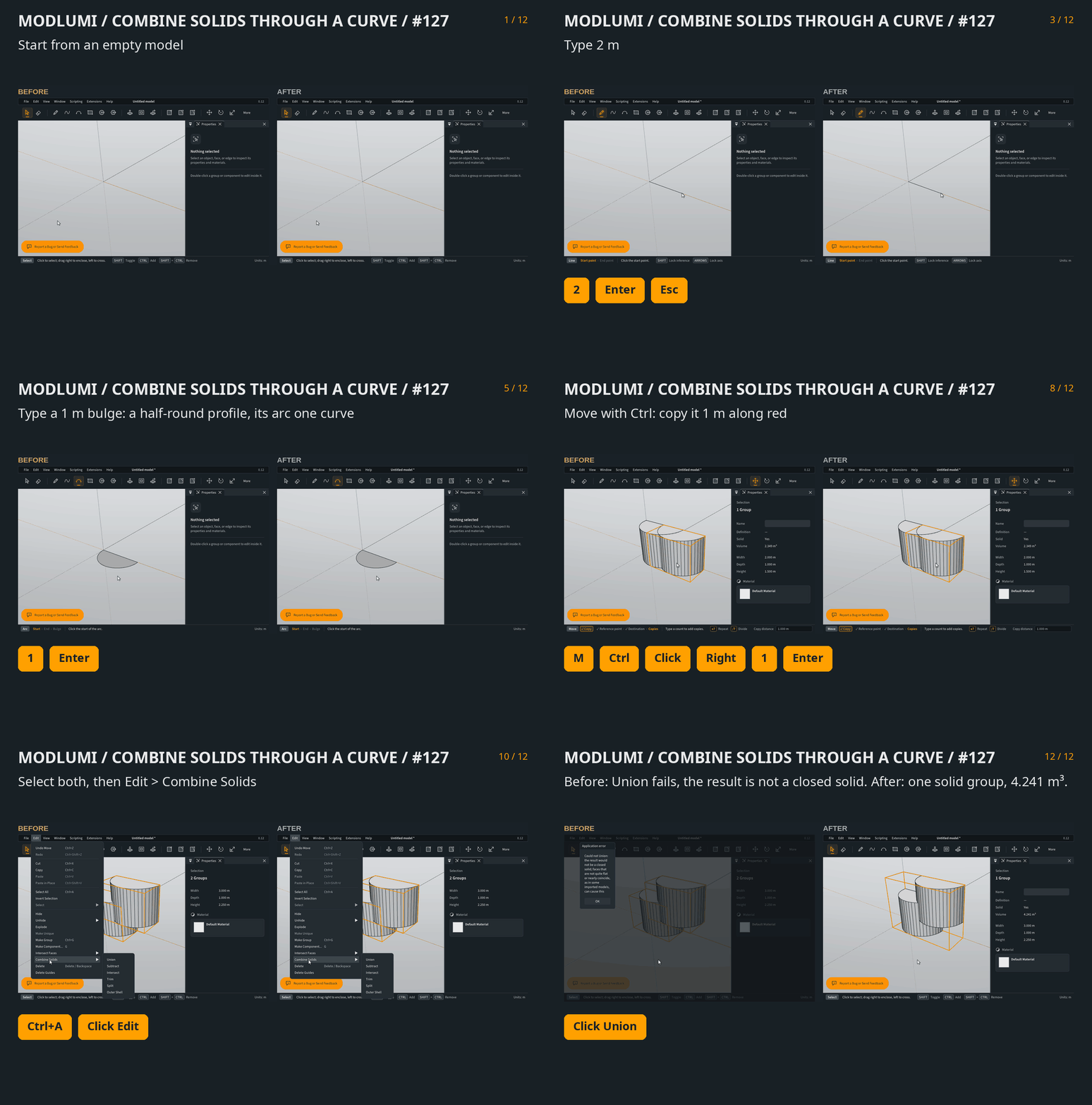
                              Combine Solids through a curve, before and after

                              Redrawn sides stay whole

                              Erasing a line drawn across a rectangle together with the side it touched, then drawing that side again, now gives one edge. The rectangle is back to four sides.
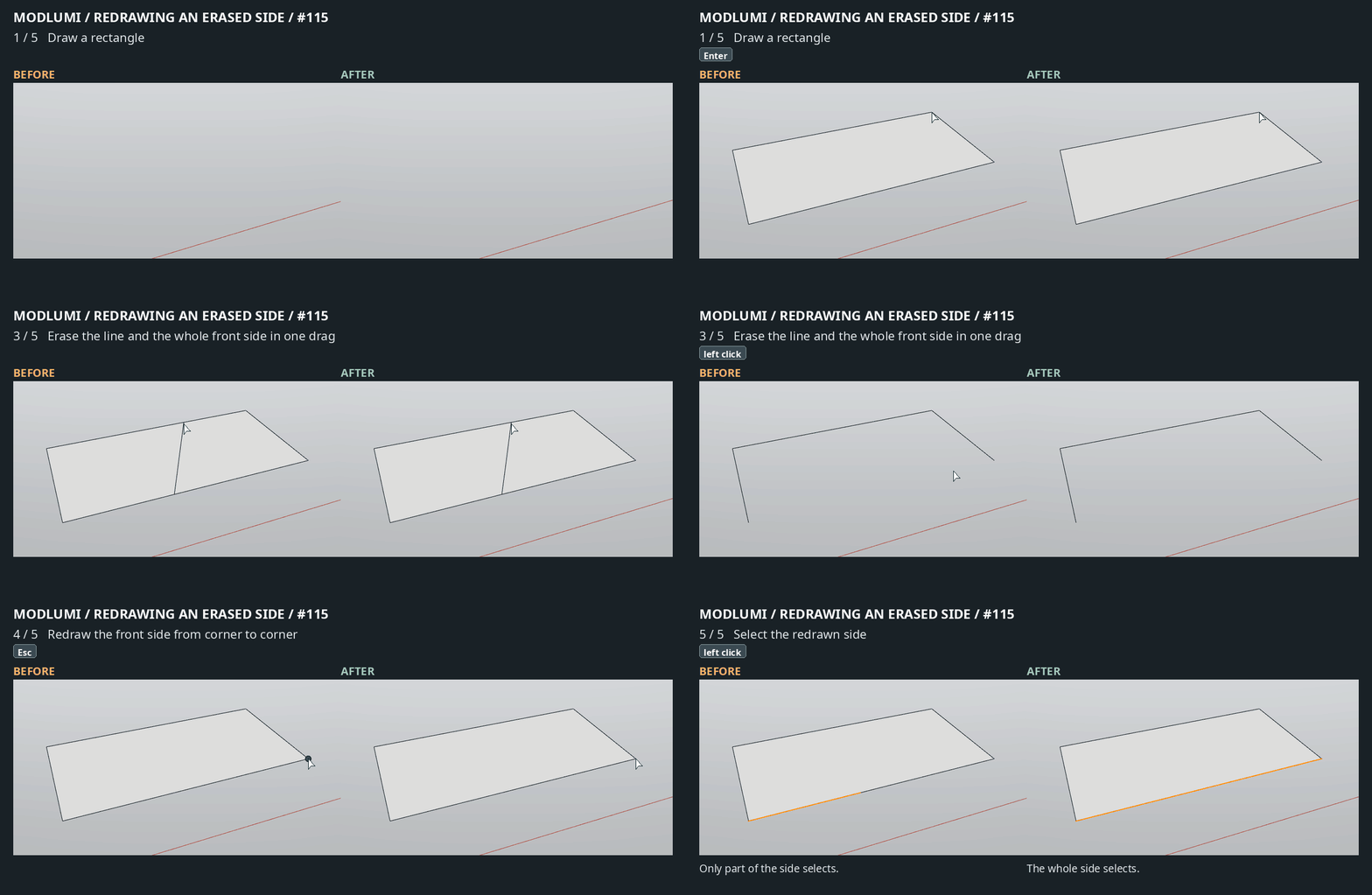
                              Redrawn side, before and after

                              Eraser on groups and components

                              Pointing the Eraser at an edge or guide inside a closed group or component now erases the whole object. To erase a single guide or edge, open the group first. That's why the guides in your 2pp file looked impossible to delete: they were inside groups.
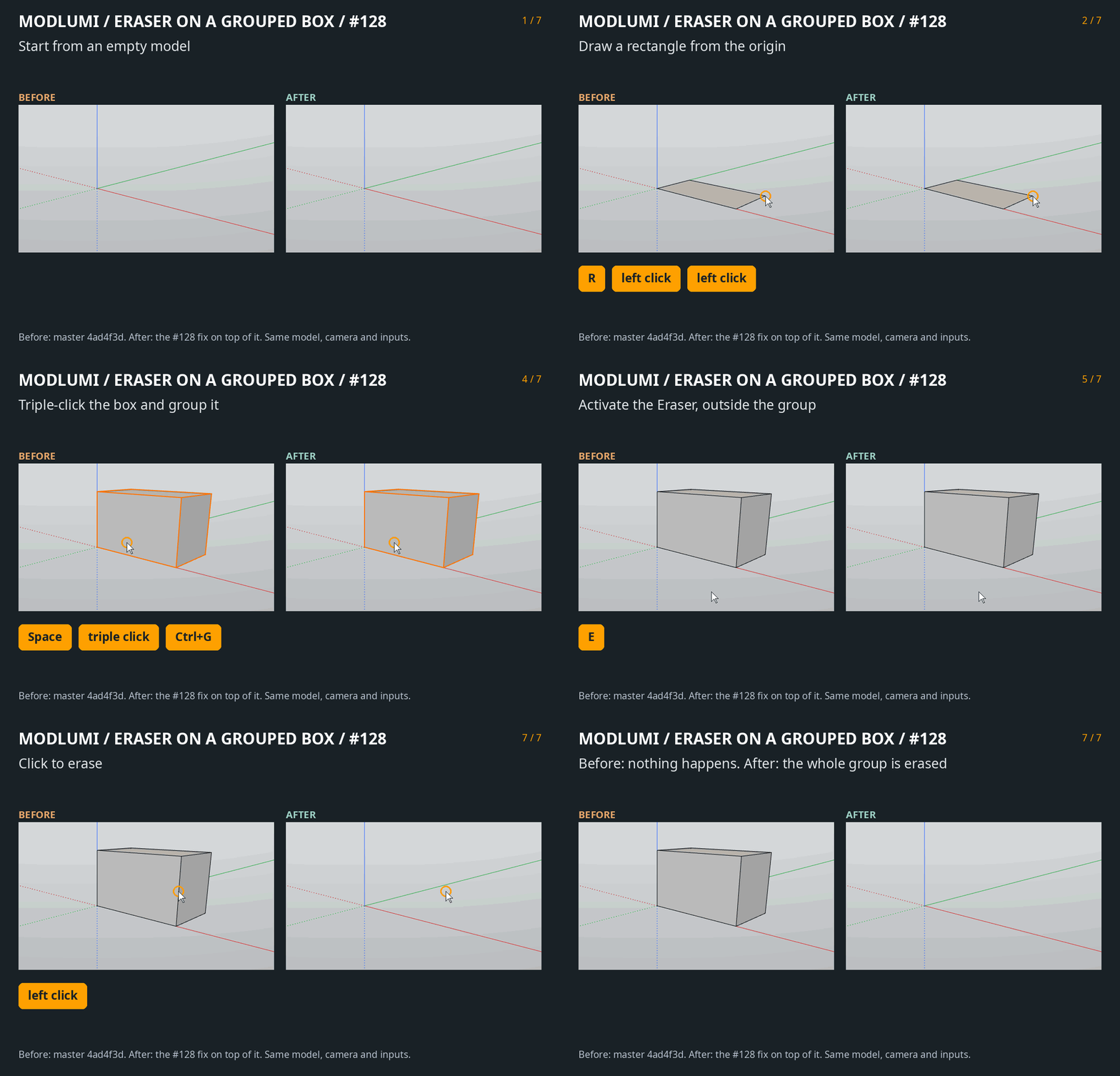
                              Eraser on a group, before and after

                              @Krass, I'm still looking at the edge artifacts you saw on the desktop version.

                              Full release notes, now also listing 0.11 and 0.12: https://modlumi.com/docs/release-notes/

                              As always, bug reports and ideas are welcome here or through the feedback button in the app.

                              I'm the developer of Rayscaper: https://rayscaper.com/ - Fast and easy rendering for SketchUp.

                              1 Reply Last reply
                              Reply Quote 0
                              • pilouP
                                pilou
                                last edited by pilou

                                @ntxdave
                                Just 2 things to know for draw Help Lines guide (for the moment!
                                You must click (select) a segment yet existing for a line .
                                So Draw a line
                                Select it Press T , Click the midle of the line for exemple, and drag , type 5 as 5 units you must ha a line drawn at 5 units!
                                For Point guide it's the same but your first click must at a corrner of 2 segments!

                                Frenchy Pilou
                                Is beautiful that please without concept!
                                My Little site :)

                                1 Reply Last reply
                                Reply Quote 0
                                • pixelcruncherP
                                  pixelcruncher Extension Creator
                                  last edited by

                                  @Krass, could you send me the Mercedes model from your videos? Attaching the .skp here is fine, or send it through Help › Send Feedback… in the app.

                                  I can't reproduce the edge artifacts on Linux with our own car model, and the desktop app on Windows draws through Direct3D, which handles one edge depth offset differently. With your model I can test a fix before the next desktop build. If you can, also mention your graphics card.

                                  Thanks!

                                  I'm the developer of Rayscaper: https://rayscaper.com/ - Fast and easy rendering for SketchUp.

                                  KrassK 1 Reply Last reply
                                  Reply Quote 0
                                  • pilouP
                                    pilou
                                    last edited by pilou

                                    @pixelcruncher
                                    Combine 2 curvated solid perfect! Ok
                                    Right Click on them / Erase ! OK perfect ! But why we can't do that also directly inside the OutLiner ???

                                    If the exe on desktop version is only 5 megas i wiil download it! 🙂
                                    Like this i will can test some script by a friend, alas not by me because scripting is out from me now! 🙂
                                    (except if i use Ai ... but that will be another story! 🙂
                                    modeling bugs first! 🙂

                                    Frenchy Pilou
                                    Is beautiful that please without concept!
                                    My Little site :)

                                    1 Reply Last reply ♥
                                    Reply Quote 1
                                    • pilouP
                                      pilou
                                      last edited by pilou

                                      Excellent the Desktop version installed is 15 megas so I have it also! 🙂
                                      And i see that is the same number 0.13
                                      That will be always the same ?

                                      Frenchy Pilou
                                      Is beautiful that please without concept!
                                      My Little site :)

                                      pixelcruncherP 1 Reply Last reply
                                      Reply Quote 0
                                      • pixelcruncherP
                                        pixelcruncher Extension Creator @pilou
                                        last edited by

                                        @pilou Okay 15MB, it was heavily zipped then 🙂 - I will try to keep the file size under control, and also ship it as a single exe file. But it might grow over time.

                                        I'm the developer of Rayscaper: https://rayscaper.com/ - Fast and easy rendering for SketchUp.

                                        1 Reply Last reply
                                        Reply Quote 0
                                        • pilouP
                                          pilou
                                          last edited by

                                          Yes but it's reasonable for old Latop! :=)
                                          Anyway that works fine! 🙂

                                          Frenchy Pilou
                                          Is beautiful that please without concept!
                                          My Little site :)

                                          1 Reply Last reply 👍
                                          Reply Quote 1
                                          • pilouP
                                            pilou
                                            last edited by

                                            Silly question but seems yes !
                                            We can lunch several versions in the same time! 🙂 For my test only 2 !
                                            But the Ctrl + C, Ctrl + V seems not working betweem them !

                                            Frenchy Pilou
                                            Is beautiful that please without concept!
                                            My Little site :)

                                            1 Reply Last reply
                                            Reply Quote 0

                                            Hello! It looks like you're interested in this conversation, but you don't have an account yet.

                                            Getting fed up of having to scroll through the same posts each visit? When you register for an account, you'll always come back to exactly where you were before, and choose to be notified of new replies (either via email, or push notification). You'll also be able to save bookmarks and upvote posts to show your appreciation to other community members.

                                            With your input, this post could be even better 💗

                                            Register Login
                                            • 1
                                            • 2
                                            • 3
                                            • 4
                                            • 5
                                            • 6
                                            • 7
                                            • 7 / 7
                                            • First post
                                              Last post
                                            Buy SketchPlus
                                            Buy SUbD
                                            Buy WrapR
                                            Buy eBook
                                            Buy Modelur
                                            Buy Vertex Tools
                                            Buy SketchCuisine
                                            Buy FormFonts

                                            Advertisement


