Sketchucation Tools 5.0...
-
Version 5.0.6 is now available:
https://sketchucation.com/pluginstore?pln=SketchUcationToolsIt's trapped for a very rare error [only one report to date!] which splatted the tool on loading, when it was checking an extension's version for the update report - if the user's installation of that extension's files is somehow incomplete - perhaps because of the use of su's migrate tool across versions glitch ? [Note: this principally affected just some of Fredo's and perhaps Thomthom's extensions, where Extension-Manager then lists it without a version etc and they were unloaded in the PluginsManager]
-
I did figure out what the error was, took a bit. I had deleted the extension with the extension manager. So it was a surprise to me. The rb file did not get removed; a quick delete took care of it.
-
The recent update of our toolset sidesteps the particular startup error, but it won't stop the underlying issue of a badly installed extension causing issue - such as having a missing file causing an extension to miss out its version.
I assume from your explanation that you've deleted the Fredo extension's RB file AND its matching subfolder - and then the error was avoided.
If you install a fresh copy of it I presume that you no longer have an issue,
because the necessary file set will now be there,
and the Extension-Manager should then report it with its proper version info etc... -
I can't seem to get this to install and show up in my Extensions drop down. I assume that is why I am getting a error message saying that I need to install the LibFredo6 plugin even though it is showing up in my extension manager nor does the tool bar appear. I have not had any issues before and it was working just fine up until a few days ago. I have tied reinstalling the LibFredo6 with no luck. I am running 2026 Sketchup/ Windows 11 and all is up to date.
Should I try a full reinstall of Sketchup or is there another trick anyone can think of?
-
When you say 'this' please be clear. The RBZ for the SketchUcation toolset which also control the licensing and ExtensionStore dialog etc is easily installed using the native Extension Manager > Install... button. Restart SketchUp afterwards to sync everything. It appears in its own submenu under Extensions and there is also a Toolbar.
LibFredo6 is not needed for the toolset, but it is vital to all of Fredo's extensions.
If you have not installed SketchUp itself 'properly' then you do not need to Uninstall and Reinstall it, instead close SketchUp, then find the SketchUp Installer's exe file in your Downloads folder [or download a fresh copy]. Select the exe file's icon, right-click > context-menu > Run as administrator - a dialog should open, accept the 'Repair' option, this will reset all of the permissions properly so extensions can install and save preferences etc. In a few rare case with some of Fredo's stuff a further manual deletion of a badly permission-ed subfolder etc is occasionally necessary, but let's cross that bridge as we come to it ! -
Version 5.0.7 is available soon watch this space.
Use v5.0.6 for now... -
Because I was dropped on my head as a small baby, I am utterly unable to find a way to turn off the sketchucation tools menubar. There are two toggles that appear to be correct on the menu, but neither works permanently. I'm sure uninstalling it would work, but that does seem a bit drastic?
I'm at a bit of a loss as to why it doesn't work like every other plugin toolbar
-
The toolbar can be switched on/off in the standard view > toolbars section.
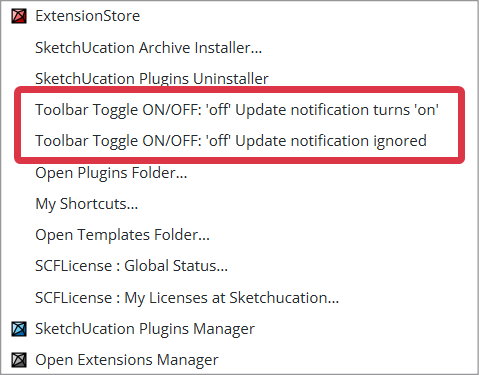
Also there are 2 toggles in the menu,:
- to switch off the toolbar [and on] AND ignore any subsequent updates-available notification [i.e. do not reopen].
- to switch off the toolbar [and on] BUT to reopen the toolbar automatically if there's an updates-available notification.
-
Here are my steps:
- Start Sketchup (in this case, my daily driver is 2023)
- Notice the ExtensionStore toolbar.
- From the extensions Menu, select Toggle toolbar ON/OFF 'off' update notification turns 'on'
- The toolbar is gone
- Exit Sketchup
- Restart. The toolbar is there again
- From the extensions Menu, select Toggle toolbar ON/OFF 'off' update notification ignored
- Acknowledge the modal popup "Toolbar button automatic Update marker may show after restart..."
- Select the same menu item again, and the toolbar is gone
- Exit Sketchup and restart
You probably wouldn't be surprised to know that the (@*!!@$/#^) toolbar is back again.
I can't be the only one who just doesn't WANT the toolbar. Really, I can start up the extension any time I want from the menu.
-
I have just retested it and I do see an issue.
With it set to ignore updates it's still reopening the toolbar on restart.
This is not correct.
I look into a fix... -
@b2pi
I have fixed the issue and there is already an updated version 'in the pipeline' - watch for its release... -
Thanks so very much (it's good to know that I'm still somewhat vaguely sane)
-
v5.0.7 released.
- Improvement to licensing system to handle networked devices
- Improvement to toolbar handling
- Minor bugfixes
Download the free D'oh Book for SketchUp 📖
-
This is likely a problem resulting from working for a large, risk averse corporation with an IT department locking things down.
I am running the latest shipping version of Sketchup on the latest version of MacOS.
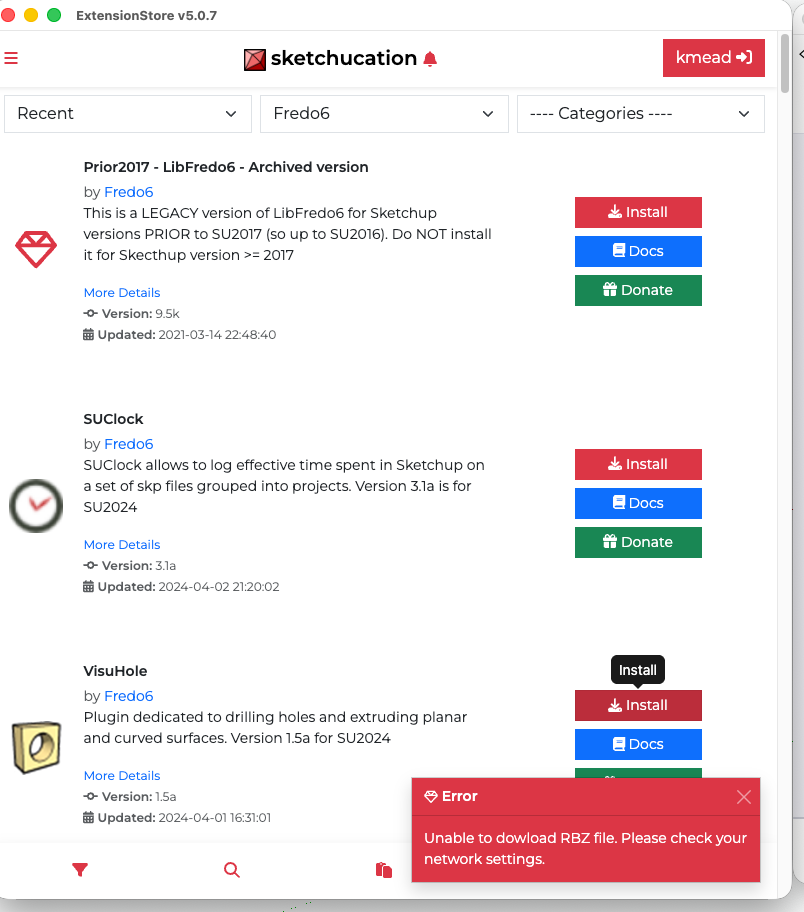
When I use SKTools to access the SK plugins store to download plugins, I get an error message. I can't find a place on MacOS to allow Sketchup/Sketchucation to be able to do so and the Sketchup Plugins Manager doesn't download plugins from Sketchucation. All around it is painful where prior to ver 5 of the Sketchucation plugin I basically ignored the Sketchup Plugin Manager.
Any tips on how to get 5.07 to download and install plugins like it once did?
Many thanks.
I created Dilbertville, sorry about that...
-
I'm sure @rich-o-brien and @gábor will chip in with more detailed advice - but in the meantime, your IT guys need to add sketchucation.com etc to their firewall white list etc ?
Remember you can always make a note of the extension in the ExtensionStore and download the very same one's RBZ from the PluginStore, then manually install it using either the native Extensions Manager > Install-Extension method, or the Extensions > SketchUcation submenu item Archive Installer... [which also installs ZIP as well as RBZ]. -
@kmead
Looks like an overzealous security policy. Hard to say for sure.It’s a holiday here today but I’ll chat with Gabor about it tomorrow.
-
@kmead Does your Ruby console show any error messages when you try to install?
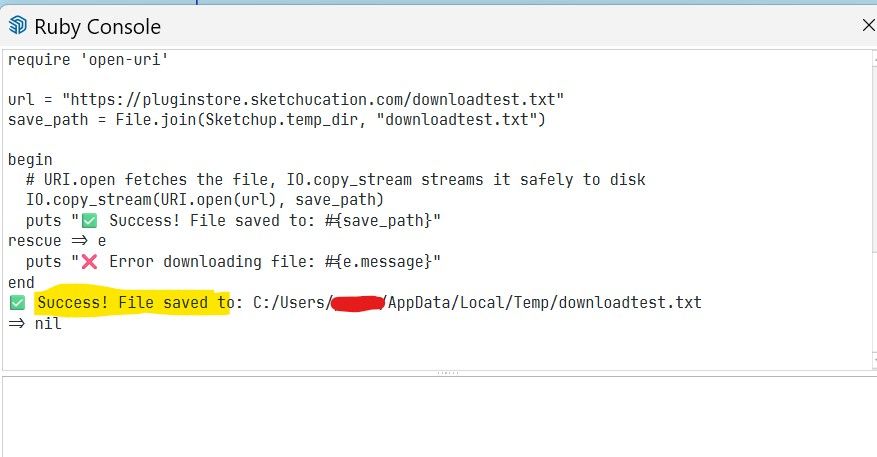
Could you try to Copy/Paste this script into your Ruby Console and press enter?
require 'open-uri'

url = "https://pluginstore.sketchucation.com/downloadtest.txt"
save_path = File.join(Sketchup.temp_dir, "downloadtest.txt")

begin
  # URI.open fetches the file, IO.copy_stream streams it safely to disk
  IO.copy_stream(URI.open(url), save_path)
  puts "✅ Success! File saved to: #{save_path}"
rescue => e
  puts "❌ Error downloading file: #{e.message}"
end
Do you get Success or Error result?
-
@Gábor Thank you for the response, I am continuing to have an error and IT is not owning up to having anything to do with it.
When I paste in your script, this is what I get returned as an error:
Error downloading file: SSL_connect returned=1 errno=0 peeraddr=178.63.47.155:443 state=error: certificate verify failed (self-signed certificate in certificate chain)
=> nil -
@Gábor needs to comment but I just ran the test and got 'Success ! ...', so it worked for me.
This suggests that your IT set up is somehow wrongly dealing with the certificate verification ?? -
@kmead Thank you for the test result. It makes it probable that your MAC/ SketchUp or Firewall or any other "middleware" is considering our SSL certificate invalid.
To narrow down the problem, could you please run the following script?
require 'open-uri'
require 'openssl'

url = "https://pluginstore.sketchucation.com/downloadtest.txt"
save_path = File.join(Sketchup.temp_dir, "downloadtest.txt")

begin
  # Bypassing SSL verification for diagnostic purposes
  IO.copy_stream(URI.open(url, ssl_verify_mode: OpenSSL::SSL::VERIFY_NONE), save_path)
  puts "✅ Success! File saved to: #{save_path}"
rescue => e
  puts "❌ Error downloading file: #{e.message}"
end
This script skips the SSL cert test. If it downloads the test file without any problems then it is very likely that the the problem is with the corporate firewall or with some other kind of middleware.
If we know the result, we can try to create a possible solution which we can integrate into the next version of the tools.




Hello! It looks like you're interested in this conversation, but you don't have an account yet.
Getting fed up of having to scroll through the same posts each visit? When you register for an account, you'll always come back to exactly where you were before, and choose to be notified of new replies (either via email, or push notification). You'll also be able to save bookmarks and upvote posts to show your appreciation to other community members.
With your input, this post could be even better 💗
Register Login


Advertisement