sketchucation logo sketchucation
    • Login
    Oops, your profile's looking a bit empty! To help us tailor your experience, please fill in key details like your SketchUp version, skill level, operating system, and more. Update and save your info on your profile page today!
    ⚠️ Update | Sketchucation Tools 5.0.8 released with licensing improvements and bugfixes Download

    [Plugin][$] RoundCorner - v3.4a - 31 Mar 24


    Scheduled Pinned Locked Moved Plugins
    1.5k Posts 477 Posters 4.1m Views 477 Watching
    Loading More Posts
    • Oldest to Newest
    • Newest to Oldest
    • Most Votes
    Reply
    • Reply as topic
    Log in to reply
    This topic has been deleted. Only users with topic management privileges can see it.
    • TIGT
      TIG Moderator
      last edited by

      @z200121 said:

      Yep with little measures that splatting soon as Enter!
      No a very clear comment 😒
      If you mean that using very small dimensions causes a BugSplat, then this a well know limitation of SketchUp -both in SketchUp's native tools and many Plugins...
      Models with edges [and any faces they might support] < 1/1000" long can 'exist', BUT they cannot be 'created' - this is because at that size the tolerance built in to SketchUp means that it takes the edge's start/end points to be coincident.
      The work around is to scale the geometry up x100 or more, do the intricate creation and scale back down afterwards.

      As I said - the tiny geometry can exist, but it cannot be created...

      TIG

      1 Reply Last reply
      Reply Quote 0
      • dereiD
        derei
        last edited by

        @tig said:

        ...can exist, but it cannot be created...

        Use this as your motto, is cool ! 😄 💚

        DESIGNER AND ARTIST DEREI.UK

        1 Reply Last reply
        Reply Quote 0
        • L
          littleche
          last edited by

          its great ! thanks fredo .

          1 Reply Last reply
          Reply Quote 0
          • DDKD
            DDK
            last edited by

            One of the best plug-ins ever, thank you!!! makes my models look more realistic. the best part of this is it keeps the faces grouped as one. cheers keep making more 😄

            1 Reply Last reply
            Reply Quote 0
            • K
              kashiu
              last edited by

              Hi fredo
              I have the su2015 & Im interstate in the round corner pouring, can you help me?
              Thanks

              1 Reply Last reply
              Reply Quote 0
              • L
                littleche
                last edited by

                HI

                I Have problem with this model . round corner can't rounding this model and recive overlab error.
                How can I fix this problem?
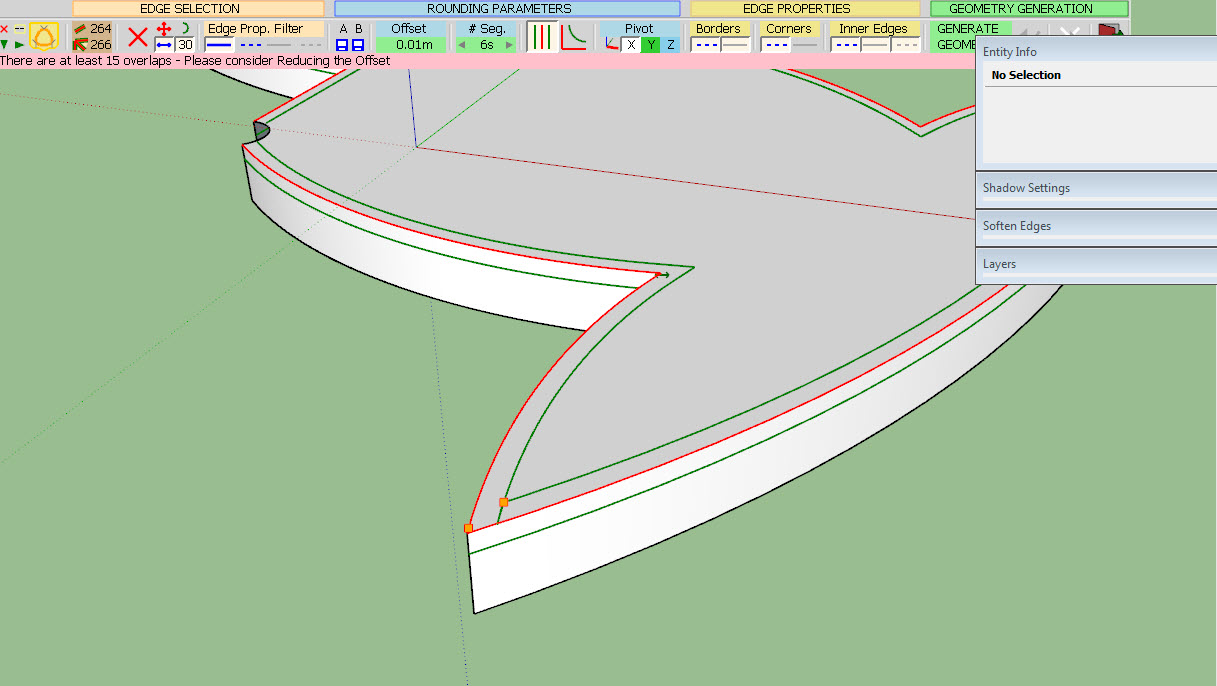
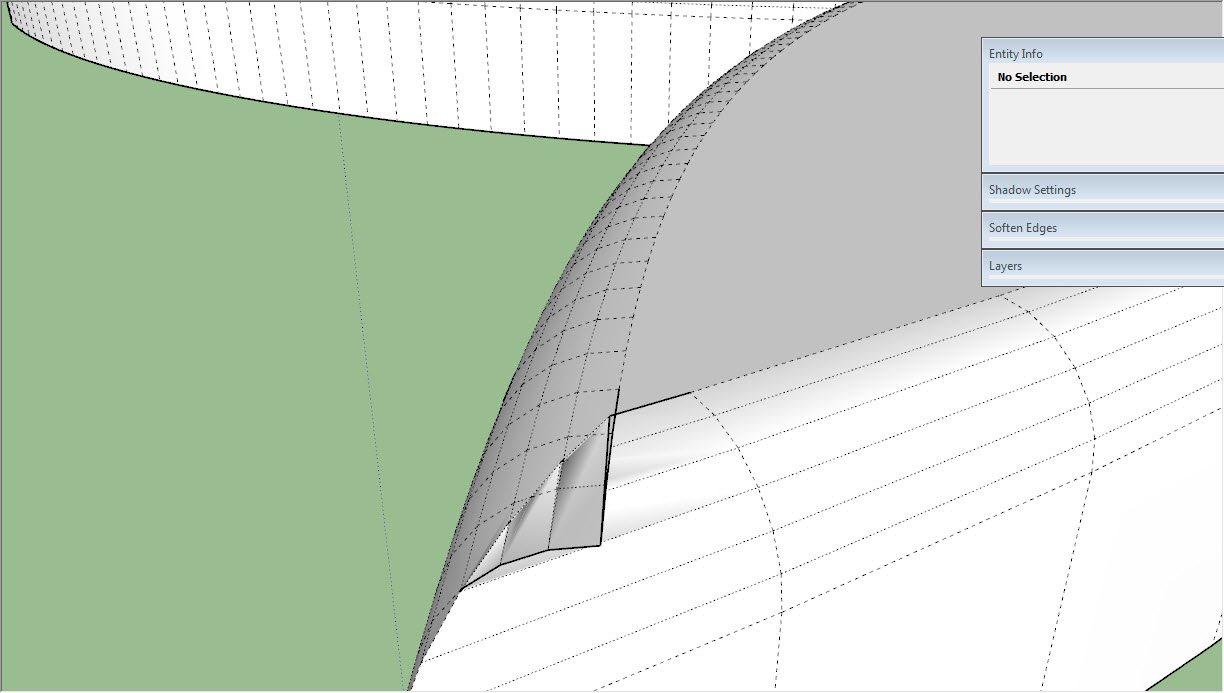
                08-13-2015 07-27-02 ب.jpg

                08-13-2015 07-29-18 ب.jpg

                P & P.skp

                thanks

                1 Reply Last reply
                Reply Quote 0
                • fredo6F
                  fredo6
                  last edited by

                  @littleche said:

                  HI

                  I Have problem with this model . round corner can't rounding this model and recive overlab error.
                  How can I fix this problem?
                  thanks

                  Unfortunately, with the current algorithm, this is not possible.
                  At the sharp corner, you have edges which are smaller than the offset.

                  Sorry for inconvenience

                  Fredo

                  1 Reply Last reply
                  Reply Quote 0
                  • L
                    littleche
                    last edited by

                    @fredo6 said:

                    @littleche said:

                    HI

                    I Have problem with this model . round corner can't rounding this model and recive overlab error.
                    How can I fix this problem?
                    thanks

                    Unfortunately, with the current algorithm, this is not possible.
                    At the sharp corner, you have edges which are smaller than the offset.

                    Sorry for inconvenience

                    Fredo

                    Thank you fredo . You are always trying to develop this plugin.And I thank you very much.If you are not a thing of SketchUp shortage!
                    I hope you can fix algorithm in the next version .Always sincerely pray for your success...

                    1 Reply Last reply
                    Reply Quote 0
                    • W
                      Will C
                      last edited by

                      I've been using this plugin for a while now and it's pretty awesome. Makes curving edges a lot faster with less frustration. Thanks for making this.

                      1 Reply Last reply
                      Reply Quote 0
                      • T
                        Tony2015
                        last edited by

                        thx fredo

                        1 Reply Last reply
                        Reply Quote 0
                        • bac9-flclB
                          bac9-flcl
                          last edited by

                          @fredo6

                          Is it possible to fix the chamfer process failing on such a corner?

                          http://i.imgur.com/EuaXGhj.png

                          It's pretty much impossible to avoid places like those in serious quad-based hardsurface modeling, and other chamfering implementations (in 3ds Max, Maya, etc.) never had issues with topology like that, so I'm not sure if anything really prevents proper chamfering here. Typically, corners like those are simply resolved like this:

                          http://i.imgur.com/8UUbDRJ.png

                          1 Reply Last reply
                          Reply Quote 0
                          • fredo6F
                            fredo6
                            last edited by

                            Not possible with the current algorithm.

                            Would require another technique, which I may implement one of these days.

                            Fredo

                            1 Reply Last reply
                            Reply Quote 0
                            • bac9-flclB
                              bac9-flcl
                              last edited by

                              Thanks for the info!

                              While at it, can you take a look at this improvement? It would be an enormous help for users inserting edges into n-gons to control triangulation, and to users with quad-based geometry or otherwise unavoidable coplanar face sequences:

                              http://i.imgur.com/wnsXjhF.png

                              1 Reply Last reply
                              Reply Quote 0
                              • G
                                Guig2000
                                last edited by

                                this plugin helped me previously, so, thanks for that, fredo.
                                But well it don't like curves at all even at 100 000 scale and despite that in this sample, the offset is much smaller than my requirement, I had overlaps everywhere.

                                http://www.zimagez.com/miniature/sketchuproundcorneroncurved.png


                                http://www.zimagez.com/miniature/sketchuproundcorneroncurved20.png

                                Also a good enhancement could be to be able to have multi-offsets capability in a selection.

                                1 Reply Last reply
                                Reply Quote 0
                                • P
                                  pegaze
                                  last edited by

                                  hi everyone,

                                  i just run that plugin and after generating geometry, the model became a single part, i'm not able to select a face, if i try to select a face or anything else, the model is all selected ... is it always like that or may i miss something ?

                                  i also dont see any line on the edges.

                                  thanks for your answers.

                                  1 Reply Last reply
                                  Reply Quote 0
                                  • Dave RD
                                    Dave R
                                    last edited by

                                    It depends on the settings you've chosen. If you choose to smooth/soften the edges, then you'll get that behavior. But you can choose not to soften the edges and then you'll be able to select a single face. Or you could turn on Hidden Geometry and select individual faces even with the edges softened.

                                    Etaoin Shrdlu

                                    %

                                    (THERE'S NO PLACE LIKE)

                                    G28 X0.0 Y0.0 Z0.0

                                    M30

                                    %

                                    1 Reply Last reply
                                    Reply Quote 0
                                    • P
                                      pegaze
                                      last edited by

                                      Great !! Thanks a lot, it's now working well

                                      1 Reply Last reply
                                      Reply Quote 0
                                      • W
                                        Wookbert
                                        last edited by

                                        Have you ever noticed the tiny size of RoundCorner control bar on a MacBook Retina? (MBPr 13" running 10.11.1 or any other Mac OS X version)? See attachment.

                                        Any idea how to solve this?
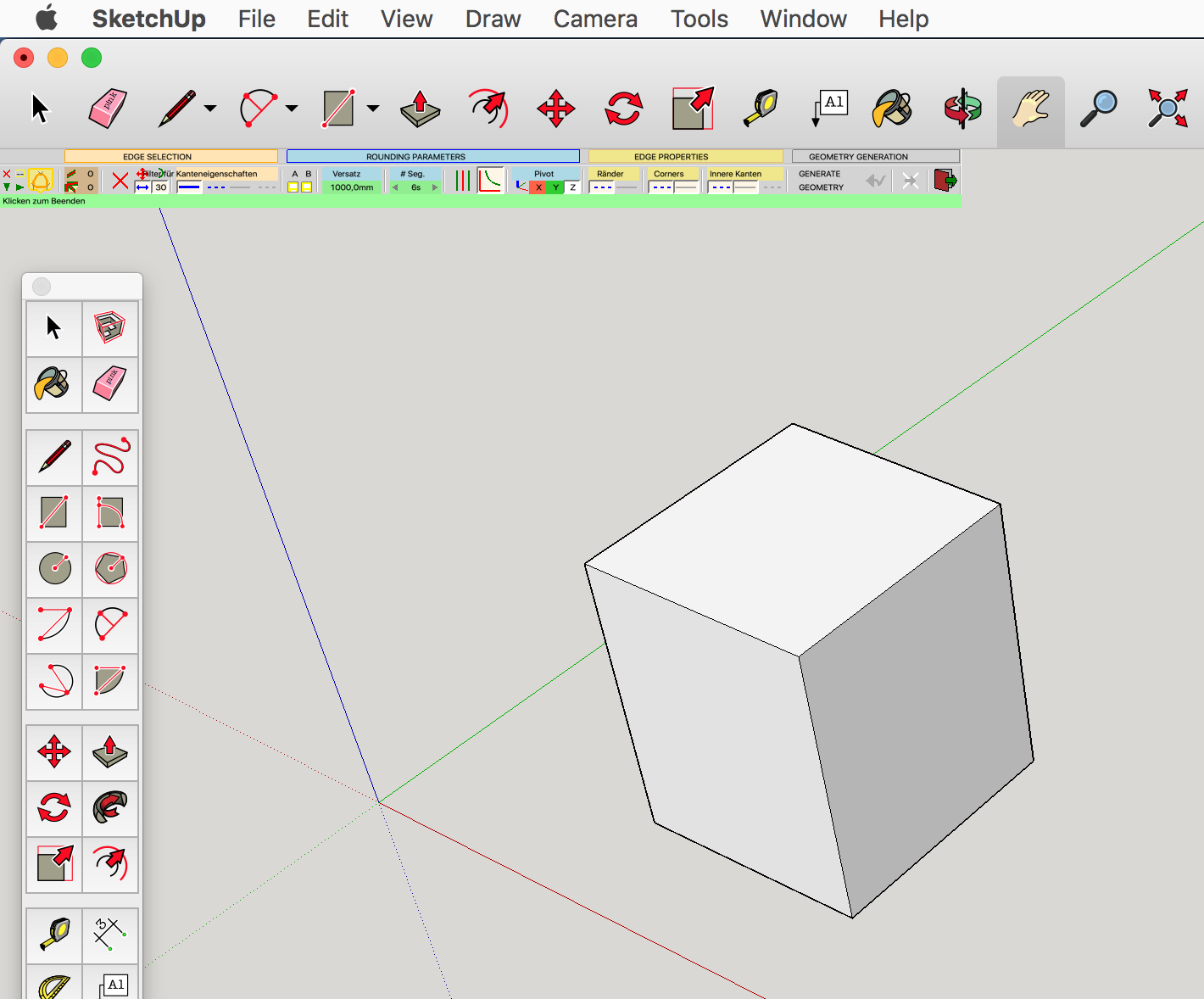

                                        Bildschirmfoto 2015-11-24 um 00.00.00.png

                                        1 Reply Last reply
                                        Reply Quote 0
                                        • I
                                          indrifitrian6
                                          last edited by

                                          where i can find the download link button?

                                          1 Reply Last reply
                                          Reply Quote 0
                                          • TIGT
                                            TIG Moderator
                                            last edited by

                                            @indrifitrian6 said:

                                            where i can find the download link button?
                                            Look in the SketchUcation PluginStore - link in menu above...
                                            Use the page's Search tool to find the entry, it it's not immediately seen...

                                            TIG

                                            1 Reply Last reply
                                            Reply Quote 0

                                            Hello! It looks like you're interested in this conversation, but you don't have an account yet.

                                            Getting fed up of having to scroll through the same posts each visit? When you register for an account, you'll always come back to exactly where you were before, and choose to be notified of new replies (either via email, or push notification). You'll also be able to save bookmarks and upvote posts to show your appreciation to other community members.

                                            With your input, this post could be even better 💗

                                            Register Login
                                            • 1
                                            • 2
                                            • 51
                                            • 52
                                            • 53
                                            • 54
                                            • 55
                                            • 74
                                            • 75
                                            • 53 / 75
                                            • First post
                                              Last post
                                            Buy SketchPlus
                                            Buy SUbD
                                            Buy WrapR
                                            Buy eBook
                                            Buy Modelur
                                            Buy Vertex Tools
                                            Buy SketchCuisine
                                            Buy FormFonts

                                            Advertisement