sketchucation logo sketchucation
    • Login
    Oops, your profile's looking a bit empty! To help us tailor your experience, please fill in key details like your SketchUp version, skill level, operating system, and more. Update and save your info on your profile page today!
    ⚠️ Update | Sketchucation Tools 5.0.8 released with licensing improvements and bugfixes Download

    Live Edge Slab

    Scheduled Pinned Locked Moved Woodworking
    10 Posts 8 Posters 2.4k Views 8 Watching
    Loading More Posts
    • Oldest to Newest
    • Newest to Oldest
    • Most Votes
    Reply
    • Reply as topic
    Log in to reply
    This topic has been deleted. Only users with topic management privileges can see it.
    • Dave RD
      Dave R
      last edited by

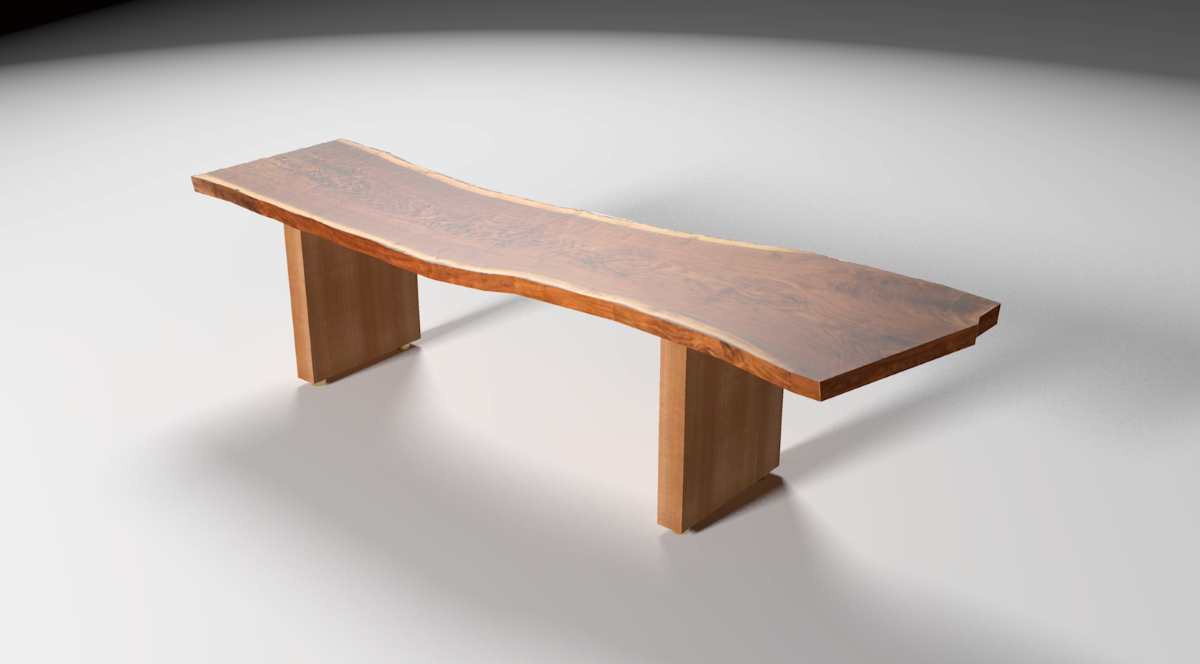
      This is a bench with a claro walnut live edge slab for the seat. I drew the slab at the request of a woodworker who wanted to know if it could be done. I guess it can be. Actually, thanks to TIG's Image Trimmer, it's a walk in the park.
      Slab bench.png

      Etaoin Shrdlu

      %

      (THERE'S NO PLACE LIKE)

      G28 X0.0 Y0.0 Z0.0

      M30

      %

      1 Reply Last reply
      Reply Quote 0
      • BoxB
        Box
        last edited by

        Very nice.

        1 Reply Last reply
        Reply Quote 0
        • D
          davidheim1
          last edited by

          And a good tutorial about using the plug-in on the "Design.Click.Build" blog on finewoodworking.com.

          Best,
          dh

          1 Reply Last reply
          Reply Quote 0
          • cottyC
            cotty
            last edited by

            @davidheim1 said:

            And a good tutorial about using the plug-in on the "Design.Click.Build" blog on finewoodworking.com.

            Best,
            dh

            Yes, it's certainly worth a link:
            http://www.finewoodworking.com/item/120817/drawing-a-live-edge-slab
            πŸ‘

            my SketchUp gallery

            1 Reply Last reply
            Reply Quote 0
            • HornOxxH
              HornOxx
              last edited by

              Dave - a great "walk in the park"! πŸ‘
              Thanks Cotty for this Explanation link.
              Thanks Tig, again for this very useful tool.
              (I did not recognize this great "Image Trimmer" feature so far)

              never trust a skinny cook

              1 Reply Last reply
              Reply Quote 0
              • Dave RD
                Dave R
                last edited by

                Thank you all.

                Etaoin Shrdlu

                %

                (THERE'S NO PLACE LIKE)

                G28 X0.0 Y0.0 Z0.0

                M30

                %

                1 Reply Last reply
                Reply Quote 0
                • daleD
                  dale
                  last edited by

                  Masterful as usual Dave. Can't tell you all I have learned from you.
                  Thanks

                  Just monkeying around....like Monsanto

                  1 Reply Last reply
                  Reply Quote 0
                  • Rich O BrienR
                    Rich O Brien Moderator
                    last edited by

                    beautiful!

                    Download the free D'oh Book for SketchUp πŸ“–

                    1 Reply Last reply
                    Reply Quote 0
                    • pbacotP
                      pbacot
                      last edited by

                      So realistic! And pretty too. How did you render it?

                      MacOSX MojaveSketchUp Pro v19 Twilight v2 Thea v3 PowerCADD

                      1 Reply Last reply
                      Reply Quote 0
                      • Dave RD
                        Dave R
                        last edited by

                        Thank you, gentlemen.

                        Dale, surely you can tell. It isn't a secret. πŸ˜„

                        Peter, the rendering was done in Kerkythea. The "set" is just a large rectangle. No walls or ceiling. Two lights inserted via SU2KT. I used a plastic material preset to get the glossiness of the wood and I used the texture for the slab as a bump map and set the strength to 0.25. It's probably wrong but whenever I want to add a little bump, I just use the texture image for the map. Seems to work fine. Rendered at preset 7 or 8. I forget which. Easy setup and quick render.


                        Etaoin Shrdlu

                        %

                        (THERE'S NO PLACE LIKE)

                        G28 X0.0 Y0.0 Z0.0

                        M30

                        %

                        1 Reply Last reply
                        Reply Quote 0

                        Hello! It looks like you're interested in this conversation, but you don't have an account yet.

                        Getting fed up of having to scroll through the same posts each visit? When you register for an account, you'll always come back to exactly where you were before, and choose to be notified of new replies (either via email, or push notification). You'll also be able to save bookmarks and upvote posts to show your appreciation to other community members.

                        With your input, this post could be even better πŸ’—

                        Register Login
                        • 1 / 1
                        • First post
                          Last post
                        Buy SketchPlus
                        Buy SUbD
                        Buy WrapR
                        Buy eBook
                        Buy Modelur
                        Buy Vertex Tools
                        Buy SketchCuisine
                        Buy FormFonts

                        Advertisement