sketchucation logo sketchucation
    • Login
    Oops, your profile's looking a bit empty! To help us tailor your experience, please fill in key details like your SketchUp version, skill level, operating system, and more. Update and save your info on your profile page today!
    ⚠️ Update | Sketchucation Tools 5.0.8 released with licensing improvements and bugfixes Download

    The "Duh!" thread (aka the Doh! thread)

    Scheduled Pinned Locked Moved SketchUp Discussions
    sketchup
    696 Posts 135 Posters 579.7k Views 135 Watching
    Loading More Posts
    • Oldest to Newest
    • Newest to Oldest
    • Most Votes
    Reply
    • Reply as topic
    Log in to reply
    This topic has been deleted. Only users with topic management privileges can see it.
    • R
      rv1974
      last edited by

      If you export a lot of pictures out of skp get the 'Smustard Scene Exporter'- it will save years of sitting in front of monitor.

      1 Reply Last reply
      Reply Quote 0
      • R
        rv1974
        last edited by

        you can easily reassign keyboard keys (on Windows level) with:
        http://sharpkeys.codeplex.com/.

        1 Reply Last reply
        Reply Quote 0
        • falkF
          falk
          last edited by

          @pmiller said:

          Probably the best SU duh!:

          404 Not Found

          favicon

          (www.sketchucation.com)

          (Link to the "Homer" button, which plays the "d'oh!" sound and does an undo. Sadly, it's no longer there. I don't suppose anybody kept a copy?)

          1 Reply Last reply
          Reply Quote 0
          • falkF
            falk
            last edited by

            My biggest D'oh! was learning to write plugins. I had no idea it would be that easy; why didn't I do it years ago?

            1 Reply Last reply
            Reply Quote 0
            • massimoM
              massimo Moderator
              last edited by

              @falk said:

              @pmiller said:

              Probably the best SU duh!:

              404 Not Found

              favicon

              (www.sketchucation.com)

              (Link to the "Homer" button, which plays the "d'oh!" sound and does an undo. Sadly, it's no longer there. I don't suppose anybody kept a copy?)

              You can find it at Jim's blog. Scroll down the page.

              1 Reply Last reply
              Reply Quote 0
              • xiombargX
                xiombarg
                last edited by

                Discovering the Outliner. All combined I probably wasted a week of my life clicking my way through nested components to get to an object when all I had to do was click on a component's name in the Outliner.

                1 Reply Last reply
                Reply Quote 0
                • falkF
                  falk
                  last edited by

                  Thanks. And now that I've made it to the end of this thread (Best. Thread. Ever.), here's a tiny little plugin that I use all the time. It adds a "Show shortcuts" item to the Help menu. I find it very useful when I can't remember what I've assigned keys to. Especially when you're trying to assign a shortcut, and preferences tells you that key is already in use, and you can't remember what for.

                  show_shortcuts.rb

                  1 Reply Last reply
                  Reply Quote 0
                  • Rich O BrienR
                    Rich O Brien Moderator
                    last edited by

                    You should try Shortcutter plugin.

                    It is bundled with SketchUcation Tools

                    Download the free D'oh Book for SketchUp πŸ“–

                    1 Reply Last reply
                    Reply Quote 0
                    • TK0001T
                      TK0001
                      last edited by

                      About this time last year, I discovered clicking on the arrow buttons locks you into that axis when moving or copying objects. Now I use the arrows religiously.

                      1 Reply Last reply
                      Reply Quote 0
                      • R
                        rv1974
                        last edited by

                        To migrate 2013 Shortcuts to 2015 one should open Preferences.dat in Notepad and use 'find and replace' feature to replace all 'Plugins' words with 'Extensions'.
                        Important: there must be only one backspace between the shortcut descriotion and the 'Extensions' word.

                        2015 Plugins folder location:
                        C:\Users\Your_Username\AppData\Roaming\SketchUp\SketchUp 2015\SketchUp\Plugins

                        1 Reply Last reply
                        Reply Quote 0
                        • oceanembersO
                          oceanembers
                          last edited by

                          shift to lock inferences/directions/etc. was one that I found way too late x_x

                          1 Reply Last reply
                          Reply Quote 0
                          • pilouP
                            pilou
                            last edited by

                            Never seen that! 😳
                            Draw a circle, Select the circumference : right Click / Divide ! 😲
                            Works only one time! πŸ€“

                            http://sketchucation.com/forums/download/file.php?id=126133

                            Frenchy Pilou
                            Is beautiful that please without concept!
                            My Little site :)

                            1 Reply Last reply
                            Reply Quote 0
                            • BoxB
                              Box
                              last edited by

                              It only works one time Pilou because once you divide it it becomes separate segments. Those individual segments can then be divided, and the divisions can be divided etc
                              It works with polygons and arcs also. There is even at least one plugin that I know of that will put the segments back together so you can divide the circle again. So you can go round and round again.

                              1 Reply Last reply
                              Reply Quote 0
                              • pilouP
                                pilou
                                last edited by

                                @unknownuser said:

                                So you can go round and round again.

                                ...and speedy fill your computer memories! πŸ˜„

                                Frenchy Pilou
                                Is beautiful that please without concept!
                                My Little site :)

                                1 Reply Last reply
                                Reply Quote 0
                                • david_hD
                                  david_h
                                  last edited by

                                  Quick question. . .It seems to me that in SU's long past. . .version 4 or so there was a push pull trick where you could just click on a shape to be PP'd and then either hold a shift key to lock the axis or and endpoint of something and it would just auto push to that point. Kinda like Follow me, but it was innate to the PushPull tool. Does anyone remember this?

                                  Thx,

                                  D

                                  If I make it look easy...It is probably easy

                                  1 Reply Last reply
                                  Reply Quote 0
                                  • cottyC
                                    cotty
                                    last edited by

                                    There are different options in Fredo6s JointPushPull (like vetor push pull), something like that?

                                    my SketchUp gallery

                                    1 Reply Last reply
                                    Reply Quote 0
                                    • david_hD
                                      david_h
                                      last edited by

                                      Yeah. . I've got those and they're great. It just seemed to me there was a native SU trick to do that, but I guess I am mistaken. Hence the D'oh!

                                      If I make it look easy...It is probably easy

                                      1 Reply Last reply
                                      Reply Quote 0
                                      • jeff hammondJ
                                        jeff hammond
                                        last edited by

                                        @david_h said:

                                        Quick question. . .It seems to me that in SU's long past. . .version 4 or so there was a push pull trick where you could just click on a shape to be PP'd and then either hold a shift key to lock the axis or and endpoint of something and it would just auto push to that point. Kinda like Follow me, but it was innate to the PushPull tool. Does anyone remember this?

                                        Thx,

                                        D

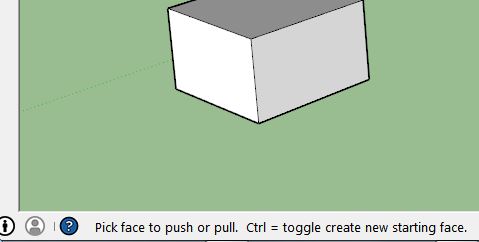
                                        the only push/pull modifier key is:

                                        Option(alt) = create new starting face.

                                        (as seen in the lower left hand corner of the drawing window πŸ˜‰ )

                                        dotdotdot

                                        1 Reply Last reply
                                        Reply Quote 0
                                        • pilouP
                                          pilou
                                          last edited by

                                          @unknownuser said:

                                          as seen in the lower left hand corner of the drawing window

                                          Can you put an image of that ?

                                          Frenchy Pilou
                                          Is beautiful that please without concept!
                                          My Little site :)

                                          1 Reply Last reply
                                          Reply Quote 0
                                          • BoxB
                                            Box
                                            last edited by

                                            @jeff hammond said:

                                            the only push/pull modifier key is:

                                            Option(alt) = create new starting face.

                                            (as seen in the lower left hand corner of the drawing window πŸ˜‰ )

                                            It's Ctrl on windows.


                                            Ctrl.JPG

                                            1 Reply Last reply
                                            Reply Quote 0

                                            Hello! It looks like you're interested in this conversation, but you don't have an account yet.

                                            Getting fed up of having to scroll through the same posts each visit? When you register for an account, you'll always come back to exactly where you were before, and choose to be notified of new replies (either via email, or push notification). You'll also be able to save bookmarks and upvote posts to show your appreciation to other community members.

                                            With your input, this post could be even better πŸ’—

                                            Register Login
                                            • 1
                                            • 2
                                            • 25
                                            • 26
                                            • 27
                                            • 28
                                            • 29
                                            • 34
                                            • 35
                                            • 27 / 35
                                            • First post
                                              Last post
                                            Buy SketchPlus
                                            Buy SUbD
                                            Buy WrapR
                                            Buy eBook
                                            Buy Modelur
                                            Buy Vertex Tools
                                            Buy SketchCuisine
                                            Buy FormFonts

                                            Advertisement