Improve watertightness in modelling
-
You are working very small and that can cause all sorts of problem. One of which is faces not forming properly and you are probably seeing clipping, problems with things disappearing when you zoom in.
Life would be easier if you worked larger and scaled down when you need to print.But the main thing is you need to understand how something becomes 'watertight'. In other words you need to understand how to work with solids, which is what a watertight thing is.
You can't just throw a whole bunch of shapes together and expect them to be solid. That can work in a drawing but proper modelling is really about making geometry that works in the real world.@tig said:
The simple definition of a manifold solid - one that will successfully 3d-print when exported to a compatible file format - is a collection of 'geometry', consisting of just faces and the edges bounding those faces [within a group or a component 'container'].
Every edge must bound exactly two faces - no fewer and no more.
So that precludes faceless edges, or edges around holes, forming flaps/shelves etc with therefore one face only, or edges bounding internal partition faces where they would have three or more faces, or edges shared by two otherwise seemingly solid objects - like cubes meeting along one edge - where that edge is shared by four faces.
It also precludes nested groups/components and any other entities like text and dims.
Although construction-lines and points [aka guides] within a collection do not compromise its solidity, these are best avoided when sending on for 3d-printing etc... -
Yeah, I kinda figured that. Means I probably have to start all over again.
Man, I should learn Blender...
-
you don't have to just use push/pull either to create a solid!
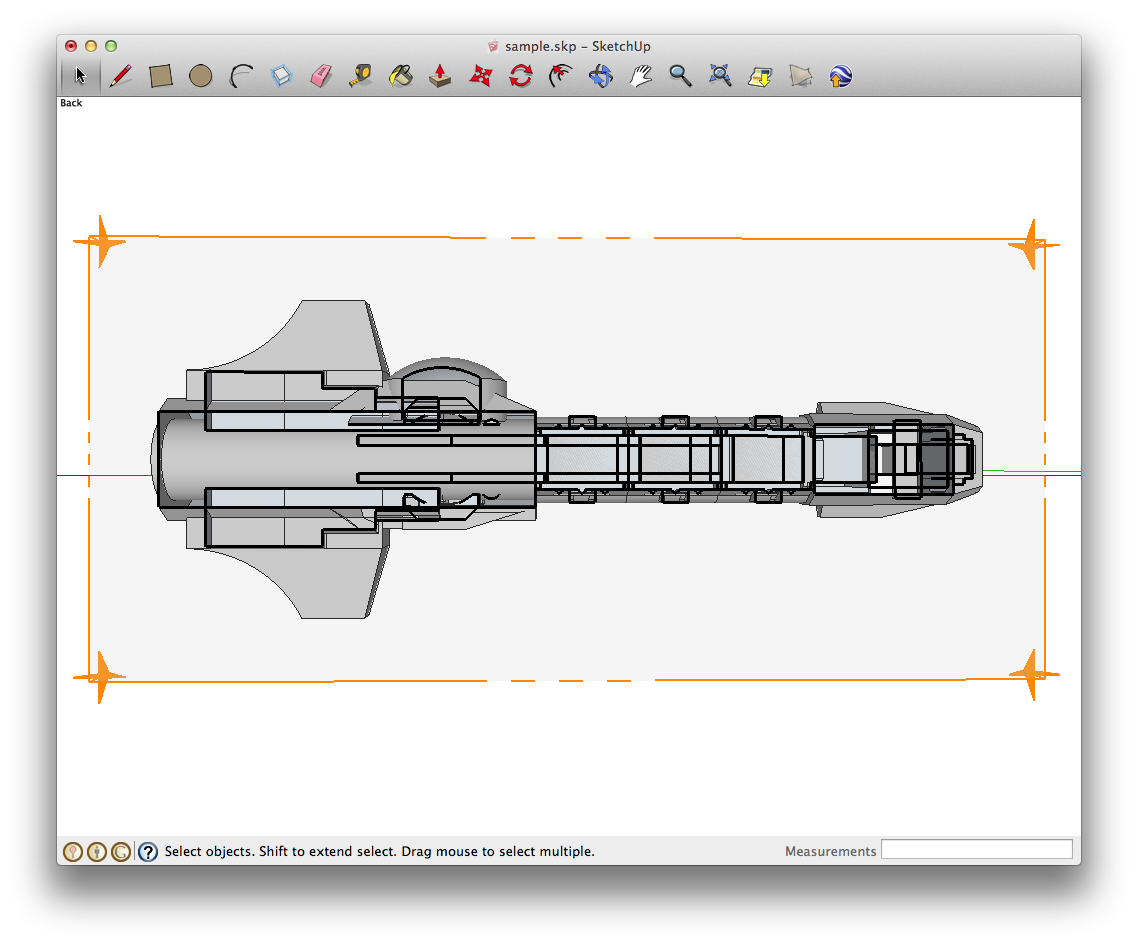
If you made a model like this in blender, you would still come into problems because you haven't intersected anything, you have just placed shapes inside one another, see section, it should be hollow like a hull:
-
Sorry, I'm just a bit bummed out. Spent a lot of time trying to do this and then realized that I basically did it all wrong with the geometry. I thought I created a solid model, which apparently I didn't.
-
if you don't make mistakes you will never learn
 we all do it! won't take you long to model something like that again; lots of repeating elements where if you get one right, they will all be right. There is also a solid inspector plugin to see where the holes are.
 -
@olishea said:
if you don't make mistakes you will never learn
we all do it! won't take you long to model something like that again; lots of repeating elements where if you get one right, they will all be right. There is also a solid inspector plugin to see where the holes are.I've got the solid inspector plugin, so I will give it a shot with that.

I guess I've grown a bit lazy, kinda hoped a new version of SketchUp could automatically make a selection solid if it doesn't have too big holes. But yeah, that's just super wishfull thinking I guess.

-
SketchUp does already have boolean tools! It's called Solid Tools. You can always do it manually do, by intersecting and deleting geometry.
Tak2hata also wrote a bool plugin, as have others.
-
@olishea said:
SketchUp does already have boolean tools! It's called Solid Tools. You can always do it manually do, by intersecting and deleting geometry.
Tak2hata also wrote a bool plugin, as have others.
That means you already need to have solid objects. I was kinda hoping for a feature that would easily and automatically make my model solid, meaning I can just easily draw stuff without having to worry about geometries and such.
Like I said...I'm feeling lazy.

-
Remember, this is a computer program and GIGO applies.
One of the things I tell my students early on is to practice good housekeeping and make clean models. It may seem like extra work at the time but it's a whole lot less work than fixing up the model to make it usable, later.
-
@stefmanovic said:
That means you already need to have solid objects. I was kinda hoping for a feature that would easily and automatically make my model solid, meaning I can just easily draw stuff without having to worry about geometries and such.
Like I said...I'm feeling lazy.
I know what you mean.....but it can't happen. You are asking a computer to make choices about which areas to fill etc.
You are almost asking the computer to make a vacuum formed cast of your model....now there's an idea for a plugin. Like a vacuum drape tool.
I don't see why you have a problem creating an array of solids, when your model contains, well, an array of solids already. You are already making solids, they just haven't been intersected cleanly.
-
Make your spaceship 30+ meters long...
Then when it's done scale it down to 32mmVery tiny facets will not get made in many operations like FollowMe and mesh-making plugins.
However, you can scale down afterwards - tiny facets can exist but they can't be made.
Also set your 'length-snapping' OFF.
Thomthom's SolidInspector will highlight 'issues' with non-solid forms.
If the errors are relatively minor then my SolidSolver can probably fix it.
If the problems are more widespread, then there are many posts on how to use Temporarily-Hiding-Faces, Using-SectionPlanes, With-Erase, and so on... the solve the issues raised by SolidInspector... -
Also remember the "Outer Shell" tool, which combines solids into one watertight shell.
-
Thanks a lot for the help guys!
I've been playing with the Solid Inspector, which works like a charm! It works that great that I no longer need stuff like Netfabb to fix the model.




Hello! It looks like you're interested in this conversation, but you don't have an account yet.
Getting fed up of having to scroll through the same posts each visit? When you register for an account, you'll always come back to exactly where you were before, and choose to be notified of new replies (either via email, or push notification). You'll also be able to save bookmarks and upvote posts to show your appreciation to other community members.
With your input, this post could be even better 💗
Register Login


Advertisement