[Plugin] Projecting Floor Paintings
-
Hello everyone,
have been absent for quite some time now. just too much to do. but now I've got a problem, that might be solved by a nice little ruby script:Do you know these painters, drawing a painting on the floor in a pedestrian area? Some of these paintings use a fantastic trick, so that if you stand at one specific point you will see a hole in the ground or similar. They do it via perspective distortion.
To create such a painting in SketchUp all I have to do is create the scene, then define one camera point in space. Then I have to draw lines from this camera point to all the visible vertexes and continue these line until they hit the ground floor. And finally all I have to do is connect these new intersection points on the ground.
If I look thorugh the camera now, I will see a 3D object, that is actually painted on a flat floor.
(by the way: there is a new "Film and Stage" plugin for SketchUp 8 )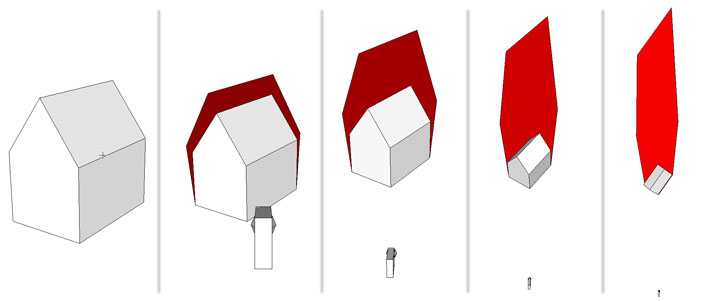
Unfortunately I need to do that for quite a few scenes. And I figured this might be something that can be done via Ruby (I know there is the Projection ruby. But it doesn't do projections from one single point, only parallel...)
I need to do the project over the weekend. So time is short
Any help would be highly appreciated!
-
Hi, plot-paris:
Nice to see you back.
I thought perhaps you could do a Forum wide search on "camera", but then I saw that there were only 307 pages on this search topic. However, what you describe does bring up thoughts of discussions within the last 6 months, it seems, on related topics. -
Try this Put into Plugins folder and restart Sketchup...
projecteye2ground.rbSelect raw geometry [i.e. including the edges to project] and type
projecteye2groundinto the Ruby Console, and the vertices are projected onto the ground plane from the eye, with cpoints and clines reproducing the distorted form... -
In lieu of all that exhaustive searching, we have the resident problem solver to present the solution. Well done, TIG.

-
wow, TIG! Did you just write that? thats almost perfect! wonderful! you just made my day!!!
-
-
Very good TIG!!! Could it project on other objects too or only on ground floor?
-
Hey TIG, this is all great information,
is there a way of projecting on the ground and onto a vertical surface ? ie onto a street and onto a building across the street? So the "object is projected on the flat and vertical surfaces in the same drawing?
thanks.. -
@plot-paris said:
Do you know these painters, drawing a painting on the floor in a pedestrian area? Some of these paintings use a fantastic trick, so that if you stand at one specific point you will see a hole in the ground or similar. They do it via perspective distortion.
Julian Beever is probably the most famous. http://www.julianbeever.net/index.php?option=com_content&view=article&id=1&Itemid=1
Here is a basic tutorial http://www.instructables.com/id/3D-Anamorphic-Street-Art/
With Photoshop http://www.instructables.com/id/Anamorphic-3-D-Images-with-Photoshop/
-
Heres mine: Nancy with a basketball, in scene 1 the ball looks normal. In scene 2 you can clearly see how the ball is flat and distorted by using the scale tool and how long the anamorphic images have to be to get the desired effect.
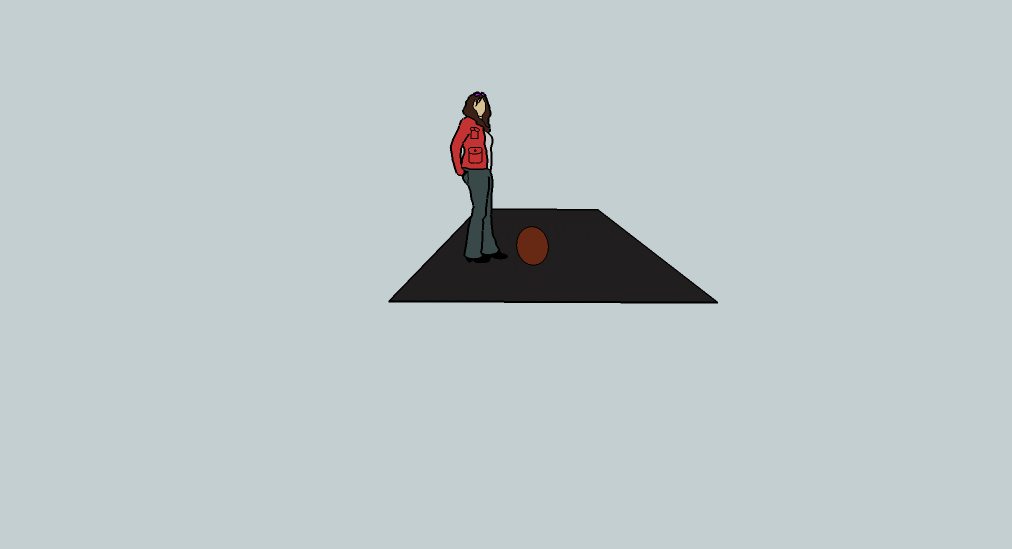
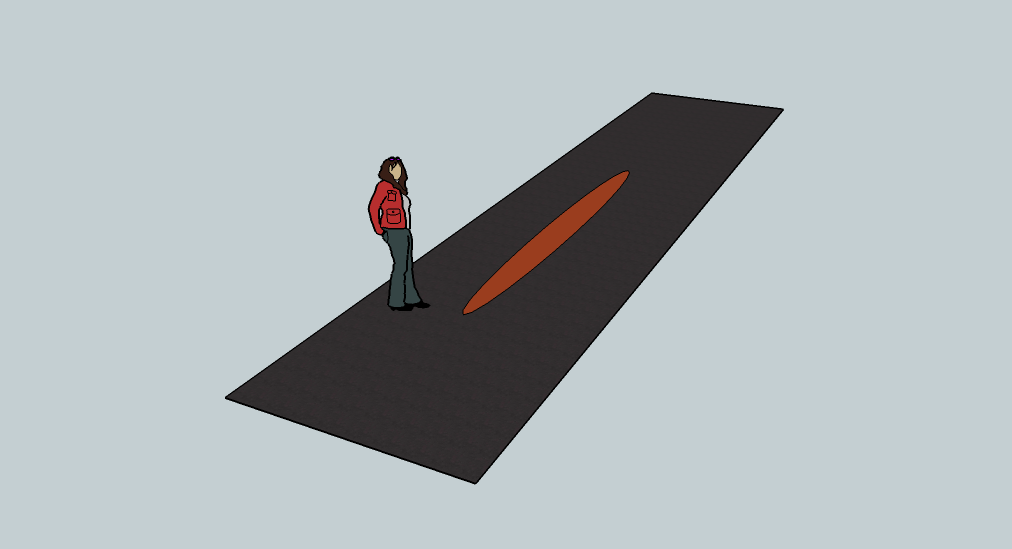
-


-
How to place the camera in the designated place (x, y, z)?
Google TranslatorRobert
-
@robertwan said:
How to place the camera in the designated place (x, y, z)?
eye = [1000,1000,1000]
target = [0,0,0]
up = [0,0,1]
my_camera = Sketchup;;Camera.new(eye, target, up)
Sketchup.active_model.active_view.camera = my_camera
Vary the eye and target as desired...
-
@RPNZ:
Try my Projections extension, I think it can do itHere: https://extensions.sketchup.com/extension/8f66e284-c0e3-45a9-be6e-e86911a3cf5e/projections-tools
-
-







Hello! It looks like you're interested in this conversation, but you don't have an account yet.
Getting fed up of having to scroll through the same posts each visit? When you register for an account, you'll always come back to exactly where you were before, and choose to be notified of new replies (either via email, or push notification). You'll also be able to save bookmarks and upvote posts to show your appreciation to other community members.
With your input, this post could be even better 💗
Register Login


Advertisement