What is this?
-
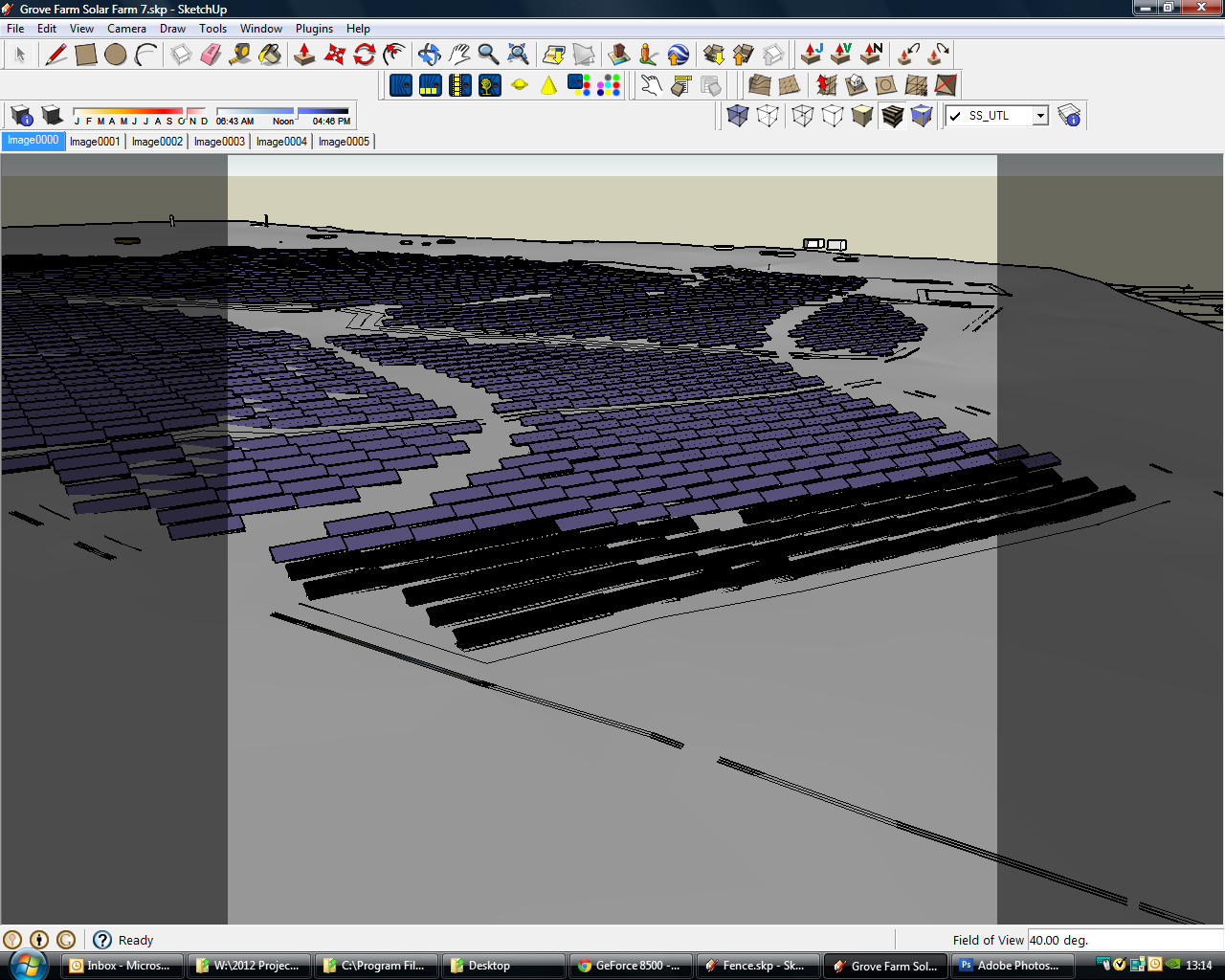
What are these gray borders? They appear when I set up a scene. However when I want to continue working on the model they stay there. Can't figure out hoe to disable it and and am having to restart to remove them.
please, someone must know

-
change camera setting
-
Looks like masking from the Advanced Camera Tools plugin but that only works in Pro. Is it possible the style you are using contains a watermark mask?
Go to Window>Styles and choose a style from the default Styles library. Does it go away?
By the way, you could move some of your toolbars up and give yourself some additional drawing window space.
-
probably from your renderer.. looks like you exported a square view.
see if your render plugin has a reset camera option -
Yes, as far as I know, often that coming from some render camera settings. There is also a plugin to remove that if you can't get rid of it in other ways.
http://www.smustard.com/script/FixAspectRatio




Hello! It looks like you're interested in this conversation, but you don't have an account yet.
Getting fed up of having to scroll through the same posts each visit? When you register for an account, you'll always come back to exactly where you were before, and choose to be notified of new replies (either via email, or push notification). You'll also be able to save bookmarks and upvote posts to show your appreciation to other community members.
With your input, this post could be even better 💗
Register Login


Advertisement