sketchucation logo sketchucation
    • Login
    Oops, your profile's looking a bit empty! To help us tailor your experience, please fill in key details like your SketchUp version, skill level, operating system, and more. Update and save your info on your profile page today!
    Mac User? | Join the Rayscaper Beta for Mac Learn More

    [Plugin][$] Vertex Tools

    Scheduled Pinned Locked Moved Plugins
    667 Posts 92 Posters 655.8k Views 92 Watching
    Loading More Posts
    • Oldest to Newest
    • Newest to Oldest
    • Most Votes
    Reply
    • Reply as topic
    Log in to reply
    This topic has been deleted. Only users with topic management privileges can see it.
    • cottyC
      cotty
      last edited by

      @cotty said:

      I've played a little more and noticed, that it depends on the soft radius: 30cm only selects front vertices, with 40cm the back vertices are selected too...

      Here are some variations...
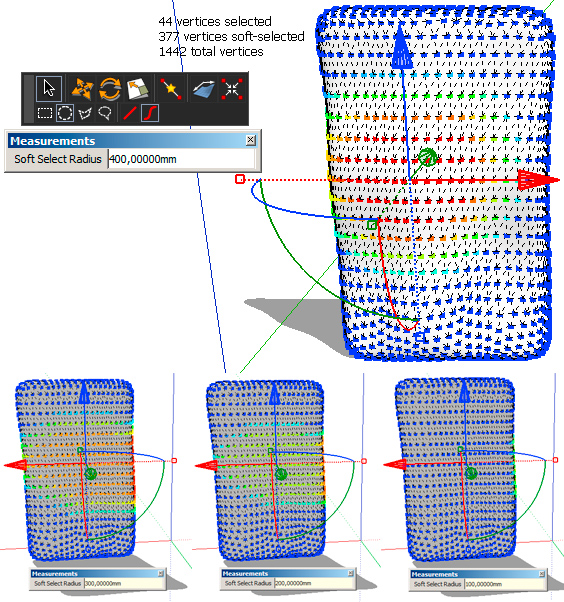
      vertex_backface_visible2.jpg

      my SketchUp gallery

      1 Reply Last reply
      Reply Quote 0
      • thomthomT
        thomthom
        last edited by

        Ah, yes. Soft-selection is affected by proximity of the selected vertices - not connected distance. I have it on my list to implement a soft-selection that acts upon connected distance that would have solved your problems in this particular case. Unfortunately that doesn't help you now. 😞

        Thomas Thomassen β€” SketchUp Monkey & Coding addict
        List of my plugins and link to the CookieWare fund

        1 Reply Last reply
        Reply Quote 0
        • panixiaP
          panixia
          last edited by

          nice! i was here to do the same exact request because i just modeled an hanging cloth and found that having an option of "only connected" for soft selection would be really cool.. i know 3dstudio max has a sort of cloth simulator, but i find 3dsmax is.. how can i say.. a "bit more expensive" than your tool.. πŸ˜„

          oh.. and "merge to point" rules!!! go for it!

          1 Reply Last reply
          Reply Quote 0
          • opalO
            opal
            last edited by

            would putting part of the model on a different layer and hiding it help to get only one surface's verts?

            1 Reply Last reply
            Reply Quote 0
            • cottyC
              cotty
              last edited by

              @thomthom said:

              Ah, yes. Soft-selection is affected by proximity of the selected vertices - not connected distance. I have it on my list to implement a soft-selection that acts upon connected distance that would have solved your problems in this particular case. Unfortunately that doesn't help you now. 😞

              No (urgent) problem because I'm only playing around πŸ˜‰
              Should a "Select only visible" does help anyway to reduce the selection?

              @unknownuser said:

              would putting part of the model on a different layer and hiding it help to get only one surface's verts?

              Yes, a selection with no soft selection (r=0) and grouping these vertices for soft selection is a workaround...

              my SketchUp gallery

              1 Reply Last reply
              Reply Quote 0
              • thomthomT
                thomthom
                last edited by

                @unknownuser said:

                would putting part of the model on a different layer and hiding it help to get only one surface's verts?

                I was about to say no - but then gave it a second thought and tried it. And yes, it works. Hiding the geometry you don't want affected will prevent them from being affected by soft-selection. πŸ˜„
                I think I might have to add that to the FAQ. Nice trick.

                @cotty said:

                Should a "Select only visible" does help anyway to reduce the selection?
                No - it would only effect selected vertices - not the soft-selection.

                Thomas Thomassen β€” SketchUp Monkey & Coding addict
                List of my plugins and link to the CookieWare fund

                1 Reply Last reply
                Reply Quote 0
                • pbacotP
                  pbacot
                  last edited by

                  Just grouping the faces on the far side protects them--or am I missing the point?

                  But you have to be sure your operation doesn't affect the boundary vertices or you'll have trouble getting the shape back together again.

                  MacOSX MojaveSketchUp Pro v19 Twilight v2 Thea v3 PowerCADD

                  1 Reply Last reply
                  Reply Quote 0
                  • thomthomT
                    thomthom
                    last edited by

                    @pbacot said:

                    Just grouping the faces on the far side protects them--or am I missing the point?

                    That is one possibility, yes. But as you mention - you might end up with not being able to merge the vertices again. Simply hiding the stuff you don't want affected solves it without having to modify the mesh.

                    Thomas Thomassen β€” SketchUp Monkey & Coding addict
                    List of my plugins and link to the CookieWare fund

                    1 Reply Last reply
                    Reply Quote 0
                    • D
                      d12dozr
                      last edited by

                      @thomthom said:

                      ...I have it on my list to implement a soft-selection that acts upon connected distance that would have solved your problems in this particular case...

                      πŸ‘ πŸ‘ I was also wishing for this a few days ago.

                      3D Printing with SketchUp Book
                      http://goo.gl/f7ooYh

                      1 Reply Last reply
                      Reply Quote 0
                      • pbacotP
                        pbacot
                        last edited by

                        OH, now I see! It somehow retains connection, even when your selection's along the boundary, but still doesn't include the hidden parts in the selection. Ingenious.

                        MacOSX MojaveSketchUp Pro v19 Twilight v2 Thea v3 PowerCADD

                        1 Reply Last reply
                        Reply Quote 0
                        • thomthomT
                          thomthom
                          last edited by

                          SCF Premium members can now buy Vertex Tools for a discounted price of 16$

                          Thomas Thomassen β€” SketchUp Monkey & Coding addict
                          List of my plugins and link to the CookieWare fund

                          1 Reply Last reply
                          Reply Quote 0
                          • pbacotP
                            pbacot
                            last edited by

                            Thanks TT. I already have it. How much for Bezier Surface?

                            MacOSX MojaveSketchUp Pro v19 Twilight v2 Thea v3 PowerCADD

                            1 Reply Last reply
                            Reply Quote 0
                            • thomthomT
                              thomthom
                              last edited by

                              Not sure what Bezier Surface will be priced at. But existing Vertex Tools customer will get a discount.

                              Thomas Thomassen β€” SketchUp Monkey & Coding addict
                              List of my plugins and link to the CookieWare fund

                              1 Reply Last reply
                              Reply Quote 0
                              • pbacotP
                                pbacot
                                last edited by

                                Heh, just prodding. Can't be had for any price as yet. πŸ˜‰

                                MacOSX MojaveSketchUp Pro v19 Twilight v2 Thea v3 PowerCADD

                                1 Reply Last reply
                                Reply Quote 0
                                • Mistro11M
                                  Mistro11
                                  last edited by

                                  Just bought it!!! Great plugin TT! I think my arsenal of tools is pretty beefed up now. Thanks.

                                  Structural Integrity is Not Just Physical...It's in the Design and Purpose

                                  1 Reply Last reply
                                  Reply Quote 0
                                  • thomthomT
                                    thomthom
                                    last edited by

                                    @pbacot said:

                                    Heh, just prodding. Can't be had for any price as yet. πŸ˜‰

                                    πŸ˜„ Yea. It's taking its time. At the moment I'm rewriting a piece of the core which require some larger changes affecting everything. Once it's complete it should allow me to work on the UI features and tools.

                                    Thomas Thomassen β€” SketchUp Monkey & Coding addict
                                    List of my plugins and link to the CookieWare fund

                                    1 Reply Last reply
                                    Reply Quote 0
                                    • thomthomT
                                      thomthom
                                      last edited by

                                      @mistro11 said:

                                      Just bought it!!! Great plugin TT! I think my arsenal of tools is pretty beefed up now. Thanks.

                                      πŸ‘ πŸ‘ πŸ˜„

                                      Thomas Thomassen β€” SketchUp Monkey & Coding addict
                                      List of my plugins and link to the CookieWare fund

                                      1 Reply Last reply
                                      Reply Quote 0
                                      • panixiaP
                                        panixia
                                        last edited by

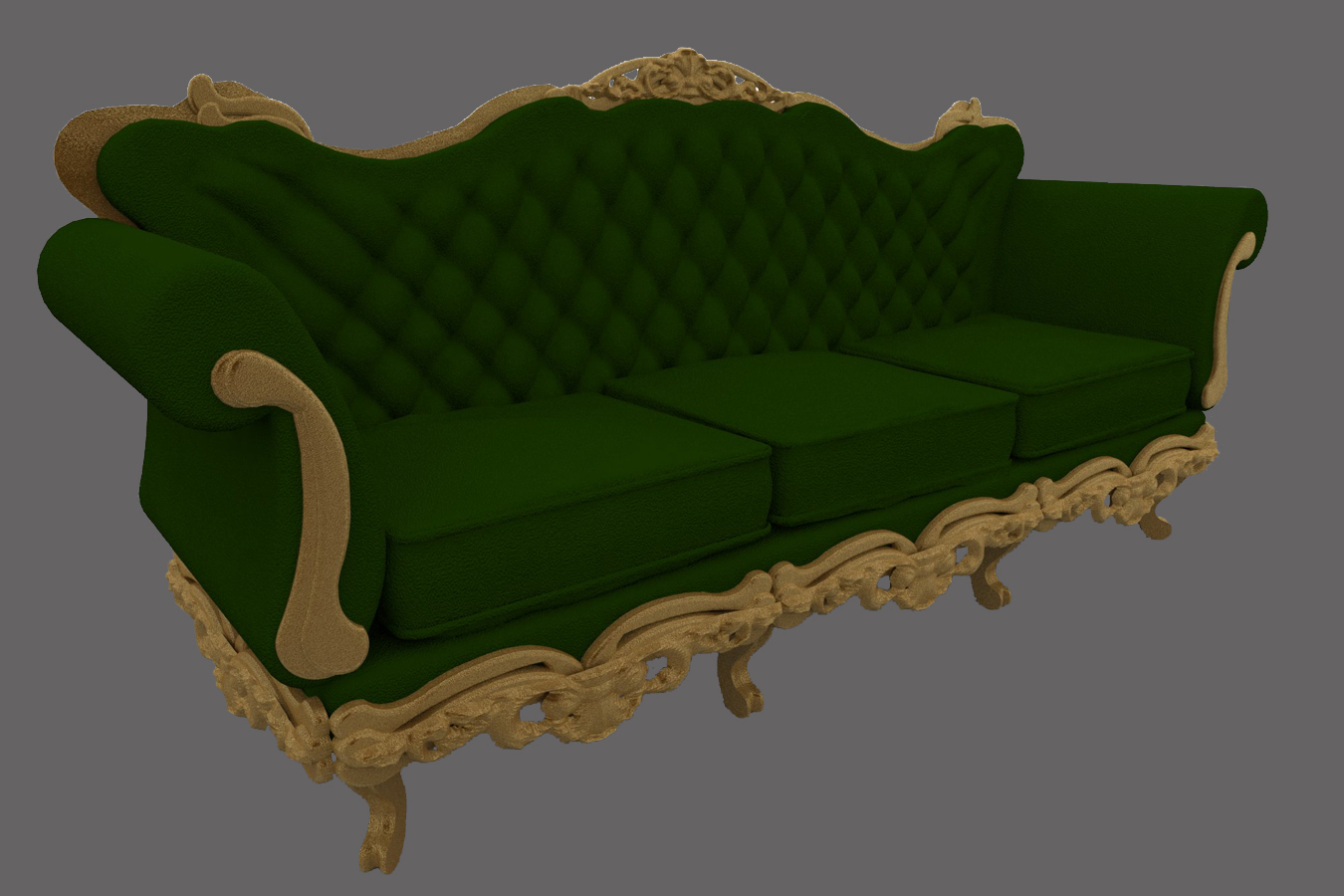
                                        i have to model a couple terrific of old sofa/chairs and tried to figure out how to do this.. at the end i managed to do this without using neither vray displacement or artisan/blender wathever subdivision modeling.. just the combination of your brilliant mesh from eightmap plugin and of course VT.. faster and more effective than whatever i could dream of..
                                        this is a fast draft anyway, i plan to try a better one, but so far way better and easier than i expected at first.
                                        once again, thank you..

                                        1 Reply Last reply
                                        Reply Quote 0
                                        • panixiaP
                                          panixia
                                          last edited by

                                          just forgot to upload the file.. 😳
                                          sofΓ  nonna ricchionacci web.jpg

                                          1 Reply Last reply
                                          Reply Quote 0
                                          • thomthomT
                                            thomthom
                                            last edited by

                                            That's looking mighty nice! And mighty heavy. Got a pure wireframe screenshot?

                                            I'm curious to how you worked this. How did you combine the mesh from Mesh from Heighmap into this sofa?


                                            Thomas Thomassen β€” SketchUp Monkey & Coding addict
                                            List of my plugins and link to the CookieWare fund

                                            1 Reply Last reply
                                            Reply Quote 0

                                            Hello! It looks like you're interested in this conversation, but you don't have an account yet.

                                            Getting fed up of having to scroll through the same posts each visit? When you register for an account, you'll always come back to exactly where you were before, and choose to be notified of new replies (either via email, or push notification). You'll also be able to save bookmarks and upvote posts to show your appreciation to other community members.

                                            With your input, this post could be even better πŸ’—

                                            Register Login
                                            • 1
                                            • 2
                                            • 13
                                            • 14
                                            • 15
                                            • 16
                                            • 17
                                            • 33
                                            • 34
                                            • 15 / 34
                                            • First post
                                              Last post
                                            Buy SketchPlus
                                            Buy SUbD
                                            Buy WrapR
                                            Buy eBook
                                            Buy Modelur
                                            Buy Vertex Tools
                                            Buy SketchCuisine
                                            Buy FormFonts

                                            Advertisement