Weird jaggy command trails
-
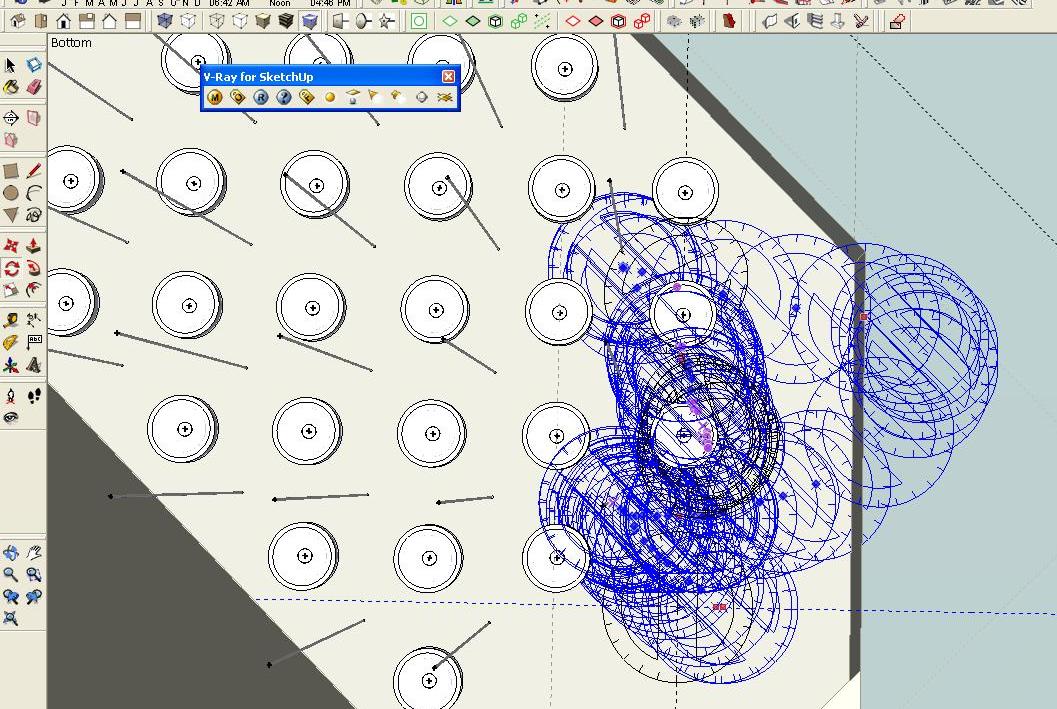
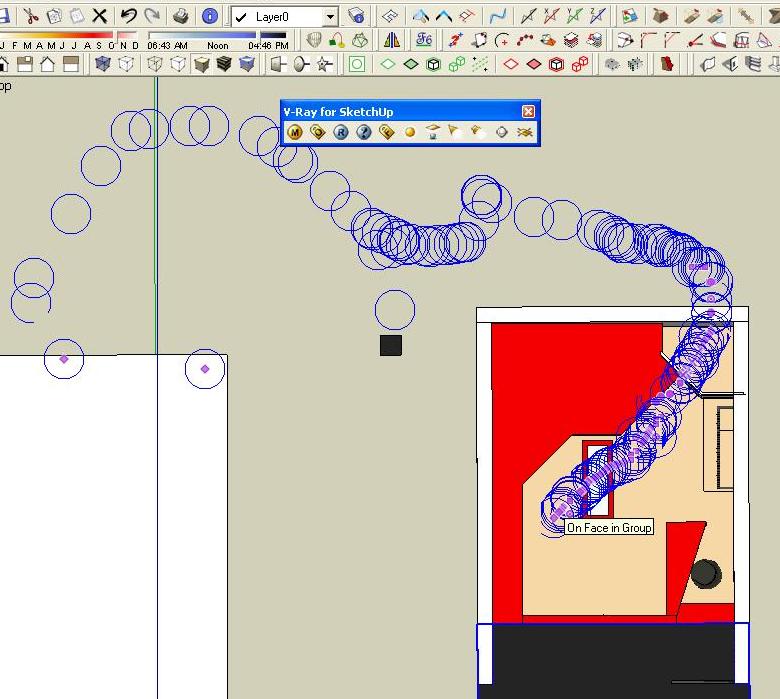
in the office i'm using windows xp sp3 fully updated. my mother board drivers are also updated, and sketchup found no problems in enabling open gl or fast feedback. enabling these two increases performance. for last 2 days i'm experiencing problems like this. all of a sudden, the pointer, the measuring tool, or any tools shows up trails. if i press ESC and retry the command, it works fine. what's wrong?
-
@john2 said:
enabling open gl
You mean Hardware Acceleration under Preferences?
This looks like a graphic hardware or driver issue. What hardware do you have? -
This looks like your hardware does not support"Fast Feedback". Try disabling it in Window → Preferences → OpenGL.
Or update your graphcis driver and see if the upgrade improves fast feedback. -
@thomthom said:
@john2 said:
enabling open gl
You mean Hardware Acceleration under Preferences?
This looks like a graphic hardware or driver issue. What hardware do you have?yes, the hardware preferences in SU. my hardware specs are
pentium d cpu, 2.8 GHz, MSI motherboard g4 mp26, 2gb ram.@aerilius said:
This looks like your hardware does not support"Fast Feedback". Try disabling it in Window → Preferences → OpenGL.
Or update your graphcis driver and see if the upgrade improves fast feedback.i downloaded the driver from the website. i have already specified earlier. all updates installed. even the printer driver is up to date. all the drivers downloaded a week ago from the manufacturer's website .the problem occurs after 3 hours or so. iv disabled open gl. lets see what happens.
-
@john2 said:
yes, the hardware preferences in SU. my hardware specs are
pentium d cpu, 2.8 GHz, MSI motherboard g4 mp26, 2gb ram.You omitted the graphic card.
@john2 said:
i downloaded the driver from the website. i have already specified earlier. all updates installed.
There could still be a graphic card / driver issue. It could be that even the latest drivers doesn't fix it. It could be that your graphic card doesn't support OpenGL that well.
-
@thomthom said:
@john2 said:
yes, the hardware preferences in SU. my hardware specs are
pentium d cpu, 2.8 GHz, MSI motherboard g4 mp26, 2gb ram.You omitted the graphic card.
@john2 said:
i downloaded the driver from the website. i have already specified earlier. all updates installed.
There could still be a graphic card / driver issue. It could be that even the latest drivers doesn't fix it. It could be that your graphic card doesn't support OpenGL that well.
no external graphic card. in the control panel it says intel graphic media accelerator. on old PCs Su showed warning about incompatibility. Su ain't showing that message if i enable or disable Graphic acceleration.

-
Do you happen to have a wacom tablet, I've seen this problem with them and resetting the wacom preferences fixes it.
-
@john2 said:
no external graphic card. in the control panel it says intel graphic media accelerator. on old PCs Su showed warning about incompatibility. Su ain't showing that message if i enable or disable Graphic acceleration.
That would be your problem then. Integrated cards often have poor support. Older Intel cards are known to be troublesome.
I recommend you pick up an nVidia card. They have solid OpenGL support. -
@thomthom said:
@john2 said:
no external graphic card. in the control panel it says intel graphic media accelerator. on old PCs Su showed warning about incompatibility. Su ain't showing that message if i enable or disable Graphic acceleration.
That would be your problem then. Integrated cards often have poor support. Older Intel cards are known to be troublesome.
I recommend you pick up an nVidia card. They have solid OpenGL support.I'LL have to ask my boss then

-
Indeed - anyone working with CAD and 3d needs a separate dedicated graphic card.
-
Whenever I encounter a problem like this I just do a Purge (the plugin) and it fixes it (even if a purge isn't needed). Don't know why, but it works for me. FWIW.
-
@hellnbak said:
Whenever I encounter a problem like this I just do a Purge (the plugin) and it fixes it (even if a purge isn't needed). Don't know why, but it works for me. FWIW.
you're saying using this plugin solves the problem?
-
@john2 said:
@hellnbak said:
Whenever I encounter a problem like this I just do a Purge (the plugin) and it fixes it (even if a purge isn't needed). Don't know why, but it works for me. FWIW.
you're saying using this plugin solves the problem?
No, I'm saying that it works for me. Whenever my computer starts to lag a bit, whether it's because of a texture-heavy model or having shadows turned on while orbiting a lot, whenever I run Purge it does fix the problem for me. Not permanently, but long enuf for me to continue my work, and purging only takes a few seconds. I'm no computer geek or SU guru, and like I said I don't know why it works, just thought I'd pass along something that might help someone else out.
-
John2, purging unused stuff from your SketchUp models is a good idea no matter what but a plugin is not going to fix hardware that isn't up to the task. Reducing the work your GPU has to do by leaving textures turned off and by limiting the number of edges and faces it has to process will help but at some point you'll need it to be able to handle those things.
-
No Dave, I'm not saying that purging is a replacement for ensuring that your hardware is up to the task. All I'm saying is that when I'm working on a model and the textures start disappearing when I move or orbit it, or movement gets sluggish, even if I have changed nothing in the model and have done nothing since the last purge but move the model around a lot, purging does alleviate the problem. Not permanently, but certainly long enuf for me to get on with my work.
It works for me, and I just thought I would pass this along to possibly help John2 maybe get by until he does get his problem sorted out.
-
I wasn't disagreeing with you, Steve. You are absolutely correct.

-
@dave r said:
I wasn't disagreeing with you, Steve. You are absolutely correct.
Thanks. Now can somebody explain to me how purging can do this when you've done nothing to the model but move it around?
-
[off:3vk1y28v]According to my research, your machine is tripping.
 [/off:3vk1y28v]
 -
@hellnbak said:
No Dave, I'm not saying that purging is a replacement for ensuring that your hardware is up to the task. All I'm saying is that when I'm working on a model and the textures start disappearing when I move or orbit it, or movement gets sluggish, even if I have changed nothing in the model and have done nothing since the last purge but move the model around a lot, purging does alleviate the problem. Not permanently, but certainly long enuf for me to get on with my work.
yeah that's happening to me too!
ditto






Hello! It looks like you're interested in this conversation, but you don't have an account yet.
Getting fed up of having to scroll through the same posts each visit? When you register for an account, you'll always come back to exactly where you were before, and choose to be notified of new replies (either via email, or push notification). You'll also be able to save bookmarks and upvote posts to show your appreciation to other community members.
With your input, this post could be even better 💗
Register Login


Advertisement