sketchucation logo sketchucation
    • Login
    Oops, your profile's looking a bit empty! To help us tailor your experience, please fill in key details like your SketchUp version, skill level, operating system, and more. Update and save your info on your profile page today!
    Mac User? | Join the Rayscaper Beta for Mac Learn More

    Line Color Editor?

    Scheduled Pinned Locked Moved SketchUp Discussions
    sketchup
    14 Posts 9 Posters 18.0k Views 9 Watching
    Loading More Posts
    • Oldest to Newest
    • Newest to Oldest
    • Most Votes
    Reply
    • Reply as topic
    Log in to reply
    This topic has been deleted. Only users with topic management privileges can see it.
    • D
      DonovanWeberDesign
      last edited by

      Is there a plugin out there that can color without changing the style? I already have a model built full of materials and I want all the lines to be black except like 6 of them. Anyway to just change the color of some lines but not all?

      Thanks in advance.

      1 Reply Last reply
      Reply Quote 0
      • Alan FraserA
        Alan Fraser
        last edited by

        You can color any line just as you can a face. Just go to the In Model > Edges tab of the styles dialog and change the style from All the Same to Color by Material in the drop-down at the bottom.
        It's pretty difficult actually coloring a line, as it's such a small target. It's usually easier to select it first.

        3D Figures
        Were you required to walk 500 miles? Were you advised to walk 500 more?
        You could be entitled to compensation. Call the Pro Claimers now!

        1 Reply Last reply
        Reply Quote 0
        • D
          DonovanWeberDesign
          last edited by

          @alan fraser said:

          You can color any line just as you can a face. Just go to the In Model > Edges tab of the styles dialog and change the style from All the Same to Color by Material in the drop-down at the bottom.
          It's pretty difficult actually coloring a line, as it's such a small target. It's usually easier to select it first.

          The problem with doing that with this particular model is that I have already applied materials and colors to everything (including lines incidentally) and I don't want all the others lines to turn green in the grass or brown for the wood surfaced. I want all the lines to be black except a few. Is there any way around this without going through and making all the lines in all the other groups black again?

          1 Reply Last reply
          Reply Quote 0
          • GaieusG
            Gaieus
            last edited by

            @donovanweberdesign said:

            Is there any way around this without going through and making all the lines in all the other groups black again?

            Have a look at the CleanUp Plugin. (Please, carefully read the installing instructions as other plugins are also needed).

            First run the plugin. Unless you also applied materials to whole groups/components, all will turn into the default black. Then paint your edges selectively.
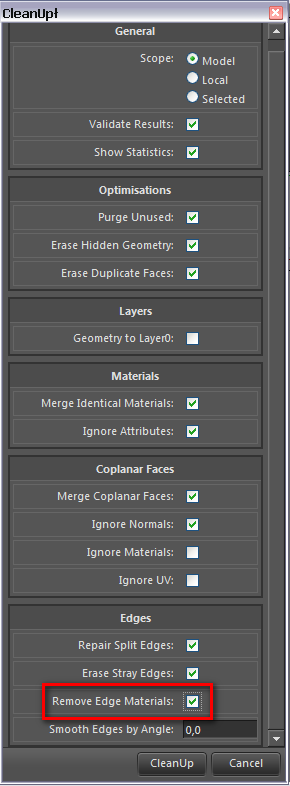

            CleanUp.png

            Gai...

            1 Reply Last reply
            Reply Quote 0
            • D
              DonovanWeberDesign
              last edited by

              @gaieus said:

              @donovanweberdesign said:

              Is there any way around this without going through and making all the lines in all the other groups black again?

              Have a look at the CleanUp Plugin. (Please, carefully read the installing instructions as other plugins are also needed).

              First run the plugin. Unless you also applied materials to whole groups/components, all will turn into the default black. Then paint your edges selectively.

              Beautiful. Notice the grey lines! Thanks!
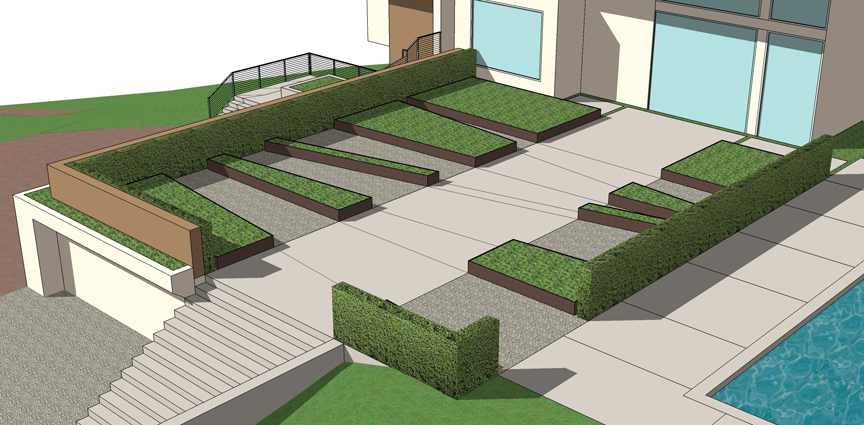
              http://donovanweberdesign.com/personal files/lines.jpg

              1 Reply Last reply
              Reply Quote 0
              • GaieusG
                Gaieus
                last edited by

                Now you can easily colour edges "en mass" if you simply colour the group/component they are in. If the faces have a different material, the group colour will only display on the edges.

                Gai...

                1 Reply Last reply
                Reply Quote 0
                • gillesG
                  gilles
                  last edited by

                  In an another way, if you set style to color by material then set view/faces style/wireframe.
                  Select all desired edges, right click, entity info, click the color window then choose your color.
                  Uncheck wireframe.

                  " c'est curieux chez les marins ce besoin de faire des phrases "

                  1 Reply Last reply
                  Reply Quote 0
                  • brookefoxB
                    brookefox
                    last edited by

                    Thanks for the tips. For unfaced edges (in my case naked edges componentized and used for 'grass'), only Alan's method seems to work:
                    @unknownuser said:

                    Model > Edges tab of the styles dialog and change the style from All the Same to Color by Material in the drop-down at the bottom
                    .

                    ~ Brooke

                    1 Reply Last reply
                    Reply Quote 0
                    • masterpaulM
                      masterpaul
                      last edited by

                      Is there a plugin that could turn all selected components and there edges to black? Wireframe doesnt do the job. And when you have many components and sub components things get messy.

                      1 Reply Last reply
                      Reply Quote 0
                      • Dave RD
                        Dave R
                        last edited by

                        Why in the world do you need a plugin when the Paint Bucket tool would handle it?

                        Etaoin Shrdlu

                        %

                        (THERE'S NO PLACE LIKE)

                        G28 X0.0 Y0.0 Z0.0

                        M30

                        %

                        1 Reply Last reply
                        Reply Quote 0
                        • masterpaulM
                          masterpaul
                          last edited by

                          @dave r said:

                          Why in the world do you need a plugin when the Paint Bucket tool would handle it?

                          In more complex model, the wireframe also selects faces. Also it gets more complicated with subcomponents. Lets say you want this component with many lines to be red (its complex and has many subcomponents). There isnt really a way to colour all the lines without opening each individual component and selected the line?

                          1 Reply Last reply
                          Reply Quote 0
                          • jeff hammondJ
                            jeff hammond
                            last edited by

                            ThruPaint by Fredo will help you.. (it's part of his FredoTools plugin suite)

                            i don't think you can select all the components then have them automatically update to all black edges but if you set up thruPaint as shown in the image, you'll be able to click on any edge and all connecting edges will be painted the chosen color.. the selection works through groups/components so you don't have to open each one individually.
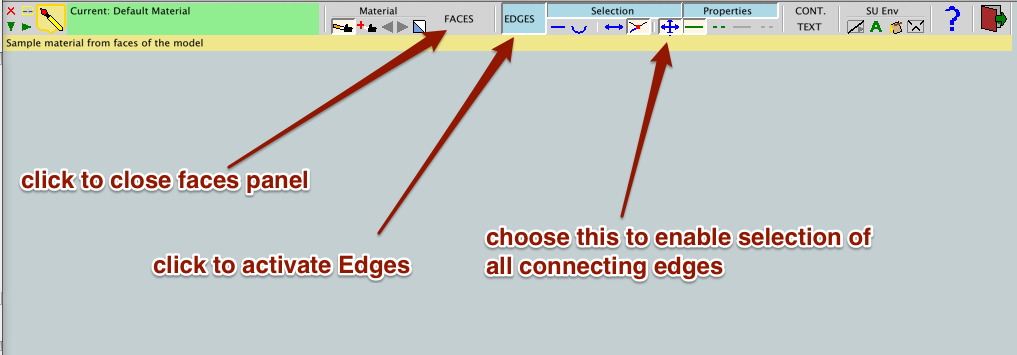
                            click-> bigger

                            dotdotdot

                            1 Reply Last reply
                            Reply Quote 0
                            • Dave RD
                              Dave R
                              last edited by

                              @masterpaul said:

                              In more complex model, the wireframe also selects faces.

                              You certainly don't have to select faces when selecting the edges in Wireframe. It's up to you and depends on how you use the Select tool.

                              Jeff's pointed you in the right direction, though.

                              Etaoin Shrdlu

                              %

                              (THERE'S NO PLACE LIKE)

                              G28 X0.0 Y0.0 Z0.0

                              M30

                              %

                              1 Reply Last reply
                              Reply Quote 0
                              • BoxB
                                Box
                                last edited by

                                Something like this Dave?


                                Edges.JPG

                                1 Reply Last reply
                                Reply Quote 0

                                Hello! It looks like you're interested in this conversation, but you don't have an account yet.

                                Getting fed up of having to scroll through the same posts each visit? When you register for an account, you'll always come back to exactly where you were before, and choose to be notified of new replies (either via email, or push notification). You'll also be able to save bookmarks and upvote posts to show your appreciation to other community members.

                                With your input, this post could be even better đź’—

                                Register Login
                                • 1 / 1
                                • First post
                                  Last post
                                Buy SketchPlus
                                Buy SUbD
                                Buy WrapR
                                Buy eBook
                                Buy Modelur
                                Buy Vertex Tools
                                Buy SketchCuisine
                                Buy FormFonts

                                Advertisement