Save model in PNG without background . anyone?
-
hi,
i wonder if there is an option how to save model in PNG without background or have to edit in other corelraw/photohop program
thanks!
-
The Mac version can do it natively and for us, puny Windows users, there is this plugin:
http://forums.sketchucation.com/viewtopic.php?t=30819Note that you need to turn off sky and ground and turn your background completely white (RGB 255 all) in order that this plugin work.
-
@gaieus said:
turn your background completely white (RGB 255 all) in order that this plugin work.
eh? really? thought I've used it with any colour background - as long as sky and ground is off...
-
That's what I remember. Hold on...
-
Yes I have - it's even in the screenshots of the post - using the default grey background of SU's architecture template.
-
Okay, you may be right, I could only find the sky and background issue in the topic (I was the one with problems).
-
For that model you could use QuadFace Tools to UV map the surface: http://forums.sketchucation.com/viewtopic.php?f=323&t=39442&hilit=+quadface#p348501
-
hi,
a pretty fast answer, thank you!
The more i learn, the more i realize how little i know in difference from you guys
best of luck ! -
hi,
thanks for your tips, so what are the final tricks?
a smart plugin solves everything ?
wow, that´s pretty cool !additional question about adding texture to faces
round one http://www.youtube.com/watch?v=AVYYdWYRqrg
flat surface http://www.youtube.com/watch?v=KEg6tHWNXb4&feature=relmfu
to move texture on flat surface is easy, but what about round one
i need to move a bit replace my texture at the entrance of the building / see picture
thanks!
-
hi,
the plugin works like a charm, but my model is a bit "hairy"
is there any setting how to convert model into higher resolution of PNG, to reduce raster to minimum please?
thank you!
-
You have the same settings as when you export normally, Width, Height and Anti-aliasing - adjust to your requirement.
I never use SketchUp's AA when exporting - instead I export the image out much larger and scale down in Photoshop which then produce nice smooth edges.
-
Haven't used other applications. Either I do it by hand, or I use the panorama function in PhotoShop. http://tv.adobe.com/watch/learn-photoshop-cs5/creating-a-panorama/
-
hi,
you´re right. to export bigger model, then resize in PS, but when i need transparent backgroung?
do you thing PS fix everything?
thanks!
note: just making a texture of bulding (another project) photos were made from many places around.
when i need to make panorama pic to wrap the model, i´ve to fix/strech photos for nice result.
do you think PS is the best, or is there any other tools/programs, which can fix distortions too.
your valuable tips are very appreciated
-
Aye - that is what I do. Some times I increase the size of Outlines in Edge Styles as the edge thickness doesn't scale up with the size of the export. An alternative is using Layout - let you export with nice AA, edge size scale, transparent background and you can even export as vector.
-
hi,
a prety fast help, thanks, the tut is great !
i´m very thankful, i´ve spent many valuable moments here with you guys

so, when i return to previous topic, the best think is to change resolution of size of the model, then reduce it in PS.
wonderful !

-
good job, well done !
hope to be a good source of wisdom like you someday
interesting info about panorama makers:

-
Thothom, if you please, what is meaning of the acronym "AA"?
-
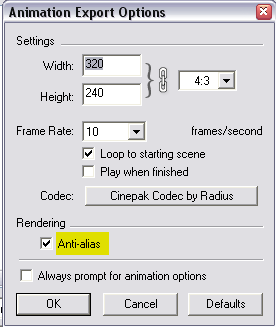
AntiAliasing. The rest you probably know but here it is for those new to SU.Can be set at system preferences level - in this case it only affects what is rendered on the screen.
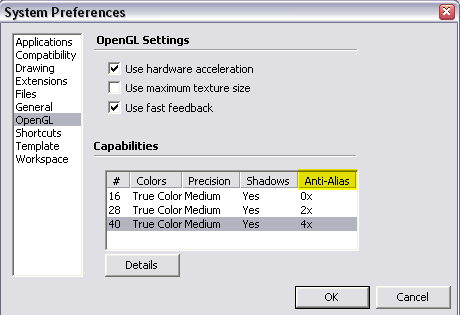
And can be set when exporting stills and animations - this time it is done by the software (SU) but that is not a nice job (here they could improve a lot)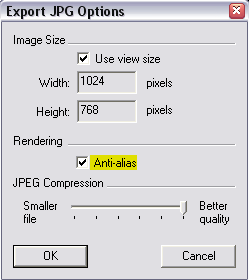
-
 of course!
 -
I told you knew!




Hello! It looks like you're interested in this conversation, but you don't have an account yet.
Getting fed up of having to scroll through the same posts each visit? When you register for an account, you'll always come back to exactly where you were before, and choose to be notified of new replies (either via email, or push notification). You'll also be able to save bookmarks and upvote posts to show your appreciation to other community members.
With your input, this post could be even better 💗
Register Login


Advertisement