sketchucation logo sketchucation
    • Login
    Oops, your profile's looking a bit empty! To help us tailor your experience, please fill in key details like your SketchUp version, skill level, operating system, and more. Update and save your info on your profile page today!
    ⚠️ Update | Sketchucation Tools 5.0.8 released with licensing improvements and bugfixes Download

    SVG file Import (importing)

    Scheduled Pinned Locked Moved Developers' Forum
    20 Posts 11 Posters 26.0k Views 11 Watching
    Loading More Posts
    • Oldest to Newest
    • Newest to Oldest
    • Most Votes
    Reply
    • Reply as topic
    Log in to reply
    This topic has been deleted. Only users with topic management privileges can see it.
    • kenK
      ken
      last edited by

      Script question.
      I have been using Simon Beard’s, FlightofIdeas.RB to make SVG files out of SketchUp’s faces. This script works well in to turning faces into SVG files. I then use MS Visio to open the SVG files, and export to a DWG file. I do this to make ACAD drawing from my work.

      I know that Sketchup can export to ACAD, but if the faces are not absolutely parallel to a plane, they will have the wrong dimensions. The FlightofIdeas.rb allows me to export the multiple faces without aligning all the faces to the same plane.
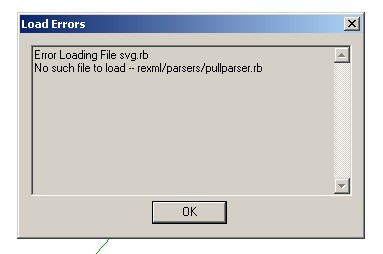
      However, I found this script, SVG.rb that should import SVG files into SketchUp. However, I get the following attached error code.
      I have looked for the missing files, however, I have been unable to locate this script.
      Any help would be appreciated.
      Thanks in advance
      Ken

      ToSketchup10-15.jpg

      Fight like your the third monkey on Noah's Ark gangway.

      1 Reply Last reply
      Reply Quote 0
      • J
        Jim
        last edited by

        Ken, I'll try to put rexml and svg.rb plugin together in a package for you. Stay tuned...

        Hi

        1 Reply Last reply
        Reply Quote 0
        • kenK
          ken
          last edited by

          @jim said:

          Ken, I'll try to put rexml and svg.rb plugin together in a package for you. Stay tuned...

          Thank you. I am not even sure what all I was looking for and what all I would need.

          What I wanted to do is to be able to bring back into sketchup the exported SVG files, so I could re-export the drawing into DWG files, without have to go through Visio.

          Ken

          Fight like your the third monkey on Noah's Ark gangway.

          1 Reply Last reply
          Reply Quote 0
          • J
            Jim
            last edited by

            I have not bee able to get an svg file imported. I think I have the setup right - all the files in the right place. I am able to start the import, an SVG Layer is created, but no geometry - only a lot of errors. I'm not sure at this point if it is the svg.rb file, or the rexml library that's generating the errors. I'm still trying as time permits.

            I've attached what I have so far.

            attachment removed due to conflict with set.rb

            Hi

            1 Reply Last reply
            Reply Quote 0
            • kenK
              ken
              last edited by

              Jim

              Thanks for the help. I am on my way home after 6 weeks in LA. Will be offline for a couple of days.

              Thanks again for you help

              Ken

              Fight like your the third monkey on Noah's Ark gangway.

              1 Reply Last reply
              Reply Quote 0
              • X
                xavier9
                last edited by

                Hello, I'm french, new here and my english is bad...

                I've seen that bezier.rb is missing in the zip file.
                I've found it on the Didier Bur's site.
                I could open just a few svg files, but the others
                can be converted to SIMPLE svg files with Inkscape.
                It works for me.

                Xavier

                1 Reply Last reply
                Reply Quote 0
                • J
                  Jim
                  last edited by

                  @xavier9 said:

                  Hello, I'm french, new here and my english is bad...

                  I've seen that bezier.rb is missing in the zip file.
                  I've found it on the Didier Bur's site.
                  I could open just a few svg files, but the others
                  can be converted to SIMPLE svg files with Inkscape.
                  It works for me.

                  Xavier

                  Yes, I forgot to include bezier.rb in the .zip file, I have added it to the .zip. I do have it in my plugins folder. Can you post an example svg file that you were successful in importing?

                  Hi

                  1 Reply Last reply
                  Reply Quote 0
                  • X
                    xavier9
                    last edited by

                    This one is importable

                    Xavier


                    Importable AFTER decompression!

                    1 Reply Last reply
                    Reply Quote 0
                    • X
                      xavier9
                      last edited by

                      Now, a not importable svg opened with Inkscape and saved as "simple svg"

                      It rocks!

                      Xavier


                      the two versions are included

                      1 Reply Last reply
                      Reply Quote 0
                      • X
                        xavier9
                        last edited by

                        Hm...

                        "Simple svg" is a french translation for "Plain svg"

                        So, in Inkscape, choose "Save as Plain svg" to have a file you can open in SU.

                        Xavier

                        1 Reply Last reply
                        Reply Quote 0
                        • J
                          Jim
                          last edited by

                          Ah yes, it now works. I have Inskscape installed, but I missed the "Save as Plain SVG" Option.

                          Thank you, Xavier.

                          Hi

                          1 Reply Last reply
                          Reply Quote 0
                          • E
                            Eulgrand
                            last edited by

                            Has anyone experienced problems with the sandbox tool after installing SVG import ? I did : no more smoove...

                            1 Reply Last reply
                            Reply Quote 0
                            • CadFatherC
                              CadFather
                              last edited by

                              yes the two don't work together

                              1 Reply Last reply
                              Reply Quote 0
                              • E
                                Eulgrand
                                last edited by

                                Thanks a lot CadFather, I'll deal with it 😉

                                1 Reply Last reply
                                Reply Quote 0
                                • M
                                  maxim_
                                  last edited by

                                  Hello. I am a newbie and I speak Russian. Translation of Google. I have a problem. When you import an SVG, I receive an error:

                                  Error (in script) while reading “D:\Libelle_3-view-SIMPLE.svg”:
                                  Exception parsing

                                  How to solve this problem?
                                  Regards Max.

                                  1 Reply Last reply
                                  Reply Quote 0
                                  • D
                                    danbig
                                    last edited by

                                    Hi -

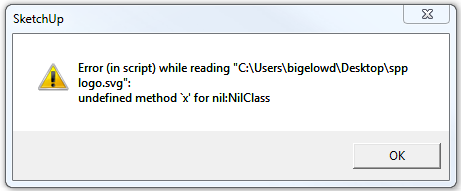
                                    Has anyone used this scrip in SU8 yet?

                                    I get the following error when I try to import:
                                    Capture.PNG

                                    1 Reply Last reply
                                    Reply Quote 0
                                    • C
                                      Catalyst
                                      last edited by

                                      Hi danbig,
                                      You need to open your SVG file with inkscape.

                                      1. Go into Inskcape's preferences
                                      2. Under "Tools" select "SVG output"
                                      3. Under "Path data" - uncheck "Allow relative coordinates"
                                      4. Right below that - check "Force repeat commands"

                                      Be sure to save the new preferences by hitting the little triangle-in-a-box button in the top right corner of the preferences window.

                                      Once you do that, you can save Plain SVG files and import them successfully into Sketchup for further manipulation.

                                      1 Reply Last reply
                                      Reply Quote 0
                                      • dereiD
                                        derei
                                        last edited by

                                        Where I can find this SVG importer ? Is it possible to be posted here, on SketchUcation?
                                        Thank you.

                                        DESIGNER AND ARTIST DEREI.UK

                                        1 Reply Last reply
                                        Reply Quote 0
                                        • TIGT
                                          TIG Moderator
                                          last edited by

                                          http://flightsofideas.net/ seems to be the source of many things SVG...
                                          e.g http://code.google.com/p/sketchup-svg-outline-plugin/downloads/detail?name=sketchup-svg-outlines-plugin-0.99.zip
                                          and for which http://www.sketchucation.com/forums/viewtopic.php?f=323&t=29481 also applies ?
                                          BUT this http://rhin.crai.archi.fr/rld/plugin_details.php?id=435
                                          etc etc...

                                          TIG

                                          1 Reply Last reply
                                          Reply Quote 0
                                          • M
                                            Majenta
                                            last edited by

                                            @catalyst said:

                                            Hi danbig,
                                            You need to open your SVG file with inkscape.

                                            1. Go into Inskcape's preferences
                                            2. Under "Tools" select "SVG output"
                                            3. Under "Path data" - uncheck "Allow relative coordinates"
                                            4. Right below that - check "Force repeat commands"

                                            Be sure to save the new preferences by hitting the little triangle-in-a-box button in the top right corner of the preferences window.

                                            Once you do that, you can save Plain SVG files and import them successfully into Sketchup for further manipulation.

                                            I HAVE NOT BEEN ABLE TO SUCCESSFULLY IMPORT A PLAIN SVG FILE INTO SKETCHUP MAKE 2014 USING THIS METHOD. IS THERE ANY ADDITIONAL STEPS I NEED? GOAL IS TO INPUT A SVG FILE (THE WORDS "PEACE" "ON" AND 'EARTH" WHICH HAVE BEEN TRACED AND WELDED TOGETHER IN TO THREE INDIVIDUAL SVGS.) OF A WELDED WORD INTO SKETCHUP AND EXTRUDE IT TO MAKE A 3D 'BOX' ABOUT 2" THICK.


                                            1 Reply Last reply
                                            Reply Quote 0

                                            Hello! It looks like you're interested in this conversation, but you don't have an account yet.

                                            Getting fed up of having to scroll through the same posts each visit? When you register for an account, you'll always come back to exactly where you were before, and choose to be notified of new replies (either via email, or push notification). You'll also be able to save bookmarks and upvote posts to show your appreciation to other community members.

                                            With your input, this post could be even better 💗

                                            Register Login
                                            • 1 / 1
                                            • First post
                                              Last post
                                            Buy SketchPlus
                                            Buy SUbD
                                            Buy WrapR
                                            Buy eBook
                                            Buy Modelur
                                            Buy Vertex Tools
                                            Buy SketchCuisine
                                            Buy FormFonts

                                            Advertisement

