Text Symbols
-
Are there "Degree", "Plus or Minus", "Diameter" more...symbols?
-
Are you trying to add these symbols to the text in a LayOut document? If so, you can add those characters (if the chosen font includes them) via Character Map under Windows>Accessories. Many of the characters can be typed by holding Alt and typing a 4-digit number on the numeric keypad. For example a degree symbol (°) is typed by holding Alt and typing 0176.
-
@dave r said:
Are you trying to add these symbols to the text in a LayOut document? If so, you can add those characters (if the chosen font includes them) via Character Map under Windows>Accessories. Many of the characters can be typed by holding Alt and typing a 4-digit number on the numeric keypad. For example a degree symbol (°) is typed by holding Alt and typing 0176.
"...via Character Map under Windows>Accessories."
I do not see this under the Layout Window menu; is it not inside the program Layout?. I did use the four digit code to get the result. Where are these codes located for quick reference?
-
The Character-Map tool is under Windows>Accessories i.e. accessed via the main PC's Windows Start menu... note that it is there, but it's inside the SystemTools subfolder in Vista...
It's a Windows tool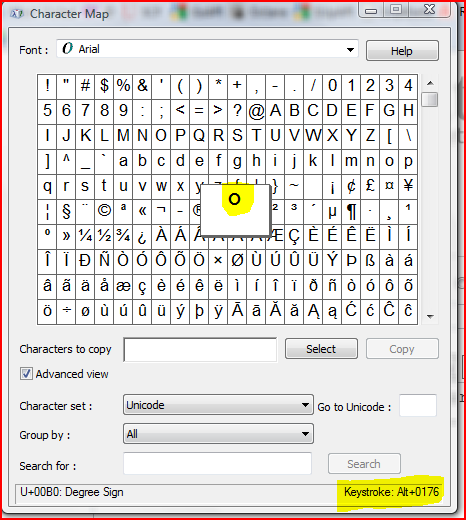 Any keystroke combo is shown bottom right. Simply select the symbol[s] you want and copy to the clipboard the revert to your Layout window and paste it [or you can do the Altxxxxx combos inside your app' once you've learnt them
  ]
] -
Sorry I wasn't more clear on that. Looks like TIG to the rescue.
-
…and just to include us Maconauts, the Character Viewer and Keyboard Viewer apps can be added to the menubar from the SystemPreferences|Keyboard pane - tick the 'Show Keyboard & Character viewer in menubar' checkbox.
You can get all sorts of interesting characters.
Ever head of the 'Z notation schema composition' symbol? - ⨟ - Nor me.
Asterism - ⁂
Degree - °
Plusminus - ±
Diameter - ⌀
Blank symbol - ␢ (but it's not blank!)


Hello! It looks like you're interested in this conversation, but you don't have an account yet.
Getting fed up of having to scroll through the same posts each visit? When you register for an account, you'll always come back to exactly where you were before, and choose to be notified of new replies (either via email, or push notification). You'll also be able to save bookmarks and upvote posts to show your appreciation to other community members.
With your input, this post could be even better 💗
Register Login


Advertisement