sketchucation logo sketchucation
    • Login
    Oops, your profile's looking a bit empty! To help us tailor your experience, please fill in key details like your SketchUp version, skill level, operating system, and more. Update and save your info on your profile page today!
    ⚠️ Important | Libfredo 15.6b introduces important bugfixes for Fredo's Extensions Update

    [REQ] triangulation ruby

    Scheduled Pinned Locked Moved Plugins
    19 Posts 9 Posters 3.3k Views 9 Watching
    Loading More Posts
    • Oldest to Newest
    • Newest to Oldest
    • Most Votes
    Reply
    • Reply as topic
    Log in to reply
    This topic has been deleted. Only users with topic management privileges can see it.
    • R Offline
      remus
      last edited by

      i think TIGs written such a plugin already, called something like triangulate.rb im sure a quick search will throw up some results. It wouldnt do your different methods of triangulation but its a start.

      http://remusrendering.wordpress.com/

      1 Reply Last reply Reply Quote 0
      • TIGT Offline
        TIG Moderator
        last edited by

        My triangulateQuadFaces.rb already triangulates quad faces successfully but always from vertex[0] to vertex[2].
        It's here http://forums.sketchucation.com/viewtopic.php?p=201025#p201025
        You seem to want a subdivide option on top of that?
        My [and CJP's and TT's!] triangulateFaces.rb triangulates any face successfully but is 'messy', just like auto-fold ! http://forums.sketchucation.com/viewtopic.php?p=175613#p175613

        TIG

        1 Reply Last reply Reply Quote 0
        • soloS Offline
          solo
          last edited by

          TIG, you are correct, I want to use it with the SDS plugin, the current triangulation does not work well on all shapes, so if I had more ways to triangulate before subdivision the better and smoother results I can accomplish.

          http://www.solos-art.com

          If you see a toilet in your dreams do not use it.

          1 Reply Last reply Reply Quote 0
          • soloS Offline
            solo
            last edited by

            TIG, I downloaded both the ruby's and they work great for triangulating quads, and they seem to triangulate differently from each other (I did a test with a box), however they only split the quad, so they can only do 1 iriteration. Now id another ruby can be added to split a triangle into two, that would be awesome.
            Or... one ruby with an options panel, thus incorporating all triangulation/splitting ruby's into one.
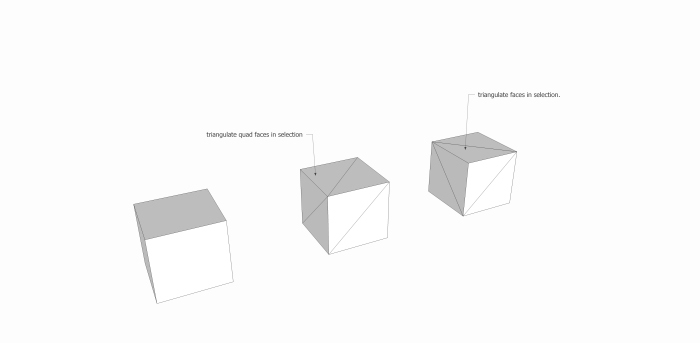

            Untitledtriangulate.jpg

            http://www.solos-art.com

            If you see a toilet in your dreams do not use it.

            1 Reply Last reply Reply Quote 0
            • TIGT Offline
              TIG Moderator
              last edited by

              The 'basic quad' version always divides a four-sided face from its vertex[0] to its vertex[2] wherever they are.
              The 'general' version triangulates quads and upwards, but this uses the API mesh methods to divide the faces - this seems to take a face and divides it up from the first vertex it finds - which might be nearest the camera ? Therefore the results can differ...

              They have a built in check and ignore any three-sided faces as they are already triangulated.

              You could run [a yet to be invented script] 'subdivideAndTrianglulateQuadFaces()'...
              Which subdivides each quad-face into a triangle [AND beyond], which is overlaid so that you have your 3/4/5th option for the subdivision: however, your 6th version needs to be done to the quad first as it becomes 4 quads then subdivided [its sibling is type-4]...

              It's quite possible - any other ideas before I sleep on it ? 😐

              TIG

              1 Reply Last reply Reply Quote 0
              • soloS Offline
                solo
                last edited by

                Yea, that sounds awesome.

                If it can group after triangulation that would be very handy when you need to SDS just parts of a model/mesh.

                http://www.solos-art.com

                If you see a toilet in your dreams do not use it.

                1 Reply Last reply Reply Quote 0
                • D Offline
                  DIEGO-RODRIGUEZ
                  last edited by

                  other opcion is subdivideSelected.rb (in English) of wikii.

                  has two options.

                  • division triangular
                  • division rectangular

                  http://img138.imageshack.us/img138/8563/subdivideselected.gif

                  1 Reply Last reply Reply Quote 0
                  • TIGT Offline
                    TIG Moderator
                    last edited by

                    Solo
                    So, if your Mandarin is up to it, then it might already exist ?
                    ❗

                    TIG

                    1 Reply Last reply Reply Quote 0
                    • soloS Offline
                      solo
                      last edited by

                      ooooh! 😲

                      Anyone able to translate that ruby? is it free? how can I get an English version?

                      http://www.solos-art.com

                      If you see a toilet in your dreams do not use it.

                      1 Reply Last reply Reply Quote 0
                      • jeff hammondJ Offline
                        jeff hammond
                        last edited by

                        hey Pete,

                        wikii is a member here and i think that tool is included in SUtools?

                        http://forums.sketchucation.com/viewtopic.php?f=180&t=14480

                        the download link is missing now though.. maybe PM him?

                        [edit] oops, fixed link.

                        dotdotdot

                        1 Reply Last reply Reply Quote 0
                        • D Offline
                          DIEGO-RODRIGUEZ
                          last edited by

                          the plugin is free and simple of traslate

                          http://forums.sketchucation.com/viewtopic.php?f=323&t=24207

                          1 Reply Last reply Reply Quote 0
                          • T Offline
                            tallbridgeguy
                            last edited by

                            Could somebody post a link to the ruby? It looks like a plugin I could use as well.

                            thanks!
                            s

                            Nielsen
                            http://www.tallbridgeguy.com/

                            1 Reply Last reply Reply Quote 0
                            • TIGT Offline
                              TIG Moderator
                              last edited by

                              Here's a tweaked version of it, I've given it a Plugins submenu 'Subdivide Selected' with the two options of 'At Vertices' and 'At Mid-Points'.
                              I also made a few minor adjustments and moved the midpoints def inside of the main def wrapper to avoid clashes with others...
                              Seems to work fine.
                              Hope wikii doesn't mind...
                              subdivideSelected.rb

                              TIG

                              1 Reply Last reply Reply Quote 0
                              • D Offline
                                DIEGO-RODRIGUEZ
                                last edited by

                                exelente tig. thank you very much.

                                Maybe, Jim can add this option to plug protrudes, NO?

                                1 Reply Last reply Reply Quote 0
                                • EarthMoverE Offline
                                  EarthMover
                                  last edited by

                                  Thanks TIG. Plugin works great for me. Curious to see Pete's new SDS method.

                                  3D Artist at Clearstory 3D Imaging
                                  Guide Tool at Winning With Sketchup
                                  Content Creator at Skapeup

                                  1 Reply Last reply Reply Quote 0
                                  • soloS Offline
                                    solo
                                    last edited by

                                    Thanks a bunch TIG, this should do the trick.

                                    Adam, I am planning to use this division with Sculpt tools and SDS. Sculpt tools works great for moving vertices on pre-divided meshes, I feel like I have more control over what to expect from the subdivision now.

                                    http://www.solos-art.com

                                    If you see a toilet in your dreams do not use it.

                                    1 Reply Last reply Reply Quote 0
                                    • thomthomT Offline
                                      thomthom
                                      last edited by

                                      Moved the thread to the Developer's forum. We have reorganized so that the Plugin section is only a list of plugins you can download and use. πŸ€“

                                      Thomas Thomassen β€” SketchUp Monkey & Coding addict
                                      List of my plugins and link to the CookieWare fund

                                      1 Reply Last reply Reply Quote 0
                                      • 1 / 1
                                      • First post
                                        Last post
                                      Buy SketchPlus
                                      Buy SUbD
                                      Buy WrapR
                                      Buy eBook
                                      Buy Modelur
                                      Buy Vertex Tools
                                      Buy SketchCuisine
                                      Buy FormFonts

                                      Advertisement



