sketchucation logo sketchucation
    • Login
    Oops, your profile's looking a bit empty! To help us tailor your experience, please fill in key details like your SketchUp version, skill level, operating system, and more. Update and save your info on your profile page today!
    ⚠️ Important | Libfredo 15.6b introduces important bugfixes for Fredo's Extensions Update

    Creating curves on an extruded shape that is curved...

    Scheduled Pinned Locked Moved Newbie Forum
    sketchup
    15 Posts 7 Posters 1.1k Views 7 Watching
    Loading More Posts
    • Oldest to Newest
    • Newest to Oldest
    • Most Votes
    Reply
    • Reply as topic
    Log in to reply
    This topic has been deleted. Only users with topic management privileges can see it.
    • Jean LemireJ Offline
      Jean Lemire
      last edited by

      Hi Land234, hi folks.

      See this SU file for ideas.


      Ripple on curved surface.skp

      Jean (Johnny) Lemire from Repentigny, Quebec, Canada.

      1 Reply Last reply Reply Quote 0
      • L Offline
        land234
        last edited by

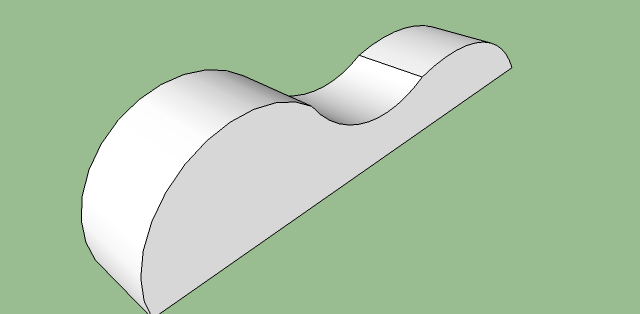
        Thanks folks! That is what I'm looking to do, with the ripple on the top like that. πŸ‘

        Stupid noob question. What is fred06's fredoscale plugin?

        1 Reply Last reply Reply Quote 0
        • R Offline
          remus
          last edited by

          http://forums.sketchucation.com/viewtopic.php?f=180&t=17948&st=0&sk=t&sd=a&hilit=fredoscale

          http://remusrendering.wordpress.com/

          1 Reply Last reply Reply Quote 0
          • L Offline
            land234
            last edited by

            @jean lemire said:

            Hi Land234, hi folks.

            See this SU file for ideas.

            wow, thanks for putting that together...! I just downloaded version 7 and was able to look at it, thanks! πŸ‘

            1 Reply Last reply Reply Quote 0
            • M Offline
              monk77
              last edited by

              @remus said:

              Heres a quick go using the bend tool in fred06's fredoscale plugin.

              1. Make wave
                [attachment=1:8kpf8z01]<!-- ia1 -->wave1.jpg<!-- ia1 -->[/attachment:8kpf8z01]

              2. Use bend
                [attachment=0:8kpf8z01]<!-- ia0 -->wave2.jpg<!-- ia0 -->[/attachment:8kpf8z01]

              Hi Remus,

              how do you do that? I downloaded fredos scale plugin and there is an option "Radial Bending (free). What must I select to get this nice curve?

              Cheers
              monk77

              my sketchup-animations

              1 Reply Last reply Reply Quote 0
              • GaieusG Offline
                Gaieus
                last edited by

                No, thet's (I guess) "Shape Bender" by Chris Fullmer.

                Gai...

                1 Reply Last reply Reply Quote 0
                • R Offline
                  remus
                  last edited by

                  It was radial bend, and i just grouped the whole thing->selected the group->bend around one of the corners. The plugin does the rest for you.

                  http://remusrendering.wordpress.com/

                  1 Reply Last reply Reply Quote 0
                  • GaieusG Offline
                    Gaieus
                    last edited by

                    My bad - sorry for the misleading info
                    πŸ˜‰

                    Gai...

                    1 Reply Last reply Reply Quote 0
                    • M Offline
                      monk77
                      last edited by

                      @gaieus said:

                      My bad - sorry for the misleading info
                      πŸ˜‰

                      No problem Gaieus. πŸ˜„

                      @Remus I have made a group, selected this and then I use the radial blend tool at the top of my mesh (in the middle of the top-surface), but it doesn't work. It is totally deformed. If I use the tool around one of the corners, it does nothing.

                      Can you mark the point in my attachment, where I must use the radial blend tool?

                      Cheers
                      monk77

                      mesh.png

                      my sketchup-animations

                      1 Reply Last reply Reply Quote 0
                      • massimoM Offline
                        massimo Moderator
                        last edited by

                        Have you pressed "F4" before you used the bend tool on your shape? This will let you to obtain a smooth curved bend.

                        1 Reply Last reply Reply Quote 0
                        • M Offline
                          monk77
                          last edited by

                          @massimo said:

                          Have you pressed "F4" before you used the bend tool on your shape? This will let you to obtain a smooth curved bend.

                          Thank you Massimo. I got it. F4-key was the right way.

                          Cheers
                          monk77

                          my sketchup-animations

                          1 Reply Last reply Reply Quote 0
                          • massimoM Offline
                            massimo Moderator
                            last edited by

                            You're welcome. πŸ˜„

                            1 Reply Last reply Reply Quote 0
                            • 1 / 1
                            • First post
                              Last post
                            Buy SketchPlus
                            Buy SUbD
                            Buy WrapR
                            Buy eBook
                            Buy Modelur
                            Buy Vertex Tools
                            Buy SketchCuisine
                            Buy FormFonts

                            Advertisement
