sketchucation logo sketchucation
    • Login
    1. Home
    2. wind-borne
    3. Posts
    Oops, your profile's looking a bit empty! To help us tailor your experience, please fill in key details like your SketchUp version, skill level, operating system, and more. Update and save your info on your profile page today!
    โš ๏ธ Important | Libfredo 15.6b introduces important bugfixes for Fredo's Extensions Update
    Offline
    • Profile
    • Following 0
    • Followers 0
    • Topics 5
    • Posts 189
    • Groups 1

    Posts

    Recent Best Controversial
    • RE: Calling Whaat and Fredo!! new MAC issues (SOLVED)

      @chrisjk said:

      In my case, the Podium stuff turned out to be a red herring.

      Immediately upon opening SU after installing Podium, several plugins
      broke down.

      Immediately after flushing what Podium created, SU plugins worked properly in the proper location.

      In between, some valuable learning experiences coupled with rage. ๐Ÿ˜’

      posted in Developers' Forum
      wind-borneW
      wind-borne
    • RE: Help: several of Didier's plugins not working

      I had to install Didier's Layer Manager and Projections on both HD and User paths when I had Podium on my computer in order for tools to be functional.
      Not elegant, but maybe worth a quick try.

      posted in Developers' Forum
      wind-borneW
      wind-borne
    • RE: Why do some Rubies not load?

      @tfdesign said:

      I still have issues with BoolTools. The tools are finally showing up on screen, but the ruby still refuses to work. The same goes with the layer manager tool. No success there either.

      When I was in the middle of this mess, Bool tools would work thru HD and icons would show up if I installed thru User also, so had to be in both locations for full functioning, same with layer manager. The most perplexing to me was Fredo's bezier in which half of tools disappeared thru HD and the whole toolset would show when installed thru User. Was so relieved when I found those stray podium files buried in SU6, which they hadn't mentioned, and was able to clean everything up.

      Jeff, you are a real trooper for going down that path again, I won't go anywhere near Podium in the future. ๐Ÿ˜ฎ


      SUPodium.jpg

      posted in Developers' Forum
      wind-borneW
      wind-borne
    • RE: Why do some Rubies not load?

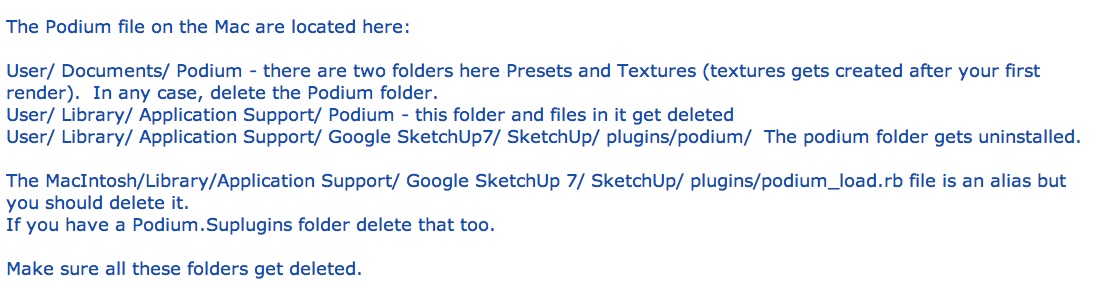
      I went through this awhile back. After a few emails, Podium sent this as all the locations they install at. About a month later I found more Podium files in SU 6 plugin folder and once deleted, life returned to normal.


      Region capture 1.jpg

      posted in Developers' Forum
      wind-borneW
      wind-borne
    • RE: Spacebar woes

      Occasionally have situation where spacebar tap will not exit Rectangle tool.
      There is another default shortcut for Select on Macs also, Command /

      posted in SketchUp Discussions
      wind-borneW
      wind-borne
    • RE: Finding the actual *Plugins*

      almost 700 listed here at the site you are on right now with links to threads and plugins.
      SketchUcation index

      posted in Newbie Forum
      wind-borneW
      wind-borne
    • RE: [Plugin] Control points ver. 1.6.

      kirill,

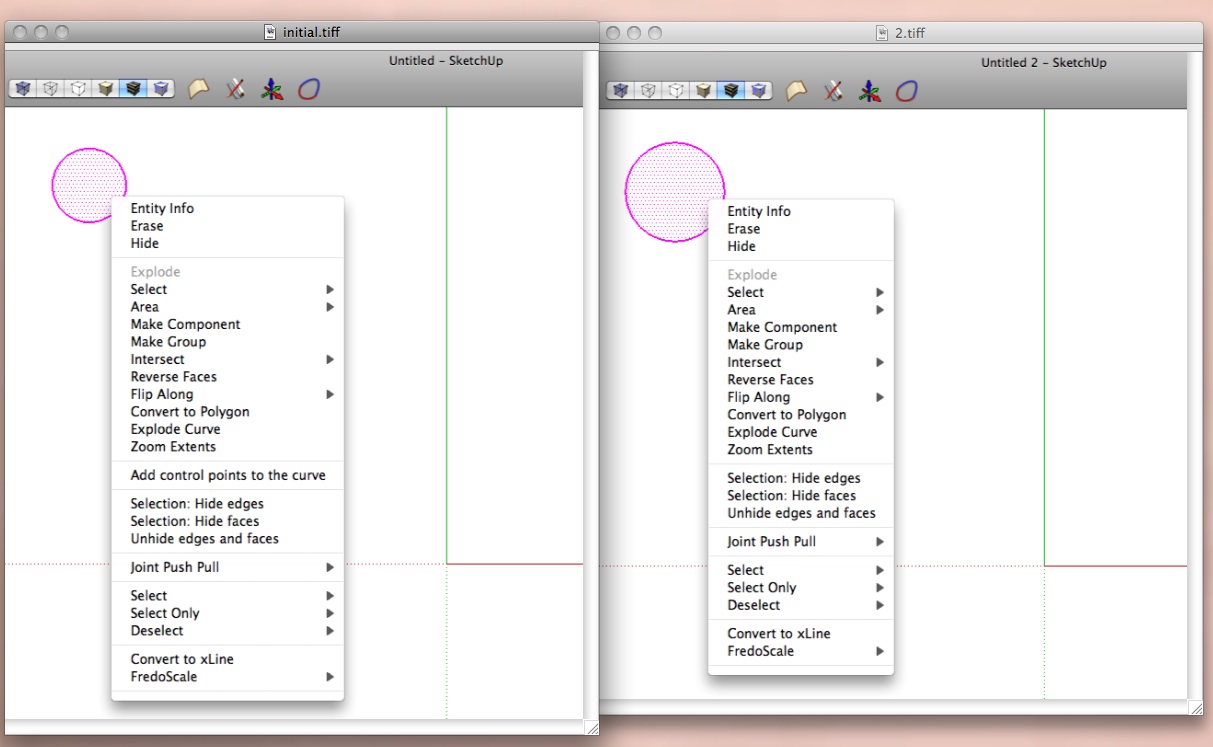
      Thanks for your response, the problem is that the plugin only appears in the first file of a session, be it opening Sketchup with an old file or a new one. If I open an old or new after the initial startup, plugin is simply not there, curves or curves/faces selected doesn't make any difference( works both ways in first file opened).

      The strange behavior is that the plugin follows the copy/paste and works on the original object (even though I have deleted it after pasting) in the new file but not on anything newly drawn.

      Actually by thinking out loud I can see now how to do what I need to, just a cumbersome path.

      The plugin, itself, has a nice feel. ๐Ÿ˜„

      posted in Plugins
      wind-borneW
      wind-borne
    • RE: [Plugin] Control points ver. 1.6.

      Very interesting plugin.

      i am having a strange problem, plugin only shows up on initial opening drawing. If I open a new one without closing Sketchup completely, no plugin.

      I've tried copy from initial( where it works) and paste to new with real odd results also. The plugin then shows up but misbehaves. If I draw a new object, new construction points are put on the pasted object(even though I have deleted it) instead of new object which was selected.


      control points.jpg

      posted in Plugins
      wind-borneW
      wind-borne
    • RE: [Plugin] HoverSelect - v1.5a - 07 Oct 17

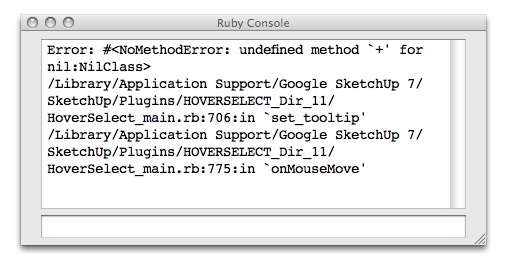
      Just joined recently to enter the wild, wacky world of ruby. Ran across this thread and realized this might be something i would use regularly, but only a couple of the functions work, no hovering, rectangle or lasso selecting. Clicking an edge, very difficult; clicking a face does select edges easily.

      Your other tools I downloaded work fantastic.๐Ÿ˜„
      Thanks in advance if you can steer me in right direction. ๐Ÿ˜†


      ruby.jpg

      posted in Plugins
      wind-borneW
      wind-borne
    • 1
    • 2
    • 6
    • 7
    • 8
    • 9
    • 10
    • 10 / 10