@tulacong said:
thank you...thank you ....oh zeeee
Hi,tulacong.
I am happy for your word!
Hi,SUMASTER.
I will improve it and update it after two weeks.
Thnx. 
@tulacong said:
thank you...thank you ....oh zeeee
Hi,tulacong.
I am happy for your word!
Hi,SUMASTER.
I will improve it and update it after two weeks.
Thnx.
Hi,
I update to version 1.4beta.
I add usefull function "Table Editor".
and improves.
enjoy. 
@hygicell said:
excellent tool, but not (yet) working for me:
I cannot find an installation manual
nor a user manual
and where do I put the .csv files?
please help
Frank
Hi, hygicell.
Please puts ".csv"file to folder you like.but windows special folder is not recommended.
The windows special folder is like "C:\program files" "C:\Windows".
Mac user do not mind this.
After puts it,You must "Change profile list path" from plugins menu.
and select the file.
Hi,Mastarhand.
Me,too.
Hi,all.
I will update this script after few days.
Thanks.
@sufractal said:
@tak2hata said:
@sufractal said:
I just upgraded to the latest version, but am no longer able to access "steel columns" in the North American List? Other elements appear to work fine.
Hi,Sufractal.
In my enviroment,"Steel Column" shown from "North American pflist" no problem.
Check the line include "##" in the csv file, If you edited it.
"##STEEL_COLUMN" is needed.so, send to me your profile list or upload here it.
and I will look it.Thanks.
i believe I used the correct text in the file?
Hi,
I tested it working fine.
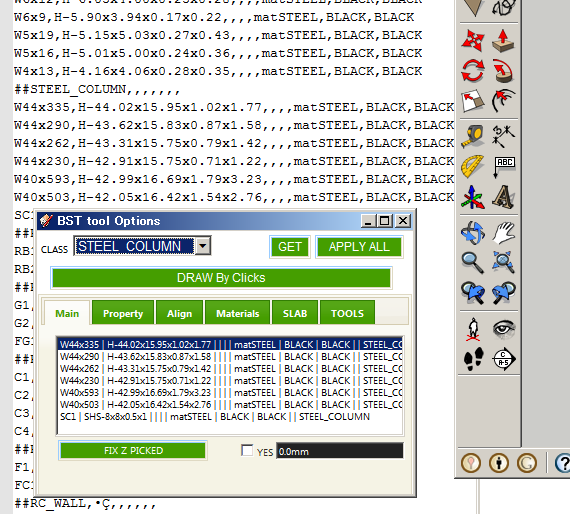
I judge that it is fine by looking only that picture.
The last advice I say is "Change Profile list path" and select it again.
The information about this problem is too small.
Is there anyone had same problem?
and please reply here.
Thanks.
Hi,All.
I update to version2.2.
Add Menu ,"Change Units" for reports.
You can select every units of length , area , volume, cost.
Hi,camilozunga.
I tested solid quantify on mac.
I could not found problem you sayed.
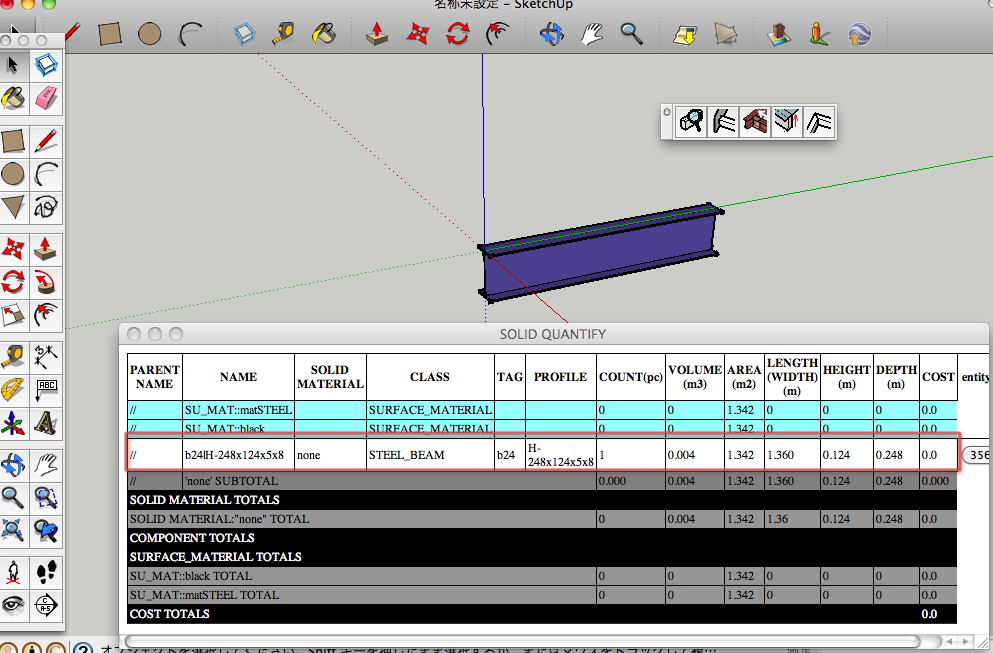
Green line in this picture is Y-Axis.
The entity was placedalong Y-Axis.
Webdialog is fine.
Please upload here skp file had problem and Screen capture of Webdialog.
Or send it to me by message.
Thanks.
@sufractal said:
I just upgraded to the latest version, but am no longer able to access "steel columns" in the North American List? Other elements appear to work fine.
Hi,Sufractal.
In my enviroment,"Steel Column" shown from "North American pflist" no problem.
Check the line include "##" in the csv file, If you edited it.
"##STEEL_COLUMN" is needed.
so, send to me your profile list or upload here it.
and I will look it.
Thanks.
Hi,all.
I attach CTMan's UK Steel pflist file on top of this thread.
It will helps Building structure tool users.
Thanks.
Hi,camilozunga.
I will test the problem on mac.
Please wait.
Hi,QS3D.
I made this plugin be using simply.
So there are only "meter" or "inch".
I will add selecting quantities units.(maybe units in Sketchup).
Please wait.
Thanks.
Hi,All.
I update to version1.2. in Sep17,2012.
v1.2:2012.09.17:
Bugs? fixed.and Improves.
#Fix:Undo when Multi(Extend/Chamfer/Grow).
#Fix:Undo when change properties of many entities.
#Fix:(Extend/Chamfer/Grow) Structure entity which have devided side by user.
#Improve about create slab.
Hi,Sumaster.
In your file ,there was no compound wall.
But the wall's edge was cutted by your manipulation.It do not good for "Extend tool" in previous version.
It was improved in this ver.
Thanks.
@sumaster said:
yes
and another problem facing here . . .
i upgrade your new version but when i OPEN my OLD version file means (i was working your old BS tool) and exend to face and other 3 tools are not working good . . .Pleas CHK
Hi,Please upload your data include problems.
The part to limit the problem entities.
Hi,CTMan.
I add link to your reply in the top of thread.
Thanks a lot for uploading your profile list of UK STEEL.
Channel([) have tapered flanges when the schema is like "[-100x50x5x7.5x8x4"
Channel([) have not tapered flanges when the schema is like "[-100x50x5x7.5"
So If you want to not tapered flange Channel,the schema is like "[-AxBxCxD".
Hi,sumaster.
"Extend to structure" tool works extending the structure to the other structure.not to face.
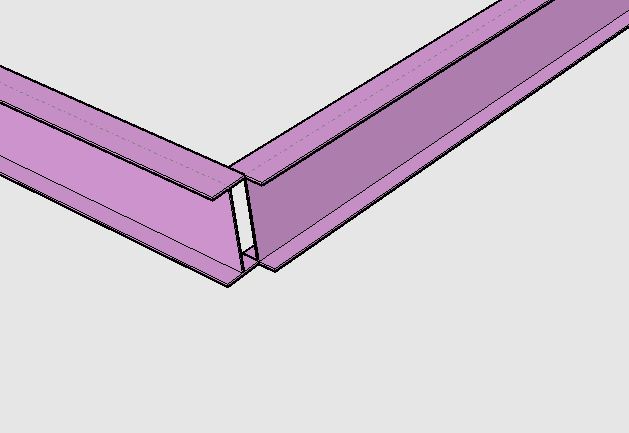
Using "Extending to Face" to extend like this picture takes time and effort.
So "Extend to Structure" exists for that purpose.
I see the "undo" problem.
I will fix it few days.
Thanks.
Hi,
I update this in Sep 05,2012.
Bugfix about extending to face with selecting single bst entity.
Hi,Sumaster.
Adding toolbar like previous version has not done well yet.
I gave priority to correction of a bug and update.
wait while.
Hi,david.
"Add new profile" was disable since version1.0.
Because the adding to CSV with ruby script has problem.
The text code is defferent between languages.
So the character peculiar in the language included in csv will be modified strange when ruby overwrite the csv file.
Please edit CSV file with application like Excel or open office calc.
Thanks.
Hi,All and Henk.
I update this.
There are two Bugfix.
Surface area calculated double,when that face do not have back-material.
And mistaked about units when report rendered in webdialog.
This problem fixed.
Thanks.
@henkw said:
Screenshot of error report with wrong areas indicated.
Hi,Henk.
Thanks for your helps.
I will fix the problem in few days and update here.
Thanks.
Hi,CTman.
You are welcome!
If you upload the PFC profile file here , I will create link to your post in top of thread.
Your PFC profile file will help users of BST!
Hi,Sumaster.
I also checked the bug.
I will fix the problem within several days.
And I will update here.
Thanks.
@sumaster said:
Hi,
First thank you for made this plugin . . . . ,
how i add previous toolbar . . . . ?
its very Helpful. . . .
Hi,sumaster.
I changed all dialogs to one webdialog in version1.0+.
So I worried many icons in the toolbar become obstructive.
And older dialogs is not valid now.
I can create toolbar with many icons like older.
It will open webdialog with specified class(ex. STEEL_COLUMN,RC_GIRDER,etc).
Please wait.
Thanks.
Hi,hugo , mitcorb and everybody.
It is bug,and I fixed it.
It happened according to sending double quotation in webdialog.
The length is shown with double quotation.When sketchup "units" is "Architecture" or etc.
And I re-add function "extending" multiple walls to face."growing" also.
Thanks.
Hi,
I am too busy.So I can not improve my plugins.
Multiple "Grow to face" will be added.
I will consider applying "Grow" for "MWALL".
@sufractal said:
tak2hata:
I have what I hope is a simple question. How do I change the color of any beam, column, etc. before placing/drawing it? In the webdialog box, the option default is black. No matter which color I type into the box, the color remains a light blue color.
The color is material.
Beams material is created from "FRONT FACE MATERIAL" and "BACK FACE MATERIAL".
It appears random color when the materialnames in "FRONT FACE MATERIAL" and "BACK FACE MATERIAL" is not existed in sketchup model.
So you may set sketchup templete with the materials.
Thanks.
Hi,zfrps and all.
I update BST version to 1.1e.
Bugfix about auto creating columns.
And improves.
BST becomes nice tool step by steps.
Thanks.
