sketchucation logo sketchucation
    • Login
    1. Home
    2. TaffGoch
    3. Posts
    Oops, your profile's looking a bit empty! To help us tailor your experience, please fill in key details like your SketchUp version, skill level, operating system, and more. Update and save your info on your profile page today!
    โš ๏ธ Important | Libfredo 15.6b introduces important bugfixes for Fredo's Extensions Update
    Offline
    • Profile
    • Following 0
    • Followers 0
    • Topics 7
    • Posts 364
    • Groups 1

    Posts

    Recent Best Controversial
    • RE: Solar Power - Be inspired

      Bob,

      Solar ice-making and cooling has been of recent interest. Maybe this article will intrigue (and inspire) others as well:

      Solar Ice Maker

      Several companies have started producing turnkey products, based on the principles from this "do-it-yourself" article. It's starting to see some application in Africa and other developing countries, where electrical infrastructure is limited, or too expensive:

      ISAAC - Solar Ice Company
      dvice - Solar icemaker (San Jose State University)

      Regards,
      Taff

      posted in Corner Bar
      TaffGochT
      TaffGoch
    • RE: Contour lines on irregular surface

      @pbacot said:

      How do you generate the terrain in the Palo Duro and Panther Creek models?"

      Peter,

      I download USGS DEM data files from the GIS Data Depot, to start.

      SketchUp can import DEM files, but they're HUGE! I import them into TerraGen, and select the portion of the topographic map in which I'm interested, sub-sample (simply) the data, and export as a DXF file. These steps reduce the complexity of the mesh data, and produce a much more reasonably-sized data file for SketchUp to import. (TerraGen is free, as are a couple of plugins required to do the DXF stuff.)

      Once you've done it a few times, it goes pretty quickly. (By the way, topographic map imagery can also be downloaded from the GIS Data Depot.)

      Taff

      posted in Developers' Forum
      TaffGochT
      TaffGoch
    • RE: Sketchup selection tool problem

      wanderer...

      It sounds to me like a graphics card (or driver) problem. spirp is intimating such, when he suggests disabling 'hardware acceleration.' That basically cripples the use of the 3D functions provided by your graphics card, and forces SketchUp to do all the 3D calculations itself (which will slow down operations.)

      If you have no other graphics display problems, you may want to try disabling 'fast feedback' first (instead.) This function handles much of the screen updates involving the cursor. Disabling 'fast feedback' doesn't impair the operational speed as much as disabling 'hardware acceleration.'

      How to disable 'fast feedback':
      http://sketchup.google.com/support/bin/answer.py?answer=39694
      (I know, the title doesn't seem to fit the problem. Try it anyway.)

      How to disable 'hardware acceleration' is described at the bottom of this page:
      http://sketchup.google.com/support/bin/answer.py?answer=36252

      Some additional important info, regarding [url=http://download.sketchup.com/OnlineDoc/gsu_win/M-Technical_Reference/Tech-OpenGL.htm:vykyw6x6]SketchUp and OpenGL[/url:vykyw6x6]

      Taff

      posted in Newbie Forum
      TaffGochT
      TaffGoch
    • RE: Contour lines on irregular surface

      Peter,

      Sorry I didn't catch this discussion earlier. Any help here?
      Terrain Tech - Google 3D Warehouse

      Taff

      posted in Developers' Forum
      TaffGochT
      TaffGoch
    • RE: How to see thumbnail with sketchup files ???

      @unknownuser said:

      ":3br823pt]help me !

      Well, I tried, but didn't see any feedback from you regarding my two posts...

      Were they not of any use?

      posted in Newbie Forum
      TaffGochT
      TaffGoch
    • RE: Black screen lockup

      @unknownuser said:

      ":16igdwe5]SketchUp is not on the list, so I'm now experimenting....

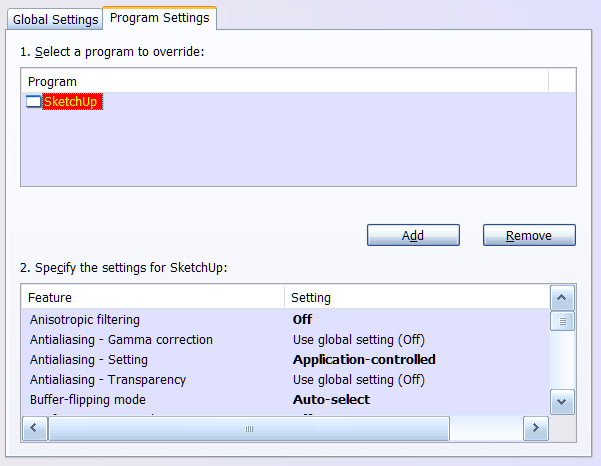
      You should be able to add 'SketchUp' using the nVidia control panel.
      nVidia_control_panel.png
      I seem to recall that the 'Conformant texture clamp' setting made a difference on my nVidia system. Here are my nVidia Quadro settings for SketchUp, should they be of any use to you:

      Ansitropic filtering : Off
      Antialiasing - Gamma correction : Off
      Antialiasing - Setting : Application-controlled
      Antialiasing - Transparency : Off
      Buffer-flipping mode : Auto-select
      Conformant texture clamp : Off
      Enable overlay : Off
      Error reporting : Off
      Exported pixel types : Color indexed overlays (8 bpp)
      Extension limit : Off
      Force stereo shuttering : Off
      Maximize texture memory : On
      Multi-display/mixed-GPU acceleration : Multiple display performance mode
      Stereo - Display mode : Use on-board DIN connector
      Stereo - Enable : Off
      Stereo - Swap eyes : Off
      Threaded optimization : Auto
      Triple buffering : Off
      Unified back/depth buffer : On
      Vertical sync : Use the 3D application setting
      Taff


      DELL Precision M90 / 2 GB RAM
      nVidia Quadro FX 1500M / 256 MB
      nVidia driver: Forceware 162.65

      posted in Newbie Forum
      TaffGochT
      TaffGoch
    • RE: Importing files from autocad

      set designer,

      You should note that SketchUp doesn't actually do curves. All circles, arcs, bezier curves, etc. are composed of straight-line entities.

      After import, you can select a curve and change the number of line segments, if you need a smoother 'curve.' (At least, that is usually reported as effective.) After selection, look in the 'Entity Info' dialog box, and therein change the number of segments.

      Taff

      posted in SketchUp Discussions
      TaffGochT
      TaffGoch
    • RE: Black screen lockup

      jhearcht,

      You need to try a new graphics driver. nVidia Forceware 162.65 works great on my Quadro FX 1500M (mobile). For a while, I had trouble with the drawing window either turning black or not updating, whenever I used anti-aliasing (other than '0x'). This driver fixed it, and no new problems were introduced:

      For your graphics card, version 169.96 is recommended:
      http://www.nvidia.com/object/winxp_169.96.html

      You also have some other choices with which to experiment, if that one doesn't work right:
      http://www.nvidia.com/object/winxp_169.47.html
      http://www.nvidia.com/object/winxp_169.39.html
      http://www.nvidia.com/object/winxp_162.65.html

      I found these recommendations using the nVidia search engine:
      http://www.nvidia.com/Download/Find.aspx?lang=en-us

      Regards,
      Taff


      SketchUp Pro / Version 6.4.112
      Windows XP Pro / SP3
      DELL Precision M90 / 2 GB RAM
      nVidia Quadro FX 1500M / 256 MB
      nVidia driver: Forceware 162.65

      posted in Newbie Forum
      TaffGochT
      TaffGoch
    • RE: How to remove

      @jim said:

      As a work-around, you can create a rectangle anywhere - it does not need to be attached to your unfold geometry - and select it as the last unfold plane.

      Who knew! How great is that?

      I've been rotating the 'flattened' results, using SketchUp's 'rotate' tool. Thanks for the tip, Jim. (You really should add it to your blog's 'Unfold' page.)

      Taff

      posted in SketchUp Discussions
      TaffGochT
      TaffGoch
    • RE: How to see thumbnail with sketchup files ???

      Also, see the "Other Known Issues" section, in the Google SketchUp Release Notes. There are a couple of references to not being able to see thumbnails:
      http://docs.google.com/View?docid=ajg9d7mmp8rt_4gp925h

      The above link refers to the Microsoft Knowledge Base article...
      http://support.microsoft.com/kb/895561
      ...which provides a partial work-around.

      Note that the workaround suggests that the 32-bit version of the "Windows Explorer" (file directory) be used, and describes how to do so. This will only affect the folder/file directory display, and will not impair or change the running of the remainder of the 64-bit system.

      Taff

      posted in Newbie Forum
      TaffGochT
      TaffGoch
    • RE: How to see thumbnail with sketchup files ???

      @huyvuvn said:

      I'm using windows xp64 bit sp2
      I can not see the thumbnail of sketchup files?

      Unless it has been updated, I don't think the "thumbsup.dll" will work on 64-bit systems (according to the SketchUp developers):
      http://www.sketchucation.com/forums/scf/viewtopic.php?f=15&t=9988&p=64407#p64407

      Can't hurt to try, though. You might also check the rest of the above-linked discussion, to see if there's something else that might work.

      Taff

      posted in Newbie Forum
      TaffGochT
      TaffGoch
    • RE: How can I draw a parabola?

      Hi, Jean

      That's exactly how I used to do it! (...although I typically used a DXF import, rather than CSV/cloud.) The spreadsheet method is undoubtedly more precise.

      When I first found the parabola 'construction' method in an old drafting textbook, I thought it was so cool. I figured others might not be familiar with the technique and find it intriquing, as well. When you know your desired external dimensions, it constructs so nicely. (And it can be used in the workshop, during actual solar-collector fabrication.)

      I suppose that appreciating the beauty of such a 'trick' makes me a bit of a 'math geek.' (I know that Gai wrote 'maths-brained,' but we all know what that really means.) ๐Ÿ˜‰

      posted in Newbie Forum
      TaffGochT
      TaffGoch
    • RE: DXF 3DFaces2SuComponents

      honoluludesktop,

      When I have such questions, I study the problem in reverse.

      Create a file in SketchUp, with your components defined as you describe (including layers) and export it to a DXF file. Open the DXF file in an ASCII editor, and study the contents (keep the SketchUp model/components simple, or the DXF file gets too big/complicated.)

      I just tried the above method with 4 rectangles, each defined as a separate component, in separate layers. I then imported the DXF file I exported, and SketchUp re-created everything just as originally drawn. The components and layers were retained as originally defined. So the DXF file has been demonstrated as viable.

      I haven't studied the ASCII contents of this DXF file, but now that I know it's viable, study should reveal how the layer/component definitions are implemented.


      I'm presume I understand your query correctly. If not, my apologies.

      If you need an online DXF-standards description/definition (Appendix A is particularly useful):
      AutoCAD 2000 DXF Reference

      Taff


      Layer_component_test.zip

      posted in SketchUp Discussions
      TaffGochT
      TaffGoch
    • RE: Dome

      Tonto,

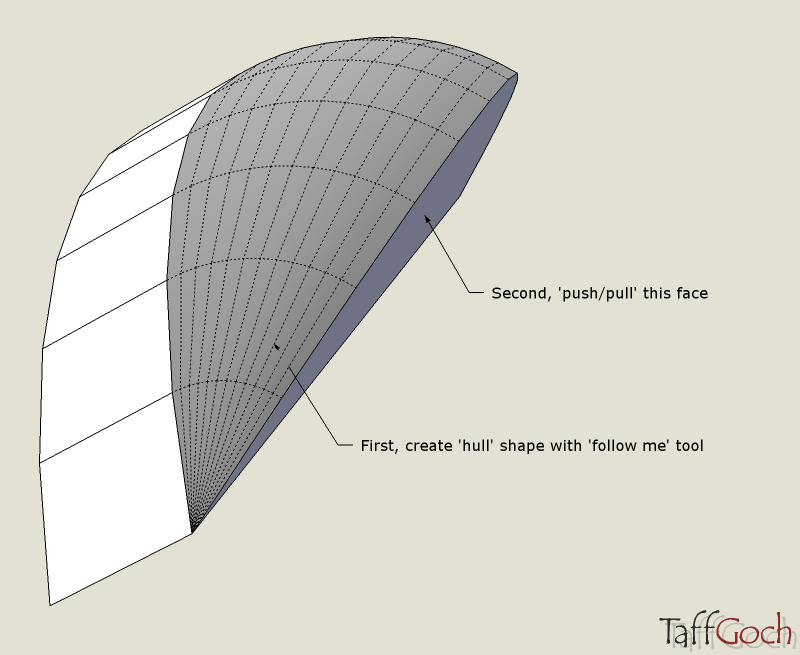
      So you got how to create the hull shape with the 'follow me' tool? If not, those steps can be demonstrated in more detail.

      Taff

      posted in Newbie Forum
      TaffGochT
      TaffGoch
    • RE: How can I draw a parabola?

      thirit,

      Glad to hear of your success. I hope our responses helped you plot that curve in SketchUp.

      ...and welcome to the community, by the way.

      Taff

      posted in Newbie Forum
      TaffGochT
      TaffGoch
    • RE: Centering with the Rectangle tool

      darkhelmet,

      [ Hazza has corrected my misreading of your query. Please ignore. ]
      Draw a diagnonal across the square, then split it in half (you can use the midpoint inference.) There's your centerpoint.

      Taff

      posted in SketchUp Discussions
      TaffGochT
      TaffGoch
    • RE: Dome

      Tonto,

      Interesting building.

      I played with 'follow me' and 'push/pull' to create the basic structural shape. I make no claims to accuracy of angles, length/width ratio, etc. This model merely demonstrates a means of construction. (See attached model.) For the rest of the building, similar application of these two tools should satisfy.


      Arts&Sciences.png


      Arts&Sciences.zip


      Arts&Sciences.skp

      posted in Newbie Forum
      TaffGochT
      TaffGoch
    • RE: How can I draw a parabola?

      @wo3dan said:

      ...where one needs to construct the focal point again?

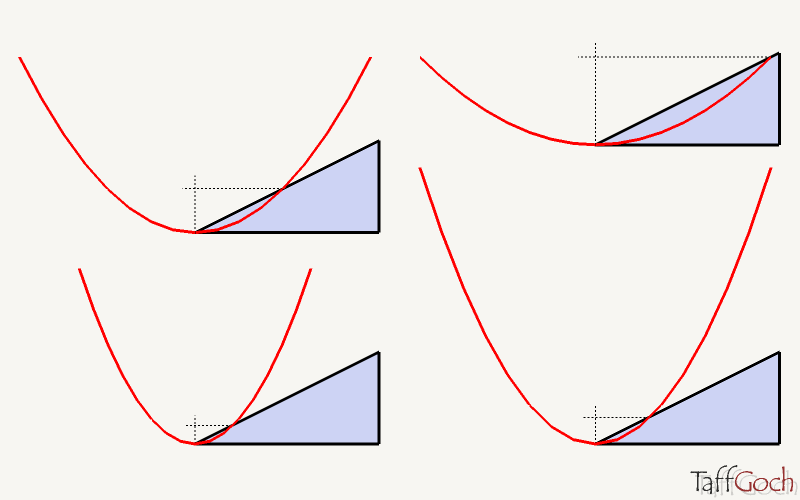
      Yes, indeed. I've highlighted the pertinent phrase in my previous post, to draw more attention to that fact. It's very easy, however, to re-establish the focal point with a 2:1 triangle intersection.


      Parabola.png

      posted in Newbie Forum
      TaffGochT
      TaffGoch
    • RE: How can I draw a parabola?

      thirit,

      I'm more accustomed to drawing a parabola based on desired external dimensions, say for a parabolic dish (or trough) solar collector. I plot points and connect with lines, as you suggested, but don't use any mathematics at all. You may find that the math plugins referenced by remus are exactly what you need.

      If you need to size your parabola to particular dimensions, and want to avoid mathematics entirely, this model should provide a method you can use:
      Parabola Construction Tutorial

      Note that you can scale a parabola (shallower or deeper) and it remains a parabola.You will have to locate the new focal point, but the dish shape will still reflect incident radiation to a single point. If you need to 'fine tune' the size of the dish with the SketchUp scale tool, you don't have to worry about 'breaking' the functionality of the parabolic shape.

      Taff

      posted in Newbie Forum
      TaffGochT
      TaffGoch
    • RE: Another odd dialog glitch

      Anssi,

      I just tried it, and my PC system/installation will take "1" (as I presume your own PC does)

      Is your work computer a PC or Mac?

      Is the SketchUp version up-to-date? (although I don't recall reading about this bug in earlier versions)

      Have you tried the "repair installation" feature?
      SketchUp Help Center ...repair an installation

      Regards,
      Taff


      DELL Precision M90 / 2 GB RAM
      nVidia Quadro FX 1500M / 256 MB
      nVidia driver: Forceware 162.65

      posted in SketchUp Discussions
      TaffGochT
      TaffGoch
    • 1 / 1