a SU Pro license is allowed to install and activate on 2 systems of the licensee (using it alternating of course).
how often did you have activated this license on differing systems already?
 Offline
a SU Pro license is allowed to install and activate on 2 systems of the licensee (using it alternating of course).
how often did you have activated this license on differing systems already?
• SketchUp Video Tutorials
• SketchUp Self-paced Tutorials
• SketchUp YT Channel
• The SketchUp Book (Basic & Advanced)
hth
if "C:\Program Files\SketchUp\SketchUp 2015\ShippedExtensions\su_webtextures.rb" (and according subfolder) is not avail or blocked by a security solution resp. missing user rights, this may result in the described effect too.
install SU again by "right-clicking > run as admin" in connection with the Windows user account which should be used for running SU (i.e. not e.g. an admin account).
ensure, that plugins are not disabled at "Window > Ruby Console" by:
is_disabled = Sketchup.plugins_disabled?
ensure, that JavaScript (not Java) is not blocked by a browser plugin of your security solution.
the common procedure is:
• update the MS IE (which is solely used by SU) to the latest version (W7 = version 11)
• delete cache and cookies (of google.com/sketchup.com)
• ensure that the security settings for the internet zone of the MS IE is not set higher than "medium-high"
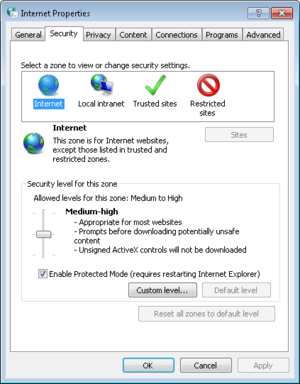
sitting behaind a company proxy or disabling/blocking the integrated Flash player of the MS IE might have an influence too.
Norbert
any 'exotic' configuration, i.e. operating system on partition  (SSD) and the programs on partition
  (HDD)?
if setting the internet security zone to "medium-high" (or lower) doesn't help, reset the whole MS IE settings to factory default.
and do launch SU by "right-click > run as admin".
or provide a free license to all SU Pro customers
@deaneau said:
also ich habe bisher nur Systemvoraussetzungen für win8 gefunden. wieso geht ihr jetzt schon auf win10?
Win 10 hat dieselben Systemvoraussetzungen wie Win 7/8, letztlich ist das alles nur eine Evolution von Win Vista.
Die Minimal-Hardware zur Erinnerung:
• Prozessor: 1 GHz oder schneller mit PAE/NX/SSE2-Support
• Arbeitsspeicher: 1 GB (x32) / 2 GB (x64)
• Festplatte: 16 GB (x32) / 20 GB (x64)
• Grafikkarte: DirectX 9-fähig mit WDDM 1.0 oder höher
also von min. jedem Rechner der in den letzten 5 Jahren verkauft wurde locker erfüllbar.
@deaneau said:
win8 ist doch brauchbar..ich hatte sogar Probleme nach update auf 8.1 und hatte danach ein refresh auf 8.0 gemacht.
Win 8.1 ist mehr oder weniger ein besseres 'Service Pack', Probleme danach sind unwahrscheinlich bzw. typischerweise nicht durch 8.1 verursacht.
@deaneau said:
ich bin der Meinung, dass man bei dem win System bleiben sollte, mit dem der Rechner ausgeliefert wurde.
spätestens wenn der Support durch MS abgekündigt wird, wie kürzlich bei XP, ist ein Wechsel des BS, zumindest wenn man sich im Internet bewegt, opportun.
@deaneau said:
ein Versionssprung erst durchführen, wenn auch wirklich alle Programme sauber damit laufen.
eh klar, ich benutze hier derzeit Win 7 Pro (Support bis 2020) und das wird die nächste Zeit auch so bleiben, da mir Win 8.x/10 produktiv keine Vorteile bietet.
@deaneau said:
bei Betriebssystemen ist es ja oft so, dass sie auf eine neue Hardwaregeneration optimiert wurde und alte Hardware schlimmstenfalls so gar verlangsamt oder einige Programme inkompatible sind.
bei Mac OS X wird alte Hardware gerne abgeschnitten... gerade Windows ist allerdings dafür bekannt selbst uralte Hardware-Standards weiter zu unterstützen... bei exotischer Hardware gibt's halt oft vom Hersteller keinen passenden Treiber mehr.
@deaneau said:
die selbe Erfahrung habe ich mit meinem ipad gemacht (ios6) 7 und 8 werden hier nicht installiert egal ob im appstore die meisten Programme nur noch ab ios7 lauffähig sind.
iOS 7 war selbst auf alten iOS Geräten vollkommen pflegeleicht, iOS 8 vielleicht besser nicht mehr auf iPhone 4S/iPad 2 und älter.... hierbei auch nicht die beinhalteten Sicherheits-Bereinigungen vergessen.
@deaneau said:
... geprädigt
aua das tut weh 
hth
für den ersten Weg mag fredo6 'Tools On Surface' Plugin hilfreich sein, für letzteren Chris Fullmers 'Shape Bender' Plugin.
Norbert
kannst auch unser freies Support-Tool OpenGL Config (nur Windows) dafür benutzen.
@glenn at home said:
...now it's free but bad in them no longer developing it.
alternatively check the more capable but also easy useable Twilight Render with a free 'Hobby' version avail too.
@grizzler said:
Gimp is definitely where I will be heading for PP.
if you are evaluating software by feature lists than go for Gimp (= steep learning curve), if usability or a further use of existing PS knowledge or compatiblity with the pros does play any role for you, stay with PS.
roughly, everything modeling (and file saving/opening) is CPU, everything display/printer output, some render plugins and raster export is GPU (OpenGL).
a high-clocked intel Core i5/i7 (recent IV. Gen.) and a dedicated (not shared) video subsystem in form of the nVidia GeForde GTX series w/ min. ~3,500 passmark points should play fine.
Norbert
go for a MSI or Asus w/ a twin cooler.
@utiler said:
Be good to hear any opinions of whether we go to 32GB Ram, Quadro cards; are they really going to be better than a Ge Force GTX 970 or 980...?
no, especially the slow Quadro K620. Go for a GeForce GTX 750Ti (in the same price range) or better: GTX 960 -> GTX 970 -> GTX 980
16 GB work memory is more than enough for SU besides you have another memory cosuming app running as e.g. a renderer or image processor or video editing.
the 840 Evo has some speed issues with files not touched for a while, Samsung plans to fix this soon but with the 850 Pro you would be on the safe side.
Norbert
@luds said:
...seem to work normally, but nothing is saved.
could be missing user rights (see lower left corner), try if running by "Right-Click > Run as Admin..." works.
@jga said:
...to v.7 with the DWG importer.
why not use your previous SU v2014 network license instead of degenerating to SU v7, which btw doesn't support recent operating systems.
 .
.