When you select the Circle Tool, the current number of segments is displayed in the VCB,lower right corner of the window. To change, simply keyin the desired number. For something as small as what you working on, I would think maybe 90 would be enough. You can change the number of sides of an existing circle by right clicking on the circle and choosing Enity Info and keyin a new value for segments.
Oops, your profile's looking a bit empty! To help us tailor your experience, please fill in key details like your SketchUp version, skill level, operating system, and more. Update and save your info on your profile page today!
⚠️ Important | Libfredo 15.8b introduces important bugfixes for Fredo's Extensions Update
 Offline
Posts
-
RE: Bearing Race
-
RE: Bearing Race
It is a common problem with small parts. Scale everything up by 1000, do the extrusions, then scale back to original size.
Also, you have some very high segment counts in the circles. You could probably get by with something less.
-
RE: Translation and rotation vectors of copies of a component
The transformation matrix for components and groups is a 16 element array which contains the vector definitions for the x,y,z axes and the origin point. The rotations can be derived by finding the arcsin or arccos of certain values of the array.
If t is the transformation array and tx0,ty0,tz0 refers to the origin then tx0=t[12], ty0=t[13], and tz0=t[14]. The x_rotation=acos(t[5]), y_rotation=acos(t[0]), and z_rotation=asin(t[4]). These rotation values are not independent and can be influenced by one another.
What do you plan to do with this info once it is written to a file?
-
RE: Screw threads on a cone
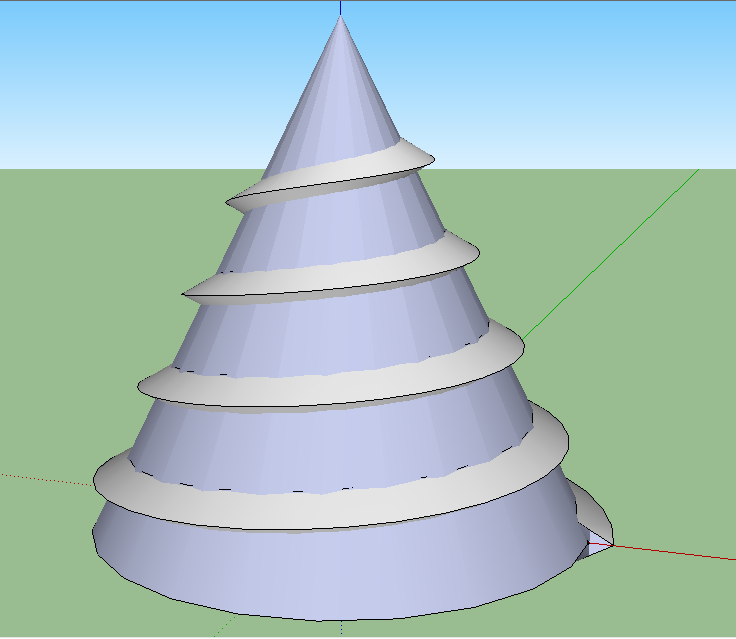
Determine the final dimensions of the threaded cone and multiply them by 100. Create a spiral path for the thread to follow. Create a shape to represent the cross-section of the thread at the end of the spiral. Use plugin FollowMe and Keep http://forums.sketchucation.com/viewtopic.php?t=16465 to extrude the thread. Create the cone to fit the thread. Select all and scale down to final dimensions.
-
RE: Geometry, Transformation, and Scaling
To use ThomThom's code as a subroutine that can be called multiple times following a move of either base, you will need to return the spring to its initial position.
vector = base1_pt.vector_to( base2_pt ) # Initialize spring position tr_init = spring.transformation spring.transform! tr_init.inverse # Height Scaling -
RE: Creating New Materials Group and Sharing with Others
You might find the discussion at the following link helpful.
http://forums.sketchucation.com/viewtopic.php?f=79&t=42446&p=377074&hilit=creating+materials#p377074
-
RE: Is there a way to unskew mesh?
You can use the Move Tool and move any vertex to an absolute position,[x,y,z],or by a delta amount,<dx,dy,dz>. If the mesh is on a regular grid, my Snap2Grid plugin at my blog might solve the problem.
-
RE: TIN from Contour Issue
Sandbox from contours will have a problem with vertical faces I believe. You might try dividing the segments above the "gullies" so that additional triangles are formed.
-
RE: How to get eye & camera position coordinates?
The camera data for any view can be retrieved by the following
mod = Sketchup.active_model vue = mod.active_view cam = vue.camera puts "Camera location=#{cam.eye}" #where the camera is puts "Camera target=#{cam.target}" #where the camera is pointed puts "Camera up=#{cam.up}" #where top of the camera is facing -
RE: Intersect_with problems
Weird indeed but moving the prism up 1mm solves the problem.
-
RE: [REQ] Random Profiles
So each point on subsequent profiles should be determined like the starting Z.
mod = Sketchup.active_model ent = mod.entities sel = mod.selection p=[];z=5;y=0 for x in 0..10 p<<Geom;;Point3d.new(x,y,z) case rand(3) when 0; z -= 1 if z > 0 when 2; z += 1 if z < 10 end z=5 if x==9 end for y in 1..10 for i in 1..10 ent.add_line(p[i-1],p[i]) end for i in 0..10 p[i].y=y case rand(3) when 0; p[i].z -= 1 if p[i].z > 0 when 2; p[i].z += 1 if p[i].z < 10 end end p[10].z=p[0].z end -
RE: Orienting (rotating) faces in same dirrection
I have sent you, by PM, a possible help for orienting faces.
-
RE: [REQ] Random Profiles
Code added to vary start/end z
mod = Sketchup.active_model ent = mod.entities sel = mod.selection start_z=5 for y in 0..10 p=[];z=start_z for x in 0..10 case rand(3) when 0; z -= 1 if z > 0 when 2; z += 1 if z < 10 end z = start_z if x==10 p<<Geom;;Point3d.new(x,y,z) end for i in 1..10 ent.add_line(p[i-1],p[i]) end case rand(3) when 0; start_z -= 1 if start_z > 0 when 2; start_z += 1 if start_z < 10 end end -
RE: [REQ] Random Profiles
Added statement to make start=end
mod = Sketchup.active_model ent = mod.entities sel = mod.selection for y in 0..10 p=[];z=5 for x in 0..10 case rand(3) when 0; z -= 1 if z > 0 when 2; z += 1 if z < 10 end z = 5 if x==10#<<< to make start=end p<<Geom;;Point3d.new(x,y,z) end for i in 1..10 ent.add_line(p[i-1],p[i]) end end -
RE: [REQ] Random Profiles
I use Web Console also but I didn't include the first three lines where mod, ent, and sel are defined. Try this
mod = Sketchup.active_model ent = mod.entities sel = mod.selection for y in 0..10 p=[];z=5 for x in 0..10 case rand(3) when 0; z -= 1 if z > 0 when 2; z += 1 if z < 10 end p<<Geom;;Point3d.new(x,y,z) end for i in 1..10 ent.add_line(p[i-1],p[i]) end end -
RE: [REQ] Random Profiles
@unknownuser said:
If not yet existing
Drawn in Y, in first time without constaint in Y so just "raws"
In second time (if courageaous) with same constaint than in X so columns + raws
Here the possibilities drawn in X
[attachment=0:2m70jbmg]<!-- ia0 -->Random_profiles.jpg<!-- ia0 -->[/attachment:2m70jbmg]Your example profiles don't appear to be very "random". "raws"? Perhaps you mean "rows".
The following code will generate a 10 X 10 X 10 random set of profiles.
for y in 0..10 p=[] for x in 0..10 p<<Geom;;Point3d.new(x,y,rand(10)) end for i in 1..10 ent.add_line(p[i-1],p[i]) end end -
RE: 2D Faces to 3D Groups (Plugin(s) needed!)
@unknownuser said:
- Edit endless amount of groups at once in one click (plugin needed)
What sort of "Edit"?
-
RE: Circle selection
No VCB control but allows you to enter a minimum and maximum radius of selection circle/sphere.
-
RE: Shape bender 90 degree bends
Yes, Shape Bender will make 90 degree bends. The problem is the bend you want to make and the sheet metal group is a bit to complex I think.
