Is there a way to unskew mesh?
-
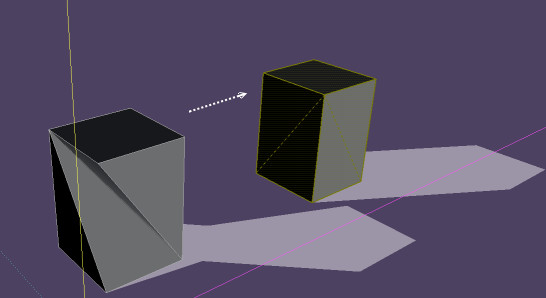
I already know about fredoscale but the only thing is its a bit difficult to use it in the way I want to. Basically some of my mesh got messed up and it seems like ALL of it got uniformly skewed. Its off by a few centimeters. I tried using freedoscale to move the mesh back on its XYZ coords but it seems like the bounding box wont allow it. It would me much simpler if I was able to take a single point and skew it back upright right on point. Is there a reliable way to do this?
-
You want say "Twist" ?
If that just use the Twist function with the same angle of twist but negative
-
You can use the Move Tool and move any vertex to an absolute position,[x,y,z],or by a delta amount,<dx,dy,dz>. If the mesh is on a regular grid, my Snap2Grid plugin at my blog might solve the problem.


Hello! It looks like you're interested in this conversation, but you don't have an account yet.
Getting fed up of having to scroll through the same posts each visit? When you register for an account, you'll always come back to exactly where you were before, and choose to be notified of new replies (either via email, or push notification). You'll also be able to save bookmarks and upvote posts to show your appreciation to other community members.
With your input, this post could be even better 💗
Register Login


Advertisement