That chart is uncannilly accurate 
Oops, your profile's looking a bit empty! To help us tailor your experience, please fill in key details like your SketchUp version, skill level, operating system, and more. Update and save your info on your profile page today!
Urasik Extensions | Lots of new extensions to check out Learn More
R
Offline
Posts
-
RE: Avatar - A new Era of Cinema begins
@johnsenior1973 said:
I want to go and watch it in 3D, but as I wear glasses I'm wary of whether the 3d glasses will work properly over my glasses. Has anyone used the 3D glasses as well as their normal glasses?
I tried using the free glasses given away for Channel 4s 3D week, but they were a complete waste of time.
Yes they work fine over regular glasses - also they are polarised light ones - not the old style red/green type.
-
RE: Transformers USB
I have USB ravage - I especially like the 3d model of him that runs around the screen eating your icons when it's plugged in. Here's one site that has him.
-
RE: Alternative Christmas Songs suggestions?
I want an alien for Christmas - Fountains of Wayne.
-
RE: Here I was reading the paper today ...
But don't you understand? Bankers and the chief executives are 'Very Important People'

-
RE: Random noob questions part deux
Use the offset tool on the top of the buildings? If you want to offset all the tops by the same amount, do one (type in the distance if you want) and then double clicking the others will ofset them the same amount.
I don't think there's an easy way to do all the roofs in one go though (unless you make the first building a component and then copy it to make the rest)
-
RE: Random noob questions part deux
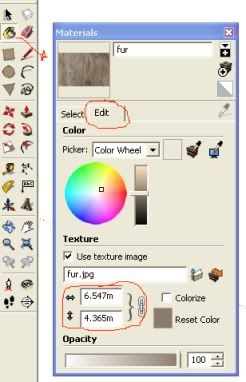
In that case use the resizing option on the materials window (as in pic) Just type the size you want the texture in the boxes.
-
RE: Random noob questions part deux
@vizier said:
- I have a map of a city I am trying to model. Whats a good way to stretch the 2d map on the ground so I have something to trace? When I try using the map as a material I get 10million little ones where I just want 1 huge one.
Right click on the textured ground, select texture>position on the menu and scale/move/rotate it however you want.
(or on the edit button of the materials menu you can also resize textures) -
RE: New member
I've had this happen as well - I don't know what the solution is, I usually just leave a snarky comment about giving credit to the creator on the upload they make.
-
RE: Question about subdivide&smooth trying to edit only one side
You definately need some more geometry if you want to smooth the back of the calf out - I think my suggestion in the pic on my previous post should be a quick way.
-
RE: Question about subdivide&smooth trying to edit only one side
Short answer - I think not.
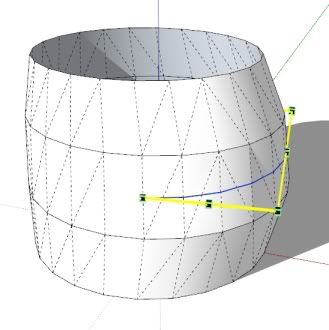
(As always I could be wrong - haven't used SDS too much)I think your best bet would be to just turn on hidden geometry and either move the offending points into slightly better positions or divide the line on the edge and move the new end points.
It would help to see what the hidden geometry looks like.Edit You could add a new midline between two existing sections (I used tools on surface for simplicity) and scale the new line slightly - just another possibility.
-
RE: Noobie question: How do I copy and flip?
@chris fullmer said:
Welcome aboard!
Then scale it to -1 (make sure you grab the correct scale handle or else you flip it in more directions than you really want).Or while the copy is selected right click and select 'flip along red/green/blue axis'
-
RE: UK local elections
I'm not sure that the Tories getting control can be called a victory, a change - not a victory.
-
RE: Unbelievable technology
While I'm sceptical of how 'true' the prerecorded video clip is to the actual systems responses, though the body/face tracking part of it is pretty clever - I'm not sure how much the sytem would be used outside of fitness games (and I've grown out of talking to imaginary people)
For gaming the PS3 wand would be more useful - and as opposed to the wii, the PS3 has the power to do more interesting things with it. (3:00 & 5:00 in the video are pretty good)
-
RE: When you're bored...
http://www.fmylife.com/ and http://notalwaysright.com/ are good for a few hours of time wasting.
Also [url=http://www.mil-millington.com/:3f8b6luw]Things my girlfriend and I have argued about[/url:3f8b6luw]
-
RE: Re: Some Funny Pics.
@unknownuser said:
Reminds me of something I saw on T.V. once...
Wait, how do you 'embed' videos??
It looks like you cut off the < at the start of that html.