sketchucation logo sketchucation
    • Login
    1. Home
    2. RickW
    3. Posts
    Oops, your profile's looking a bit empty! To help us tailor your experience, please fill in key details like your SketchUp version, skill level, operating system, and more. Update and save your info on your profile page today!
    πŸ”Œ Smart Spline | Fluid way to handle splines for furniture design and complex structures. Download
    R
    Offline
    • Profile
    • Following 0
    • Followers 0
    • Topics 36
    • Posts 779
    • Groups 1

    Posts

    Recent Best Controversial
    • RE: Windowizer4 now available!

      @chango70 said:

      do I use the same link Smustard sent me to Re-download? I tried that and it say it can't verify my email.

      This may seem like a dumb question, but did you use the correct email address? Some people have a seldom-used email address for PayPal, and sometimes forget that's the one to use to access the download.

      posted in Developers' Forum
      R
      RickW
    • RE: [poss. BUG] Best-Fastest way to loop through all objects

      I would structure it like this:

      1. loop through the definitions
        a. if a definition has multiple instances,
           i. if they are groups, make them all unique, then loop through the only remaining group's entities and paint everything that's not a group or component
           ii. if they are component instances, loop through the definition's entities and paint everything that's not a group or component
        b. if a definition has a single instance, loop through the entities (of the group if it's a group, or of the definition, if it is a component instance) and paint everything that's not a group or component
      2. loop through the model.entities and paint everything that's not a group or component instance
      

      Based on my experience with bomb.rb (which explodes all groups and components in a model), it is always faster to parse the definitions than it is to recursively parse groups and components from the entities list.

      posted in Developers' Forum
      R
      RickW
    • RE: Windowizer4 now available!

      Urgh. Typo on my part. Re-download to get the fixed version.

      posted in Developers' Forum
      R
      RickW
    • RE: Spam

      @alan fraser said:

      I don't think there's a single line in the whole article that rings true.

      Now you tell me.

      posted in Corner Bar
      R
      RickW
    • RE: US Election results.

      Ah, a retread of a Clinton joke. Not unexpected. Hopefully, it will be reworked again in 4 years... πŸ˜„

      posted in Corner Bar
      R
      RickW
    • RE: [poss. BUG] Best-Fastest way to loop through all objects

      There is a known bug in SU that copies of a group act like component instances unless the copies are individually edited manually, or you use group.make_unique in a script.

      If you don't do one of those two things, any changes to one group will be applied to all copies of the group.

      I suggest you first loop through the definitions and query each definition's instances to see if they are groups, and if so, call group.make_unique on each. This will make all groups unique and eliminate the problem.

      posted in Developers' Forum
      R
      RickW
    • RE: Windowizer4 now available!

      @chango70 said:

      Rick what is the Safari Su bug? Anyway I've tried it with Ruby Console open and it went like this:[attachment=0:10baznmq]<!-- ia0 -->Question.jpg<!-- ia0 -->[/attachment:10baznmq]

      If you had Windowizer3, you would have an older version of offset.rb. Did you overwrite that one with the offset.rb from the Windowizer4 .zip file? The error messages suggest that could be the problem.

      The Safari-SU-Ruby bug is a problem where webDialogs don't communicate back and forth with SU as they should. In this case, the plugin tries to add dropdown menu items to the webDialog (list of materials for frames and glass, and Yes/No preferences for "Group" and "Front Only" options). I suspect the bug is causing the blank dropdown menus.

      @putnik said:

      Rick, will W4 work in SketchUp 5?

      Unfortunately, no. Because it uses WebDialogs, it requires SU6. If there's enough interest, I could try to rework it for SU5, but it would lose some functionality.

      posted in Developers' Forum
      R
      RickW
    • RE: I guess we can just give up on ver 7

      @bellwells said:

      @sorgesu said:

      Ah I bet the stock has split several times since 46, not a fair comparison

      Ahha Susan, I failed to consider this so I did a little research. According to Yahoo, GM did a 2:1 split in March of 1989. If this is accurate, then today's stock price is only twice what it was in 1946.

      GM Stock Split History lists all the splits since the 1950s

      posted in Corner Bar
      R
      RickW
    • RE: [Bug?] Pan &quot;on border&quot;: Is this a known bug ?

      I think it was intended to avoid having to switch to Pan mode while drawing things.

      posted in Developers' Forum
      R
      RickW
    • RE: Windowizer4 now available!

      Looks like I've fallen prey to the infamous Safari-SU-Ruby bug. 😞
      I think I know how to work around it, but it will take some time.

      I'll post a notice when the updated files are ready to download.

      Thanks,

      posted in Developers' Forum
      R
      RickW
    • RE: [Bug?] Pan &quot;on border&quot;: Is this a known bug ?

      As far as I know, that is the intended behavior, consistent with how the native tools work.

      posted in Developers' Forum
      R
      RickW
    • RE: Windowizer4 now available!

      @utiler said:

      Thanks so much Rick, bought it and loving it!!!

      A few questions:

      1. Great to see it cuts both faces; when deleting a window, the hole still remains. Is this normal? I just assumes that the whole window would act like a component but it appears that the opening is separate from the window [if grouped]...
      2. When extracting Windowizer4, i over-road a few rubies, I assume were part of windowizer30b5. Which files do I delete from the plugins folder that are only associated with windowizer30b5? I want to get rid of what i don't need...
      3. Color selection - there is 7 options for coloring both the frame and glass, is there a way to access the materials palette?

      Way 😎

      Glad you're happy with it! πŸ˜„

      1. Yes, the hole becomes part of the geometry of the model, just as if you had created the hole manually and then put a window in it (since components only auto-cut a hole in one face, it was the only way to penetrate a wall). I haven't yet decided the best way to handle deleting the windows yet. Part of the challenge is that things can be edited, and there's no guarantees of what geometry should stay or go.
      2. You can probably safely delete "EntsGetAtt.rb" (or move it to a subfolder to make sure everything else still works, prior to deleting it)
      3. Windowizer can currently only access the materials in the model. I know it's a pain, but you'll need to paint something with the materials you want to use before they'll show up in the list. I haven't given up, though - I'm still investigating how to get to the material palettes.
      posted in Developers' Forum
      R
      RickW
    • RE: Windowizer4 now available!

      @cheffey said:

      @utiler said:

      Cheers Rick.

      BTW, any plans for a doorizer? would be real handy to keep it 'in house'..... πŸ‘

      I'm Voting for Doorizer also!!!

      Looks like I'm adding a "Doorizer" plugin to my ToDo list. πŸ˜„

      posted in Developers' Forum
      R
      RickW
    • RE: Windowizer4 now available!

      @chango70 said:

      @rickw said:

      @chango70 said:

      Rick I can't get it to work for some reason. I've unzipped everything into the plugins folder. When I use the Windowizer4 dialogue it creates a single group. Am I doing something wrong?

      For metric, you need a dot between the number and the units, i.e. 50.mm

      Hope that helps.

      Hi Rick. Thanks for the quick reply. I still have the same problem this morning after following your instructions. I'll post an image when I have time.

      Try again with the Ruby Console open, and let me know if you see any error messages.

      posted in Developers' Forum
      R
      RickW
    • RE: Windowizer4 now available!

      @gaieus said:

      Hi rick again,

      I think that I'm running into some isues (I can elaborate later and attach images).

      The Max wall thicknes doesn't sem to work for me; it's always the sum of the frame thicknes nd frame inset (OR I am doing something wrong).

      I see your script is not scrambled so I can re-write my version to start with some more handy values in metric (although I hate ruining others' work) πŸ˜„

      Anyway, I will include a re-translation of the html file to be added instead of this one now. Can I place charset metatags into the <head>?

      It's clear I need to make some modifications for metric users, so I'll try to get that done ASAP.

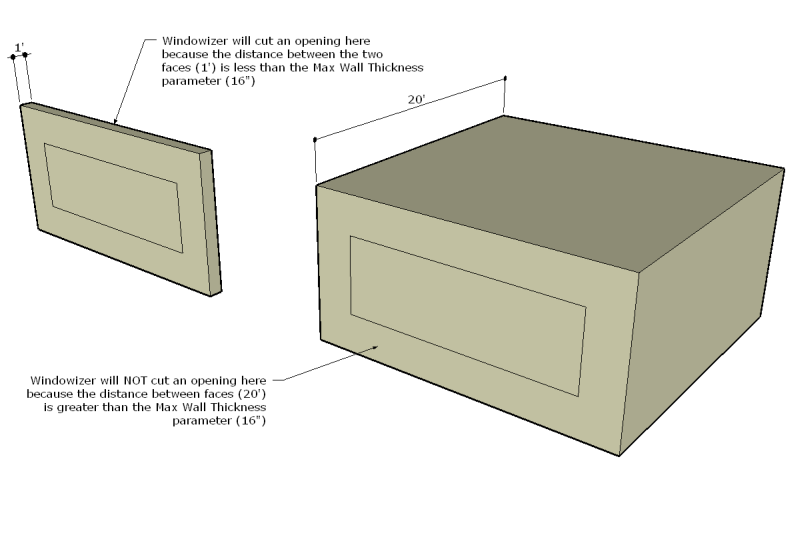
      "Max Wall Thickness" simply describes the maximum distance between 2 faces for them to be considered a "wall". If two faces are within the distance, Windowizer will cut an opening; otherwise, it will not. This is applicable primarily when using it for full 3D buildings where you have interior and exterior areas modeled.

      windowizer4 illustrated - max wall setting - small.png

      posted in Developers' Forum
      R
      RickW
    • RE: Windowizer4 now available!

      I could change "vertical panes" and "horizontal panes" back to "rows" and "columns", which is the terminology I used previously. Changing mullion height to transom height isn't a big deal as it only affects the dialog and the documentation. Thanks for the comments.

      posted in Developers' Forum
      R
      RickW
    • RE: Windowizer4 now available!

      Any suggestions for the Visual Reference PDF?

      I wanted everything to be clear and easily cross-referenced, but it's possible I missed something. Is there anything that is not explained well enough?

      Also, if there's any feedback on the new Window Styles feature, I'd be glad to hear it. I'm still developing the Styles Manager (including rename/delete/import/export), so if you have any suggestions, now is the time. πŸ˜„

      Thanks, everyone!

      posted in Developers' Forum
      R
      RickW
    • RE: Windowizer4 now available!

      @thinkbuild said:

      Dear Rick -

      I haven't downloaded W4 yet (but I will soon) and I was just thinking - I've got a small project in Sweden, and there, we have triple-glazed windows. Do you think it would be possible to add an option, "# of panes of glass"? In Germany, we also use double-glazing and so on...I was thinking, I could perhaps just make a "thick" single pane but there might be situations in which it would be useful to model the "real" situation...

      I imagine it might at some point get a bit much, but since you are already working at such a high level of detail...

      Just a thought.

      best wishes,

      Jason

      I could add that if there's enough interest. We use double-glazed windows here, too. I just arbitrarily decided (for the sake of lower poly counts, primarily) that only the outside faces of the glass would be modeled, so I use 1" thick glass (which in reality would be two panes of 1/4" glass with a 1/2" airspace) for my models. The only other option right now is zero-thickness glass, which will draw a single face only. But, like I said, if there's enough interest, I could add it.

      posted in Developers' Forum
      R
      RickW
    • RE: Windowizer4 now available!

      @chango70 said:

      Rick I can't get it to work for some reason. I've unzipped everything into the plugins folder. When I use the Windowizer4 dialogue it creates a single group. Am I doing something wrong?

      For metric, you need a dot between the number and the units, i.e. 50.mm

      Hope that helps.

      EDIT: I looked again at the image you posted. My first answer is still correct, but I see something I need to try to fix for default metric users: the default settings are 2" and 4", which are being converted to '~51mm' and '~102mm' without the dot, so that's my problem to fix. But, at least there's an easy workaround - make sure there's a dot. πŸ˜‰

      Thanks for making me aware of that issue.

      posted in Developers' Forum
      R
      RickW
    • RE: Windowizer4 now available!

      @unknownuser said:

      RICK. I just purchased and am using it. It is awesome. Anyway to put it in a context menu rather than the pull down?

      It's much more friendlier that way> . . . πŸ’š

      @cheffey said:

      I just purchased it as well, and that's my only request is to add to a right-click dialog as David mentions.
      Works flawless though, going to be such a time saver.

      Sounds like I need to put a right-click menu item in place... πŸ˜„
      No problem - I'll add it to my list.

      posted in Developers' Forum
      R
      RickW
    • 1 / 1