sketchucation logo sketchucation
    • Login
    1. Home
    2. Regular Polygon
    3. Posts
    Oops, your profile's looking a bit empty! To help us tailor your experience, please fill in key details like your SketchUp version, skill level, operating system, and more. Update and save your info on your profile page today!
    πŸ”Œ Smart Spline | Fluid way to handle splines for furniture design and complex structures. Download
    R
    Offline
    • Profile
    • Following 0
    • Followers 0
    • Topics 9
    • Posts 88
    • Groups 3

    Posts

    Recent Best Controversial
    • RE: [REQ] K-set Tilable Surfaces

      Unfortunately, I couldn't download the K-set Tilable Surfaces paper from the ACM. You either have to purchase a membership, or purchase the article. πŸ‘Ž

      The paper, Triangle Surfaces with Discrete Equivalence Classes, at http://faculty.cs.tamu.edu/schaefer/research/index.html, explained the algorithm pretty well. But it looks pretty complicated. πŸ˜’

      I think it is an interesting problem. But I wonder how often people actually need to model a surface with tiles that have exactly K distinct shapes?

      posted in Plugins
      R
      Regular Polygon
    • RE: [Plugin] Menger Sponge 1.0

      @starling75 said:

      Menger in the field

      Abstract art at its best. πŸ‘ πŸ˜†

      posted in Plugins
      R
      Regular Polygon
    • RE: [Plugin] Menger Sponge 1.0

      Hi Didier,

      You are correct, the implementation is recursive. What I mean by iterative is that the construction is a repetitive process, where each level is built up from subcomponents of the previous level in the same way.

      Nice to see someone is checking the source code. πŸ‘

      posted in Plugins
      R
      Regular Polygon
    • [Plugin] Menger Sponge 1.0

      This plugin is strictly just for fun. The Menger Sponge is a 3D fractal in the Mathematics world. In the computer graphics world you can only draw the first few levels before it becomes too complex to render. However, it still has an interesting self-similar shape, which makes it possible to build using a plugin.

      It is constructed iteratively. You start with a cube. Scale the cube down to one third the size, and make 27 copies arranged like the cells in a Rubik’s Cube. Then remove the cube at the middle of every face, and remove the cube in the center, leaving 20 cubes. Merge them together so there are no coplanar edges. This gives you the first level.
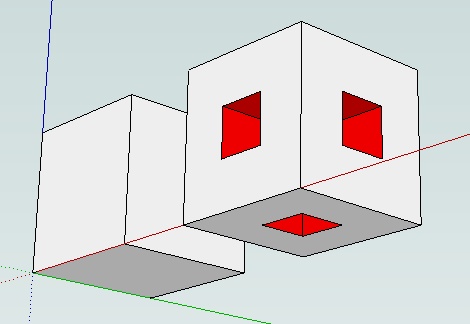
      level 1.png

      The second iteration is the same process, only instead of a cube, you start with the first level sponge, scale it down, and translate 20 copies as before.
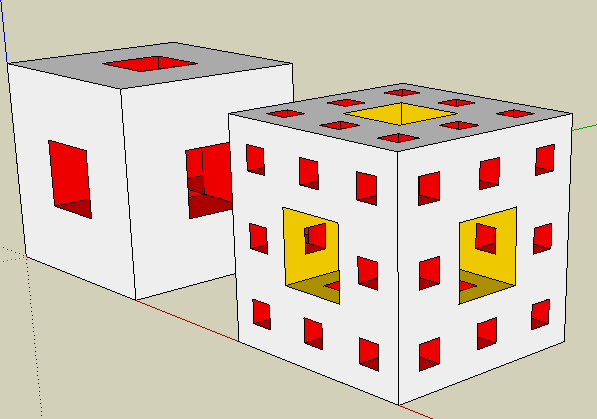
      level 2.png

      The third level is constructed from 20 copies of the second level sponge, and so on. Below is an image of the fourth level, which is probably about as far as you want to go. It has 200k faces, and takes about a minute to generate all the geometry.
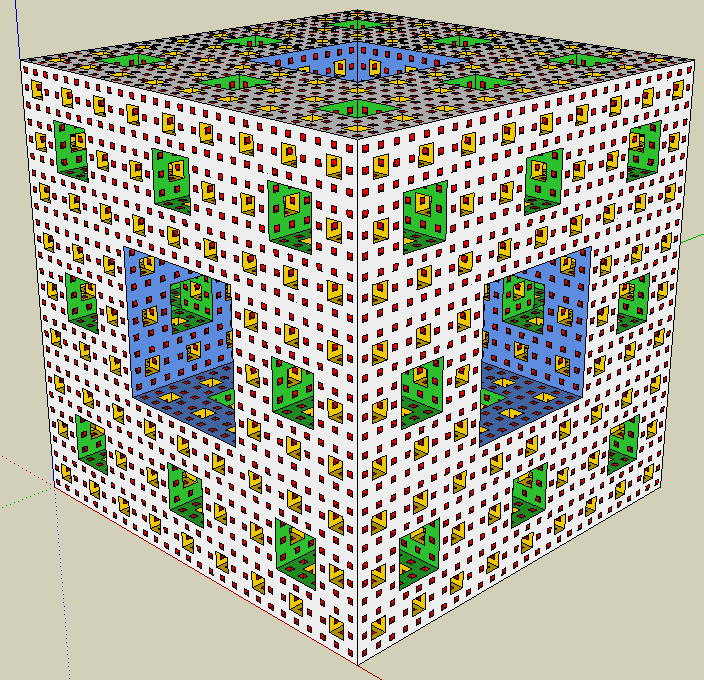
      level 4.png

      You can color the outside by clicking on the component with the paint bucket. The inside faces have a different color for each level. You are not stuck with my color choices. They are grouped by material. So, just open the component, and apply the paint bucket to any face. That will paint all the faces that are the same color.

      There is more documentation, and a link to download this plugin, here: Menger Sponge 1.0.

      Thanks.

      posted in Plugins
      R
      Regular Polygon
    • RE: [Plugin] Torus 1.0

      Hi halim,

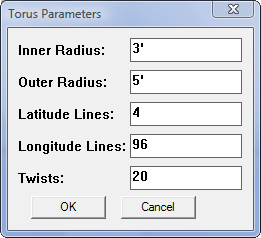
      The top torus with 20 twists had these settings:

      settings 20 twists.png

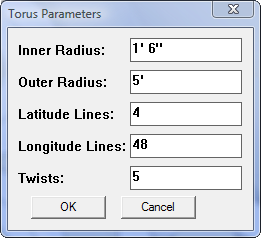
      The bottom six tori had these settings, except they each have a different twist parameter varying from 0-5.

      settings 0-5 twists.png

      P.S. Welcome to the forum!

      posted in Plugins
      R
      Regular Polygon
    • RE: [Plugin] Torus 1.0

      Thanks Box -- I really like your new avatar. πŸ‘

      posted in Plugins
      R
      Regular Polygon
    • RE: [Plugin] Torus 1.0

      What a coincidence that our separate lines of work would meet like that! 😲

      You are doing things I never imagined people would do with this plugin. πŸ‘

      posted in Plugins
      R
      Regular Polygon
    • RE: [Plugin] Torus 1.0

      Thanks a lot everyone for all your positive feedback. πŸ˜„

      @d12dozr said:

      RP, how about a fractal generating plugin? ...you know, just for kicks πŸ˜›

      That's an idea. I can't think of anymore simple shapes to draw. Definitely would be just for fun.

      posted in Plugins
      R
      Regular Polygon
    • [Plugin] Torus 1.0

      Hi folks,

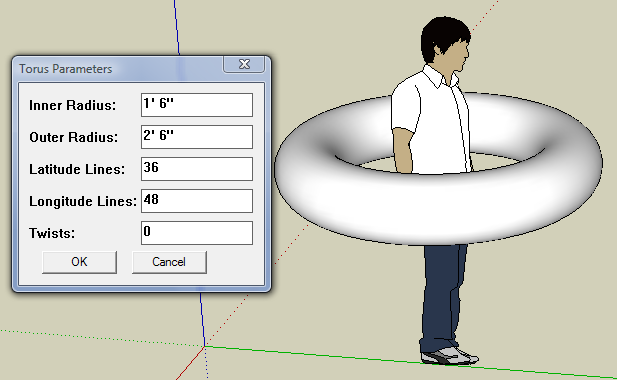
      I couldn't resist one more plugin for creating simple shapes. This is an easy to use plugin that draws a torus. You just go to the menu item Draw -> Torus, enter the parameters in a dialog box, and place the newly created component in the model. You could draw a torus with the SketchUp Follow Me Tool, but it would take 5 minutes instead of 5 seconds.

      Dialog box and torus.

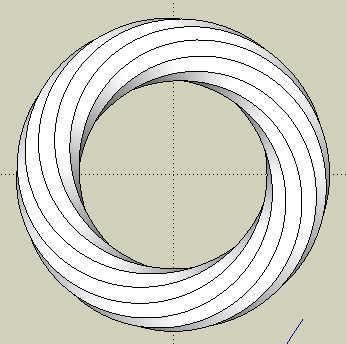
      This plugin will also draw a "twisted torus". OK, I made up the name. But it is the shape you would get if you could cut the tube, twist the ends, and glue them back together. To see the twist, the tube needs to have a polygonal cross section. But, you can control this aspect of the geometry by specifying just a few latitude lines for the torus.

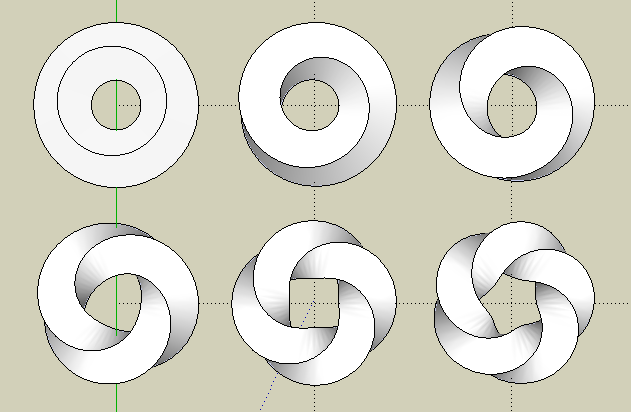
      Square tori twisted from 0-5 times.

      The examples above use a square torus. It is square because the tube has four latitude lines (the creased edges), with four sides (surfaces) in between, so the cross section is a square. The torus on the upper left has no twist. The next has one twist; if you follow one side around the torus, you will end up on the adjacent side after one revolution. The next torus has two twists, and so on, up to five twists.

      12 sided torus twisted 12 times.

      You can have any number of sides and twists. In the example above, the torus has 12 sides, and 12 twists, so each side reconnects with itself after one revolution.

      There is more documentation on the usage for this plugin, and a link to download it, here: regularpolygon.org/plugins/torus.php.

      Thanks

      posted in Plugins
      R
      Regular Polygon
    • RE: Close Gaps Script

      I don't think that repair_broken_lines.rb will close gaps. It looks like it just replaces collinear connected edges with a single edge.

      Sounds like an interesting problem. I'm surprised that there isn't a free script to solve it.

      posted in Plugins
      R
      Regular Polygon
    • RE: [Plugin] Superellipsoid 1.0

      Yeah, it is true for superellipsoids, and ordinary ellipsoids. The length, width, and height are basically just scale factors of a unit superellipsoid. πŸ€“

      posted in Plugins
      R
      Regular Polygon
    • RE: [Plugin] Superellipsoid 1.0

      @massimo said:

      Really? What about some wooden pillars in the Herzog & De Meuron style? Just one click πŸ˜„

      That's interesting. They sure look like superellipsoids -- or maybe just ordinary ellipsoids.

      posted in Plugins
      R
      Regular Polygon
    • RE: [Plugin] Superellipsoid 1.0

      @thomthom said:

      Good stuff!
      Looking forward to the 4D version! πŸ˜„

      Glad you like it. Actually, I am running out of ideas for geometry. I'll probably move on to tools or something else.

      posted in Plugins
      R
      Regular Polygon
    • RE: [Plugin] Superellipsoid 1.0

      @tig said:

      Thanks for another interesting tool in your toolset... πŸ˜„

      Thanks TIG, and everyone else. I don't deny that my interests are probably offbeat, if not peculiar.

      posted in Plugins
      R
      Regular Polygon
    • RE: [Plugin] Superellipsoid 1.0

      @massimo said:

      Thank you, it works like a charm. πŸ‘

      Thank you massimo. After no replies since I posted it 11 hours ago, I was afraid this topic was going to sink into oblivion on page 2. πŸ˜’

      posted in Plugins
      R
      Regular Polygon
    • [Plugin] Superellipsoid 1.0

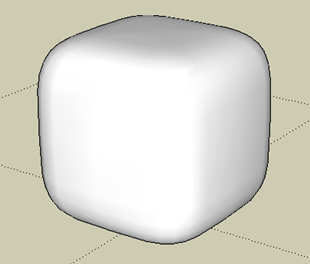
      OK, enough about the superellipse. This plugin draws its 3D cousin, the Superellipsoid. The superellipsoid varies between a round shape (an ellipsoid), and a square shape (the rectangular bounding box). If all three axes are equal, it varies between a sphere and a cube. Here is an example of a superellipsoid that is halfway between a sphere and a cube, (i.e. 50% square).

      sup1.png

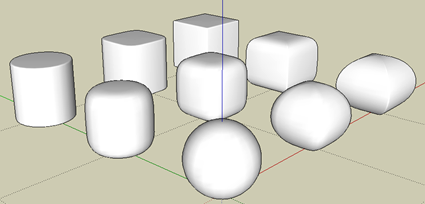
      The degree of squareness can vary in two directions: horizontal and vertical. The horizontal cross section is a superellipse with one degree of squareness. And the vertical cross section is also a superellipse with an independent degree of squareness.

      sup2.png

      In the picture above, the superellipsoids get more square horizontally as you move along the red axis, and more square vertically as you move along the green axis. The squareness values vary from 0% at the origin (the sphere) to 90% in each direction.

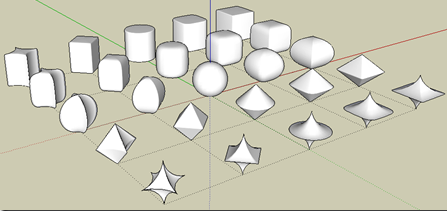
      You can also consider negative squareness values. The more negative the value, the more the surface contracts in towards the center.

      sup3.png

      In this picture, the horizontal squareness varies along the red axis from –90 to +90, and the vertical squareness varies along the green axis from –90 to +90.

      The Superellipsoid plugin is at: regularpolygon.org/plugins/superellipsoid.php.

      Thanks.

      posted in Plugins
      R
      Regular Polygon
    • RE: [Plugin] Superellipse 1.2

      Update to version 1.2

      Previous versions started off each session with arbitrary default values in the dialog box for the Superellipse parameters. This version remembers your last dialog box values between sessions.

      posted in Plugins
      R
      Regular Polygon
    • RE: [Plugin] Superellipse 1.2

      @su reviewer said:

      Looking good! Definitely works better, will update the review. πŸ‘

      That is +1 vote for the new squareness scale in version 1.1. I think it improved the plugin, thanks for the suggestion.

      posted in Plugins
      R
      Regular Polygon
    • RE: [Plugin] Sphere 1.1

      @watkins said:

      Can you enter metric sizes too? Looks a useful plugin, so many thanks.

      Regards,
      Bob

      You are welcome!

      I think you can enter any length, (e.g. 100mm, 10cm, 1', etc.). The plugin remembers your input, and uses the last value entered as the default value the next time. How the length is displayed depends on the format that you have set in the Model Info - Length Units Manager. I am using the Architectural format, so it displays the lengths in feet and inches.

      posted in Plugins
      R
      Regular Polygon
    • [Plugin] Sphere 1.1

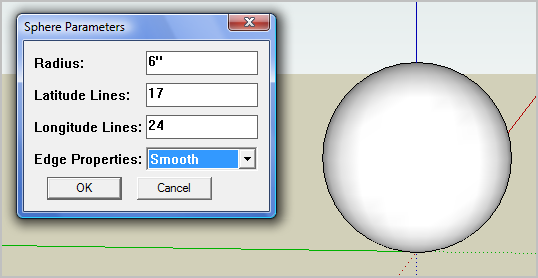
      This is a simple to use plugin that draws a sphere. You enter the parameters in a dialog box. It creates a sphere component, and activates the component placement tool to position it in the model.

      dialog sphere.PNG

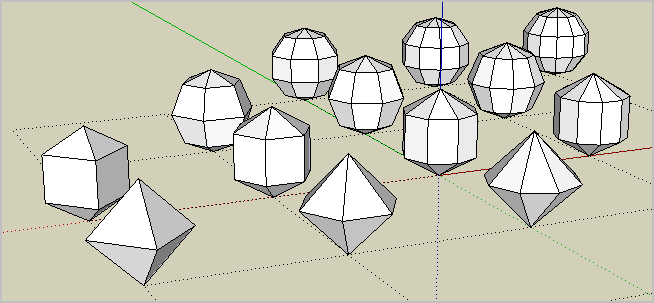
      You can control exactly how much geometry is created by specifying the number of latitude lines and longitude lines. You can also create some interesting sphere shaped polyhedra with just a few latitude and longitude lines.

      facets.PNG

      ` # CHANGELOG

      1.1 - July 4, 2010

      * Remember dialog box parameters between sessions.`

      The Sphere plugin is at regularpolygon.org/plugins/sphere.php.

      Thanks

      posted in Plugins
      R
      Regular Polygon
    • 1
    • 2
    • 3
    • 4
    • 5
    • 4 / 5