sketchucation logo sketchucation
    • Login
    1. Home
    2. Regular Polygon
    3. Posts
    Oops, your profile's looking a bit empty! To help us tailor your experience, please fill in key details like your SketchUp version, skill level, operating system, and more. Update and save your info on your profile page today!
    ๐Ÿ”Œ Smart Spline | Fluid way to handle splines for furniture design and complex structures. Download
    R
    Offline
    • Profile
    • Following 0
    • Followers 0
    • Topics 9
    • Posts 88
    • Groups 3

    Posts

    Recent Best Controversial
    • RE: [Plugin]$ Keyframe Animation

      iichiversii, technically you could do this yourself in version 1.5. But to imply that it is simple to do, and no plugin is necessary to automate the process, is just plain false.

      When the tweens are created for an animation, there are usually 500+ tweens, often over a 1000. Are you really going to go through 1000 scenes and manually adjust the visibility of the layers for each one? Even if you could update one scene every 10 seconds that would still take nearly three hours. You must have a lot more time on your hands than I do. I think most people would consider a script that automates this process to be a new feature. And that is probably why I received so many emails requesting it.
      posted in Plugins
      R
      Regular Polygon
    • RE: [Plugin]$ Keyframe Animation

      Greetings,

      There have been a couple updates since I last posted. The most frequent request (at least from the email I receive) has been to animate the objectsโ€™ visibility. So, as of version 1.6, objects can appear or disappear at any point in the animation.

      Their visibility is controlled by putting the objects on layers, and then turning those layers on or off for each key frame. The tweens generate the objects with the same visibility that they had on the key frames, so the animation can be exported to a movie.

      This demo animates the object visibility in a construction process. The bookcase parts all start off hidden. Their visibility is turned on when they are required for assembly, and they stay visible for the rest of the animation.

      [flash=480,360:3oqdsb0a]http://www.youtube.com/v/WGozLwOerfY?version=3&hl=en_US&rel=0[/flash:3oqdsb0a]

      BTW, I ought to mention that there is a new website for all my plugins. If you havenโ€™t visited, please check it out. The landing page for Keyframe Animation is regularpolygon.org/keyframe-animation/

      Thanks

      posted in Plugins
      R
      Regular Polygon
    • RE: [Plugin]$ Keyframe Animation

      Hi Everyone,

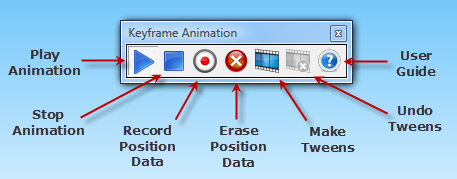
      Just thought I'd mention that version 1.4 is available. There is now a toolbar to facilitate the animation process. Here's a screenshot:

      Keyframe Animation Toolbar

      Thanks

      posted in Plugins
      R
      Regular Polygon
    • RE: [Plugin]$ Keyframe Animation

      Thanks for bringing this to my attention everyone. ๐Ÿ‘ Especially thanks to cperkins for sending me his model so I could see what was going on.

      File size is not the problem. It turns out, there was an actual bug that stops the execution of the script before the tweens are generated. It was most prone to occur in models that have a lot of sub-components, so that is why large file size seemed to be a factor. ๐Ÿค“

      The bug must of crept into version 1.2. Anyway, it has been fixed, the new version is 1.3.1, and it is available on the Download page.

      If you still have any issues after installing this new version, feel free to post them here, or send me a PM.

      Thanks,

      posted in Plugins
      R
      Regular Polygon
    • RE: [Plugin]$ Keyframe Animation

      There have been a few updates to Keyframe Animation since it was released three months ago. The current version is 1.3. The plug-in and user manual are available on the Download Page.

      Version 1.1 made improvements to much of the code. A new algorithm generates the in between scenes over twice as fast as the original. They are important because you can export the tween scenes to an AVI movie.

      Versions 1.2 and 1.3 have simplified the process for creating an animation. You no longer need to assign a unique name to each instance that you want to animate โ€“ that seemed to be the least intuitive, most tedious step in the whole process. The script will now automatically distinguish which instances are active and which are static. You donโ€™t have to do anything.

      The basic workflow can be summarized in five easy steps:

      1. Add some scenes.
      2. Select the first scene.
      3. Move the objects where you want them.
      4. Record the position data.
      5. Select the next scene, and go to step 3.

      This video tutorial illustrates the new workflow in version 1.3, and in the process, shows how to animate a Rubikโ€™s Cube.

      [flash=640,510:5q5jjjp5]http://www.youtube.com/v/ZmNmQ3izNnI?fs=1&hl=en_US&rel=0[/flash:5q5jjjp5]

      posted in Plugins
      R
      Regular Polygon
    • RE: [Plugin] Sphere 1.1

      Just wanted to say thanks to everyone who replied. Hope you all find the Sphere plugin useful.

      Also, there is a slightly improved version available, which I'll call version 1.1. The first version remembered the dialog box values entered, but only during each session. If you closed SketchUp and reopened it, your last values would be lost. This version remembers the parameters between sessions as well.

      You can download Sphere 1.1 here on my blog.

      Thanks.

      posted in Plugins
      R
      Regular Polygon
    • RE: [Plugin] Sphere 1.1

      @chrisglasier said:

      ... it is customary to put new versions in the first post so the latest comes up in a search. Another post to notify its arrival is also good. Thanks.

      Sorry about that, I am new to the posting customs here. I edited the OP so the the link points to the latest update Sphere 1.1. That does seem more organized, thanks for the tip.

      @unknownuser said:

      Please be kind enough to upload the .rb file to this topic, as blogspot is blocked in some countries.

      As for my blog being blocked in some countries, I have to say that this was complete news to me. I suppose you are referring particularly to China. I did some research using this tool, Website Pulse, and found that my site was blocked in 3 out of 4 major cities in China! However, I still feel strongly about having my plugins downloaded from a single distribution point, and the logical place for that is my blog where they are fully documented.

      Perhaps this problem can be resolved in the near future another way. Blogger is pretty limited, so I am considering moving to a different platform, where the URL would have my own domain name. Then my blog wouldn't be blocked anywhere, or at least it would be as accessible as this forum, so there would be no issue.

      posted in Plugins
      R
      Regular Polygon
    • RE: [Plugin]$ Keyframe Animation

      @andybot:
      Thank you!
      Iโ€™m glad you are finding the plugin useful. ๐Ÿ˜„

      posted in Plugins
      R
      Regular Polygon
    • RE: [Plugin]$ Keyframe Animation

      @marian said:

      I had an Idea today ๐Ÿ˜›. Would it be possible for the plugin to detect scale deformations or other modifications to the mesh not only its position? Now that would make it a game changer ๐Ÿ˜„

      Thanks for your suggestion. ๐Ÿ‘

      Yeah, right now Keyframe detects changes in the position and orientation of objects between scenes, and animates them by interpolating those properties. Currently, it ignores the size. But it wouldnโ€™t be so difficult to detect changes in scale, and interpolate those values as well.

      Iโ€™ll put it on my list of planned updates. I am just wondering how often this feature is required. If I get more feedback in favor of animating the size of objects, Iโ€™ll up the priority.

      posted in Plugins
      R
      Regular Polygon
    • RE: [Plugin]$ Keyframe Animation

      My only other guess is that the edge styles might have an effect. All edges are a little blurry. So, the thinner they are, the better. I would turn off things like Profiles, Depth cue, etc., and see if that improves the quality.

      edge-styles-80.png

      posted in Plugins
      R
      Regular Polygon
    • RE: [Plugin]$ Keyframe Animation

      Hi peweuk,

      The most likely culprit is the anti-alias setting in the Options dialog. If you don't check it, the edges will be quite blurry.

      options-anti-alias.png

      posted in Plugins
      R
      Regular Polygon
    • RE: [Plugin]$ Keyframe Animation

      Thanks for the tutorial. I learned some things about using Kerkythea. โ˜€

      The plugin to export the animation to Kerkythea is su2kt.rb by Tomasz. It works great, but you still have to stitch together the images generated by Kerkythea to make a movie, which is one more step.

      If rendering is not required, there is a quick way to export your animation directly from SketchUp. Just create the tween scenes using the Keyframe Animation plugin. Then export the tweens to a movie using the SketchUp utility, File > Export > Animation.

      posted in Plugins
      R
      Regular Polygon
    • RE: [Plugin]$ Keyframe Animation

      Well, that is strange. Firefox downloads the installer just fine. But IE claims the file is not found. ๐Ÿ˜•

      OK, the link on the Download page should work for either browser now. I zipped up the installer, and IE seems to be content.

      @tallbridgeguy:
      Thanks for that. ๐Ÿ‘

      posted in Plugins
      R
      Regular Polygon
    • RE: [Plugin]$ Keyframe Animation

      @tallbridgeguy said:

      Thanks for fixing it! I will give it another go.

      Update: It works great now!

      Update: I got it to work in kerkythea.

      I am glad that solved the problem. Thanks for the update. ๐Ÿ‘

      @cperkins said:

      youdaman! ๐Ÿ˜Ž Sketchup stock just jumped 10 points! Here's a quick one exported from Sketchup, animating 4 levels deep. I'll post a rendered version later on. Thanks again!

      That animation is great! ๐Ÿ˜ฒ โ—
      It is a good example of nested animated components. Thanks for sharing your work. ๐Ÿ‘

      posted in Plugins
      R
      Regular Polygon
    • RE: [Plugin]$ Keyframe Animation

      I downloaded the demo, and tested things out, and it turns out that VRay is not compatible after all. The problem is that VRay doesnโ€™t export the layer visibility properties for each scene when it renders the scenes in batch.

      I wrote customer support at V-Ray about this issue. They confirmed my suspicion, and said they plan to fix this in the future. Here is the ticket.

      So, there is no work-around for this problem, Keyframe Animation requires layers to create the animation. Each layer has objects on it at a different point the animation. Each tween has a different layer that is visible. The effect is that the objects appear to move as you flip through the tweens.

      VRay will render each tween individually OK -- just not in batch -- but that would be too tedious. ๐Ÿ˜’

      posted in Plugins
      R
      Regular Polygon
    • RE: [Plugin]$ Keyframe Animation

      @chrisglasier said:

      Totally misconstrued. Code-based approach is good for specific tasks that are commissioned by those that can afford them - e.g. banks, airlines and stock markets. Code-based approach is also good for paperwork type applications like Word and Excel that are essentially blank. What you and I have been doing with animation plugins is to mix code and information to offer something that can be manipulated by anyone ... and that points the way to escape the subliminal stranglehold of software "total solutions". Don't you think?

      I guess I am still not clear on the distinction. Why would Excel belong to the code-based camp? It is not limited to specific tasks; anyone can configure a spreadsheet to compute what they want. Is this basically a distinction between programs that rely on text-based input as opposed to applications that use a GUI? ๐Ÿ˜•

      posted in Plugins
      R
      Regular Polygon
    • RE: [Plugin]$ Keyframe Animation

      @mariocha
      Wow! ๐Ÿ˜ฒ Now that is what I call a professional demo. ๐Ÿ‘

      posted in Plugins
      R
      Regular Polygon
    • RE: [Plugin]$ Keyframe Animation

      I can see how a code-based approach would be useful in certain situations. My approach is pretty much the opposite. I am trying to give non-programmers an intuitive way to define an animation. Basically, the animation relies on the change in the orientation of the component between two key frames. It is both a math problem and programming problem, which made it extra fun to work on.

      @chrisglasier said:

      I'm not in the plug-in competition but otherwise would be very happy to collaborate in some way.

      I am not in a plugin competition either. Am I overzealous about communicating this pluginโ€™s functionality? That is possible. ๐ŸŽ‰

      posted in Plugins
      R
      Regular Polygon
    • RE: [Plugin] Skel_animation base extension 1.01 +.02

      Your mannequin seems like a very useful test-model for human figure animation. I posted some more about it on my Keyframe Animation topic here.

      posted in Plugins
      R
      Regular Polygon
    • RE: [Plugin]$ Keyframe Animation

      There is an interesting mannequin model, by Chris Glasier, posted on his [plug-in] Skel_animation topic. This looks like a very useful model for testing out plugins capable of human figure animation. So, I thought I would see what Keyframe Animation could do with it. I made several key frames, and exported a movie of the animation. Here it is.

      [flash=640,505:25hp8sz8]http://www.youtube.com/v/eS4QUrALcrE?fs=1&hl=en_US&rel=0[/flash:25hp8sz8]

      The SketchUp model is attached, if you want to experiment with your own animations.
      mannequin.skp

      I did change the way the components in the mannequin are grouped. I made the hand a sub-group of the forearm, because it moves relative to the forearm. Likewise, the forearm is sub-group of the upper-arm. And the lower-leg is a sub-group of the upper-leg. It is not absolutely necessary to group objects like this, it just makes things a lot easier. It also proves that Keyframe Animation can animate sub-groups -- in this case they are three levels deep.

      The Keyframe Animation 1.0 page has more demos, documentation, a video tutorial, and the latest version to download.

      posted in Plugins
      R
      Regular Polygon
    • 1
    • 2
    • 3
    • 4
    • 5
    • 2 / 5