sketchucation logo sketchucation
    • Login
    1. Home
    2. Phillip H
    3. Posts
    Oops, your profile's looking a bit empty! To help us tailor your experience, please fill in key details like your SketchUp version, skill level, operating system, and more. Update and save your info on your profile page today!
    ⚠️ Important | Libfredo 15.6b introduces important bugfixes for Fredo's Extensions Update
    Offline
    • Profile
    • Following 0
    • Followers 0
    • Topics 6
    • Posts 72
    • Groups 1

    Posts

    Recent Best Controversial
    • RE: DC Exploration 1 - Color!

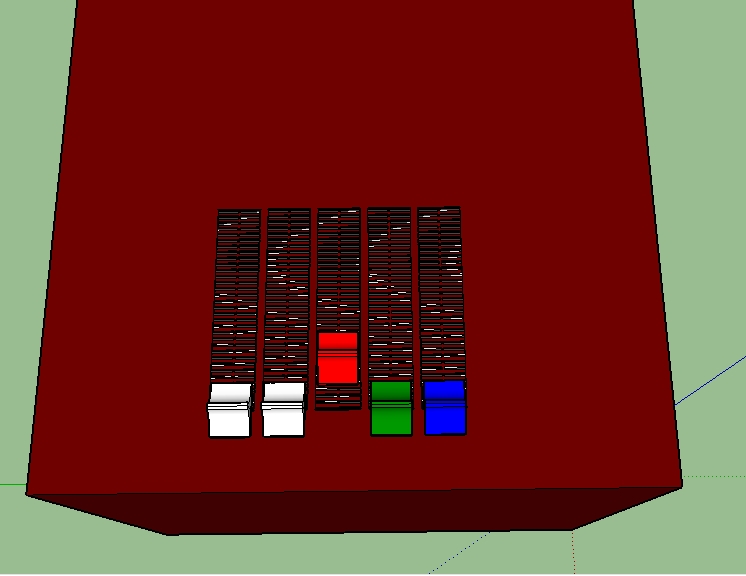
      The intention of this exercise was to move one component and have it immediately affect to color of another by reinterpreting its X value. This result is a failure. It requires an intermediate set of actions. The user must select the interact tool and click on the component. Perhaps someone with more knowledge and better skills (which would be just about anyone here) will see something I missed.

      The three sliders, SliderR, SliderG and SliderB's X attribute is evaluated as:
      =NEAREST(CURRENT("X"),0,0.015748,0.031496,{...},3.984252,4.000000)

      ColorCube Material=CONCATENATE(INT(ABS((SliderR!X/IncAmt))),",",INT(ABS((SliderG!X/IncAmt))),",",INT(ABS((SliderB!X/IncAmt))))

      ColorCube onClick=REDRAW()

      Slider DC v1.skp

      posted in Dynamic Components
      Phillip HP
      Phillip H
    • RE: Feature request.

      @garry k said:

      You are limited to the interact tool.

      Personally - I don't think I would involve the scaling tool. I was able to affect 2 components with different motions with 1 click.

      If this is what you are looking for I can post an example.

      I get that. But that is the point. Can you select one of 256 increments with one click without going to a drop down box? The scale tool does not fire the onClick attribute, so unfettered dynamic motion such as produced by scale and move will not activate a formula. That is the reason for a feature request. See my post in 'What's the Future of Dynamic Components?' for my reasoning. See if you agree. I would be very interested to get your take on this.

      posted in Dynamic Components
      Phillip HP
      Phillip H
    • RE: Feature request.

      @pcmoor said:

      Hi Phillip

      could you use the nudge idea with a variable input, like int(255/input)? to get one to a general color change then fine tune to suit.

      Philip (with only one L)
      Sure could Philip (with only one L - I'm sorry for your loss). 😆 If we ever meet, you can hit me for that. 😉

      As a matter of fact, that is probably the only solution that will get me to my goal. I have 4 inches of travel, so its INT(ABS((Rx/IncAmt))) where Rx is the X value of the Red slider and IncAmt represents the 256 divisions of 4. I threw in the ABS function when I observed a -0 at one point and I broke each step out so I could better monitor the values... I'm a noob after all.

      I have aligned the slider axes to the middle of the component. The axis for the Cube is aligned to 0 at the beginning of the slider's X axis travel. The scale tool stretches the slider component, but I can still visually choose where the slider X axis lands on the grid. I am limiting the travel with [NewX=NEAREST(CURRENT("X"),0.00000,0.015748,{..........},3.984252,4.000000)] causing X to snap to the nearest correct value, then X=NewX.

      Each slider contains the following custom attributes:
      Constants:
      IncAmt=0.015748
      OldLenX=1 (Resets the slider geometry after the scale operation)

      The RGB slider X values:
      (Brings the X values from all three of the sliders into the active [selected] slider.)
      Rx=SliderR!X
      R=INT(ABS((Rx/IncAmt)))
      Gx=SliderG!X
      G=INT(ABS((Gx/IncAmt)))
      Bx=SliderB!X
      B=INT(ABS((Bx/IncAmt)))

      Convert increment count numbers into characters and format them for the Material attribute.
      Trick=CONCATENATE(R,",",G,",",B)

      I'm not sure how to add 'clickable' surfaces without embedding them in the slider component. If I do that they won't click. If I don't, they won't scale. Hmmm...

      Provided I can implement your answer, it will mean that I have to scale, then switch to the interact tool, then nudge (click, click click...), then scale the next slider, etc. Unfortunately, jumping back and forth between sliders and back and forth between scaling and clicking to get to the desired color, introduces an order of magnitude of complexity to the user interaction. However, by adding the click it will at least fire the onClick attribute and display the current color. Not ideal and not what I intended, but if I can do it, I can at least put this exercise to bed until a better solution presents itself. Thanks again for the suggestion.

      Phillip (with both Ls) 😄

      posted in Dynamic Components
      Phillip HP
      Phillip H
    • RE: What's the Future of Dynamic Components?

      @driven said:

      @phillip h said:

      ..."Whatever can this mean?...
      Anyone have any news or thoughts they can share?

      I believe that there was a 'bit of a cockup' updating the preview images for older 3dWareHouse models...

      a number of models where converted to kmz format in error and lost all their unique skp properties...

      this included simple things like 'smooth edges' , 'double sided faces' and DC 'attributes'...

      the updating was halted and 'fix' has been tested and a re-render/repair is expected soon...

      so, keep on playing...

      have a look into controlling DC's with Ruby via tool observers, there may be some milage in that approach...

      have fun

      john
      Whoo hoo! Thanks for the update John! And thanks for the suggestion! Hope springs...

      posted in Dynamic Components
      Phillip HP
      Phillip H
    • RE: What's the Future of Dynamic Components?

      My current DC exercise involves using three sliders to produce a concatenated RGB color number from three X axis values. I am using the scale tool because it triggers the custom attributes to load and process values (after a fashion) based on the X axis of the component I scale.

      The problem is that the scale tool doesn't fire the onClick attribute so I can't get the SET() function to apply the color number to the Material attribute of the target group or component. SET() only works in onClick as far as I can tell.

      The alternatives are 1) 'clicking' each slider n times to get to the desired color number (up to 765 clicks!) OR 2) resort to a drop-down box, which defeats the purpose of using sliders or dials in the first place.

      I want to be able to replicate 'controls' (sliders and knobs) that dynamically control something with a degree of precision. If there is an acceptable work-around, I haven't found it yet.

      posted in Dynamic Components
      Phillip HP
      Phillip H
    • RE: What's the Future of Dynamic Components?

      @ntxdave said:

      Interesting that no one else has replied but I will give you my take:

      IMHO the future is not necessarily in DC's themselves but rather is in the ability to share your 3D models in an online environment that allows you to do both "walk thru" and object/component animations (i.e. movies, WebGL or one of the 3D viewers - see next paragraph). The drawback that I see (I honestly have not developed one) is that you must be in an environment that allows you to trigger the animation of the object.

      I can animate the component like is done with a DC using plugins like SketchyPhysics, Keyframe Animation and SU Animate and then export to a movie. There are also plugins like CL3VER and Spread3D which also give you some of those capabilities. The key to all of these tools is that "I do not have to get me hands dirty coding".

      I think the real future for this industry is the ability to view models in an interactive 3D environment. As I said above some of this already exists but I am looking forward to the day when I can build a model that has animated components, provides the ability to "walk thru" the model and stop the "walk thru" and "look around" yet at the same time interact with items in the model (something like your DCs). Again, IMHO, I think we will see these type of tools take over in the next 2 to 3 years. Oh, and without the need to do any "scripting/coding".

      It will be interesting to see if any others respond 😎

      Hi ntxdave,

      Thanks for the perspective. Short answer, I agree. For DCs to become more than just a novelty that can be moved, morphed or animated, they need some of their limitation to be addressed. They need some added functionality and flexibility.

      From the Sketchup user's perspective (that is the person(s) actually creating the models), I think that there is a place for DCs in that area between needing a full blown SketchUp extension to create components and having to draw one from scratch. I think if DCs capabilities were expanded a little, they could fill that niche admirably.

      Finding the right component drawing on the 3D Warehouse is difficult. Have you ever tried to find a single piece of hardware, like the correct bolt or screw? This is critical for 3D printing applications, but it's a crap shoot at best. Having to do the research and reproduce a component to spec from scratch is a pain. If DCs were tweaked a little, they could be made to produce the desired results. Imagine a single DC named 'Bolts' instead of hundreds of individual models that are named and categorized in a completely haphazard fashion. See what I'm getting at?

      I had envisioned a DC that through user input or web sourced table data, could replicate any bolt, standard or custom, in as many materials, copies and styles as the designer might require. Of the standard threaded bolt, there is a head of varying type (hex, Allen, knurled, slotted, Phillip's, countersunk, etc.), a shoulder of varying type (shaped, round, tined, etc), sometimes a taper between the shoulder and the shaft, a shaft of varying type (threaded [left and right twist, of varying type and pitch], shaped or cylindrical [no threads = a pin], tapered or straight, drilled or not); each portion with specific geometry (I haven't even touched on hardness and the accompanying markings). While that might sound like a lot, they could be represented by as little as four or five basic shapes. Selections could be standardized. Pick one as modify it accordingly. Custom components made from drop-down selections or user input.

      I had also played with the idea of the DC creating two types of static swappable components; a low poly placeholder and a detailed, printer or render ready version.

      I can't see how this could do anything but help accommodate your vision of the future, the organization of the 3D Warehouse and SketchUp modelers in general. But please keep in mind that I am a noob and don't really understand what would have to happen 'under-the-hood' to make these changes to DCs a reality. It too is just a vision.

      posted in Dynamic Components
      Phillip HP
      Phillip H
    • RE: Feature request.

      @garry k said:

      There is an interact tool that becomes available when the 'Dynamic Components' extension is loaded.

      Or are you talking about something else?

      Hi Garry!

      Yeah I am. The interact tool only fires onClick when the mouse button is depressed while the cursor is on a 'clickable' surface. There is a certain level of integration with the scale tool, but it doesn't fire the onClick attribute of DCs. What I am talking about would be a move tool integration that would allow some drag and drop functionality and would also 'fire' the onClick attribute when the mouse button is released. In that way, the user could affect X, Y, Z AND RotX, RotY and RotZ and process the results through the formulas stored in the onClick attribute.

      Of course, I'm a noob, so if there is another way of accomplishing this, I'm all ears.

      posted in Dynamic Components
      Phillip HP
      Phillip H
    • Feature request.

      I would love to see a move tool that fired the onClick attribute.

      posted in Dynamic Components sketchup
      Phillip HP
      Phillip H
    • What's the Future of Dynamic Components?

      Hi All,

      As pcmoor confirmed to me in another thread, a number of users have noted that DCs on 3D Warehouse are being emptied of all attributes. The effort seems to be somewhat extensive but not comprehensive.

      I am new to DCs (and SketchUp for that matter) so I visited the help pages at help.sketchup.com. Many of the DCs 'emptied' have been from there; such as the DCs linked from Dynamic Components Function Examples. However, Chris Fullmer among others, have been kind enough to send me links to DC examples too; many not authored by SketchUp. However, most of the ones I visited were likewise empty.

      My DC exercises (Vertical Blinds and DC Desk), rudimentary as the are, still worked at last check.

      Now please don't view this query in the light of some '40s Hollywood starlet, back of the hand to the forehead in a feigned near swoon whilst she cries, "Whatever can this mean? I know we are on the verge of an upgrade. So I wonder if there is a connection. I also wonder if there is a future for DCs in SketchUp or if the DCs on the Warehouse will be updated with new attributes or capabilities. In short, I wonder if I should continue to investigate DCs in their current incarnation or wait for the upgrade to continue?

      Anyone have any news or thoughts they can share?

      posted in Dynamic Components sketchup
      Phillip HP
      Phillip H
    • RE: Dynamic Components Function Examples

      @pcmoor said:

      the other forum has noted the loss of examples

      Link Preview Image
      Basic self paced tutorials broken?

      I use SketchUp with students a few times a year and prefer the self-paced tutorials for them to get familiar with the basic concepts, but currently all the basic tutorials supplied by “SketchUp” appear to be broken. They…

      favicon

      SketchUp Community (forums.sketchup.com)

      [attachment=0:hi3y6q0h]<!-- ia0 -->Capture.PNG<!-- ia0 -->[/attachment:hi3y6q0h]

      plus other issues with tutorials..maybe this is the lead up to the new release

      The DCs are but spreadsheet cell formulas, convenient for simple object manipulation. Ruby on the other hand is a language use to create plugins. (DCs forms and functionality was built using Ruby)

      However DCs are the most likely vehicle for information modeling, so understanding how they work is not a waste of time

      deleted last comment

      going through your examples now
      Thanks for clearing that up. It helps me put things in focus. It's also good to know that I haven't lost my mind, thinking the DCs were empty. If your assumption is correct, then I presume we will see some major changes in functionality.

      In the following file, I have broken out things into various attributes to better monitor results. The ColorCube has its Material attribute removed as it need to be added fresh each time. I have been have some difficulty with the Scale tool too, so the same applies. It needs to be reinitialized in each slider; SliderR, SliderG and SliderB. LenX gets evaluated with NEAREST(CURRENT()) and the X axis is aligned to the base of the slider scale. This give a direct relationship between LenX and X. The 'Trick' attribute of ColorCube came from telling myself, this might just do the trick. 😉 Thanks for looking. It means a lot to me.

      Upon some reflection, I think I need to move most of ColorCube's attributes to the sliders and do all the processing from there.

      posted in Newbie Forum
      Phillip HP
      Phillip H
    • RE: Dynamic Components Function Examples

      Oops

      posted in Newbie Forum
      Phillip HP
      Phillip H
    • RE: Dynamic Components Function Examples

      @phillip h said:

      Thanks for clearing that up. It helps me put things in focus. It's also good to know that I haven't lost my mind, thinking the DCs were empty. If your assumption is correct, then I presume we will see some major changes in functionality.

      In the following file, I have broken out things into various attributes to better monitor results. The ColorCube has its Material attribute removed as it need to be added fresh each time. I have been have some difficulty with the Scale tool too, so the same applies. It needs to be reinitialized in each slider; SliderR, SliderG and SliderB. LenX gets evaluated with NEAREST(CURRENT()) and the X axis is aligned to the base of the slider scale. This give a direct relationship between LenX and X. The 'Trick' attribute of ColorCube came from telling myself, this might just do the trick. 😉 Thanks for looking. It means a lot to me.

      Upon some reflection, I think I need to move most of ColorCube's attributes to the sliders and do all the processing from there.

      My deepest regrets and apologies to all. I have been studying government regulation for testing and re-certification purposes for weeks now. Living off of a few hours sleep a night and too much caffeine does little to help the logic processes. I just went through my drawing and I am so embarrassed, having made so many logic and math errors and then posting them in the drawing for all to see! Yikes!

      I'll post the corrected version after a quick nap and some quality time with a spreadsheet program. Sorry.[/quote]

      posted in Newbie Forum
      Phillip HP
      Phillip H
    • RE: Dynamic Components Function Examples

      @pbacot said:

      Phillip,

      In your first post you seem to be conflating Sketchucation Community Forums with the Trimble SketchUp 3d Warehouse. The Warehouse is run by Trimble (though they do not produce most of the content). These forums and their moderators do not have any responsibilities with the 3d Warehouse.

      Still, as you see, you can bring up subjects here related to Trimble and someone might answer.

      I personally wonder about DC components. They seem to be an idea that few wish to pursue. So you don't find too many people to discuss them with. There are some nice components out there that people have made but it's not a consistent selection, and nowhere near as widely adopted, or developed as, say, ruby plugins. DC components have added a functionality that allows certain gifted individuals, already well-versed in their respective trades, to provide more parametric aids to modelling. Other than that, I think they tend to end up limited and gimmicky, at least in regard to professional use.

      Hi pbacot,

      Thanks for your reply and for giving me the opportunity clarify my remarks. Your observation is correct and I apologize. Though I seem to mix the two entities up in my post, it is due to poor communication on my part, not confusion. I should have been more careful.

      I once had an English instructor about half a century ago that would occasionally remind me that it is not enough to communicate so as to be understood. One must communicate so clearly as to not be misunderstood. I was addressing my remarks to the people here that cite those examples and link to those models. It seems I dropped the ball. Please forgive me.

      Just thinking out loud here: As far as the commercial value of DCs, I tend to think that DCs are an under-developed concept and certainly under utilized because of it. A few more predefined attributes and functions could make a world of difference. I have read great praise from some designers that have found them very useful in streamlining their workflow, even in their current state. Kitchen cabinets immediately come to mind.

      Considering the importance of labor costs in budgeting design efforts, I would think that there is a great deal of commercial potential here. Were the concept expanded a little, there might be more of an effort to develop, categorize and standardize their use, especially among Web developers for sites where inventories are accessed by designers.

      I am surprised that there aren't more collections where whole subsets of inventories are made out of DCs; Hardware, lumber, pipe and fittings, fasteners, etc., rather than endless models ad nausium, all of different sizes and types of the same thing. Instead, a DC that hold the definition(s) for many like items. Seem like great candidates for this type of thing. Better yet, DCs that can produce custom output much like a digital equivalent of a 3d printer. Perhaps a place holder; low poly component 'targets' that holds the item number, the orientation and position in the drawing; one that allows a one-click DC to swap out the more robust replacements when the designer needs them.

      I'm probably talking over my head. Again, just spit-balling. Must be the coffee. 😆 Thanks for your input and thanks for listening. It's been a pleasure.

      posted in Newbie Forum
      Phillip HP
      Phillip H
    • RE: Dynamic Components Function Examples

      @pcmoor said:

      Hi

      I believe animating the sliders maybe more effective than the scaling idea. Each slider should have a front and back component/group switch, which moves the slider a given distance. Similar to your scale method a step can be updated or reduced. The corresponding step can be added/subtracted to influence the color as well as the slider position.

      Added a sample continuous movement on a cube using the set function

      Must say G'Night from a Tassie Friend

      Ah! A 'taz' man! The coolest people in the world! Rest well my new mate.

      I liked your offering. Very elegant. I may use a variation of that algorithm in something else. Hope that's OK with you.

      The reason I chose to try and model the Scale tool approach was because I thought it would be difficult. At my current skill level, I was right. But the payoff is noteworthy. In close to only three moves, the user could quickly and somewhat accurately make a discrete selection from over 16 million possibilities. Besides, I had never seen it done; a doable dynamic color-picker. 😄 I know this approach isn't pretty. I didn't expect that it would be. But this was after all, simply an exercise.

      Btw, I like your suggestion about being able to 'nudge' the slider to fine-tune the selection. Brilliant! I'll put it in! But first I must get the thing to work! 😆

      posted in Newbie Forum
      Phillip HP
      Phillip H
    • RE: Dynamic Components Function Examples

      I'll be away for a few hours and will check back later. - Phillip

      posted in Newbie Forum
      Phillip HP
      Phillip H
    • RE: Dynamic Components Function Examples

      @pcmoor said:

      Had my dinner.. just checked the warehouse examples, they are indeed empty. This was not the case years before. Someone has stuffed up with updating the models.

      Can you share the models you are working on and formulas you are having difficulty with
      I have little experience with scripting languages; Ruby in particular and specifically within the context of the DC limitations of SketchUp, so the function examples I tried have been many. My main focus has been to find what functions work with what attributes and under what circumstances. The environment is pretty constrained so exceptions and work-arounds have been my focus.

      Completely in keeping with the antiques meme that is me, I have been following a sticky thread started in 2008 by Chris Fullmer: DC Exploration Series. If you look at my meager offerings on 3D Warehouse, I have shared some of my exercises like, Vertical Blinds (Animated & Scalable) and DC Desk. I took it upon myself to attempt a DC that addressed the majority of the challenges in all three parts of the series, DC Exploration 1 - Color!, DC Exploration 2 - Movement! (rotation, linear) and DC Exploration #3 - Scaling and Copying.

      The premise is simple. Since the Scale tool seems to be the only integrated tool that offers dynamic component functionality through the mouse; that is, beyond a 'click'; I want to use the Scale tool to manipulate a slider-like component. The idea is to align the X axis with the base of the scale and use a variation of LenX/2 to define three slider controls' X value. Then I concatenate the outputs to an RGB color number. A 1/64th inch [0.015625"] increment amount would give a slide control a travel length of 4 inches (64*4=256 or 0 to 255). So, a slider for Red, for Green and for Blue.Color Cube DC.jpg

      I have to date, limited the X value with a NEAREST(CURRENT("X"),[...increment series...]) function that defines a custom attribute called NewX. Getting the Scale to 'fire' the custom attributes was easy. Concatenating was easy. But I seem to be having some trouble using the SET() function to load ColorCube!Material. I only works the first time and when the Material attribute of the ColorCube is in its <default> state. ...So I'm looking for another workaround.

      Thanks for asking. It seems that nobody talks to the basic membership much. Understandable though.

      posted in Newbie Forum
      Phillip HP
      Phillip H
    • RE: Dynamic Components Function Examples

      @pcmoor said:

      Hi Phillip,

      Dynamic components are saved as a definition, their size,position and orientation as are other attributes are held within the file, so editing a DC is done by placing it into a new or existing drawing. An instance of the definition is then observed. When edited it can be save via the right click menu, this includes loading it to the warehouse as a component.
      So if you download a DC and save it o a dedicated folder, you then you can insert an instance via the component browser. A copy of this definition remains in the drawing file despite deleting all the instances, one needs to purge the drawing to remove all traces.
      In regards to the warehouse, I find the drag and drop method best, have an empty sketchup drawing and drag the component file from the download menu to the sketchup interface and drop. This inserts the component and observed definition intact, you are not opening the DC file. Sometimes you may need to explode the DC as it may have been enclosed in another component wrapper

      will keep in touch after viewing your posts

      Hi! And thanks for your prompt and courteous reply. 👍

      While I understand the jist of your explanation, some of the terminology (like 'drawer') is a little vague to me. I was a programmer of old, when operating systems and high level languages for microprocessors were GOING to be the next big thing and the line between hardware and software was still pretty fuzzy. I left off writing dedicated machine code in hex for other pursuits, though I tried to keep up on an amateur level. My last project was consulting with DGO Systems to develop new technology for mobile telephonic voice encoders as the mass communications market had newly transitioned from 'car phones' to cell phones. My man-cave is really a cave and my object oriented context is still pretty sparse.

      I think I can follow your instructions. If I have any trouble, I'll check back. 💚

      posted in Newbie Forum
      Phillip HP
      Phillip H
    • Dynamic Components Function Examples

      Let me start by saying I'm not complaining. I understand that this is a for-profit membership site and most of you guys are overworked and besieged by people looking for favors and freebies. You have been very generous with your examples and explanations. As for me, I'm a basic member. I have a non-profit Pro license because I could not afford a pro license otherwise. So if you are giving away free membership upgrades, my hand is already raised. But I am not offended that it isn't available and I am very grateful for the kindness that you have shown me by allowing me to come here and learn. That said...

      I don't know if the powers that be have noticed, but every one of the Dynamic Components Function Examples that I have downloaded are empty. The groups and components in these DC example do not have ANY attributes assigned, much less have any functions or code examples embedded in them. Most of the DC Function Examples on the 3D Warehouse site have 'SketchUp 2015' links as a download option but I have tried several different versions with no joy. I hope it's an issue with my install or OS, because otherwise this situation looks like a lot of work to correct.

      Digging through the fora for examples and instruction can be fruitful, but it is a time consuming and tedious alternative to having examples linked to function and syntax definitions; especially when you are trying to find an solution or a work-arounds to an immediate problem. Still, I don't want anyone to do the work for me. I love this stuff. I'd just like to be able to find some answers without having to bug the Mods and membership too much.

      Thanks for all you do and thanks for listening...

      posted in Newbie Forum sketchup
      Phillip HP
      Phillip H
    • RE: DC Exploration 1 - Color!

      @unknownuser said:

      The 'Color Cube'component has a Material attribute that I have set:

      • Material=CONCATENATE(ABS(INT((SliderR!X100))),",",ABS(INT((SliderG!X100))),",",ABS(INT((SliderB!X*100))))
        This method needs refining too. Among other things, it returns values that end with '.0'

      Forehead slap! I had reversed ABS() and INT(). It should read:

      • Material=CONCATENATE(INT(ABS(SliderR!X100)),",",INT(ABS(SliderG!X100)),",",INT(ABS(SliderB!X*100)))
      posted in Dynamic Components
      Phillip HP
      Phillip H
    • RE: DC Exploration 1 - Color!

      Color Cube DC.jpg
      I have had some successes, most notably that I have affected a color change of a component by moving a slider with the scale tool. These are very humble gains but suffice as proof of concept.

      I am loading a Slider component's custom attribute (SliderR for Red in this case) named NewX as follows:

      • NewX=NEAREST(CURRENT("LenX"),.015625,0.031250,0.046875,0.062500,0.078125,0.093750,0.109375,0.125000,0.140625,0.156250,0.171875,0.187500,0.203125,0.218750,0.234375,0.250000,0.265625,0.281250,0.296875,0.312500,0.328125,0.343750,0.359375,0.375000,0.390625,0.406250,0.421875,0.437500,0.453125,0.468750,0.484375,0.500000,0.515625,0.531250,0.546875,0.562500,0.578125,0.593750,0.609375,0.625000,0.640625,0.656250,0.671875,0.687500,0.703125,0.718750,0.734375,0.750000,0.765625,0.781250,0.796875,0.812500,0.828125,0.843750,0.859375,0.875000,0.890625,0.906250,0.921875,0.937500,0.953125,0.968750,0.984375,1.000000,1.015625,1.031250,1.046875,1.062500,1.078125,1.093750,1.109375,1.125000,1.140625,1.156250,1.171875,1.187500,1.203125,1.218750,1.234375,1.250000,1.265625,1.281250,1.296875,1.312500,1.328125,1.343750,1.359375,1.375000,1.390625,1.406250,1.421875,1.437500,1.453125,1.468750,1.484375,1.500000,1.515625,1.531250,1.546875,1.562500,1.578125,1.593750,1.609375,1.625000,1.640625,1.656250,1.671875,1.687500,1.703125,1.718750,1.734375,1.750000,1.765625,1.781250,1.796875,1.812500,1.828125,1.843750,1.859375,1.875000,1.890625,1.906250,1.921875,1.937500,1.953125,1.968750,1.984375,2.000000,2.015625,2.031250,2.046875,2.062500,2.078125,2.093750,2.109375,2.125000,2.140625,2.156250,2.171875,2.187500,2.203125,2.218750,2.234375,2.250000,2.265625,2.281250,2.296875,2.312500,2.328125,2.343750,2.359375,2.375000,2.390625,2.406250,2.421875,2.437500,2.453125,2.468750,2.484375,2.500000,2.515625,2.531250,2.546875,2.562500,2.578125,2.593750,2.609375,2.625000,2.640625,2.656250,2.671875,2.687500,2.703125,2.718750,2.734375,2.750000,2.765625,2.781250,2.796875,2.812500,2.828125,2.843750,2.859375,2.875000,2.890625,2.906250,2.921875,2.937500,2.953125,2.968750,2.984375,3.000000,3.015625,3.031250,3.046875,3.062500,3.078125,3.093750,3.109375,3.125000,3.140625,3.156250,3.171875,3.187500,3.203125,3.218750,3.234375,3.250000,3.265625,3.281250,3.296875,3.312500,3.328125,3.343750,3.359375,3.375000,3.390625,3.406250,3.421875,3.437500,3.453125,3.468750,3.484375,3.500000,3.515625,3.531250,3.546875,3.562500,3.578125,3.593750,3.609375,3.625000,3.640625,3.656250,3.671875,3.687500,3.703125,3.718750,3.734375,3.750000,3.765625,3.781250,3.796875,3.812500,3.828125,3.843750,3.859375,3.875000,3.890625,3.906250,3.921875,3.937500,3.953125,3.968750,3.984375,4.00000)
        As mentioned above, this number series is based on 1/64th inch increments. The intention is to distill these values to a 000 to 255 range. How is another matter.

      This method keeps the scaling process within a 0" to 4" range for now but does not accurately reflect the new X value yet. It does change it though. The slider axis is set in the middle of the component and I have not compensated for this yet. However, the process does demonstrate that it can be made to work which is enough for now.

      The 'Color Cube'component has a Material attribute that I have set:

      • Material=CONCATENATE(ABS(INT((SliderR!X100))),",",ABS(INT((SliderG!X100))),",",ABS(INT((SliderB!X*100))))
        This method needs refining too. Among other things, it returns values that end with '.0' and I don't know how to eliminate that yet. It also requires an onClick REDRAW() to change the color. I'm guessing I need to define the color number within the slider component and set the Color Cube material attribute from there.

      I would really appreciate it if someone would throw me a line. I'm in waaay over my head.

      posted in Dynamic Components
      Phillip HP
      Phillip H
    • 1 / 1