sketchucation logo sketchucation
    • Login
    1. Home
    2. pcmoor
    3. Posts
    Oops, your profile's looking a bit empty! To help us tailor your experience, please fill in key details like your SketchUp version, skill level, operating system, and more. Update and save your info on your profile page today!
    FredoBend | Powerful new bending tool for SketchUp Download
    P
    Offline
    • Profile
    • Following 0
    • Followers 0
    • Topics 1
    • Posts 378
    • Groups 1

    Posts

    Recent Best Controversial
    • RE: Dynamic Components Function Examples

      Hi Phillip,

      Dynamic components are saved as a definition, their size,position and orientation as are other attributes are held within the file, so editing a DC is done by placing it into a new or existing drawing. An instance of the definition is then observed. When edited it can be save via the right click menu, this includes loading it to the warehouse as a component.
      So if you download a DC and save it o a dedicated folder, you then you can insert an instance via the component browser. A copy of this definition remains in the drawing file despite deleting all the instances, one needs to purge the drawing to remove all traces.
      In regards to the warehouse, I find the drag and drop method best, have an empty sketchup drawing and drag the component file from the download menu to the sketchup interface and drop. This inserts the component and observed definition intact, you are not opening the DC file. Sometimes you may need to explode the DC as it may have been enclosed in another component wrapper

      will keep in touch after viewing your posts

      posted in Newbie Forum
      P
      pcmoor
    • RE: Dynamic Component Instances and File Size?

      Its all got to do with DCs, as observed moving them individually after a copy make SU update everyone to an unique instance. This issue has been raised with the powers that be, however it remains to see if any resolution in the next release

      An alternative which seems to work is to group the copies. Quarantine. The group can be moved and another group of same components if altered inside does not effect similar groups.


      Test12 (1).skp

      posted in Developers' Forum
      P
      pcmoor
    • RE: Rotating a component to adjust all copies

      You edit the inside of a component to effect all instances. Groups should remain unique.

      " fits onto a rotating model" Or are you making a dynamic component?

      Could you upload an example ?

      posted in SketchUp Discussions
      P
      pcmoor
    • RE: DC - Making Component Iterations Issue

      Without some examples its hard to pin point the problem, but most likely some of the sub-components have the same definition names. You will need to edit each component created from the first one by changing the saved definition names of the subs as well as the parent.
      Another possibility is using a common attribute with different formulas in swapping components, but I don't think you are swapping

      In regards to the warehouse, there is a hidden attribute which your copied components have inherited.
      This can be viewed in Attribute Inspector and then deleted.

      http://sketchucation.com/pluginstore?listtype=1%26amp;author=0%26amp;category=0%26amp;search=attribute%26amp;submit=%3Fare you

      When creating copies it is best to use the generic term Parent!anAttribute instead of mycomponentname!anAttribute

      posted in Dynamic Components
      P
      pcmoor
    • RE: DC cmu wainscotting help with wall scaling

      The DCs appear to be based on a spreadsheet. The cells can be referenced as in excel by clicking on a different cell after =, or inside a formula. So a reasonable knowledge of formula calculation in excel helps. There are articles in the Sketchup knowledge center in the help

      http://help.sketchup.com/en/article/114561

      A good understanding of groups, components, box boundary and scaling is required, generally its best to inspect other DCs to get ideas

      As with coding start simple and then add on.

      I am hoping there will be much need improvement with the next release (soon) otherwise one will need to create ruby scripts to manipulate and simplify the DC process

      I updated the block DC, swap some elements to component as group seems to be unstable in copies (another point to add to Dave's growing list why he prefers components over groups), see attached file, the pier and corner created from the basic unit. To go in the other direction, one or more block units can be rotate & attached and if required grouped. After scaling, one can change the bond if require at the unit level

      You will soon notice the lag and file sizes plus the need for purging (window/model info/statistics and purge unused button) This is why simple walls with material painted on is better.

      However, there are some processes (exploding, outer shelling) that can be done to rectify the lag and memory usage...to much really to do manually, but really waiting until after the next release before committing my time to such an adventure in Ruby


      pier.skp

      posted in Dynamic Components
      P
      pcmoor
    • RE: DC cmu wainscotting help with wall scaling

      In real life, one would lay the mortar bed, then place a full block then a perp before the next. A repetitive action to create the first row, the second and proceeding rows would be configurations of the first; but basically copies.

      So dividing the current length of the wall to get a number of blocks, then copy a std block to suit and a remainder as a cut block. To form the first row. the second would have be arranged to form a bond. Then repeat ...copy the rows into the current height.

      Decided to give it ago myself

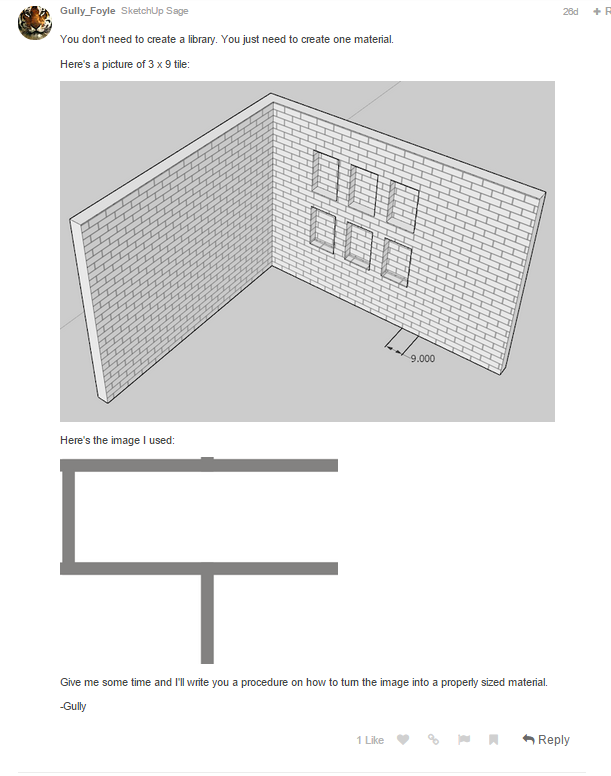
      Gully created an interesting reply to

      http://forums.sketchup.com/t/need-help-to-draw-a-shower-tile-cubby/14820

      to show how to build a simple material to scale and apply

      gully technique.PNG


      bonded blockwork.skp

      posted in Dynamic Components
      P
      pcmoor
    • RE: Reset axis of a component without changing its Position

      open the component, then right click on the axis (easier to pick outside the geometry) from the context menu pick an option. Say place, then place and orientate as required

      posted in Dynamic Components
      P
      pcmoor
    • RE: DC cmu wainscotting help with wall scaling

      Hi
      Require a bit more information, the emphasis seems to be on wainscoting, a timber panel and molding system attached to a wall. The wall type would seem irrelevant, surely a simple outline with a painted material would suffice?
      In regards to creating a DC, is this for a one to ten off project? if so then creating standard components or groups would be a more effective use of time.

      Can it be done? Yes, but only if the use is greater than twenty fold. DCs are a general drain on resources and careful consideration should be taken before pursuing this path.

      Edit: Profile Builder 2 would be best suited to creating a wainscoting

      posted in Dynamic Components
      P
      pcmoor
    • RE: Dynamic Component Instances and File Size?

      Hi

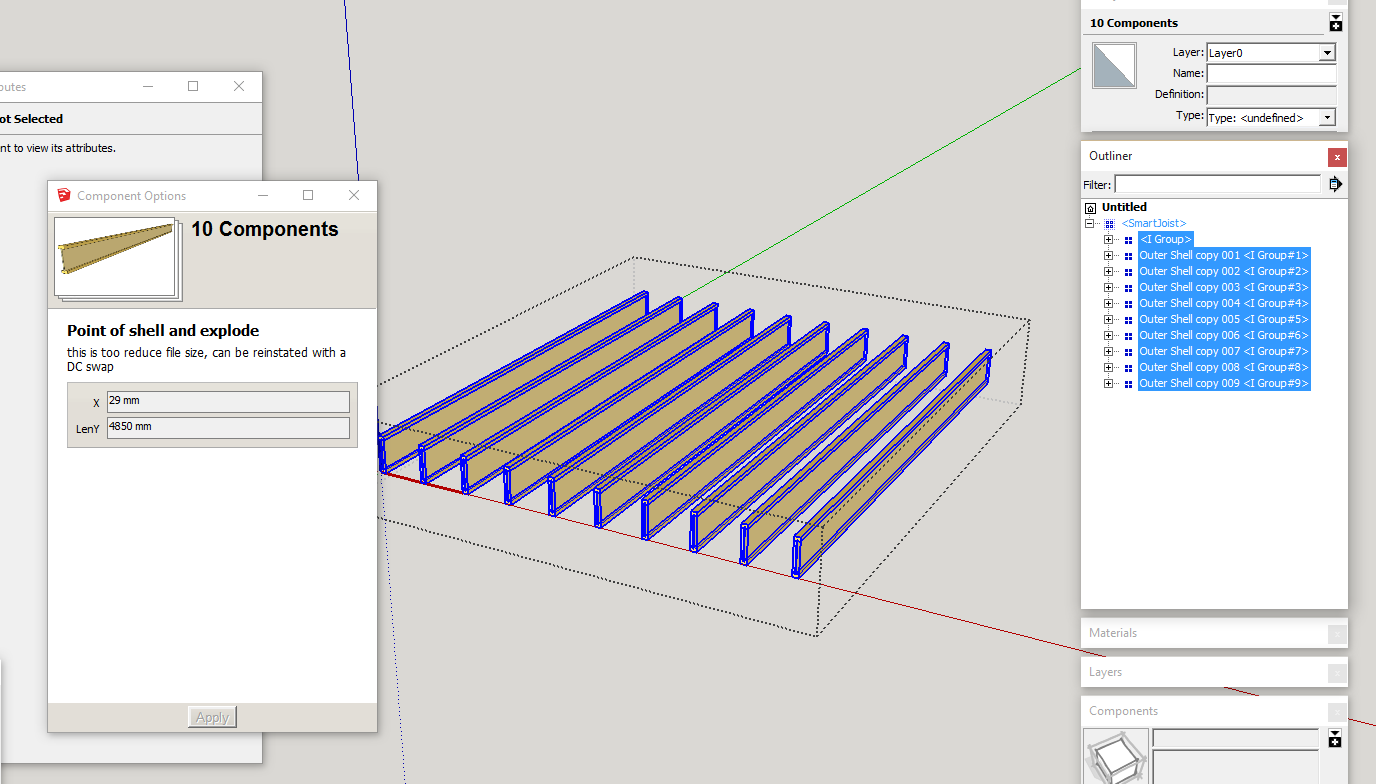
      to illustrate the group, explode, outershell and purge concept I added a similar DC (metric Australia) for an I beam. The component is the larger one on the right side.

      The process is to explode, outershell, explode the selected inner group geometry. A process made easier with a script. Whilst still retaining the outer component (wrapper). Then finally purging the model.

      I find groups of 10-20 more manageable, once done they can be copied with minimum file size changes, further more the fixed lengths can be still changed using the user form.
      Capture1.PNG
      At any time they can be reinstated by swapping the exploded group with the original component.

      Components built with an outer wrapper, with common custom attributes will update. so a common alenY that references LenY will update, thus a steel channel can inherit the common attributes of a timber beam. In other words the lengths of the beams will match on swapping. I am current building some examples on my warehouse page (same user name pcmoor).

      philip


      111 with the original

      posted in Developers' Forum
      P
      pcmoor
    • RE: Dynamic Component Instances and File Size?

      my suggestion is to destroy the collection of components after collecting the data and creating a new one containing raw geometry (the exploded DCs) then purging the drawing of these 100 or so DCs, Perhaps before such an event the group of DCs could be saved to a separate file so the newly formed group component can be swapped for editing if required

      posted in Developers' Forum
      P
      pcmoor
    • RE: Dynamic Component Instances and File Size?

      using Ruby on a selection you could collect or group a number of components, read, count the data, then explode the inner components to form a new group component, purging as you continue

      posted in Developers' Forum
      P
      pcmoor
    • RE: [Plugin] Component Array (Updated 27-Mar-2014)

      I suggest that " profile builder 2 " would best suited to this layout and take off, the profiles can be trimmed or extended to the angles

      posted in Plugins
      P
      pcmoor
    • RE: Dynamic component

      The solution attached is much more simpler than the first proposal

      works for examples given, for larger models decrease the approx spaces to check alternatives

      cheers


      wine rack.skp

      posted in Dynamic Components
      P
      pcmoor
    • RE: Dynamic component

      I need some confirmation on the design requirements. From the layout you show the first cube as 135 wide x 138 high. The next row up is 215, a difference of 77, then 97 there after.then 96, 95, 95, 98, 97, 95, 97
      Assume 97 ?
      Is 77 correct?

      The general difference on the width is 114, 114, 113, 114, 114, 114, 114, 115, 115. I assume that these should be 114?

      posted in Dynamic Components
      P
      pcmoor
    • RE: Dynamic component

      Hi

      To get the distance required to be divided we use the current("") formula. However this only works for inches so need to multiply by 2.54 for metric. So use current("LenX")*2.54 for width of the wine rack and current("LenZ")*2.54 for the height.

      To get the number of bays one would divide the total distance minus the first post width by the centers (space plus width). It’s recommended that one converts this to an integer, however Copies will accept the formula as a float.

      Create a post or stile within the component giving the inner group or component a meaningful name rather than just accepting the default, add Copies to this stile, position and lengths. Copies will equal the result of the previous division. Then to space the copies we use the special variable called copy, this is an integer that refers to the particular copy made. So for X distance, equals copyspacing,
      copy=0, X=0
      spacing = 0
      copy=1, X=1spacing = spacing
      copy=2, X=2
      spacing = 2 of spacing
      etc.
      Do similar for the rails. It is possible to make a multi dimension array of these. However as centers alternate either side of the posts and greater processing power / file size is directly proportional to copies, it is probably better to create groups of rails and copy these across.

      The attached file should work, though I haven't fully tested it. The front and back stile are copied separately so that adjustment to depth of the cabinet can be made. The rails are group as determined before. I made a fixed position option as well as a scale option to the cabinet height and width


      wine rack.skp

      posted in Dynamic Components
      P
      pcmoor
    • RE: How to update facearea() calculation in DC without redraw?

      I believe that one has to scale definition (via context menu) first then do the redraw to correctly report the area in the DC after a change in lenx,y, or z. (which in DCs is same as a scale operation)

      If you scale definition, then change a dummy or another attribute the DC will update

      example attached


      area_cal.skp

      posted in Dynamic Components
      P
      pcmoor
    • RE: Tell Me About Your BOM

      I use VBA with Excel to create reports to create BOM from AutoCad. Data is essentially the same, you need a way to process it. So I create arrays of sorted data from AutoCad, which essentially adds another brick to the pile, or a length of 90x45 (4x2) to the stack. Until there's a truck full of stuff. then go back through the array to fill a list.

      The sketchup report is a data base (sheet) that can be easily sorted using excel VBA. Provided the fields are correctly filled. This can be done using DCs where a field can be dedicated as same for all, and where possible automatically filled.

      I am waiting for the next release before I start building the same BOM techniques in Sketchup

      hopefully some shortcomings may be addressed, like
      with Sketchups report, its all inches, so have to convert to meters
      DCs need more improvements, scale problems,2.54 bug,an attribute swapping method, multiple swapping....

      So like to keep in touch on this area of interest

      posted in SketchUp Discussions
      P
      pcmoor
    • RE: Component search, select and zoom. Howto?

      @sdmitch said:

      Here's a start

      Hi Sam (sdmitch)

      I notice you use some sort of dialog or tool bar to execute the selected code from a dropdown. May I know its name and availability?

      Thanks
      Philip (pcmoor)

      posted in Plugins
      P
      pcmoor
    • RE: Dynamic components Issue Incorrect dims.?

      Sorry not enough explanation. By right clicking on one of the components or groups with the mouse, the context menu is displayed which gives you various options. If the option is grey, then its not needed, but the scale reset and scale definition should be available after changing the objects attributes or scaling

      "if in doubt right click" is my motto

      posted in Dynamic Components
      P
      pcmoor
    • RE: Dynamic components Issue Incorrect dims.?

      @danwhite said:

      I didn't intend using any scaling just simple addition and subtraction of parent perimeters,

      changing lenx,y,z actually scales the model in those directions. As an exercise create a box component and open size attributes to make a DC. then make say 3 copies of it and alter the grey out values with non fixed values (change them without using = ) each of them differently. Then right click menu to choose first scale definition on one, then reset scale on another, undo then try a few combinations to get an understanding to what is going on. (notice a difference if you try the exercise with groups)

      Working within the right context (scale, axis, rotation) is very important...otherwise you will find sub groups / components flying off to some previous scaled position or size

      For want of a better term, build your DCs at a "rest" position

      posted in Dynamic Components
      P
      pcmoor
    • 1 / 1