Problem with material
-
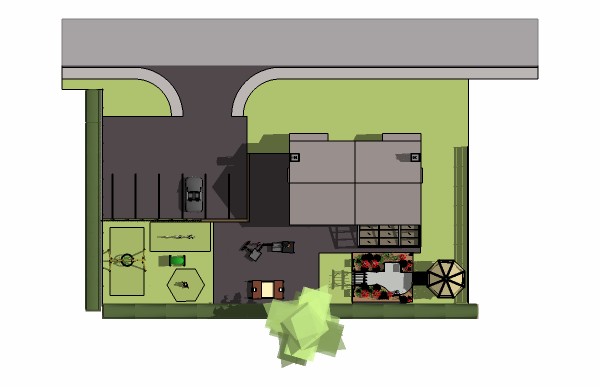
Can anyone shed any light (maybe literally!) on why my asphalt material at the top of my the model is half grey?
I have exhausted my trouble fixing knowledge - playing with shadows setting - deleting the face and re-drawing - using a new material but nothing is working!
Can you help? Ta!
-
View in Monochrome to see if a face is reversed.
View in a side Elevation to see if it is flat compared to the adjacent one.
Select the problem face and right-click context-menu 'Select > with same material' - do the other expectedfaces high-light ? If not there is a different material and you need to eye-drop one and use it on the other - perhaps it's the roof material instead of the road's ? ...
Otherwise you need to publish the offending file...
-
What Tig said, and also try "View > View Hidden Geometry" and see if there is an edge there that is preventing the texture from being applied correctly. I have also found that sometimes there are 2 coexistent faces that prevent you from texturing it properly - and there's no Z-fighting to tell you they are there. Try viewing hidden geometry, deleting everything you can, and re-making the road.
Also, I'm curious about shadows. Make sure that your model is above the origin on the blue axis, if that part of the road is below the origin, there may be some of the opaque shadows that SU generates causing this.
-
Or make sure that the shadow settings are to NOT cast shadows on the ground plane...

-
Many thanks for the thorough answers guys, I will be sure to try them out.

-
@tig said:
Or make sure that the shadow settings are to NOT cast shadows on the ground plane...
That would be my guess, too, if that part is below the ground level. Hard to tell in top view.





Hello! It looks like you're interested in this conversation, but you don't have an account yet.
Getting fed up of having to scroll through the same posts each visit? When you register for an account, you'll always come back to exactly where you were before, and choose to be notified of new replies (either via email, or push notification). You'll also be able to save bookmarks and upvote posts to show your appreciation to other community members.
With your input, this post could be even better 💗
Register Login


Advertisement