I'd like to learn to do this too!
Could you add a little "how to"?

Oops, your profile's looking a bit empty! To help us tailor your experience, please fill in key details like your SketchUp version, skill level, operating system, and more. Update and save your info on your profile page today!
Check out Febhouse | New extensions for Shadow Analysis in SketchUp Download
K
Offline
Posts
-
RE: Upholstery
-
RE: Is this possible with SP?
Won't be as easy as I thought

Hmm... that's what I feared after looking at some chain models I've seen here on the forum.
Then I imagine i can learn SP for the fun of it and do this animation with another tool.I don't need actual physics to take place, just explain how does this belt works.
Thanks for your help, I'll be needing it again for sure, right now I'm surfing throug the tut you pointed me to (thanks again) -
Is this possible with SP?
Hi
I finally decided to download SP yesterday and I've been playing with a box with cylinders, inputing numbers and trying to understand what happens.
Now, I want to learn to use it because I have a specific project that I'm not sure if can be done with SPAs english is not my language an image will explain it better:
The first belt drags a bottle to the second belt. Once it reaches the "goal" it stops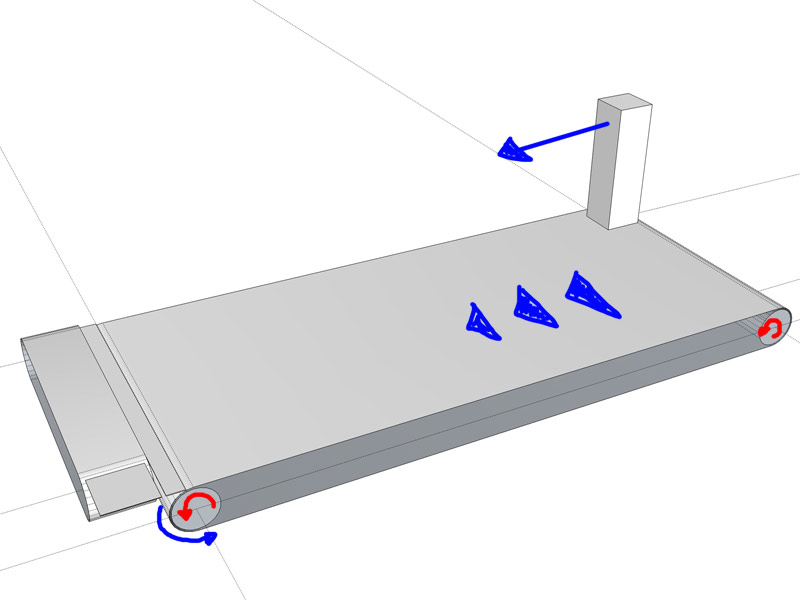
The second belt rolls and places the bottle in the lift and stops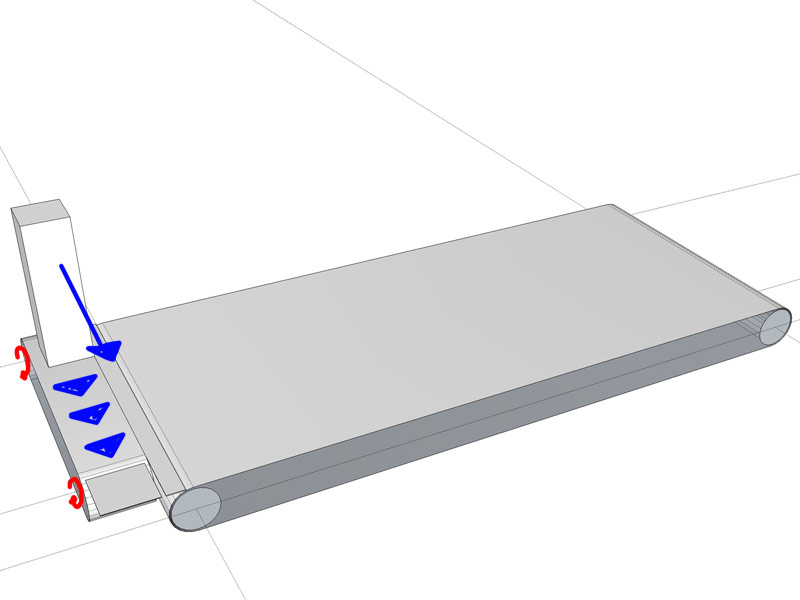
The lift goes up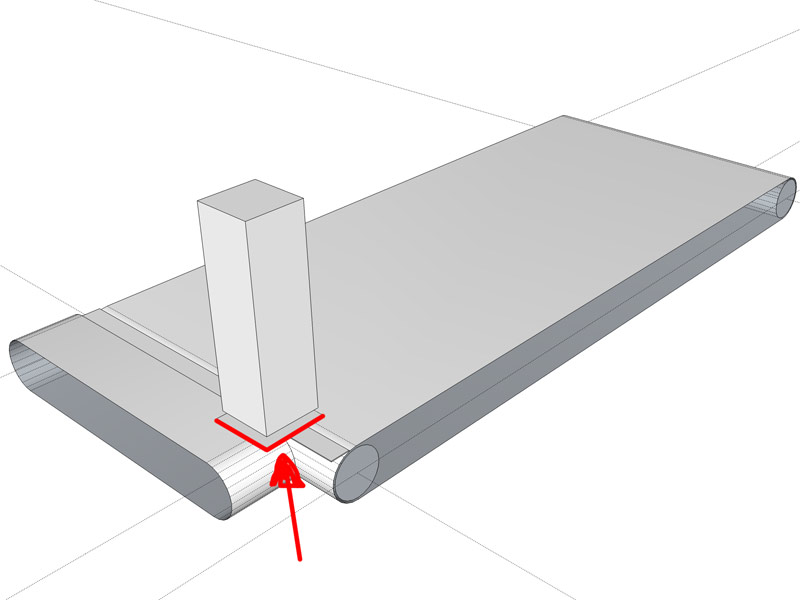
I placed a hinge in the first cylinder and a motor in the 2nd one, made static the belt (If I don't do this then if falls and the bottle also falls)...
After doing a couple of dumb tries SU crashes
will I have to place it on the ground or something?I'm totally newbie here, so will apreciate any help.
Thanks -
RE: Smooth this thread more?
The problem was that you had an internal face between each triangle.
It needed a lot of cleaning, but once every internal face was deleted and faces oriented correctly, it looked fine. But it's still not a solid, because the upper "sheet" does not have thickness, but at least now it is smooth.
-
RE: Himalayan Observatory - Digital Matte Painting
So that is layer over layer of landscape pics (or paintings)? Looks awesome, really
-
RE: Working back to front!
Have you tried futura family font? Is very similar and I like it a lot.
The G is more rounded, just like yours.
Free Fonts - 6500 Free TTF Fonts (F)
Over 6000 Free Fonts are on this page. You can download as many free fonts as you choose. These Free Fonts are True Type Fonts that are made to work with the Microsoft Windows Operating system
(www.webpagepublicity.com)
-
RE: Help - Some plugins working backwards
@gaieus said:
Reverse the faces first (so that you ruin the plugin on the front face, not the back face).
I'd say you meant run instead of ruin. But who knows
-
RE: Why Sketchup?
Well, getting a cube is faster in Blender

Jokes apart, I agree with everything said up there so there isn't much left.
For my job it is the perfect tool, because I need fast results and accurate measures to show to clients few minutes after they make the request -
RE: Old Mine

Another great one. I love the compositions you make but what impresses me must me in all of your images is the texturing job.
-
RE: Scenes
@unknownuser said:
Right click on the roof plane and choose "Align View".
Right click on the roof plane and choose "Align View".
Right click on the roof plane and choose "Align View".
Right click on the roof plane and choose "Align View".
Right click on the roof plane and choose "Align View".

Good one

Dave. Oops....

Didn't noticed you answered before. You were faster typing, because I'm sure your post wasn't there when I wrote mine. -
RE: Importing texture files
Also if you dragged those textures, maybe you will need to explode them before SU uses them as materials.
Are you looking at the mats in the file? (clicking the house icon) once exploded the mats will be there. -
RE: Scenes
And once you are in parallel view you can right click on a face and "Align View"
-
RE: 3d Warehouse downloads
Also you say you are having troubles finding the right perspective. Are you trying to photomatch your models? Because then you should first set the scene to match perspective, and then the objects will look right, but just in that scene, if you move your camera it won't match.
If you are not trying to do this, then the perspective is "automatic" when you place an object
-
RE: Open sketchup 2 times
I've been having troubles closing the files.
Everytime I close one it hangs and says the program does not respond (I work in spanish so I don't know the equivalent in english).
I'd say this started when I installed SU8 without deleting SU7. But I need them both! -
RE: HMS Victory 1765
@tadema said:
...when things go wrong they go wrong quickly

LOL totally agree.
Your ship is coming along great. But coming from you it is not a surprise. Can't wait to see it finished and textured.

-
RE: Nagra III Tape Recorder
The model is great and nicely detailed!
And I find it is a nice render aswell if you are not aiming at photorealistic.
Sometimes this is just what you need for certain presentationsSolo: your renders in Thea are spectacular (I scretly hate you)
. I never get those results with that software, and I try and try ...
Someday I'll send you a model and see if you can do something nice with it LOL -
RE: Dramatic entrance and help required
@unknownuser said:
May I ask what tools you have used to do this?
It is explained in the file I attached, but for the curves I used bezier spline, restricted to 8 segments per curve (the default is 20).
Push pull for the profiles and curviloft to join the resultants edges (the image attached to the message). -
RE: Dramatic entrance and help required
Mmmhhh I'm a bit late but here's how I've solved this in the past
bevels.skp

Ohh nice one Dave! faster than mine
Jeff, I liked the result but I can't watch youtoube from work
Nor whatever Rich is using.... flash maybe?I have to miss half of the stuff posted in the forum due to restrictions in my pc

hate that