sketchucation logo sketchucation
    • Login
    1. Home
    2. JClements
    3. Posts
    Oops, your profile's looking a bit empty! To help us tailor your experience, please fill in key details like your SketchUp version, skill level, operating system, and more. Update and save your info on your profile page today!
    πŸ”Œ Smart Spline | Fluid way to handle splines for furniture design and complex structures. Download
    Offline
    • Profile
    • Following 0
    • Followers 0
    • Topics 196
    • Posts 918
    • Groups 1

    Posts

    Recent Best Controversial
    • Photos as backgrounds >"Use Sun for Shading"

      Not sure if anyone else has come across the following or perhaps has a workaround.

      When using a photo as a BACKGROUND it can be difficult applying the correct light intensity and shadows so that the 3D objects match the photo. As soon the Sun properties are changed the photo brightness is also is changed (it is often darkened unless the top of the photo is tilted slightly "backward" from vertical so it will bounce more light off of it ... but this leads to further distortion).

      Here what I wish could be done.

      Allow the photo to ignore sun properties. This property could be toggled on or off in a manner similar to how you can turn off Cast Shadows and Receive Shadows in the Entity Info dialog for a selected geomety.

      posted in SketchUp Feature Requests sketchup
      JClementsJ
      JClements
    • RE: Copy along a path plugin

      Rick, I just thought of another possible solution.

      When the script is run, have it:

      1. gather the distances of the shortest and longest segments in the path,
      2. also have it gather the total distance of all segments and divide it by the number of segments in the path to produce an Average Segment Distance.

      3. Then display this info either in the Copy-to-Space dialog (or SU TaskBar or temporary text label);

      4. the user could then use this info to determine the distance to enter (or the average segment could automatically be put into the entry box which could then be changed by the user).

      Regards, John

      posted in Developers' Forum
      JClementsJ
      JClements
    • RE: Copy along a path plugin

      "But seriously, I'll add it to the list. It's a long list these days, with short time..."

      Understood, Rick.

      Yes:
      copy to nodes (oriented) and
      copy to nodes (as it exists now)

      Perhaps a little contribution to the baby's college fund ? 😲

      posted in Developers' Forum
      JClementsJ
      JClements
    • RE: Copy along a path plugin

      Hi Rick:

      I had assumed that the script didn't work "as advertised" because I have always chosen the Copy to Path NODES option πŸ˜’ .

      Unlike Copy to SPACING, this option doesn't use the axis orientation of the component in the same manner.

      Could there be a 3rd option, Copy to Path NODES (Oriented) added to the script? Except for the first node in a path, it would orient the component according to the direction of a node's previous segment. The existing Copy to Path Nodes function is useful as it stands so I am not requested it be modified.

      Regards, John

      P.S. Congratulations on the new family member!

      posted in Developers' Forum
      JClementsJ
      JClements
    • RE: Select (or deselect) Hidden Edges within an active selection

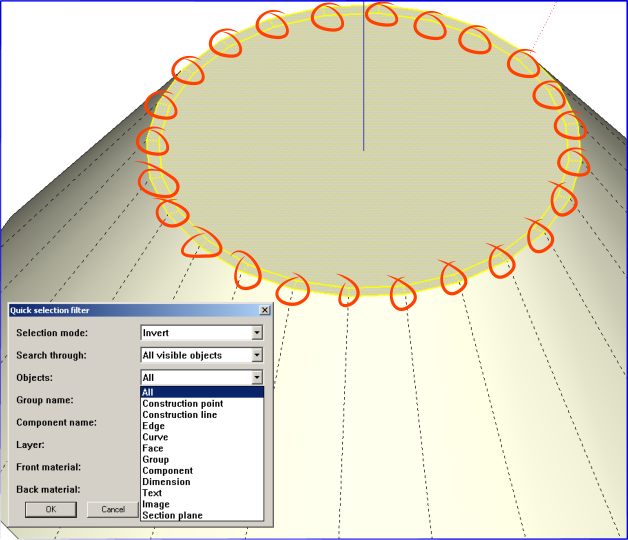
      Didier, I downloaded from the link above. The attachment shows the active selection (the top-most surface) and the hidden lines I wanted to select so I could delete them.

      It seems the menu is missing an option for Hidden lines or am I overlooking something?

      Also, should the Search Through list include "current selection" option?

      John


      Hidden Edges.png

      posted in Developers' Forum
      JClementsJ
      JClements
    • RE: Select (or deselect) Hidden Edges within an active selection

      Dider, if you wouldn't mind adding that to the script's dropdown list, that would be nice.

      Thanks, John

      posted in Developers' Forum
      JClementsJ
      JClements
    • Select (or deselect) Hidden Edges within an active selection

      Is there a script that is capable of selecting Hidden Edges within a current selection (assuming that the user has turned on Show Hidden Geometry)?

      I would like to have a way to remove hidden edges that are coplanear within a surface which are not necessary.

      John

      posted in Developers' Forum
      JClementsJ
      JClements
    • New ATI driver for SketchUp

      "AMD has released its first Catalyst driver package for the year. The new version deliver MultiView support under OpenGL, and resolves various issues for the games Bioshock, Half-Life 2 Episode 2, FEAR, Oblicion, World in Conflict, Call of Juarez, Stalker, Timeshift, Tianji and World of Warcraft. AMD also said that it has integrated patches for Lightsmark 2007 and Google Sketchup for the HD 2900 series.

      There is a separate 8.1 hotfix driver addressing AGP issues as well as a performance increase for Crysis in DirectX10 Crossfire configurations."

      http://www.tomshardware.com/2008/01/18/amd_releases_catalyst_8_1_driver_/

      posted in Hardware
      JClementsJ
      JClements
    • RE: 2D Export > Export All Scenes?

      Hi Didier:

      Thanks for doing the confirmation test.

      From my brief use of the script, it seems it is really a camera manipulation script. Have you considered adapting part of it and developing a interface (perhaps with controls similar to Jim Folz's Mover2.rb) such that the user can:
      __1. rotate (spin) the camera position around an object, model, or place on the screen using an angle increment input by the user?
      __2. Pan up or down?
      __3. Move orthographically along an axis or defined, straight path at specific intervals.

      This could really help in setting up Scenes with smooth transistions for demos, animations, etc.

      I realize other scripts or tools can do some of these things but I don't believe there is one that can do it all with a simple, intuitive interface.

      Regards, John

      posted in Developers' Forum
      JClementsJ
      JClements
    • RE: 2D Export > Export All Scenes?

      Hi Didier:

      I gave the script a quick run through.

      Seems the Scene "Perspective" is a bit off. The other scenes appear to export just fine.
      I set the image size for the script equal to SU's "Use View Size" (found it the 2D export option dialog).

      Update: perhaps it is okay and just an optical illusion (delusion).


      F.skp


      F_page exports.zip

      posted in Developers' Forum
      JClementsJ
      JClements
    • 2D Export > Export All Scenes?

      Is there a script the will export all (or selected Scenes) all at once.

      If not, and someone wants to write script, then features I would like to see are:

      Be able to select pages to export

      Options for the name of the exported Scenes:

      ... Use the .skp file name, prepended or appended with a numeral, for example: 01SUfilename.jpg, 02SUfilename.jpg, etc.
      ... Use just the Scenename only for the file name
      ... Use the Scenename prepended or appended with the SUfilename.

      posted in Developers' Forum
      JClementsJ
      JClements
    • RE: SketchyPhysics2 beta released

      No luck repeating the crashes.

      Pretty sure it had to do with trying to close the SketchyPhysics Inspector window after opening existing models (some were sketchy physics models and others were not).

      I did notice if I had the Outliner Window open it would go nuts when Play/Pause button was pressed and the Inspector title bar would show a "Not Responding" message for a while, but it didn't crash SU.

      posted in Plugins
      JClementsJ
      JClements
    • RE: SketchyPhysics2 beta released

      Sometimes I am getting crashes when I do a File > New.

      I noticed that one a SketchyPhysics dialogs is automatically loaded with the new file (even if I manually closed all toolbars/dialogs prior to doing a File > New) and that seems cause the crash.

      posted in Plugins
      JClementsJ
      JClements
    • RE: [Tutorial > Modeling] Hidden Seam Tutorial

      Great tip.

      I've been using this method for a while. However, I can never be sure (anticipate) if I'll need those surfaces later if a change to the model is needed. So I create My Hidden Edges and/or My Hidden Surfaces layers and then turn their visibility off and move the geometry to them (I try not to use the "hide" function). At end of modeling, getting rid of the hidden faces is as easy as deleting My Hidden Surfaces layer.

      posted in SketchUp Tutorials
      JClementsJ
      JClements
    • RE: Teaser or not teaser ?

      Didier, once again you've "pulled a rabbit out of the hat". Congrats.

      After you get the bugs out of the current script, do you think another script could be adapted from it to paint component along a path (curve)? See a simple example here, http://www.sketchucation.com/forums/scf/viewtopic.php?f=57&t=3210?

      The dialog box you have now does scaling, all there would need to be is a couple rotation-on-path options.

      Regards, John

      posted in Plugins
      JClementsJ
      JClements
    • RE: Select All Surfaces in a Model? Need assistance.

      Fred:

      Worked again. Many thanks.

      John

      posted in Developers' Forum
      JClementsJ
      JClements
    • RE: Select All Surfaces in a Model? Need assistance.

      Fred:

      Thank you for the code. Not only did it work, but it seemed to do so fast. :}

      One more request.

      In some models, I will want to retain the faces of any smoothed surfaces (such as those made via Push-Pull, Follow-Me, or manually softed) so I believe any Softened or Smoothed edges would have to be Unsoftened and Unsmoothed first before finding and deleting faces.

      Can you add code for an option to do this?

      posted in Developers' Forum
      JClementsJ
      JClements
    • RE: Select All Surfaces in a Model? Need assistance.

      Fredo,

      then could the above be adapted to select all faces on the upper level, delete those faces and then edit each entity in the next level of nested entities, select and delete their faces, and then to the next level of nested entities and so on?

      posted in Developers' Forum
      JClementsJ
      JClements
    • RE: More flexibility with edges

      Bob, you will get no argument from me about your comments.

      Just wanted others to note that there was another method for coloring edges.

      Regards, J

      posted in SketchUp Feature Requests
      JClementsJ
      JClements
    • Select All Surfaces in a Model? Need assistance.

      I have a project in which I will be exporting my 3D model to AutoCAD. I am using the 3D export option because it maintains components (as blocks), circles, arcs, dimensions, leaders, layers, and editable text.

      However, "Faces in SketchUp are exported as a triangulated polyface meshwith interior splframe hidden lines (if applicable). This conversion helps to simulate the appearance of your native SketchUp file, even when all exported faces are triangular".

      I would like to export just the edge-entities, not the faces. Does someone have a script the will dig down through the entire model (into all nested entities), select the faces, and delete the faces (so they can't be exported).

      My methodology would be to: save the SU model, run the script, export the 3D model, and then either do a Restore or an Undo.

      posted in Developers' Forum
      JClementsJ
      JClements
    • 1 / 1