Course not! I drew on my little sister. And the dog, if I was quick.
Oops, your profile's looking a bit empty! To help us tailor your experience, please fill in key details like your SketchUp version, skill level, operating system, and more. Update and save your info on your profile page today!
🔌 Easy Offset | Offset selected faces in SketchUp in positive and negative offsets. Download
 Offline
Posts
-
RE: Converting kmz file to zip file
-
RE: Converting kmz file to zip file
Oh would you please?? Mommy won't let me draw anymore, something about me eating the crayons

-
RE: Converting kmz file to zip file
Gee, could you draw me some pretty pictures? I like bunnies
 Actually, as I was reading your reply it occurred to me that I had not changed things to be able to view file extensions. It's fine now.
I'll crawl back in my crib, it's time for my nappy. Thanks. -
Converting kmz file to zip file
I actually managed to do this once, but failed to write down how I did it, and now I can't do it at all. Today I did manage, once, somehow, to convert it to a zip file, but when I unzip it it just converts it back to a kmz file. I need to be able to see the size of the textures in my model. Could somebody please explain, in a very detailed way (like you are talking to a three year old) exactly, step-by-step, how to do this. Assume I've never actually seen a computer before
Thanks -
RE: Applying wood texture to a doughnut shape
Thanks, this might do the trick. Even if it doesn't, it looks like something that's going to be very useful in other projects.
It's very difficult to know about all these plugins and which ones might be useful to me. There are so many out there, and you can't always go by the plugin name to know if it's what you need to solve a particular problem. Jeez, here I am complaining that there are so many fantastic plugins being created. There's just no pleasing me
A question - whenever I go to a forum site about a new plugin, or at least new to me, I've found that I have to carefully look at all pages of the post (and some of them have quite a few pages), just to make sure that a new version hasn't been created to solve a problem. I've found new versions of plugins buried deep within the post, just a couple of times, but enuf that I can't take the chance of just downloading the initial version at the beginning of the post. Is there any way to make sure the final version is the one at the beginning? Just nitpicking I suppose, but thought I'd ask.
Thanks again.
-
RE: Applying wood texture to a doughnut shape
Thanks for your input. Unfortunately I've tried that, the problem being that real wood grain does not run perfectly straight, and because of that it ends up looking very strange. The grain on one segment does not line up perfectly with the grain on the next segment, etc, etc. I need a way to apply grain to the entire wheel, somehow, and make it look natural and real.
Don't ask much, do I
-
Applying wood texture to a doughnut shape
Well, I've tried everything I can think of, so once again I've come to the experts

I'm trying to apply a wood grain texture to a steering wheel. The right way, with the grain running around the wheel instead of in bands. I've got no problem with projecting textures, but nothing I've tried has come close to looking like a real wooden steering wheel, and you just can't have a decent 67 GTO without a nice wooden steering wheel. Hopefully I'm just overlooking something obvious. Any suggestions?
' -
RE: Blueprint sources
Yeah, I've checked them out. Their numbers are impressive, but some of them are terrible quality, or so small you need a magnifying glass, and a large portion of their "blueprints" are just side views, or maybe a front view. And they only have a few of the ones I was looking for. I was hoping for maybe a source that somebody here has discovered that is not readily found in a Google search. Thanks for your reply, I'll keep looking

-
Blueprint sources
Does anybody have any good sources for blueprints? Specifically, I'm looking for blueprints for older cars, say from the 40's to the early 70's. To get a good blueprint for a specific car I would be willing to pay a reasonable price. Thanks in advance
-
RE: Warehouse suddenly in foreign language
That did the trick! Because it was in a foreign language I couldn't tell where to click to change it, your graphic showed me what to do. Thanks so much

-
Warehouse suddenly in foreign language
For some inexplicable reason whenever I open 3D warehouse now it's in some foreign language, and I can't seem to get it back to just plain english. Have searched for a solution but haven't come up with anything. I'm too old to learn a new language, any help would be appreciated.
-
RE: Components out of control?
Now that's gonna be useful!!!
 I think I can use that to do what I need to do, has all kinds of options for working with the components and groups. I can't tell you how much I appreciate your help - although I would still like to know why the component browser gives me such weird results. I'm firmly convinced that my basic modeling practices are far from ideal, and I'm paying for it with things like that. While I can do what I set out to do, pretty much, eventually, I think my sloppy techniques are resulting in some unnecessary bumps in the road and larger files and edge counts than need be. If I don't get it right now, it's only gonna get worse as I delve into more complicated models.
Anyhow, thanks again.
-
RE: Components out of control?
Thanks for taking the time. I'll give your suggestion a shot.
One more post and you'll reach the big "1,000"
-
RE: Components out of control?
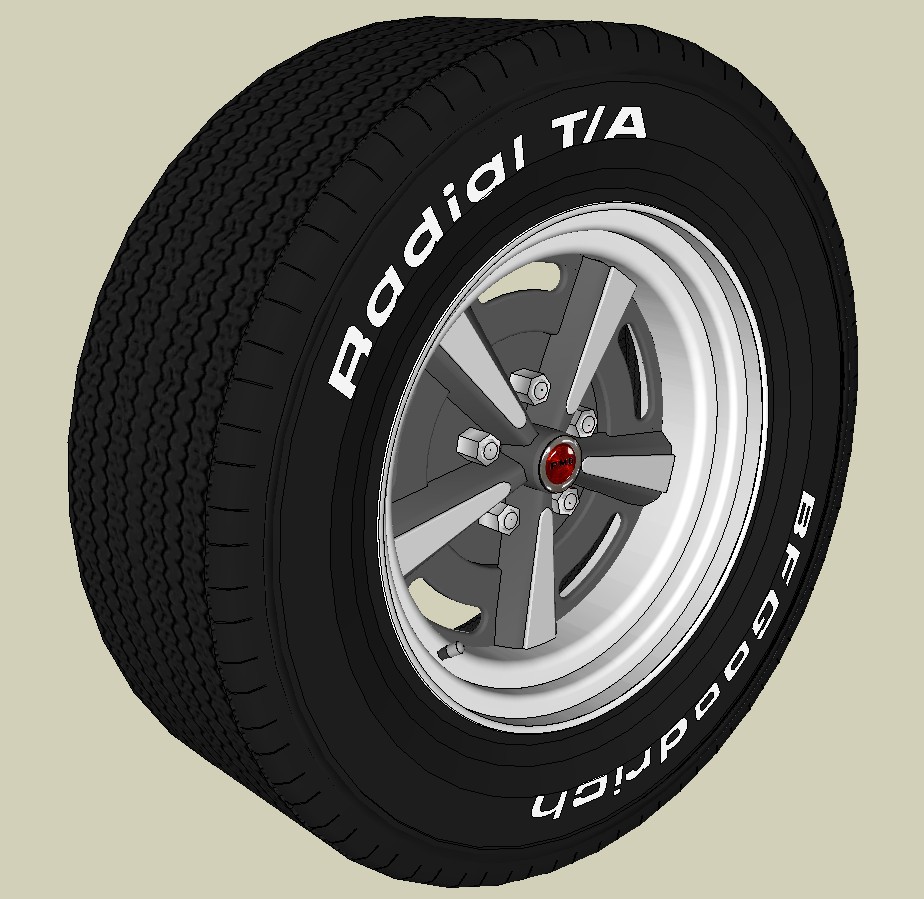
Here the dang thing is. It's just a tire, how can it be killing me? The thing is, this is just one part of the car I'm working on, can you imagine how screwed up things are overall? There's also a skp file included with my original post. thanks.
-
RE: Components out of control?
Actually that question was just an afterthought. What I really need help with is my components window list. It's crazy. I make three instances of a component and the list still shows zip instances. It will highlight the three copies when I check for instances, but it won't count them. I want to delete a component, and it won't give me that option. Or maybe it will, if I check back later. Who knows? The outer rim is composed of 61 "instances" of a component - it shows a thumbnail of the complete outer rim, with 61 instances. It's the complete rim, it should show zero instances, right? It shows a thumbnail of the component used to make the rim, no instances. Shouldn't it show 61 instances for that? There are 5 lugnuts, each a copy of the original component. It shows only 1 in the list, which is fine, but with no instances. The tire is made up of 42 copies of a component - there is a thumbnail for one of those components, showing no paint on the reverse faces - no instances. There's another thumbnail of it, showing painted reverse faces - 1 instance. But if I delete either of these components, the entire tire goes away. There just seems to be no logic to all this, no rhyme or reason, at least not to me. Instead of the list being a helpful component management tool, all it does is confuse me and raise my blood pressure. I know it probably has something to do with the way I do things when I'm creating a model, probably very basic stuff I'm doing wrong, but I need to know what that something is, now, before I go any further and make things even worse. I've looked in the books, I've searched the web, all they seem to offer is basic info on the subject, no comprehensive insights or tips, nothing in depth, nothing that comes close to answering my questions. My frustration level is very high and rising daily. I need for someone to help me make some sense of all this.
-
Components out of control?
It seems that I may have gone a little "component crazy" after discovering the wonderful world of components. I have components within components within components, ad nauseum . If I have a component showing up in my components list, and also a component showing up made of several of those first components, and on and on, is this a problem? Does the fact that I have all these components showing up numerous times in the list mean anything bad as far as file size, edge count, whatever? I'm not sure I'm explaining myself very well, I usually don't, so could somebody please take a look at the attached file and see if there is actually anything to worry about, and I would really appreciate any suggestions on how to be more organized and efficient in my modeling practices. I need to learn this stuff now, early in my "Sketchup Career", to avoid problems down the road.
Also, why is it that when I copy a component from the list, it sometimes comes out much larger than in the actual model, and/or oriented completely different? Is that because of it's size and orientation when I first made it a component?
Thanks in advance.
-
RE: "Cannot Move Face" error msg
Went with the simplest one first (alt move) and fortunately that was all I needed. These forums have yet to let me down, but I make it a point to first exhaust all other potential sources of solutions to my petty problems. It would be too easy to just come running here first. Don't want to make too much of a pest of myself
-
RE: "Cannot Move Face" error msg
@mitcorb said:
You probably already know this, but I will throw it out anyway.
Don't ever assume this with me
The amount of stuff I don't know is staggering, and increases daily. And it did the trick, thanks. -
"Cannot Move Face" error msg
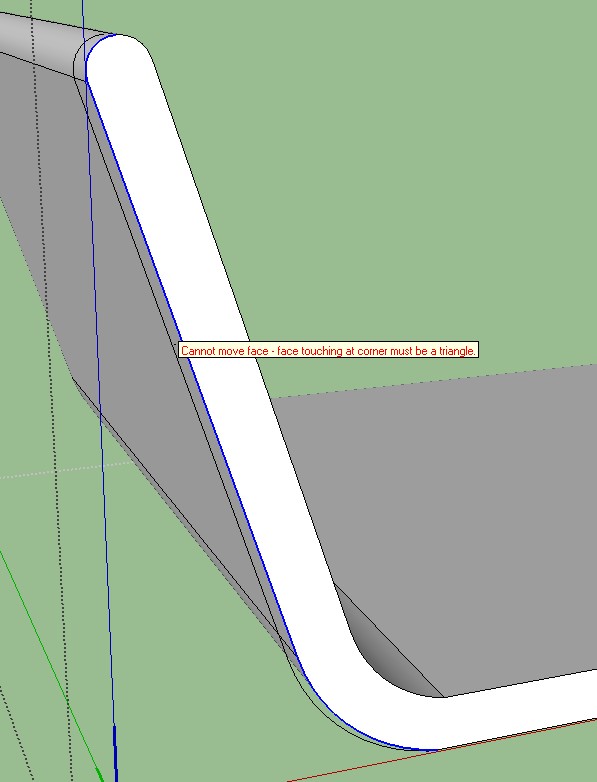
I get the msg "Cannot move face - face touching at corner must be a triangle" when I try to move the faces on this model. I did the same thing on the other half of it and it worked fine. Have searched the net and these forums, have come up with no information on what this message means or how to fix it, so any help would be greatly appreciated.
-
RE: [Plugin][$] FredoScale - v3.6a - 01 Apr 24
Well, I could give you a Porsche that's already had the crap beat out of it. Or, I could just toast you at your next wedding