And it's still rendered correctly (although some of the html elements like NAME are outdated now).
Oops, your profile's looking a bit empty! To help us tailor your experience, please fill in key details like your SketchUp version, skill level, operating system, and more. Update and save your info on your profile page today!
🚨 Skimp | 25% Off until March 30 Buy Now
 Offline
Posts
-
RE: World's First Website returns
-
RE: Hidden lines/soft and smooth lines reappearing
I am actually wondering if those are some unnecessary, stray edges in your model. Best would be to view it in monochrome mode (no textures shown) and with hidden geometry turned on.
-
RE: Hidden lines/soft and smooth lines reappearing
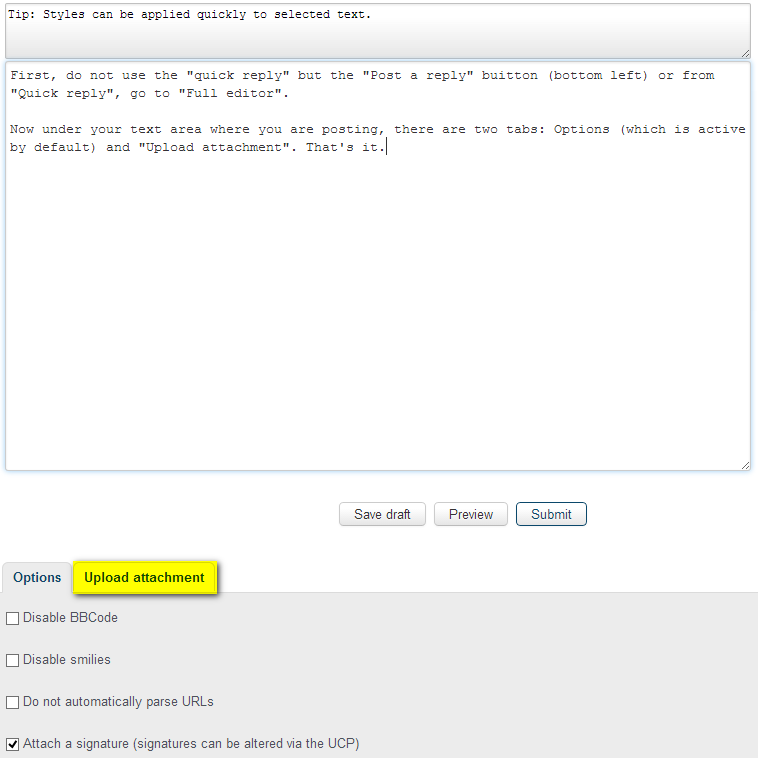
First, do not use the "quick reply" but the "Post a reply" buitton (bottom left) or from "Quick reply", go to "Full editor".
Now under your text area where you are posting, there are two tabs: Options (which is active by default) and "Upload attachment". That's it.
-
RE: Hidden lines/soft and smooth lines reappearing
I am not sure what is exactly happening there but fixing a few edges should not be an issue (if they are indeed just a few). I'd also work with hidden geometry turned on (View menu) to see where the softened edges are - and you can easily "re-soften" them using the Ctrl+Eraser tool where necessary.
Could you attach some screenshots and maybe even the model?
-
RE: Is there a plugin to group geometry by layer?
I cannot advise on the Revit to SU workflow but here is the plugin: http://www.smustard.com/script/GroupByLayer
-
[Tutorial - Modelling] Building a Dome - Part 2
In the tutorials section.
C&C, questions and thoughts are welcome.
-
RE: [Tutorial - Modelling] Creating a Cross (or Groin) Vault
Thanks Tim, I have updated it (a bit differently though but I see what you mean).
-
[Tutorial - Modelling] Creating a Cross (or Groin) Vault
In the tutorials section.
C&C, questions and thoughts are welcome.
-
[Tutorial - Modelling] Building a Dome - Part #1
In the tutorials section.
C&C, questions and thoughts are welcome.
-
RE: The Construction of a Wooden Bowl

First I read "The Construction of a Wooden Bow" however, not a "Bowl" I was wondering how that bow was going to gain shape from those pieces.

-
RE: Export to pdf only exports in landscape mode
Okay, principle taken. However, to obtain and maintain a full fledged ("own") credit card system, it would be burdened with much more extra expenses as it seems to worth.
That is: I guess. I have never been good at maths.
-
RE: Export to pdf only exports in landscape mode
@kallen said:
Hello All, I am finalizing some patent drawing with sketchup. Everything looked well until I went to export to pdf: everything comes out in landscape mode and there doesn't seem to be a way to tell the 2D exporter to export to portrait mode. Is there a solution that I'm missing or do I need a plugin or other special tool?
You can also try to use a virtual pdf printer like PDFCreator: http://sourceforge.net/projects/pdfcreator/
There (since it works like a printer), you can set page orientation although indeed LayOut would be the best choice.
@kallen said:
It seems you only accept paypal and I want to pay with a credit card.
You can use PayPal to send money from your credit card even if you do not have a PayPal account.
-
RE: Some free HDRIs with matching backplates
-
RE: [Tutorial - Modelling] Arched Windows in a Curved Wall
@jbjdesigns said:
Thank you Gaieus for the 2 tutorials! I tried them both out. Although the second tutorial (subject line) was geared towards SketchUp Pro, I was able to create 3 arched windows in a curved wall following the instructions in the first tutorial (Window in a Round Wall). Here is my results.
Thanks again! Jo Ann

I would not say it was "geared" towards SU Pro - but the method of intersecting and cleaning up is the same as in the first one - so I just would not "bother" to repeat myself (with no bad taste in the "bother" word). I even mentioned this in the second tutorial (the method is always the same - from now on, it is just our fantasy to prepare the scenes to get the desired result after the operation - no matter with which boolean tool we do that last part).
-
RE: Plant symbols
Hi Sally,
A while ago I created some scrapbook content of a few (really just a few) plants in top view: http://sketchucation.com/forums/viewtopic.php?f=40&t=29122&p=253524
I know it's not much but slowly you can grow your collection of them...
Also, please, read the instructions on how to install and you may also wish to resize them (they are very heavy but I wanted to keep the original quality)
-
RE: Does Solid Inspector work on SketchUp 8 FREE version?
"Solids" also work in the free version (and one of the solid tools, "Outer shell" is also available) only the more advanced, different boolean tools are Pro only.
Make a simple cube, group it and right click > Entity info and see if it reports the group as "Solid group".
Solid inspector (the plugin) also works in the free version (it should appear under the Tools menu). If it is not there, you must have installed it improperly.
-
RE: Walls vanishing
Hi Hector and welcome!
This is called "clipping" and a good wealth of things can cause it. Review this "list" and check your model if any of the reasons (or fixes) may apply http://support.google.com/sketchup/bin/answer.py?hl=en&answer=36261
