sketchucation logo sketchucation
    • Login
    1. Home
    2. boilingsnow
    3. Posts
    Oops, your profile's looking a bit empty! To help us tailor your experience, please fill in key details like your SketchUp version, skill level, operating system, and more. Update and save your info on your profile page today!
    ⚠️ Important | Libfredo 15.6b introduces important bugfixes for Fredo's Extensions Update
    B
    Offline
    • Profile
    • Following 0
    • Followers 0
    • Topics 2
    • Posts 62
    • Groups 1

    Posts

    Recent Best Controversial
    • RE: [Plugin] SurfaceGen (0.9.0b) — 28 April 2012

      @boilingsnow said:

      Very cool plugin!
      But a progress bar could be very helpful. Because I 've installed it and by performing the plugin it seems to take hours to generate a surface and I don't know if it is really working!

      I've waited for more than 25 minutes for a simple eqation so I have to give up finally...
      In other words, I can't get it work in my sketchup 8.

      I figured out that SurfaceGen has a conflict with another plugin calls 'Modelfuction'.
      If you get Modelfuction installed in your sketchup, you can see the pop-up window by applying Surfacegen, but it will not create any surface.
      I have uninstalled Modelfunction now and SurfaceGen works well!

      By the way this is really a awesome plugin. So it would be perfect if the author can get rid of the conflict with other plugins...
      posted in Plugins
      B
      boilingsnow
    • RE: [Plugin] Add Points to Curve

      @sdmitch said:

      @boilingsnow said:

      I think it would be perfect if you add an option to this tool: add points to the curve and delete the old vertices (rebuild the curve according to the new points). And ....even better to have another option beside adding points by spacing: add points by number of the segments.

      My plugin EqSegCurve does just that.

      Hi, sdmitch. Thanks for your notice.
      Are you sure that your plugin EqSegCurve works well in sketchup 8?
      Because I have downloaded and installed it and nothing happened after applying it to a curve. I can see the pop-up window and type in the number but no reaction after that.
      And this plugin is one of the few plugins that you haven't uploaded a tutorial in your website so I don't know if I use the pluin correctly.

      posted in Plugins
      B
      boilingsnow
    • RE: [Plugin] Circle from edge (2-pt circle,Updated 15/02/2016)

      @sahi said:

      @boilingsnow said:

      Did you test it in Sketchup 8? I'm sorry I still can't get it working.

      The archive video
      [attachment=0:12b25ek5]<!-- ia0 -->video_krug_4.rar<!-- ia0 -->[/attachment:12b25ek5]

      Yes I can see it works well in your video. And the anwsers of other Members can also confirm that it works.
      I know it's a little annoying now but the krug_11 also does't work by creating the hemispheres with up- and down arrow key. I've tested it in my notebook and in PC of the office, neither can work.

      I also tested your krug_4, I can only draw the first circle, but none of the arrow key can work. (with krug_11 I can create the second and third circles with left and right keys but not the hemispheres.

      I'm using sketchup 8.0.3117 and win XP with a german keyboard. But I don't think it has anything to do with the keyboard, right? What do you mean with your words 'In previous versions it was impossible to move the mouse'? Should I move the mouse to a certain position before I press the up arrow key?

      posted in Plugins
      B
      boilingsnow
    • RE: [Plugin] Circle from edge (2-pt circle,Updated 15/02/2016)

      @sahi said:

      @boilingsnow said:

      Am I doing anything wrong?

      In previous versions it was impossible to move the mouse, then press worked.

      I fixed it in version krug-11.zip

      Updated the script in the first message (krug-11.zip)

      Did you test it in Sketchup 8? I'm sorry I still can't get it working.

      posted in Plugins
      B
      boilingsnow
    • RE: [Plugin] Circle from edge (2-pt circle,Updated 15/02/2016)

      @sahi said:

      @boilingsnow said:

      These two options don't work in my sketchup 8...

      Updated the script in the first message (krug-10.zip)

      That was really quick! Thanks a lot. But sadly... the problem unsolved.

      Am I doing anything wrong? After drawing the circle press the up arrow key.

      By the way,the left and right arrow keys are working.

      posted in Plugins
      B
      boilingsnow
    • RE: [Plugin] Slicer5

      Similiar to Slicemodeler...
      Any new functions?

      posted in Plugins
      B
      boilingsnow
    • RE: [Plugin] Circle from edge (2-pt circle,Updated 15/02/2016)

      "Up arrow - adds one hemisphere at the top
      Down arrow - adds one side of the bottom"

      These two options don't work in my sketchup 8...

      posted in Plugins
      B
      boilingsnow
    • RE: [Plugin] RevCloud v1.1

      Thanks for this TIG!
      How about the idea: converting existing lines or curves to RevCloud?

      posted in Plugins
      B
      boilingsnow
    • RE: [Plugin] Add Points to Curve

      Thank you sdmitch!
      But if I choose "yes", nothing happens at all...No new curve is made
      Can you tell me if I'm doing anything wrong?

      Edit: With help of Fredo6's the "add vertices" tool I now understand what the option "yes" means.
      I think it would be perfect if you add an option to this tool: add points to the curve and delete the old vertices (rebuild the curve according to the new points). And ....even better to have another option beside adding points by spacing: add points by number of the segments.

      posted in Plugins
      B
      boilingsnow
    • RE: [Plugin] Chronolux for Sketchup

      @kirill2008 said:

      @boilingsnow said:

      It's sad that most of your earlier plugins dont work in Sketchup 8....Could you please update them?

      Yes, I'm going to update "LSS Toolbar", but I don't know exactly when. I'll try to make it in the coming months.

      Glad to hear about this!

      posted in Plugins
      B
      boilingsnow
    • RE: [Request]Add Components to Construction Points?

      Hey guys, thank you very much for all your answers...!

      posted in Plugins
      B
      boilingsnow
    • [Request]Add Components to Construction Points?

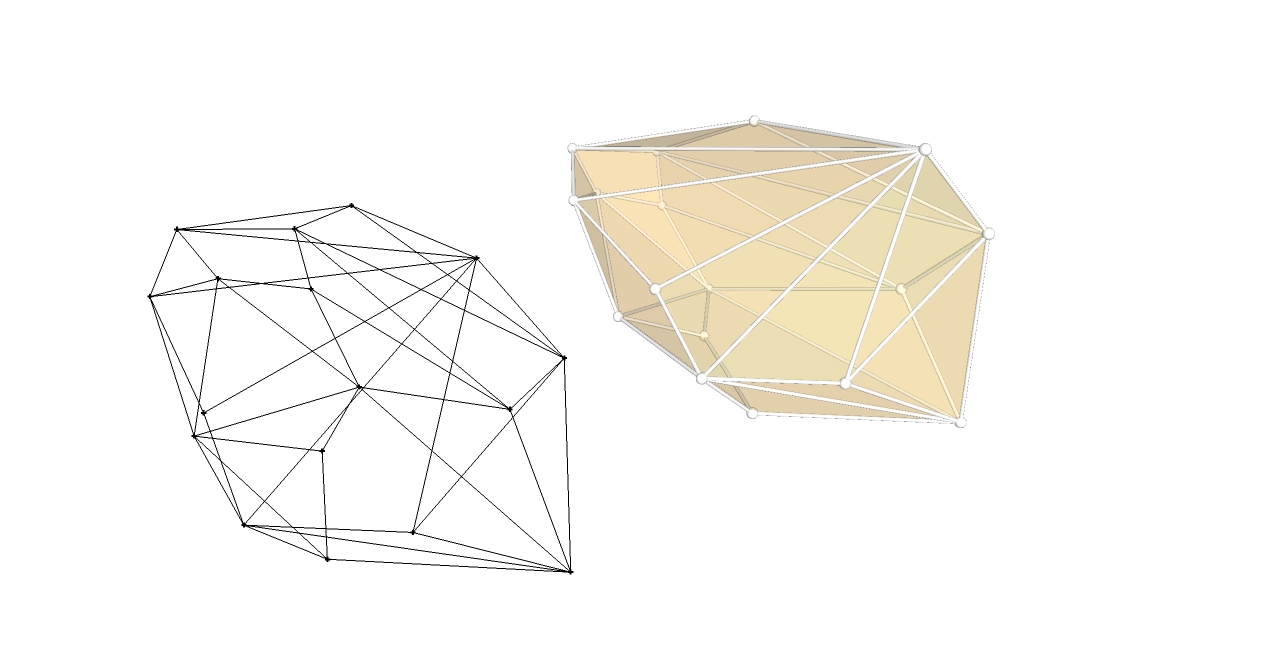
      I'm looking for a plugin that can add components to selected constrution points but I can't find it here.(or vertices...but I can add Cpoints to vertices already with Fredo6's plugin)
      That can be helpful to add nodes to some spacial building structures.


      12.jpg

      posted in Plugins
      B
      boilingsnow
    • RE: [Plugin] SurfaceGen (0.9.0b) — 28 April 2012

      Very cool plugin!
      But a progress bar could be very helpful. Because I 've installed it and by performing the plugin it seems to take hours to generate a surface and I don't know if it is really working!

      I've waited for more than 25 minutes for a simple eqation so I have to give up finally...
      In other words, I can't get it work in my sketchup 8.

      posted in Plugins
      B
      boilingsnow
    • RE: [Plugin] Chronolux for Sketchup

      Hi,kirill2008
      Thank you for your wonderful tools.
      Just as brilliant as your earlier plugins such as ControlPoints...
      It's sad that most of your earlier plugins dont work in Sketchup 8....Could you please update them? I would pay for these great tools.

      posted in Plugins
      B
      boilingsnow
    • RE: [Plugin] Milling Tools

      Doesnt work on sketchup 8....

      posted in Plugins
      B
      boilingsnow
    • RE: [Plugin] FredoTools::ReportLabelArea - v3.2a - 05 Feb 20

      @unknownuser said:

      @boilingsnow said:

      Actually I am using sutool of Wikii as a manager of all my plugins. And this set of combined tools doesn't support that.

      I understand.
      I am not a user of Wikii's SUTool. Can you tell me how you bind the icon / command to the Plugin.

      I can try to offer an interface which is compliant so that you keep seeing the plugins as standalone.

      Fredo

      PS: I regrouped the plugins to minimize the footprint in SU, (i.e. have a single menu item). I also provides a Quick Launcher.

      Thank you very much for your answer.

      posted in Plugins
      B
      boilingsnow
    • RE: [Plugin] FredoTools - v4.5c - 24 Jun 24

      @unknownuser said:

      @boilingsnow said:

      Can you tell why I can't load the plugin?
      I have already installed the latest version of LibFredo6.

      Can you check the footprint of the files.
      In the Plugins directory, you should have the Folder FREDOTOOLS_Dir_10 with all the files in it.
      It looks like you have the rb files directly in the Plugins directory, not in this folder.

      Fredo

      Thanks for your explanation. It works!

      posted in Plugins
      B
      boilingsnow
    • RE: [Plugin] FredoTools::ReportLabelArea - v3.2a - 05 Feb 20

      @unknownuser said:

      @boilingsnow said:

      Could you make them separate to install?

      What do you mean?

      Fredo

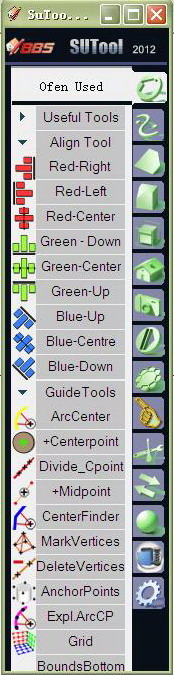
      I mean you are providing a set of tools and I have to install them all at one time. But I have already installed some of them and made my own icons for them.

      Actually I am using sutool of Wikii as a manager of all my plugins. And this set of combined tools doesn't support that.

      I konw I can also control display of the icons through your LibFredo6, but it would still be wonderful if you could continue providing these tools als seperate plugins at the same time.


      234.jpg

      posted in Plugins
      B
      boilingsnow
    • RE: [Plugin] FredoTools - v4.5c - 24 Jun 24

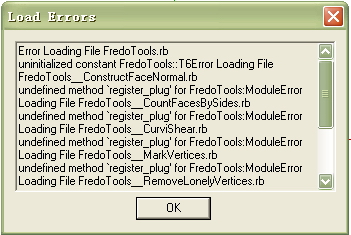
      Can you tell why I can't load the plugin?
      I have already installed the latest version of LibFredo6.


      123.jpg

      posted in Plugins
      B
      boilingsnow
    • RE: [Plugin] FredoTools::ReportLabelArea - v3.2a - 05 Feb 20

      Could you make them separate to install?

      posted in Plugins
      B
      boilingsnow
    • 1
    • 2
    • 3
    • 4
    • 2 / 4