
sketchucation logo sketchucation
    • Login
    1. Home
    2. andrea.bianco
    3. Posts
    Oops, your profile's looking a bit empty! To help us tailor your experience, please fill in key details like your SketchUp version, skill level, operating system, and more. Update and save your info on your profile page today!
    πŸ”Œ Smart Spline | Fluid way to handle splines for furniture design and complex structures. Download
    Offline
    • Profile
    • Following 0
    • Followers 0
    • Topics 9
    • Posts 38
    • Groups 1

    Posts

    Recent Best Controversial
    • FK11 Lowpoly SketchUp model

      http://andreabianco.eu/old_dropbox_public/fk11_07_COMPO.jpg

      http://andreabianco.eu/old_dropbox_public/fk11_07_persp_solid_CB.jpg

      http://andreabianco.eu/old_dropbox_public/fk11_07_persp2_solid_CB.jpg

      http://andreabianco.eu/old_dropbox_public/fk11_07_left_solid_CB.jpg

      http://andreabianco.eu/old_dropbox_public/fk11_07_right_solid_CB.jpg

      SketchUp is (also) a very nice tool for taking a 2D concept and bringing it into the third dimension! In this case I speed painted a weapon concept in Gimp (last two images of the post) and I brought it as an image into SketchUp, tracing and extruding and so on. The final model is still quite low poly and could receive more work here and there, I just need to find a minute to keep working on it πŸ˜„

      I didn't render the model, since I doubt Kerkythea would add any interesting spot to such a low poly model; the first image of the post is just a bunch of different SketchUp screenshots mixed in Gimp.

      Here are 2 speed paintings for the concept:

      http://andreabianco.eu/old_dropbox_public/fk11_red.jpg

      http://andreabianco.eu/old_dropbox_public/fk11.jpg

      I hope you like it and that I'll sooner or later update this model and make it a bit more interesting! Have a nice time and keep making this forum as great as it is πŸ˜„

      the 2 original posts about this project can be found on my blog, if you are interested : http://blog.andreabianco.eu/?p=22 and http://blog.andreabianco.eu/?p=23
      posted in Gallery
      andrea.biancoA
      andrea.bianco
    • RE: Offset Tool problem

      @honoluludesktop : thanks a lot, now I got it πŸ˜„

      Thanks for helping me understanding this, people. This forum is never ceasing to amaze me πŸ˜„

      posted in SketchUp Discussions
      andrea.biancoA
      andrea.bianco
    • RE: Offset Tool problem

      @SketchupNoobie : copy/paste/scale was one of the solutions I tried, but with it I lose the UV texture I am projecting on the mesh -- I actually copy/paste/scale the texture too.

      @honoluludesktop : I'm not sure I got what you mean

      posted in SketchUp Discussions
      andrea.biancoA
      andrea.bianco
    • Offset Tool problem

      Hi there, I have a little question for the gurus in this forum πŸ˜„

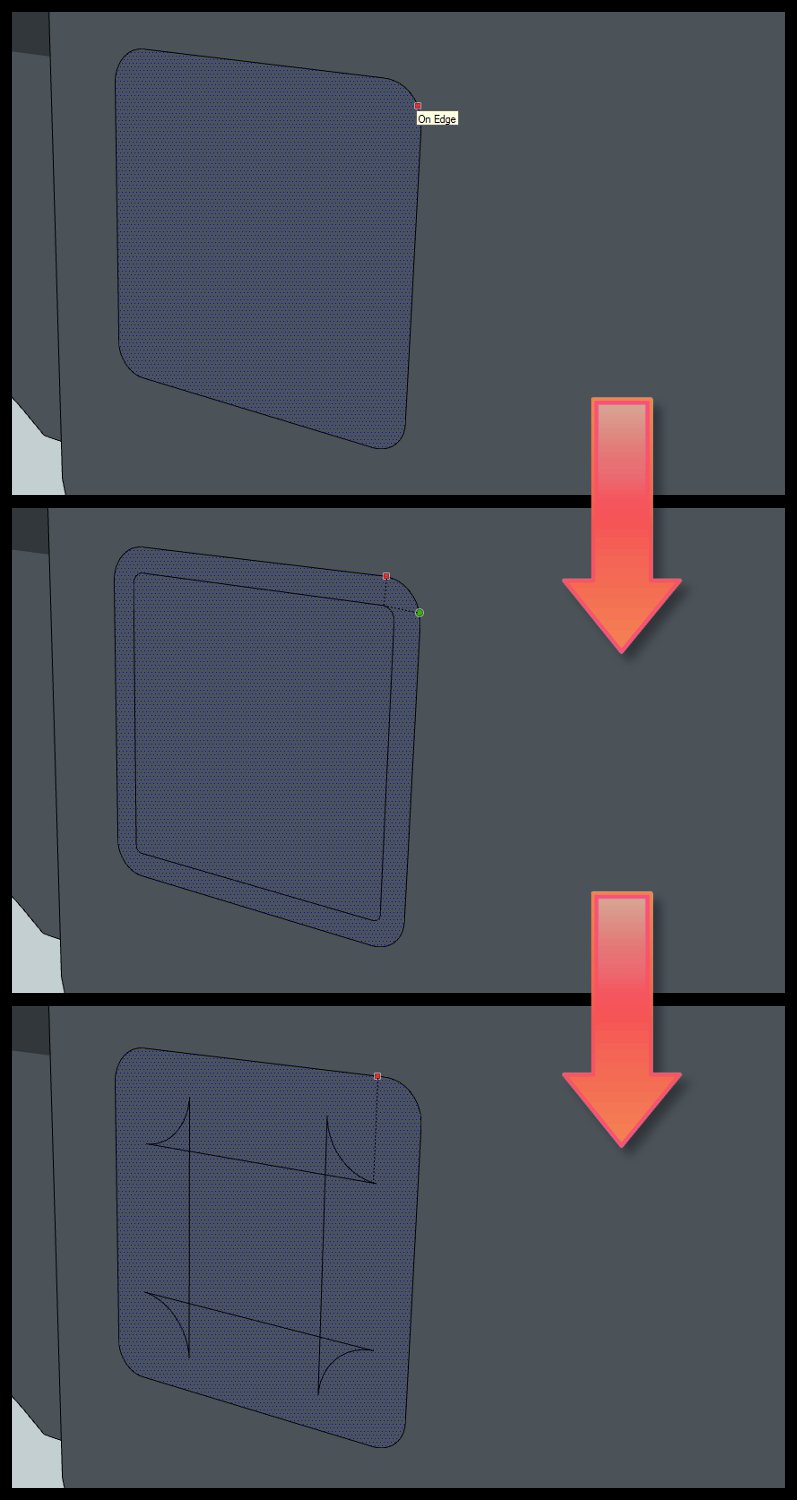
      I noticed that the Offset Tool is sometimes giving weird results. I attach an image that should make the issue clear. After a certain amount of offset something goes wrong. It happens especially with complicated perimeters, but also with a simple one like this rounded square.

      Why is it happening? Is there a way I can avoid it?

      Thanks in advance,
      Andrea.


      offset_problem.jpg

      posted in SketchUp Discussions sketchup
      andrea.biancoA
      andrea.bianco
    • RE: Inca 4 (Gimp + SketchUp)

      Thanks for the nice feedback James & ken28875 πŸ˜„

      @Pilou : I'm basically a 2D artist, most of the time I use 3D packages to make it easier composing a correct perspective if the subjects are complex or if I don't have enough time. Creating a simple 3D model and repainting it is quite a common time saving task actually πŸ˜„ By having this ship as a 3D model I can take as many screenshots as I want, in various light/shadow/fog/perspective/camera settings, and paint over it creating in very few time an effective concept for the subject. SketchUp is very good for that too πŸ˜„

      posted in Gallery
      andrea.biancoA
      andrea.bianco
    • RE: Inca 4 (Gimp + SketchUp)

      Thanks to everyone for the great feedback πŸ˜„

      posted in Gallery
      andrea.biancoA
      andrea.bianco
    • RE: Inca 4 (Gimp + SketchUp)

      Thanks for the comment πŸ˜„

      It was quite a fast concept so I didn't save the steps and I kept overwriting the same file. I just have a screen-shot of the project I took when I was starting working on values, here it is :

      http://www.lostconnection.net/misc/drone-wip_a.jpg

      Have a nice time!

      posted in Gallery
      andrea.biancoA
      andrea.bianco
    • Inca 4 (Gimp + SketchUp)

      Hi there, it's a while I'm not posting here because I sadly had not enough time to spend on SketchUp. I just installed the release 8 and I did this fast concept for warming up and trying to remember shortcuts etc. I then painted over the model using Gimp.

      That's basically my usage of SketchUp, a way for laying down the base for paintings -- but I'll probably have to start using it for architectural pre-viz soon and it looks like a fascinating topic! I'll take the time to browse through the forum, I'm sure it's stuffed with useful info and resources πŸ˜„

      I hope you like it, have a nice time people!

      http://andreabianco.eu/old_dropbox_public/inca4-1024px.jpg

      Original post with more images: http://blog.andreabianco.eu/?p=35

      posted in Gallery
      andrea.biancoA
      andrea.bianco
    • RE: Scifi Sketchup Modeling

      The whole thread is stuffed with great models mate, I especially like your last one. I saw you are featured on some mods and u truly deserve it πŸ˜„

      posted in WIP
      andrea.biancoA
      andrea.bianco
    • RE: Patrol ship (ArtRage + SketchUp)

      @tridem : thanks mate! Well I'm not an advanced KT user, I just use it from time to time for creating basic renders of my models & scenes, for testing/painting purposes. I would like to spend more time on it, KT has a great potential! Ciao πŸ˜„

      @Pilou : I saw his illustrations in conceptart.org, he has a very interesting style and he also published some kind of step-by-step in ca.org forums.

      posted in Gallery
      andrea.biancoA
      andrea.bianco
    • RE: Patrol ship (ArtRage + SketchUp)

      thanks liam! this is my true first test with a finished SketchUp model, I hope I can post something new soon πŸ˜„ by the way I checked your art and you have some great stuff online, keep it up! (about the slots on sides : two similar slots are under the side engines, but they are covered by them -- I wanted to show that in the concept sheet but I forgot πŸ˜›)

      posted in Gallery
      andrea.biancoA
      andrea.bianco
    • RE: Patrol ship (ArtRage + SketchUp)

      thanks a lot ecofeco and artysmedia !

      posted in Gallery
      andrea.biancoA
      andrea.bianco
    • RE: Patrol ship (ArtRage + SketchUp)

      @Pilou : thanks mate that will do the trick πŸ˜‰

      @Simon B : yes that blog is stuffed with amazing art and it's already in my Google Reader πŸ˜„ Thanks for the feedback & the wishes! Coming from 3DS Max & Blender I found SketchUp to be radically different -- it bothered me at first but now I am slowly understanding it and I like it a lot πŸ˜„

      posted in Gallery
      andrea.biancoA
      andrea.bianco
    • RE: Patrol ship (ArtRage + SketchUp)

      Thanks for the feedback Pilou! I tried embedding Vimeo in my post but the preview of the post was still showing code instead of video and so I dropped it, how did you manage to do it? πŸ˜„

      I'll explore SketchUp animation plugins, they look promising!

      posted in Gallery
      andrea.biancoA
      andrea.bianco
    • Patrol ship (ArtRage + SketchUp)

      Hi there, I recently decided to bring SketchUp into my creative pipeline and I joined this forum because it's truly the best online resource for it -- here I found a lot of info about features and plugins and I can say I like SketchUp a lot more than how I did in past, thanks to this forum πŸ˜„

      Here is my first try at using SketchUp for my illustration / concept art purposes (scaled down version, the high resolution one can be found following the link posted below):

      http://andreabianco.eu/old_dropbox_public/andrea_bianco-the_tank.jpg

      I created the model in SketchUp, rendered some stills in Kerkythea and composed 'em in ArtRage, where I also painted all the details, textures and worked out the overall presentation of the piece. If you are interested you can find more info and a turntable-like animation of the model (and an high resolution render) on my blog at http://http://blog.andreabianco.eu/?p=49. Thanks for reading and watching and have a nice time!

      posted in Gallery
      andrea.biancoA
      andrea.bianco
    • RE: Greetings and a question :)

      Thanks to both, I'm taking a look at both the scripts.

      I have a little question about Repeat Copy, before I buy it : will it use the normal of the receiving face for orienting the pasted component?

      I also tried "Component on face" by Chris Fullmer and it's quite useful though not exactly what I was looking for (some manual tweaking is required).

      Thanks again πŸ˜„

      posted in Newbie Forum
      andrea.biancoA
      andrea.bianco
    • RE: Greetings and a question :)

      Thanks for the answer Gaieus, I'm spending more time on Component Spray plugin and trying to get it to do what I need; I'll post about that on the plugin thread you linked to. In this post I was actually meaning to ask if there is some alternative technique I can use to accomplish the same task πŸ˜„

      posted in Newbie Forum
      andrea.biancoA
      andrea.bianco
    • Greetings and a question :)

      Hi there my name's Andrea and I'm trying to improve my SketchUp skills and hopefully include it in my creative pipeline. I'm working on some models and while detailing one of them I started wondering if there is a fast and efficient way for creating copies of elements snapped to the face of another component -- keeping them correctly oriented. Something like 3DS Max "Advanced Painter" plugin.

      I'm giving a try to "Component Spray" plugin but I can't always get it to do what I need. I would need to decide which face of my component will have to snap to the face of the other element for instance.

      I hope someone can help me and I thank all of you people, this forum is a massive source of inspiration, resources and help! πŸ˜„

      posted in Newbie Forum sketchup
      andrea.biancoA
      andrea.bianco
    • 1
    • 2
    • 2 / 2