That makes a happy gnome!

As in the API documentation… http://www.sketchup.com/intl/en/developer/docs/ourdoc/command.php
cmd = UI;;Command.new("name of the command"){
  AuthorModule;;PluginName.name_of_the_main_method()
}
cmd.tooltip = "tooltip that describes the command"
cmd.status_bar_text = "text that tells how to use the command"
cmd.large_icon = "./path/to/a/icon24px.png"
cmd.small_icon = "./path/to/a/icon16px.png"
It still can only be used with understanding of what it does, and you would have to look up how a certain plugin is started.
It would probably be sufficient and much easier to edit the plugin's own ruby file, look for "UI::Command.new" and add the icons. The icon path can either be relative to the ruby file or absolute (to the system's root, ie. "C:/" on Windows).
Some plugins add themself only to the menu without creating a command. That looks like this:
UI.menu("plugins").add_item("name of the command"){ name_of_the_method }
and can be replaced by a command object (as above) plus
UI.menu("plugins").add_item(cmd)
Is it Jim's "Custom Toolbars"?
http://sketchuptips.blogspot.de/2008/06/custom-toolbars-release-08-06-01.html
I have it installed, can you reveal to us in what way it is not working? Did you move it to the SU2013 Plugins folder? Is it activated in the extensions list? Does it not load? Does it load with an error?
There is also a related SketchUp bug. You can edit the file %(#000000)[[Plugins]/Toolbars/Files/loader.rb] at line 40:
  #ttb.show
  state = ttb.get_last_state
  if (state == TB_VISIBLE)
      ttb.restore
      UI.start_timer(0.1, false) { ttb.restore }
  end
to
  ttb.restore
  UI.start_timer(0.1, false) { ttb.restore }
Even a small SSD (whatever you can/want to afford) is absolutely worth it. Though you might need to have discipline putting only the most often used files on it (what you use everyday = your operating system), it gives an indispensible speed boost.
I had a 64GB one and it was quite spacy (and since it is less slowed down by fragmentation, you can fill it to more than 80% even if you use Windows).
Thanks for the feedback! I'll check your file and fix it.
Timers can be buggy, especially when combined with UI.messagebox (or similar) they can run continuously without stopping. I also noticed that when you try to stop a one-time timer (just to be sure it is really stopped), it can crash the OSX version of SketchUp.
Does it work when you create a timer only for the next check? I use the following pattern:
def a_method
  # …
  checkIfFinished(tempPath)
  # …
end

# checks the last line of the file for the string "done"
def check_if_finished(outfile)
  # …
  if(s == "100\n")
    calculation_finished()
  else
    UI.start_timer(2, false) {
      check_if_finished(tempPath)
    }
  end
  # …
end

def calculation_finished()
   UI.messagebox("Finshed creating output file")
end
As Thomthom said, a webdialog is created asynchronously because it could take time (at least for programmers, this is much valuable time). That means Ruby should not wait until the webdialog is visible, but it continues immediately with the next line of code. That is the reason why the Ruby API uses code blocks ( add_action_callback("action"){} or show{}). The last one is known to be buggy. The best practice is to call a callback after the body of the html file (when the complete DOM is loaded).
Offtopic: I recently noticed that modal webdialogs in the Windows version of SketchUp seem to be synchronous and stop executing Ruby code until the dialog is closed. I wouldn't rely on it, but it can be helpful for (unit) testing.
Normally the "visible" user's home directory is reserved for files that the user intentionally created, and programs should not create there any content without that the user agrees.
As has been mentioned, the temporary folder is not ideal. Although on Windows temporary files can survive for many years, we should not generally assume that they survive a reboot. I'm not sure if the parent folder of the temporary folder is a good idea (John, on OS X and other unices the parent of /tmp would be root / ?)
The ideal place would be to use the standard folder that is supposed to be used for application data. This can be depending on the operating system in ~/.local/share etc. or on Windows %AppData% which is under XP X:\Documents and Settings\[username]\Application (localized!) and under Vista,7,8 X:\Users\[username]\Data AppData\Roaming. There seems to be a ruby environment variable ENV['APPDATA'] but it's not cross-platform and it's known not to be reliable on different Windows versions (this needs to be tested). The prefered way is over the C# API: http://stackoverflow.com/questions/2588636/windows-application-data-directory
Dan suggested that the SketchUp API should provide a method to get that folder path.
A plain text editor: notepad.exe, Notepad++, Sublime, gedit, TextEdit…
You can send the file if you put it in a zip file.
Maybe because I use my laptop until it can't be sold anymore 
I think the screen will make a nice photo frame once I can detach it, and the rest goes through the extruder for 3d printing (ok, that is only a dream)
I have uploaded a beta version of KML Tools 2.0!
If you like, please help testing and give me feedback if files don't work with it.
The new version has
Isn't the Windows 8 UI a logical consequence from the previous versions?
While a technology (graphic processors) is being learned, improved and polished, its development progress is showcased by mediums that it was not intended for (window effects like glass&shadows and other gimicks) and finally overexaggerated in a playful manner. Once this development is completed, the skills are applied for different purposes but don't play a visible role on the scene:
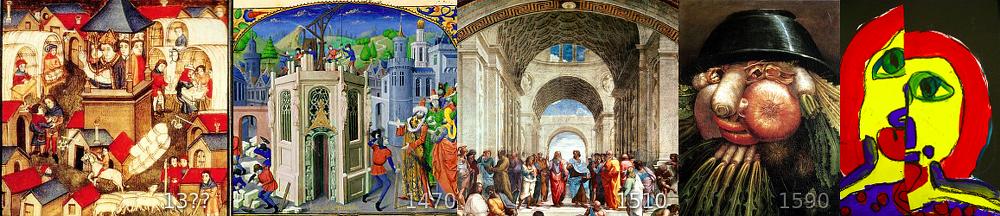
Sorry, I come late to this thread, but reading it sounds like a monologue (between many and nobody).
I find it surprising that some blame Trimble exactly for the same what they previously blamed Google. I haven't heard anything from Trimble except Bryn Fosburgh's keynote. Apart from that they are not much publicly involved in SketchUp (maybe in the only long-term strategy behind the scenes). They did not replace the people who work on SketchUp, and support/marketing/communication is still done by the same people…
Maybe we just produce too much content here and they have not enough time to mention that they are alive and reading this?
Or it is already resignation about the situation that they know a lot (somewhat) of what the community thinks and what to improve in the software, but they are unable to implement more than a fraction, so is it worth to waste time listening for more of what they can't realize?
Ohh... not again platform wars.
Standards, virtualization and app-streaming make platforms irrelevant anyways. Make one application that works really well, not many that only complement each other's issues.
I haven't written something like that. So far I only take care and add switches for the differences ( String.[], methods["method_name"] || methods[:method_name], …)
To me it seems SketchUp has been trying to "preserve" much of the goodness and success of @Last, where real innovative features had been added. Incompatibility would have been a risk for this valuable heritage and trust of users (there are other softwares that would become incompatible in much shorter time). But progress and new innovation must still happen.
The EWH with its acceptance criteria (and being included only in SU2013) would have been a chance for a break. Now the break will certainly be in 2014, and EWH will include both compatible and incompatible extensions.
I try already to write for Ruby 2.0, and use rather fallbacks for 1.8.6-specific things.
jarynzlesa, have you tried LaunchUp and ToolbarEditor? Those plugins use icons from image files, and I haven't updated the images to be identical to the SU2013 icons. You could even edit or replace them by your favorite icons.
Maybe it's just the 2013 
Everything will get better soon.